
1. Introduction
Thank you for choosing the Sona SPC 2501 Electric Pressure Cooker. This appliance is designed to simplify your cooking process, offering a versatile and efficient way to prepare a variety of meals. With its 6-liter capacity, digital control system, and multiple pre-programmed functions, it is an ideal kitchen helper for everyday use.
This manual provides essential information on the safe operation, maintenance, and troubleshooting of your new electric pressure cooker. Please read it thoroughly before first use and keep it for future reference.

Image: The Sona SPC 2501 Electric Pressure Cooker, showcasing its sleek design and a bowl of freshly cooked rice, highlighting its function as a kitchen helper.
2. Important Safety Instructions
When using electrical appliances, basic safety precautions should always be followed to reduce the risk of fire, electric shock, and injury to persons. Read all instructions carefully.
- Do not touch hot surfaces. Use handles or knobs.
- To protect against electrical shock, do not immerse cord, plugs, or the main unit in water or other liquid.
- Close supervision is necessary when any appliance is used by or near children.
- Unplug from outlet when not in use and before cleaning. Allow to cool before putting on or taking off parts.
- Do not operate any appliance with a damaged cord or plug, or after the appliance malfunctions or has been damaged in any manner.
- Do not use outdoors.
- Do not let cord hang over edge of table or counter, or touch hot surfaces.
- Do not place on or near a hot gas or electric burner, or in a heated oven.
- Extreme caution must be used when moving an appliance containing hot oil or other hot liquids.
- Always attach plug to appliance first, then plug cord into the wall outlet. To disconnect, turn any control to "off", then remove plug from wall outlet.
- Do not use appliance for other than intended use.
- This appliance cooks under pressure. Improper use may result in scalding injury. Make certain unit is properly closed before operating.
- Never force open the pressure cooker. Make sure the pressure indicator has dropped completely before opening.
- Do not fill the unit over 2/3 full. When cooking foods that expand during cooking, such as rice or dehydrated vegetables, do not fill the unit over 1/2 full.
- Always check the pressure release valve and anti-block shield for clogging before use.

Image: Illustration of the Sona SPC 2501's built-in handles for convenient relocation and cooling ducts at the base to minimize contact with hot surfaces.

Image: Detailed view of the pressure steam valve indicating pressure buildup, the auto-locking mechanism for safety, and the pressure leak sensor ensuring proper lid sealing.
3. Product Components and Features
The Sona SPC 2501 Electric Pressure Cooker is designed with user convenience and safety in mind. Familiarize yourself with its main components:
- Main Unit: Stainless steel outer housing with digital control panel.
- Inner Pot: 6.0L capacity, 1.5mm thick non-stick coating for easy cleaning and cooking.
- Lid: Features a removable silicon ring, 304 food-grade stainless steel inner lid, pressure steam valve, and auto-locking mechanism.
- Control Panel: Digital display and touch controls for various cooking functions and settings.
- Power Cord: Detachable for easy storage.

Image: A clear front view of the Sona SPC 2501 Electric Pressure Cooker, highlighting its stainless steel exterior and digital control panel.
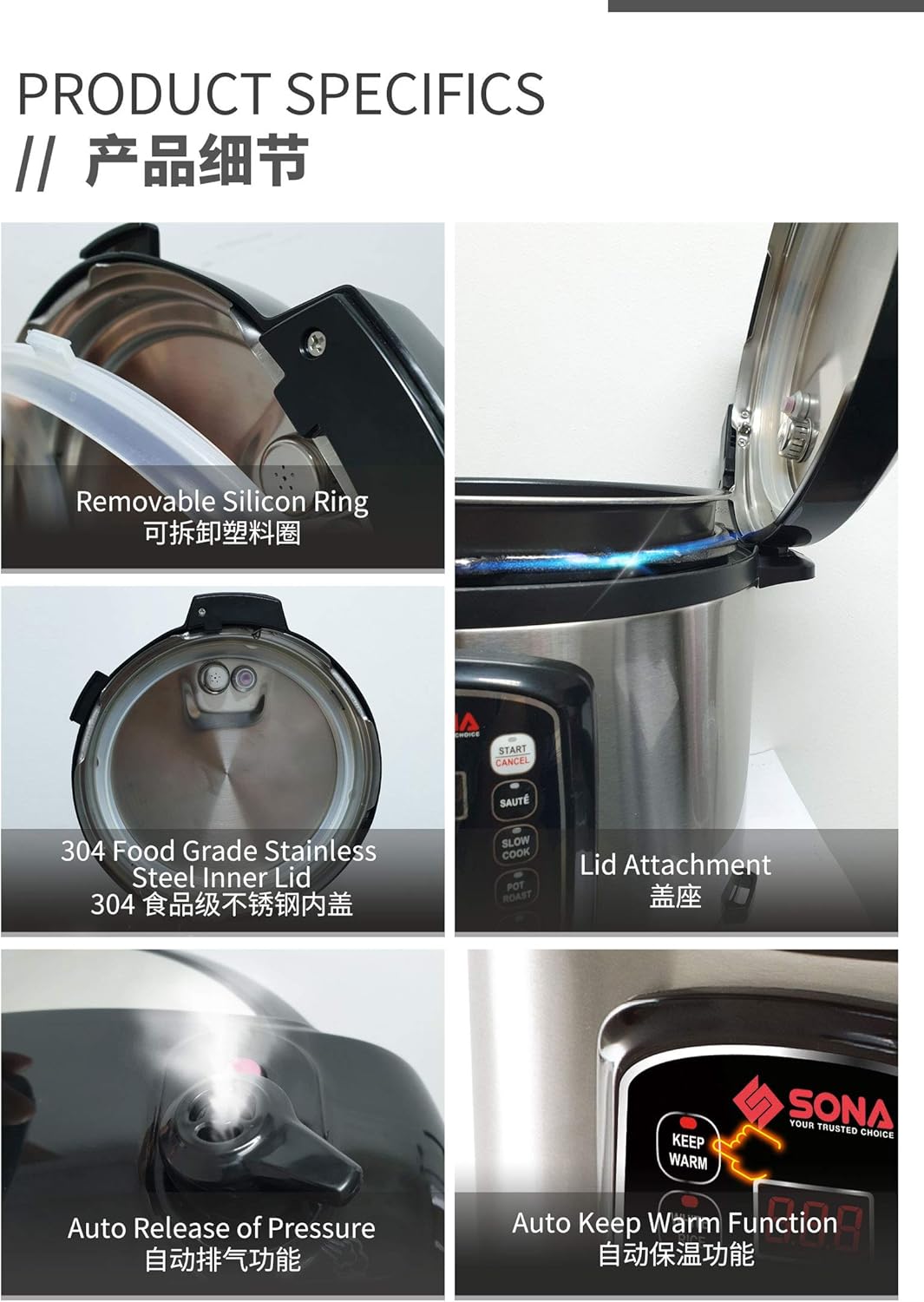
Image: Close-up views of key product specifics, including the removable silicon ring, 304 food-grade stainless steel inner lid, lid attachment, auto pressure release, and the auto keep warm function indicator.
4. Setup and First Use
4.1 Unpacking
- Carefully remove all packaging materials from the box.
- Check that all components are present: main unit, inner pot, lid, power cord, and this instruction manual.
- Remove any stickers or promotional materials from the appliance.
4.2 Initial Cleaning
- Before first use, wash the inner pot, sealing ring, and inner lid thoroughly with warm, soapy water. Rinse and dry completely.
- Wipe the exterior of the main unit with a damp cloth. Never immerse the main unit in water.
- Ensure all parts are dry before assembly.
4.3 Assembly
- Place the inner pot into the main unit. Ensure it sits properly and is level.
- Insert the sealing ring firmly into the groove on the underside of the lid.
- Place the lid onto the main unit, aligning the arrow on the lid with the arrow on the cooker body. Rotate clockwise until it locks into place.
- Ensure the pressure release valve is set to the 'Sealing' position for pressure cooking.
5. Operating Instructions
5.1 Control Panel Overview
The digital control panel features an LED display and various function buttons:
- LED Display: Shows cooking time, pressure level, and error codes.
- Pre-programmed Functions: Buttons for White Rice, Brown Rice, Soup, Saute, Slow Cook, Pot Roast.
- Timer: Sets delayed cooking time (up to 24 hours).
- +/- Buttons: Adjust cooking time or delay timer.
- Start/Cancel: Starts or cancels a cooking program.
- Keep Warm: Automatically activates after cooking or can be selected manually.
5.2 Basic Cooking Steps
- Add ingredients and liquid to the inner pot. Do not exceed the MAX fill line.
- Place the lid on the cooker and rotate clockwise to lock. Ensure the pressure release valve is in the 'Sealing' position.
- Plug the power cord into a grounded electrical outlet. The display will show '----'.
- Select your desired cooking function (e.g., 'White Rice', 'Soup'). The default cooking time will appear.
- Adjust the cooking time using the '+' or '-' buttons if needed.
- Press 'Start/Cancel' to begin cooking. The cooker will preheat, then build pressure, and the timer will count down.
- Once cooking is complete, the cooker will beep and automatically switch to 'Keep Warm' mode.
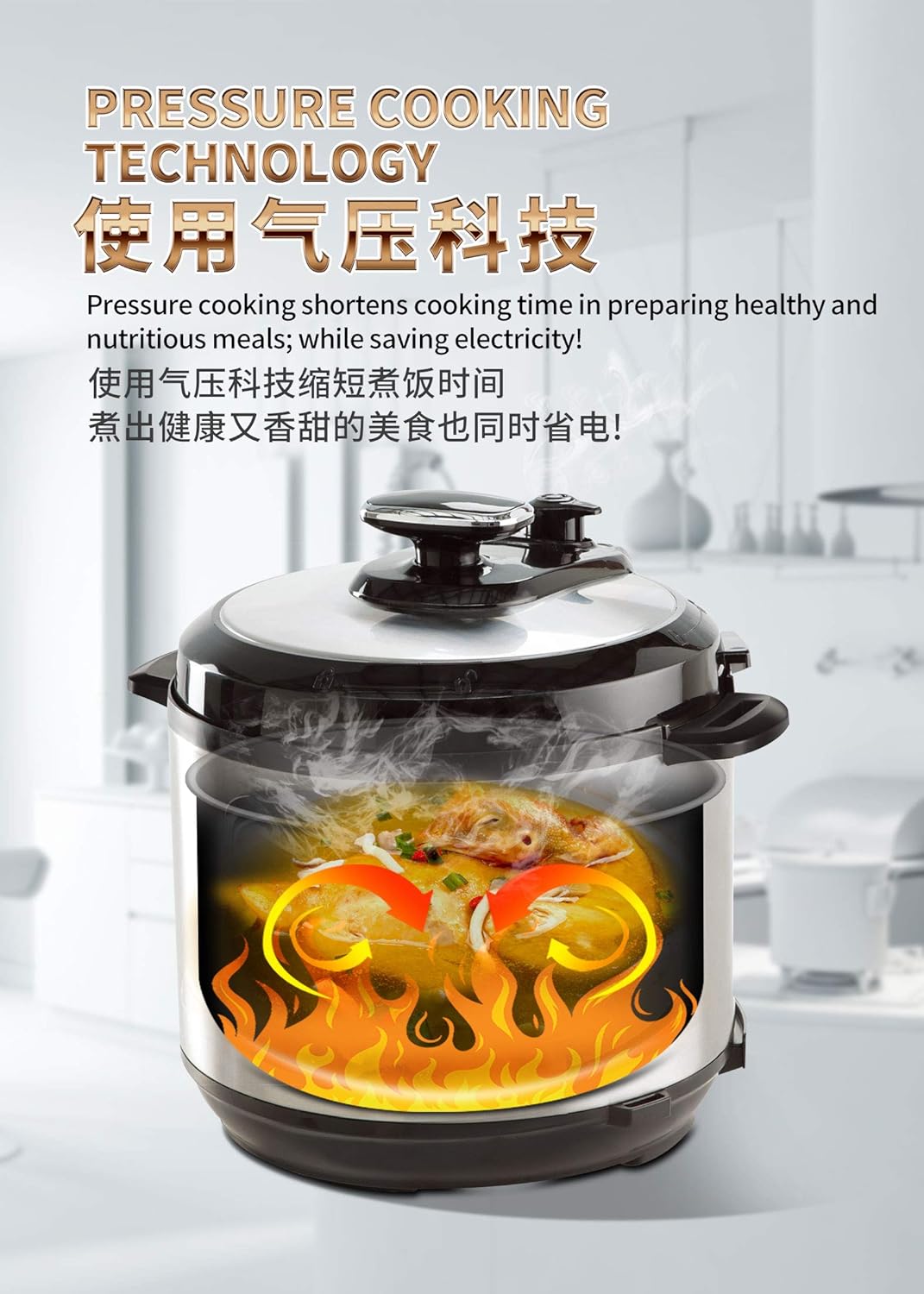
Image: An illustration demonstrating the internal process of pressure cooking, highlighting how pressure cooking shortens cooking time and saves electricity.
5.3 Pre-programmed Functions
The Sona SPC 2501 offers 6 pre-programmed functions for various dishes:
- White Rice: For perfectly cooked white rice.
- Brown Rice: Optimized for brown rice, requiring longer cooking times.
- Soup: Ideal for preparing broths, stews, and soups.
- Saute: Allows browning ingredients before pressure cooking.
- Slow Cook: For traditional slow cooking recipes.
- Pot Roast: Specifically designed for tender pot roasts.
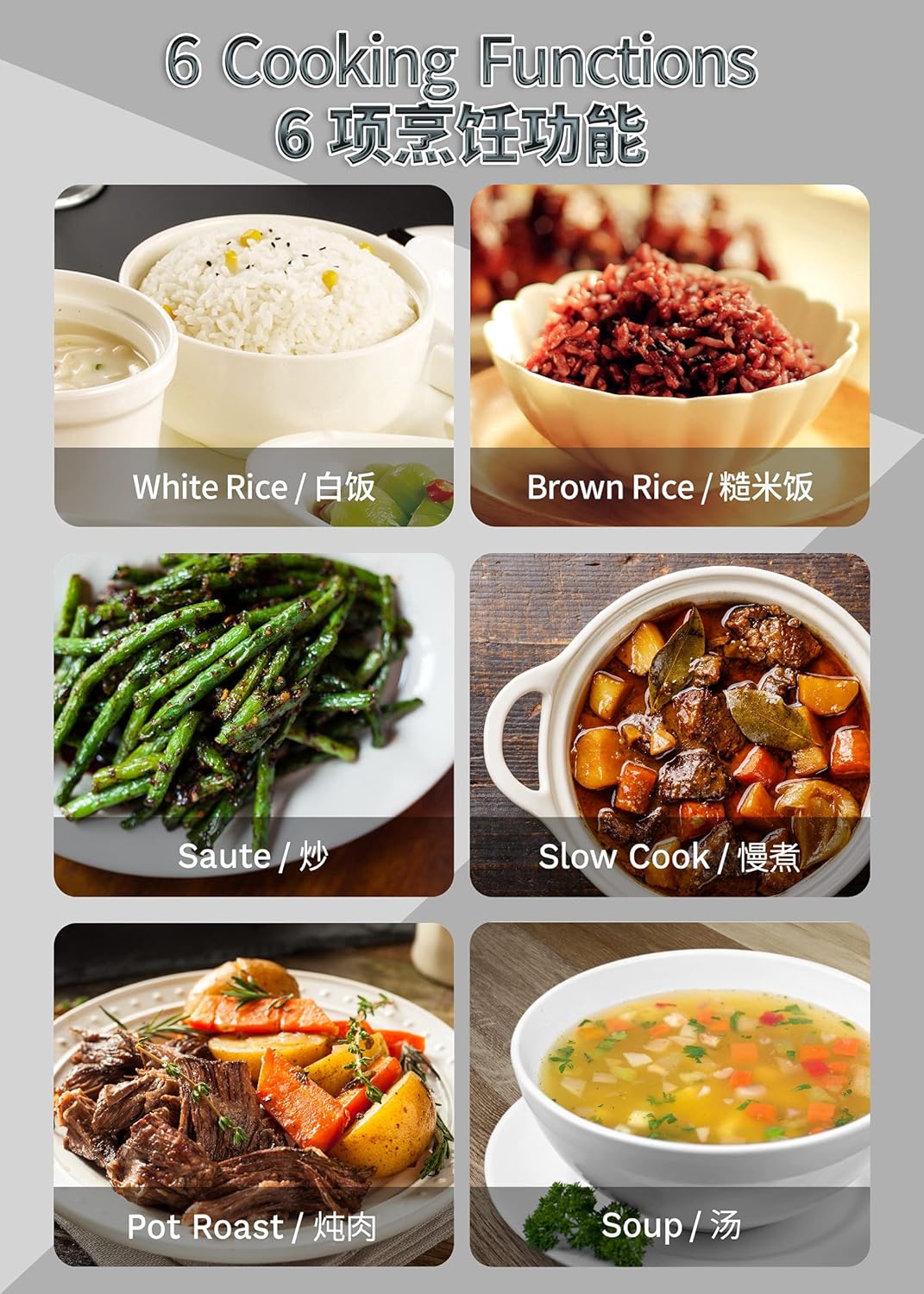
Image: Visual representation of the six pre-programmed cooking functions available on the Sona SPC 2501, each with an example dish.
5.4 Using the 24-Hour Timer and Keep Warm Function
The 24-hour timer allows you to delay the start of cooking, ensuring your meal is ready when you need it. The 'Keep Warm' function automatically maintains food temperature after cooking.
- To set a delayed start: Add ingredients, secure lid, select a cooking function, then press 'Timer'. Use '+' or '-' to set the delay time (in hours). Press 'Start/Cancel' to confirm. The cooker will start cooking after the set delay.
- Keep Warm: After any cooking cycle, the cooker automatically enters 'Keep Warm' mode for up to 10 hours. You can also manually select 'Keep Warm' by pressing the button.

Image: An illustration demonstrating the convenience of the 24-hour pre-set timer, showing how to prepare breakfast or dinner in advance.
5.5 Pressure Release
After pressure cooking, pressure must be released before opening the lid. There are two methods:
- Natural Release: Allow the cooker to cool down naturally. The pressure indicator will drop on its own. This method is recommended for foamy foods or large cuts of meat.
- Quick Release: Carefully turn the pressure release valve to the 'Venting' position. Steam will rapidly escape. Keep hands and face away from the steam. Only use for foods that cook quickly or when instructed by a recipe.
6. Maintenance and Cleaning
Regular cleaning and maintenance will ensure the longevity and optimal performance of your Sona SPC 2501 Electric Pressure Cooker.
6.1 After Each Use
- Unplug the cooker and allow it to cool completely before cleaning.
- Remove the inner pot and wash it with warm, soapy water. The non-stick coating makes cleaning easy.
- Remove the sealing ring from the lid and wash it separately. Ensure it is clean and free of food debris.
- Wash the inner lid (stainless steel part) and the pressure release valve.
- Wipe the exterior of the main unit with a damp cloth. Do not use abrasive cleaners or immerse the unit in water.
- Ensure all parts are thoroughly dry before reassembling and storing.
6.2 Storage
Store the pressure cooker in a dry place. You may place the lid upside down on the inner pot to prevent odors and allow air circulation.
7. Troubleshooting
If you encounter any issues with your Sona SPC 2501 Electric Pressure Cooker, please refer to the following common problems and solutions:
| Problem | Possible Cause | Solution |
|---|---|---|
| Cooker not building pressure | Lid not properly sealed; Sealing ring improperly installed or damaged; Pressure release valve in 'Venting' position. | Ensure lid is locked correctly; Check and re-install sealing ring; Turn pressure release valve to 'Sealing' position. |
| Steam leaking from lid | Sealing ring dirty, damaged, or not installed correctly; Food debris on rim. | Clean or replace sealing ring; Clean lid rim and inner pot rim. |
| Food not cooking properly | Insufficient liquid; Incorrect cooking time selected; Lid not sealed. | Add more liquid; Adjust cooking time; Ensure lid is sealed and pressure valve is closed. |
| Display shows an error code (e.g., E1, E2) | Sensor malfunction; Overheating; Pressure sensor error. | Unplug and plug back in; Allow to cool; If problem persists, contact customer support. |
If the problem persists after attempting these solutions, please contact Sona customer support for assistance.
8. Specifications
Technical specifications for the Sona SPC 2501 Electric Pressure Cooker:
| Feature | Specification |
|---|---|
| Model Number | SPC 2501 |
| Capacity | 6.0 Liters |
| Voltage | 220-240V~ 50/60Hz (230 Volts) |
| Wattage | 1000 Watts |
| Inner Pot Material | 1.5mm Non-Stick |
| Outer Housing Material | Stainless Steel |
| Control Method | Digital Touch |
| Pre-programmed Functions | 6 (White Rice, Brown Rice, Soup, Saute, Slow Cook, Pot Roast) |
| Timer | 24 Hours Pre-set |
| Dimensions (Package) | 35.2 x 31.6 x 30.8 cm |
| Weight (Package) | 5.48 kg |
9. Warranty and Support
Sona products are manufactured to the highest quality standards. This product comes with a standard manufacturer's warranty against defects in materials and workmanship from the date of purchase.
For warranty claims, technical support, or service inquiries, please retain your proof of purchase and contact Sona customer service:
- Website: www.sona.com.sg
- Email: support@sona.com.sg
- Phone: +65 6747 0000
Please note that the warranty does not cover damage caused by misuse, neglect, unauthorized modification, or normal wear and tear.