
Introduction
Thank you for purchasing the HOMCOM Massage Recliner Chair with Ottoman. This manual provides essential information for the safe assembly, operation, maintenance, and troubleshooting of your new recliner and ottoman set. Please read these instructions thoroughly before use and retain them for future reference.

Image: The HOMCOM Massage Recliner Chair with Ottoman, showcasing its design and placement in a home environment.
Safety Information
WARNING: Failure to follow these safety instructions may result in injury or damage to the product.
- Always read and follow the assembly instructions carefully.
- Keep fingers and other body parts clear of the swivel base and reclining mechanism during operation to prevent pinching or injury.
- Do not exceed the maximum weight capacity of 330 pounds (150 kg).
- Ensure all connections are secure before use. Periodically check and tighten fasteners as needed.
- Keep children and pets away from the chair during assembly and operation.
- Use the product only on a flat, stable surface.
- Do not expose the chair to direct sunlight or extreme temperatures, which can damage the upholstery.
- Unplug the power adapter from the wall outlet when the massage function is not in use or during cleaning.
Package Contents
Verify that all components are present before beginning assembly. If any parts are missing or damaged, contact customer support.
- Recliner Chair Backrest
- Recliner Chair Seat with Armrests
- Chair Base
- Ottoman Cushion
- Ottoman Base
- Remote Control
- Power Adapter
- Assembly Hardware (screws, washers, Allen wrench)
- Instruction Manual
Assembly Instructions
Assembly typically requires two people. Lay out all components on a soft, clean surface to prevent scratches.
- Unpack Components: Carefully remove all parts from the packaging and identify them against the package contents list.
- Assemble Chair Base: Attach the chair's swivel base to the main seat frame using the provided hardware. Ensure all screws are tightened securely.
- Attach Backrest: Slide the backrest onto the seat frame until it clicks into place or secure it with the designated fasteners. Ensure a firm connection.
- Connect Wiring: Locate the electrical wires for the massage function from the backrest and seat. Connect them according to the labels.
- Assemble Ottoman: Attach the ottoman cushion to its base using the provided hardware.
- Final Check: Once assembled, gently test the chair's stability and reclining function before full use.

Image: Detailed dimensions of the recliner chair and ottoman, including height, width, and depth in both upright and reclined positions.

Image: A close-up view of the side micro-lock knob used to adjust and secure the reclining angle of the chair.
Operating Instructions
1. Manual Reclining Function
To recline the chair, lean back gently while simultaneously adjusting the side micro-lock knobs located on the chair's sides. These knobs allow you to set the backrest to your desired angle, up to 145 degrees. To return to an upright position, lean forward and adjust the knobs to lock the backrest in place.

Image: The recliner chair shown in a reclined position, illustrating the 145-degree maximum recline angle.

Image: Visual representation of the chair's tilt mechanism, showing how it reclines to a maximum angle of 145 degrees, suitable for various activities.
2. Massage Function
The chair features a 10-point vibration massage system with two vibration levels and five modes. Use the remote control to activate and customize your massage experience.
- Power On/Off: Press the 'POWER' button on the remote to start or stop the massage.
- Intensity: Select 'HIGH' or 'LOW' for vibration intensity.
- Modes: Choose from five massage modes: Pulse, Press, Wave, Auto, Normal.
- Massage Areas: Target specific areas by pressing buttons for Neck, Back, Lumbar, Thigh, and Legs. The ottoman also includes massage points for the legs.
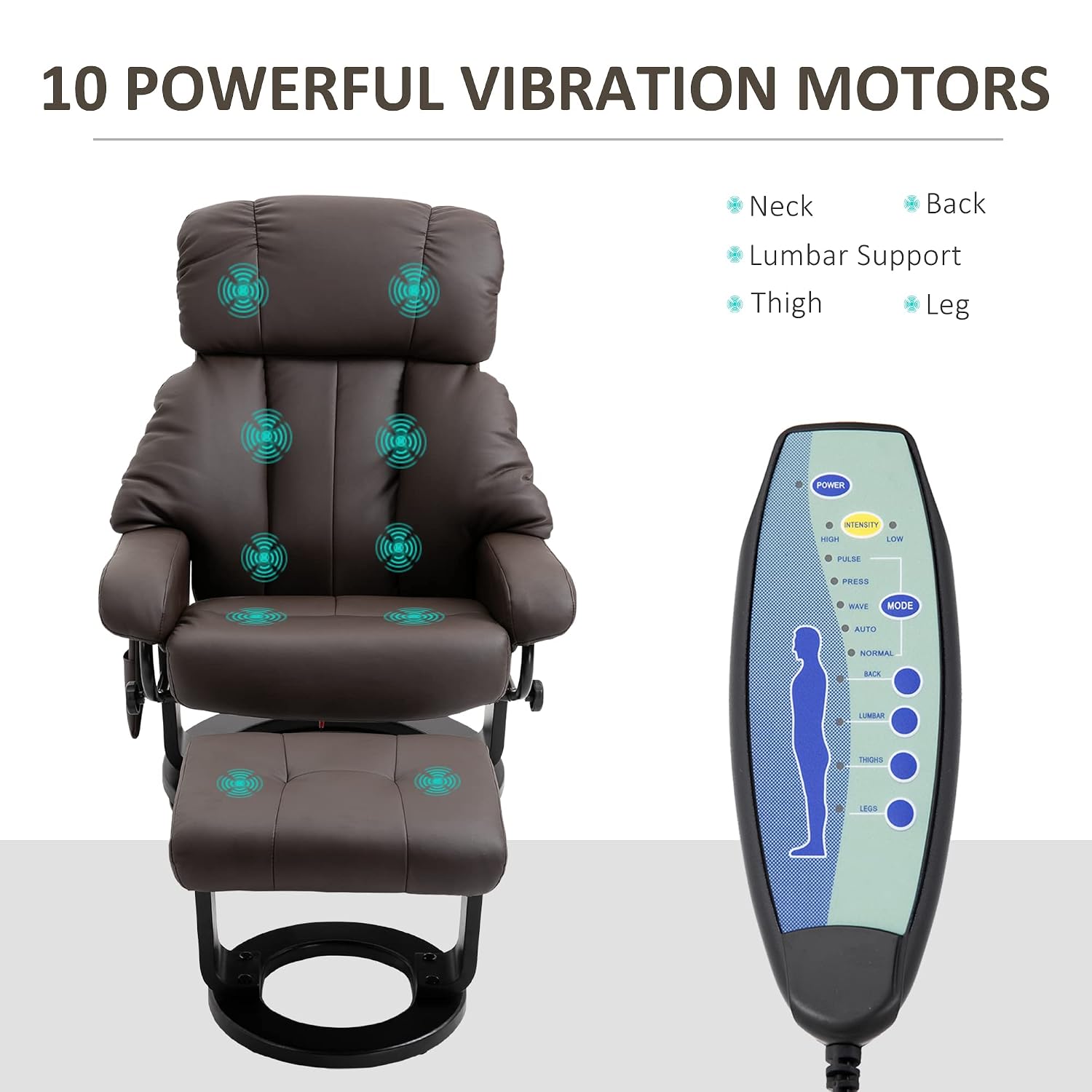
Image: The remote control for the massage function, highlighting the 10 vibration motor locations across the neck, back, lumbar, thigh, and leg areas.
3. 360° Swivel Design
The chair is equipped with a 360-degree rotating base, allowing for easy movement and orientation without needing to reposition the entire chair.
4. Remote Control Storage
A convenient side pocket is integrated into the chair for storing the remote control when not in use, keeping it easily accessible.

Image: A composite image detailing the chair's features: a side pocket for the remote, the remote itself, the matching footstool, and the thick, comfortable padding.
Maintenance
Proper care will extend the life and appearance of your recliner chair.
- Cleaning: For the PU leather upholstery, wipe with a soft, damp cloth. Avoid harsh chemicals or abrasive cleaners. For stubborn stains, use a mild leather cleaner specifically designed for PU leather.
- Spills: Blot spills immediately with a clean, dry cloth. Do not rub.
- Mechanism: Periodically check all bolts and screws to ensure they are tight. Lubricate moving parts of the reclining mechanism if necessary with a silicone-based lubricant.
- Placement: Keep the chair away from direct heat sources and prolonged exposure to sunlight to prevent fading and material degradation.
Troubleshooting
If you encounter issues with your recliner, refer to the following common problems and solutions:
| Problem | Possible Cause | Solution |
|---|---|---|
| Massage function not working | Power adapter not connected; remote control batteries low or faulty; loose wiring connection. | Ensure power adapter is securely plugged into the chair and a working wall outlet. Check remote control batteries. Verify all internal wiring connections are secure. |
| Chair does not recline smoothly | Reclining mechanism stiff; side knobs not properly loosened. | Ensure side micro-lock knobs are fully loosened before attempting to recline. Apply a silicone-based lubricant to the reclining mechanism if it feels stiff. |
| Chair feels unstable or wobbly | Loose assembly hardware. | Check and tighten all bolts and screws on the chair base and frame. Ensure the chair is on a level surface. |
Specifications
| Feature | Detail |
|---|---|
| Brand | HOMCOM |
| Model Number | 700-084BN |
| UPC | 842525138567 |
| Material | Faux Leather |
| Color | Brown |
| Upright Dimensions (W x D x H) | 30" x 31.5" x 40.25" |
| Reclining Dimensions (L x W x H) | 44" x 31" x 36.25" |
| Ottoman Dimensions (W x D x H) | 18.5" x 17.25" x 15.75" |
| Max Recline Angle | 145 degrees |
| Massage Points | 10 (Neck, Back, Lumbar, Thigh, Leg) |
| Vibration Levels | 2 (High, Low) |
| Massage Modes | 5 (Pulse, Press, Wave, Auto, Normal) |
| Swivel | 360 degrees |
| Weight Capacity | 330 lbs (150 kg) |
Warranty Information
For specific warranty details, please refer to the warranty card included with your product or contact HOMCOM customer support directly. Warranty terms typically cover manufacturing defects for a specified period from the date of purchase.
Customer Support
If you have any questions, require assistance with assembly, or need to report missing/damaged parts, please contact HOMCOM customer service.
- Manufacturer: Aosom LLC
- Online Store: Visit the HOMCOM Store on Amazon for more products and support.
Product Overview Video
Watch this video for a visual overview of the HOMCOM Massage Recliner Chair with Ottoman, demonstrating its features and functionality.
Video: An official product video from Aosom Direct showcasing the HOMCOM Massage Recliner Chair with Ottoman, highlighting its design, remote control, and massage features.