1. Introduction
The Depusheng DX400 is an ultra-compact 4-channel line mono audio mixer designed for combining multiple audio signals into a single output. It features low-noise operational amplifiers to ensure high sonic quality, even at maximum output levels. This manual provides detailed instructions for setting up, operating, and maintaining your DX400 mixer.
2. Product Features
- Ultra-compact 4-channel line mixer.
- Highest sonic quality even at maximum output level.
- Individual input level control for each channel.
- Ultra low-noise 4580 operational amplifiers for outstanding audio performance.
- High-quality components and exceptionally rugged construction ensure long life.
3. Package Contents
Please check the package for the following items:
- Depusheng DX400 4-Channel Line Mono Audio Mixer Unit
- Power Adapter (US Plug)
- User Manual (this document)
4. Controls and Connections

Figure 4.1: Front Panel Controls and Connections
- 1. Level Knobs (Input 1-4): Adjusts the input level for each of the four channels. Turn clockwise to increase volume, counter-clockwise to decrease.
- 2. Power Indicator Light: Illuminates when the unit is powered on.

Figure 4.2: Rear Panel Connections
- 3. Output Jack: 1/4-inch (6.35mm) mono output for connecting to an amplifier, recording device, or other audio equipment.
- 4. Input Jacks (Input 1-4): Four 1/4-inch (6.35mm) mono input jacks for connecting various audio sources.
- 5. 12V Power Connector: Connect the included 12V DC power adapter here.
5. Setup
Follow these steps to set up your Depusheng DX400 mixer:
- Power Connection: Connect the provided 12V DC power adapter to the 12V Power Connector (5) on the rear panel of the DX400. Plug the adapter into a suitable power outlet. The Power Indicator Light (2) on the front panel will illuminate.
- Input Device Connection: Connect your audio sources (e.g., microphones, electric guitars, electronic pianos, headphones) to the Input Jacks (4) on the rear panel. The DX400 supports various mono line-level input devices.

Figure 5.1: Available Input Devices
- Output Connection: Connect the Output Jack (3) of the DX400 to the input of your desired audio destination, such as a power amplifier, recording interface, or another mixer.
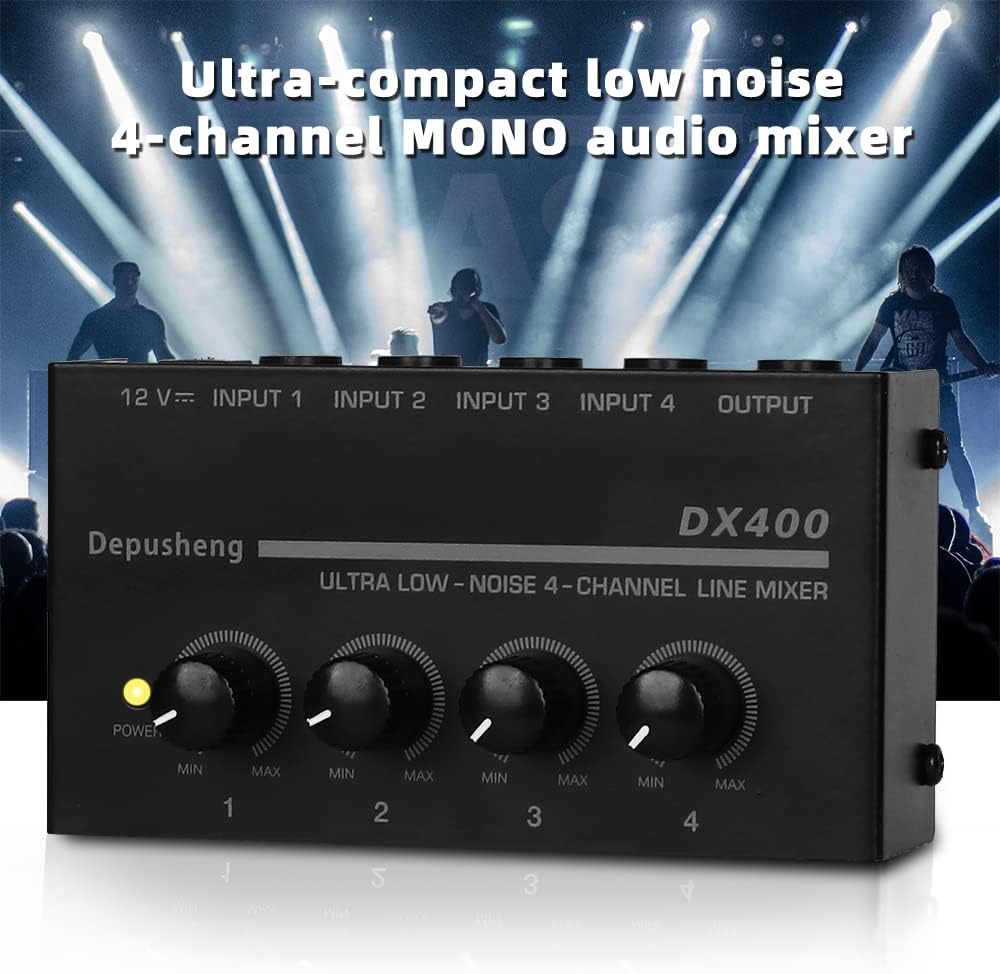
Figure 5.2: Example Connection Diagram
6. Operating Instructions
Once the DX400 is set up, follow these steps for operation:
- Power On: Ensure all connections are secure. The power indicator light should be on.
- Adjust Input Levels: Start with all Level Knobs (1) set to their minimum position (fully counter-clockwise). Gradually increase the level knob for each active input channel until the desired volume is achieved. Avoid setting levels too high to prevent distortion.
- Monitor Output: Listen to the combined audio output from your connected amplifier or recording device. Adjust individual channel levels as needed to achieve a balanced mix.
7. Maintenance
To ensure the longevity and optimal performance of your Depusheng DX400 mixer, follow these maintenance guidelines:
- Cleaning: Use a soft, dry cloth to clean the exterior of the unit. Do not use liquid cleaners or solvents, as they may damage the finish or internal components.
- Storage: When not in use, store the mixer in a cool, dry place away from direct sunlight and extreme temperatures.
- Handling: Avoid dropping or subjecting the unit to strong impacts.
- Ventilation: Ensure proper ventilation around the unit to prevent overheating.
8. Troubleshooting
If you encounter issues with your DX400 mixer, refer to the following common troubleshooting steps:
- No Power:
- Check if the power adapter is securely connected to both the mixer and the power outlet.
- Verify that the power outlet is functional.
- No Sound Output:
- Ensure all input and output cables are correctly and securely connected.
- Check that the volume levels on the connected input devices and the receiving output device (e.g., amplifier) are not muted or set too low.
- Increase the individual Level Knobs (1) on the DX400 for the active channels.
- Test with different cables and devices to isolate the problem.
- Distorted Sound:
- Reduce the input level on the source device or the Level Knobs (1) on the DX400.
- Ensure the output level of the DX400 is not overdriving the input of the connected amplifier or recording device.
- Hum or Noise:
- Ensure all cables are properly shielded and in good condition.
- Try using a different power outlet or power strip.
- Keep the mixer away from other electronic devices that might cause interference.
9. Specifications

Figure 9.1: Product Dimensions
| Specification | Value |
|---|---|
| Brand | Depusheng |
| Model | DX400 |
| Number of Channels | 4 |
| Power Source | Corded Electric (12V DC) |
| Item Weight | 6.5 ounces (185 Grams) |
| Package Dimensions | 6.3 x 5.91 x 4.45 inches |
| Color | Black |
| Date First Available | August 28, 2019 |
10. Warranty and Support
The Depusheng DX400 mixer comes with a manufacturer's warranty. Please refer to the warranty card included in your package for specific terms and conditions, including warranty period and coverage details. For technical support, troubleshooting assistance, or any product-related inquiries, please contact Depusheng customer service through the retailer where the product was purchased or visit the official Depusheng website for contact information.


