
1. Introduction
The XIAOKOA N80-B Wireless Microphone System is a versatile 2.4G wireless audio solution designed for clear voice amplification. It offers a stable wireless connection up to 160 feet (50 meters) in open areas, providing mobility and freedom of movement. This system features a 2-in-1 design, allowing it to be used as both a headset and a handheld microphone. Its plug-and-play functionality ensures ease of use without requiring complex setup procedures.
2. Package Contents
Upon unboxing your XIAOKOA N80-B Wireless Microphone System, please verify that all the following components are included:
- Wireless Headset Microphone (with integrated transmitter)
- Wireless Receiver (with 3.5mm jack)
- 6.5mm Audio Adapter
- USB Charging Cable
- User Manual (this document)

This image displays the complete XIAOKOA N80-B Wireless Microphone System. It includes the beige headset microphone, the compact black wireless transmitter, the black wireless receiver with a 3.5mm jack, and a 6.5mm adapter for broader compatibility.
3. Product Features and Design
3.1 Dual Position Headset Design
The headset microphone is designed with flexibility in mind. The detachable headset brace allows the microphone to be freely combined and assembled on either the left or right side of the earhook. This feature provides great flexibility and convenience, adapting to individual user preferences.

The headset microphone features a dual-position design, enabling users to interchange the microphone's position for placement on either the left or right ear. This adaptability accommodates different user preferences and habits.
3.2 Headset and Handheld 2-in-1 Functionality
The N80-B system offers the versatility of a 2-in-1 design. The headset microphone can also be used as a handheld microphone, providing mobility and freedom of movement for energetic and active performances or presentations.
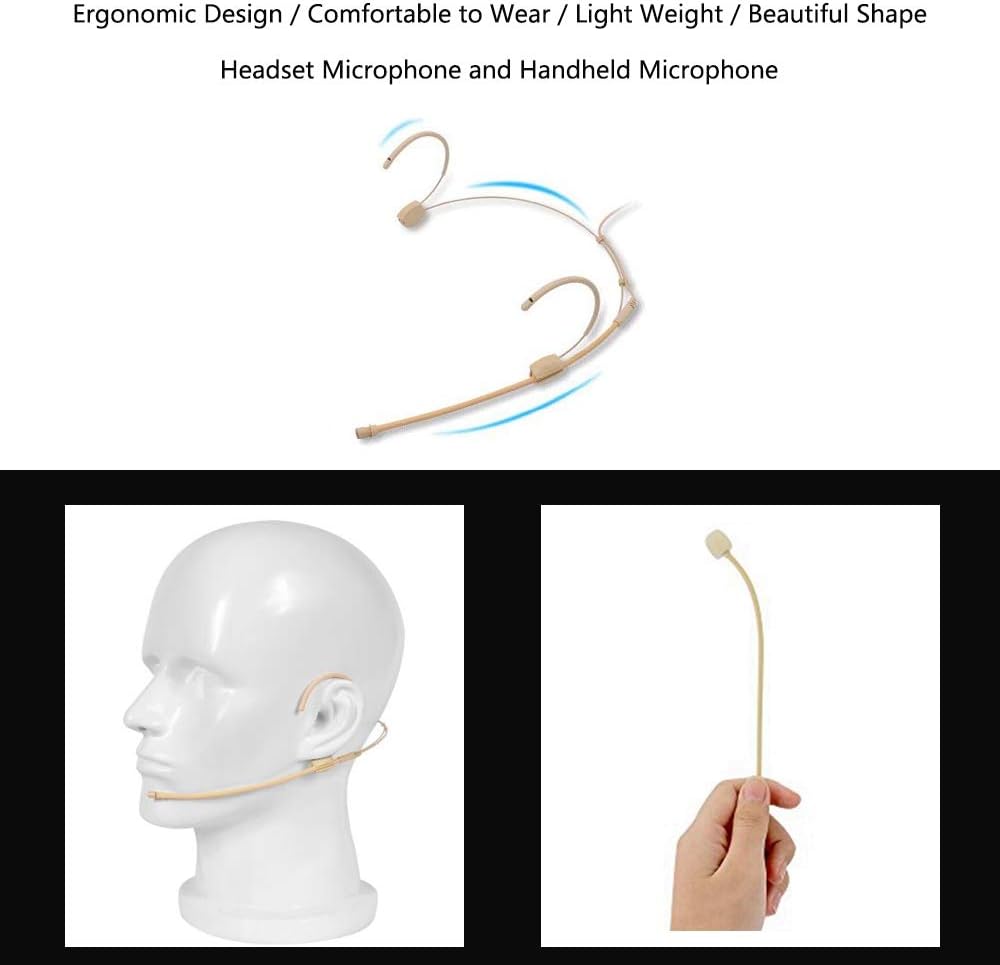
The headset microphone is designed for ergonomic comfort, being lightweight and featuring a flexible boom. It can be worn over the ear for hands-free operation or detached and used as a handheld microphone, offering versatility for various performance and presentation needs.
4. Setup Instructions
4.1 Charging the Devices
Before first use, ensure both the wireless headset microphone (transmitter) and the wireless receiver are fully charged. Use the provided USB charging cable to connect them to a standard USB power source (e.g., computer USB port, USB wall adapter). An indicator light will typically show charging status and turn off or change color when fully charged.
4.2 Connecting to an Audio Device
- Identify the audio input port on your target device (e.g., voice amplifier, PA system, speaker). This is typically a 3.5mm or 6.5mm jack.
- If your device has a 3.5mm input, plug the wireless receiver directly into it.
- If your device has a 6.5mm input, attach the included 6.5mm audio adapter to the wireless receiver, then plug the receiver (with adapter) into your device.
- Ensure the receiver is securely connected.
4.3 Powering On and Pairing
The XIAOKOA N80-B system is designed for plug-and-play operation, meaning it should automatically pair once both devices are powered on.
- Turn on the wireless receiver. An indicator light should illuminate.
- Turn on the wireless headset microphone (transmitter). An indicator light should also illuminate.
- The transmitter and receiver should automatically connect. If they do not connect immediately, ensure they are in close proximity (within a few feet) when first powered on. Once connected, they can operate up to 50 meters apart in open areas.
The XIAOKOA N80-B system utilizes 2.4G wireless transmission technology, providing a stable connection up to 50 meters (approximately 160 feet) in open areas. This image shows the wireless signal extending from the microphone to a connected amplifier.
4.4 Compatibility Notice
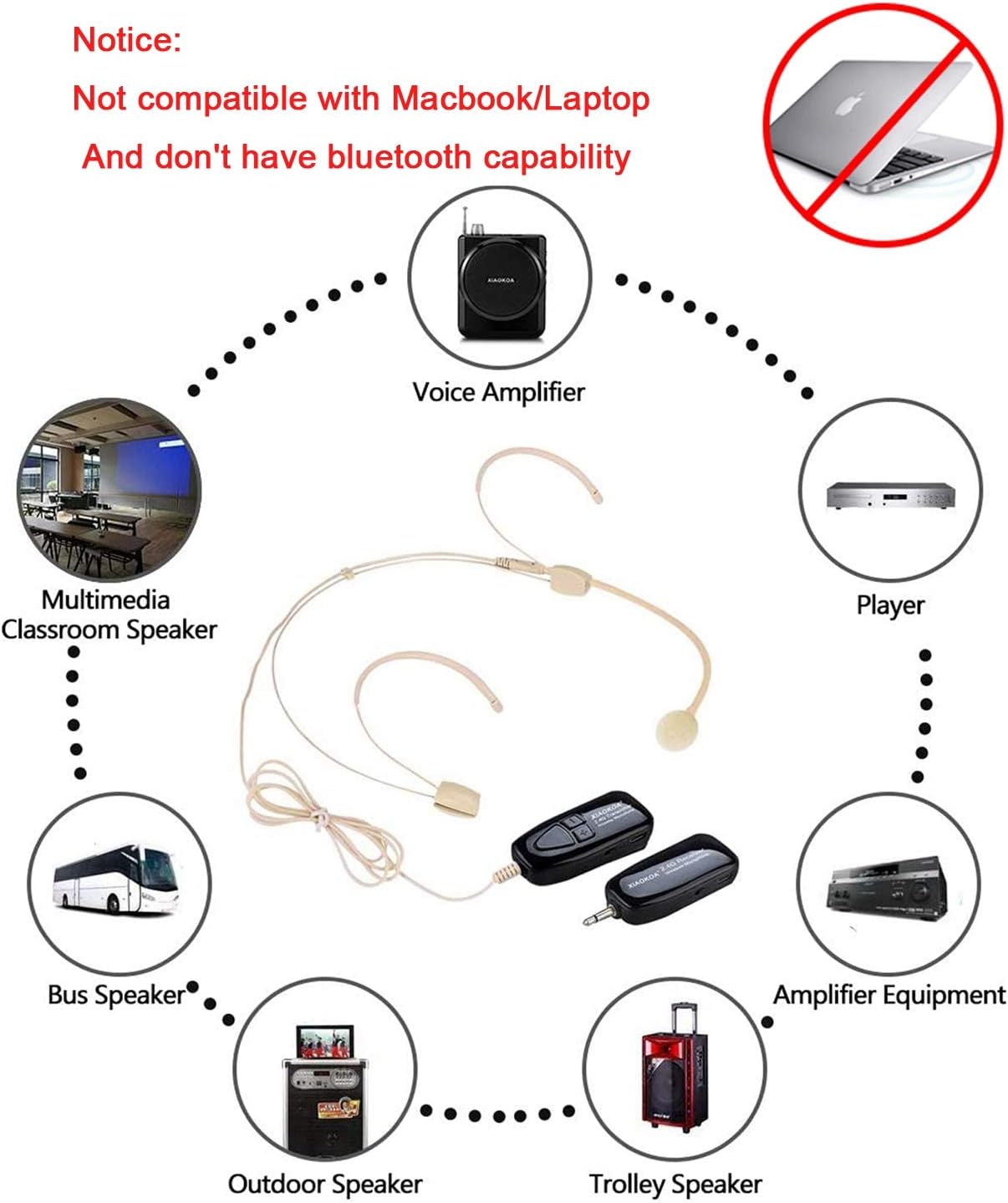
Important: This wireless microphone system is specifically designed for use with voice amplifiers, PA systems, and various types of speakers. It is not compatible with mobile phones, PCs, or laptops. The system also does not feature Bluetooth connectivity.

This diagram clarifies the compatibility of the XIAOKOA N80-B wireless microphone system. It is designed for use with devices such as voice amplifiers, multimedia classroom speakers, bus speakers, outdoor speakers, trolley speakers, player devices, and amplifier equipment. Please note, it is not compatible with phones, PCs, or laptops, and does not have Bluetooth capability.
5. Operating Instructions
5.1 Basic Operation
- After successful setup and pairing, ensure your connected audio device (amplifier/speaker) is powered on and its volume is set to a low level.
- Speak into the headset microphone. Gradually increase the volume on your audio device until the desired sound level is achieved.
- To turn off the system, simply power off both the headset microphone (transmitter) and the receiver.
5.2 Using as a Handheld Microphone
To use the headset as a handheld microphone, carefully detach the earhook components. The main microphone unit can then be held and used like a traditional handheld microphone.
5.3 Recommended Usage Scenarios
The XIAOKOA N80-B is ideal for various applications requiring clear and hands-free voice amplification:
- Teaching Lectures: For educators in classrooms or lecture halls.
- Promotional Events: For presenters or demonstrators at events.
- Visiting Guides: For tour guides needing to address groups clearly.
- Conference Speeches: For speakers in meeting rooms or auditoriums.

The XIAOKOA N80-B wireless microphone is suitable for a wide range of applications, including teaching lectures, promotional events, guiding tours, and conference speeches. Its versatility makes it an ideal tool for professionals requiring clear and reliable voice amplification.
6. Maintenance
6.1 Cleaning
To maintain the performance and appearance of your microphone system:
- Wipe the surfaces of the headset, transmitter, and receiver with a soft, dry cloth.
- For stubborn dirt, slightly dampen the cloth with water. Avoid using harsh chemicals or abrasive cleaners.
- Do not immerse any part of the system in water or other liquids.
6.2 Storage
When not in use, store the microphone system in a cool, dry place away from direct sunlight and extreme temperatures. Protect the microphone boom from excessive bending or pressure to prevent damage.
6.3 Battery Care
The system uses a Lithium Ion battery. To prolong battery life:
- Charge the devices regularly, even if not in frequent use.
- Avoid completely draining the battery before recharging.
- Do not expose batteries to high temperatures.
7. Troubleshooting
If you encounter issues with your XIAOKOA N80-B Wireless Microphone System, please refer to the following common problems and solutions:
| Problem | Possible Cause | Solution |
|---|---|---|
| No sound output | Devices not powered on; Not paired; Low battery; Incorrect connection; Audio device volume too low. | Ensure both transmitter and receiver are powered on. Verify they are paired (indicator lights stable). Charge both devices. Check that the receiver is securely plugged into the correct input of your audio device. Increase the volume on your amplifier/speaker. |
| Static or intermittent sound | Interference; Out of range; Low battery; Loose connection. | Move closer to the receiver. Ensure no large metal objects or other 2.4G wireless devices are causing interference. Recharge devices. Check all cable connections. |
| Short wireless range | Obstructions; Interference; Environmental factors. | Ensure a clear line of sight between the transmitter and receiver. Avoid using in areas with many walls or dense objects. Reduce interference from other wireless devices. |
| Microphone picks up breathing sounds | Microphone placement too close to mouth; Lack of windscreen. | Adjust the microphone boom slightly further from your mouth. Consider adding a foam windscreen (if not already present) to reduce plosives and breathing sounds. |
| Auxiliary connector broke/stuck | Physical stress or improper handling. | Handle connectors with care. Avoid excessive force or bending. If a part is stuck, seek professional assistance to avoid damage to your audio equipment. |
8. Specifications
| Feature | Specification |
|---|---|
| Brand | XIAOKOA |
| Model Name | XIAOKOA N80-B |
| Connectivity Technology | Wireless (2.4G) |
| Connector Type | 3.5 mm Jack, USB (for charging) |
| Microphone Form Factor | Microphone System (Headset and Handheld) |
| Polar Pattern | Omnidirectional |
| Audio Sensitivity | 88 Decibels |
| Signal-to-Noise Ratio | 65 dB |
| Number of Channels | 1 |
| Power Source | Battery Powered |
| Battery Type | 1 Lithium Ion battery (included) |
| Item Weight | 5 ounces |
| Color | Off-white |
| Recommended Uses | Streaming, Voice Amplification, PA Systems |
| First Available Date | August 30, 2019 |
9. Warranty and Support
XIAOKOA is committed to providing high-quality products and professional services. While specific warranty periods may vary, products typically come with a standard return policy. For this product, a 30-day return policy is generally applicable, allowing for a refund or replacement if issues arise within this period.
For further assistance, technical support, or warranty claims, please refer to the contact information provided with your purchase or visit the official XIAOKOA website. Always retain your proof of purchase for warranty purposes.