
1. Product Overview
The Hygger Mini Adjustable Aquarium Heater is designed to maintain stable water temperatures in small aquariums, providing a warm and comfortable environment for various aquatic life, including bettas and turtles. Its compact design and external digital controller ensure ease of use and safety.
Key Features:
- Compact Design: Small form factor with a protective plastic casing.
- External Temperature Controller: Easy temperature adjustment without getting hands wet.
- LED Digital Display: Shows real-time water temperature.
- Integrated Thermometer: Sensitive to water temperature changes.
- Automatic Shut-off: Safety feature that activates if the heater is out of water (E1 error) or if water temperature exceeds 35°C (HH error).
- Memory Function: Retains temperature settings after a power outage.
- Versatile Use: Suitable for freshwater and saltwater aquariums, including glass, acrylic, or plastic tanks of various shapes.
- Secure Mounting: Equipped with two strong suction cups for firm attachment to the tank.
2. Package Contents
- 1 x Aquarium Heater
- 2 x Suction Cups
- 1 x User Manual
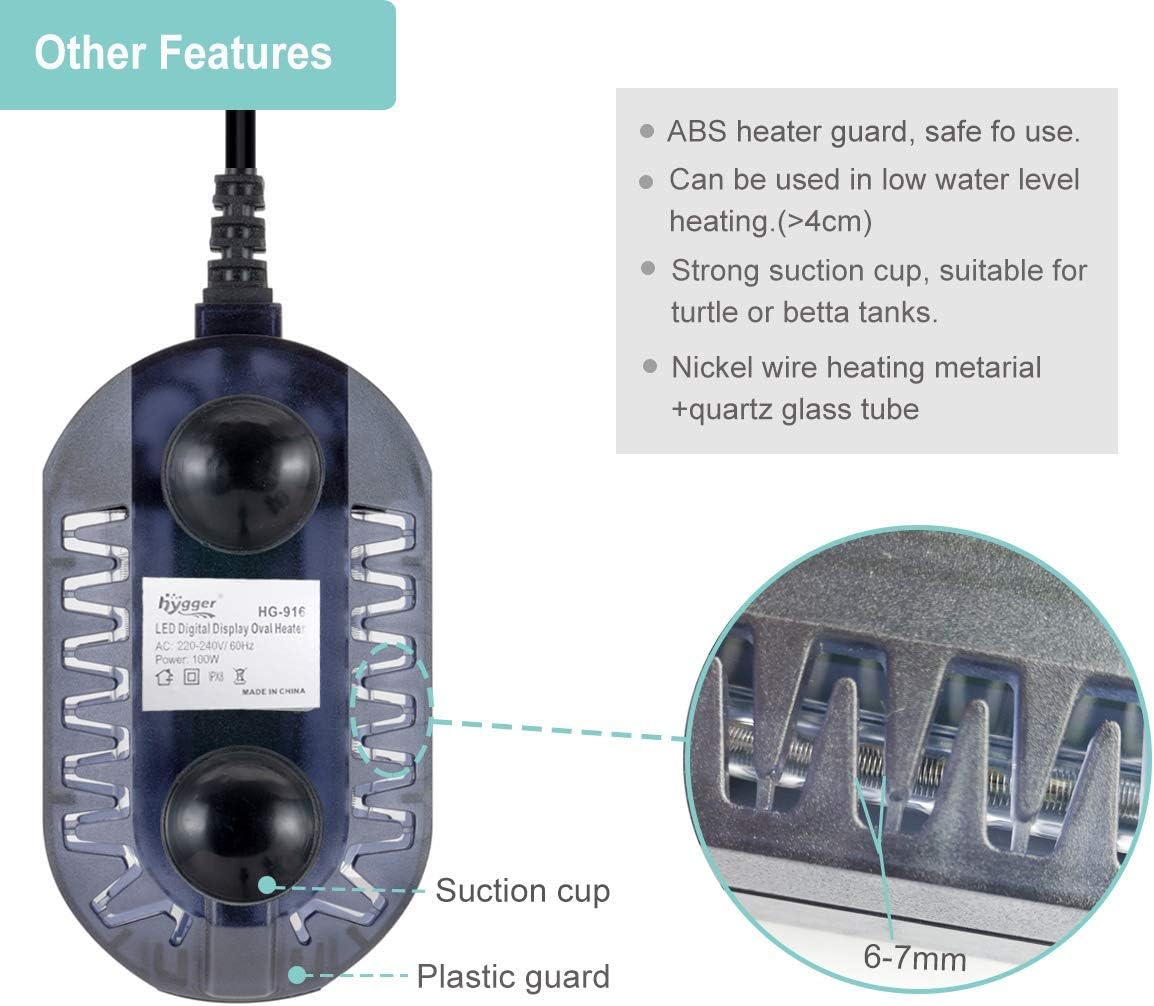
Image: Detailed view of the heater's components, including the ABS heater guard, nickel-chromium heating wire, quartz glass tube, and suction cups.
3. Setup Instructions
- Placement: Ensure the heater is fully submerged in water. Use the two strong suction cups to securely attach the heater to the inside wall of your aquarium.
- Avoid Obstructions: Do not bury the heater under gravel or sand. Ensure it is not directly touching any decorations or other equipment that could impede heat distribution.
- Power Connection: Plug the heater into a suitable power outlet. The external controller will display the current water temperature.

Image: Visual guide for proper heater installation, emphasizing full submersion and avoiding burial in substrate.
Video: Demonstrates the installation process of the aquarium heater, showing how to place it in the water flow for accurate temperature readings and how to secure it.
4. Operating Instructions
- Setting Temperature: Press the 'SET' button on the external controller repeatedly until your desired temperature is displayed. The temperature range is 17°C to 34°C.
- Confirmation: Stop pressing the button and wait for the displayed digit to flash three times. This indicates that the temperature setting is saved. The heater will then regulate the water temperature to this set point.
- Heating Indicator: A red light on the heater indicates that it is actively heating. Once the set temperature is reached, the heating will stop automatically.
- Power Outage Memory: The heater features a memory function, retaining your last set temperature even after a power interruption.
Image: Close-up of the external temperature controller, illustrating the LED display and the 'SET' button for temperature adjustment.
Video: Shows the digital display and how to set the desired temperature using the external controller. It also demonstrates the heating indicator light.
5. Maintenance
Regular cleaning of your aquarium heater is essential for optimal performance and longevity. Always unplug the heater and allow it to cool completely before handling.
- Cleaning the Heater: Gently wipe the heater's surface with a soft cloth to remove algae or mineral buildup. Avoid using harsh chemicals or abrasive materials that could damage the protective casing.
- Suction Cups: Periodically check the suction cups for wear and tear. Replace them if they lose their grip to ensure the heater remains securely in place.
The heater's design with a protective plastic shell helps prevent direct contact with the heating element, making it safer for fish and easier to clean.
6. Troubleshooting
The Hygger aquarium heater is equipped with safety features that display error codes in certain situations:
- E1 Error: This indicates the heater is out of water. The heater will automatically shut off to prevent dry burning.
- HH Error: This indicates the water temperature is above 35°C. The heater will automatically stop heating to prevent overheating.
Solutions:
- For E1 Error: Ensure the heater is fully submerged in water. Once fully submerged, it will resume normal operation.
- For HH Error: Check the aquarium's ambient temperature and ensure proper ventilation. The heater will resume normal operation once the water temperature drops below 34°C.
- General Issues: If the heater is not functioning as expected, ensure it is properly plugged in and that the power outlet is working. Verify that the temperature setting is appropriate for your aquarium.

Image: Visual representation of E1 (out of water) and HH (overheating) error codes displayed on the heater's LED screen.
7. Product Specifications
| Feature | Detail |
|---|---|
| Model Number | 916-100w |
| Power Options | 50W / 100W |
| Plug Type | EU Plug |
| Temperature Range | 17°C to 34°C |
| Aquarium Size (50W) | 1 - 25 Liters |
| Aquarium Size (100W) | 25 - 50 Liters |
| Heater Dimensions | 16 × 13 × 5 cm (approx.) |
| Cable Length | 1.5 meters |
| Material | High-quality quartz glass, double waterproof seal, protective plastic casing |
| Color | Black |

Image: Guide for selecting the appropriate heater wattage based on aquarium volume, and examples of compatible tank shapes.
8. Warranty and Support
For warranty information or technical support, please refer to the contact details provided with your purchase or visit the official Hygger website. Keep your purchase receipt as proof of purchase.


