Introduction
The Sony Alpha A6600 (ILCE6600/B) is a high-performance mirrorless camera designed for both photography and video capture. It features a 24.2MP APS-C Exmor CMOS image sensor, the latest BIONZ X image processor, and a front-end LSI, delivering enhanced image quality and performance. This manual provides essential information for setting up, operating, and maintaining your camera.
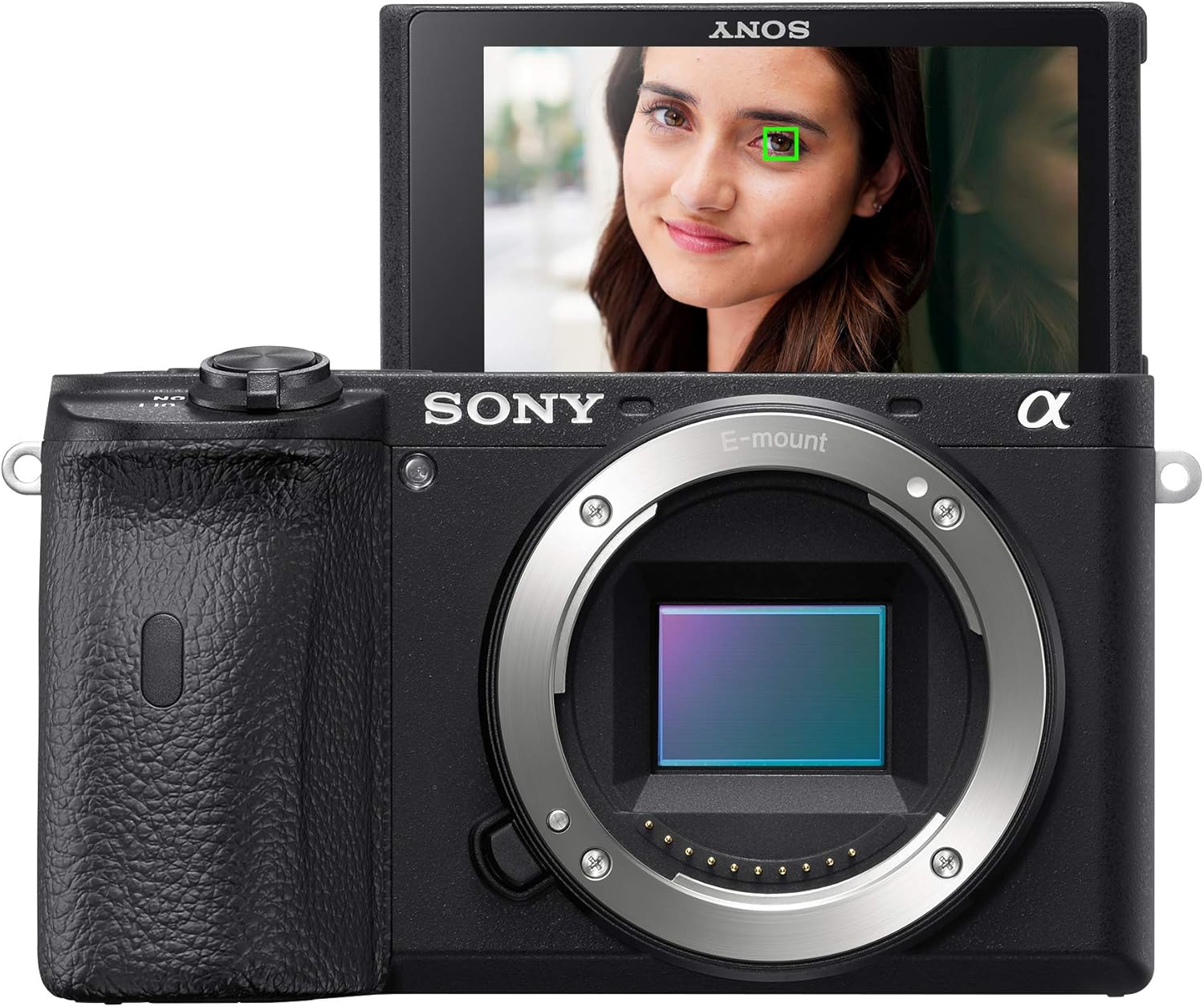
Front view of the Sony Alpha A6600 Mirrorless Camera with the LCD screen flipped upwards, displaying a live view with eye autofocus engaged on a woman's face. The E-mount lens mount is prominent.
Setup
Unboxing and Initial Inspection
Upon opening the package, ensure all components listed below are present and undamaged:
- Camera Body Only
- Lithium Battery (NP-FZ100)
- AC Charger (AC-UUD12)
- USB cable
- Body cap
- Strap
Battery Installation and Charging
Insert the NP-FZ100 battery into the camera's battery compartment. Connect the AC Charger to a power outlet and attach the USB cable to the camera for charging. The battery provides extended shooting times, reducing the need for frequent recharges.
Attaching a Lens
Align the white index mark on the lens with the white index mark on the camera body. Rotate the lens clockwise until it clicks into place. Ensure the lens is securely attached before use.
Memory Card Insertion
Open the memory card slot cover, typically located on the side or bottom of the camera. Insert a compatible SD card with the label facing the correct direction until it clicks into place. Close the cover securely.
Operating the Camera
Power On/Off
To power on the camera, slide the ON/OFF switch located on the top plate. To power off, slide the switch back to OFF.
Autofocus System
The A6600 features a world-class autofocus system with 425 phase-detection and 425 contrast-detection AF points covering 84% of the sensor area. It includes Real-time AF Tracking and Real-time Eye AF for humans and animals, ensuring sharp focus even with moving subjects. Touch Tracking allows continuous focus tracking by simply touching the display screen.

Rear view of the Sony Alpha A6600 Mirrorless Camera, showcasing the fixed LCD screen, electronic viewfinder, and various control buttons and dials for navigation and settings adjustment.
Video Recording
The camera supports UHD 4K30p video recording with HLG & S-Log3 Gammas, offering excellent detail and color grading flexibility. It also records Full HD video up to 120fps for slow-motion effects. An external mic jack and headphone jack are included for professional audio monitoring.
Official product overview video for the Sony Alpha A6600, highlighting its key features and capabilities.
Image Stabilization
Benefit from 5-axis in-body image stabilization, providing up to a 5-step shutter speed advantage. This feature is crucial for sharp handheld photos and smooth video footage, especially in challenging low-light conditions or when using longer lenses.
Customization and Ergonomics
The A6600 features a deeper grip for comfortable handling and three customizable buttons for quick access to frequently used settings. The tilting touchscreen LCD and XGA Tru-Finder 2.36m-Dot OLED EVF enhance usability and provide clear viewing options.

Side view of the Sony Alpha A6600 Mirrorless Camera, revealing the microphone input, headphone jack, USB port, and HDMI port, all protected by a cover.
Maintenance
To ensure the longevity and optimal performance of your Sony Alpha A6600, follow these maintenance guidelines:
- Cleaning the Camera Body: Use a soft, dry cloth to wipe the camera body. For stubborn dirt, slightly dampen the cloth with water or a mild cleaning solution. Avoid harsh chemicals.
- Cleaning the Lens: Use a lens brush to remove dust, then gently wipe with a microfiber lens cloth. For smudges, use a specialized lens cleaning fluid.
- Sensor Cleaning: If dust spots appear on your images, use the camera's built-in sensor cleaning function or a blower brush. For persistent dust, professional cleaning is recommended.
- Storage: Store the camera in a cool, dry place away from direct sunlight and extreme temperatures. Use a desiccant to prevent mold growth in humid environments.
- Battery Care: Store batteries in a cool, dry place. Do not leave depleted batteries in the camera for extended periods.
Troubleshooting
Here are solutions to common issues you might encounter:
- Camera not powering on: Ensure the battery is fully charged and correctly inserted. Check if the battery terminals are clean.
- Images are blurry: Verify that autofocus is correctly set and engaged. Check shutter speed and ISO settings, especially in low light. Ensure image stabilization is active if shooting handheld.
- Memory card error: Reinsert the memory card. Try a different, compatible memory card. Format the card (this will erase all data).
- Overheating during video recording: Reduce video resolution or frame rate. Avoid direct sunlight. Ensure sufficient airflow around the camera.
- Autofocus is slow or inaccurate: Ensure sufficient lighting. Clean the lens and sensor. Update camera firmware.
Specifications
| Product Dimensions | 6.18 x 5.67 x 4.53 inches |
| Item Weight | 1 pounds |
| Item model number | ILCE6600/B |
| Batteries | 1 Lithium Ion batteries required. (included) |
| Date First Available | August 29, 2019 |
| Manufacturer | Sony |
| Compatible Mountings | Sony E |
| Aspect Ratio | 16:9, 1:1, 3:2 |
| Photo Sensor Technology | CMOS |
| Supported File Format | RAW |
| Image Stabilization | Sensor-shift |
| Metering Description | Center-Weighted Average, Highlight, Multi-Zone, Spot |
Warranty and Support
The Sony Alpha A6600 typically comes with a limited 1-year manufacturer's warranty. For detailed warranty information, service, or technical support, please refer to the documentation included in your product package or visit the official Sony support website.
Online resources, including firmware updates, FAQs, and detailed user guides, are available on the Sony support portal. Registering your product may provide additional benefits and support.


