
Hyper Tough B07X3W492K
Hyper Tough 800 Lumens Rechargeable LED Flashlight User Manual
Model: B07X3W492K
Introduction
This manual provides essential information for the safe and effective use of your Hyper Tough 800 Lumens Rechargeable LED Flashlight. Please read this manual thoroughly before operating the device and retain it for future reference.

Figure 1: Hyper Tough 800 Lumens Rechargeable LED Flashlight, showcasing its compact design and integrated pocket clip.
Setup
Package Contents
Ensure all items are present in the package:
- Hyper Tough 800 Lumens Rechargeable LED Flashlight
- USB Charging Cable
- Integrated Lithium-Ion Battery (pre-installed)
Initial Charging
Before first use, fully charge the flashlight. The device is equipped with a built-in lithium-ion battery.
- Locate the charging port cover at the end of the flashlight.
- Carefully lift the yellow rubber cover to expose the Micro-USB charging port.

Figure 2: Close-up view of the flashlight's charging port, protected by a yellow rubber cover.
- Insert the smaller end of the provided USB charging cable into the flashlight's Micro-USB port.

Figure 3: The included USB charging cable for the flashlight.
- Connect the larger end of the USB charging cable to a standard USB power source (e.g., computer USB port, USB wall adapter).
- The charging indicator light will illuminate red during charging.
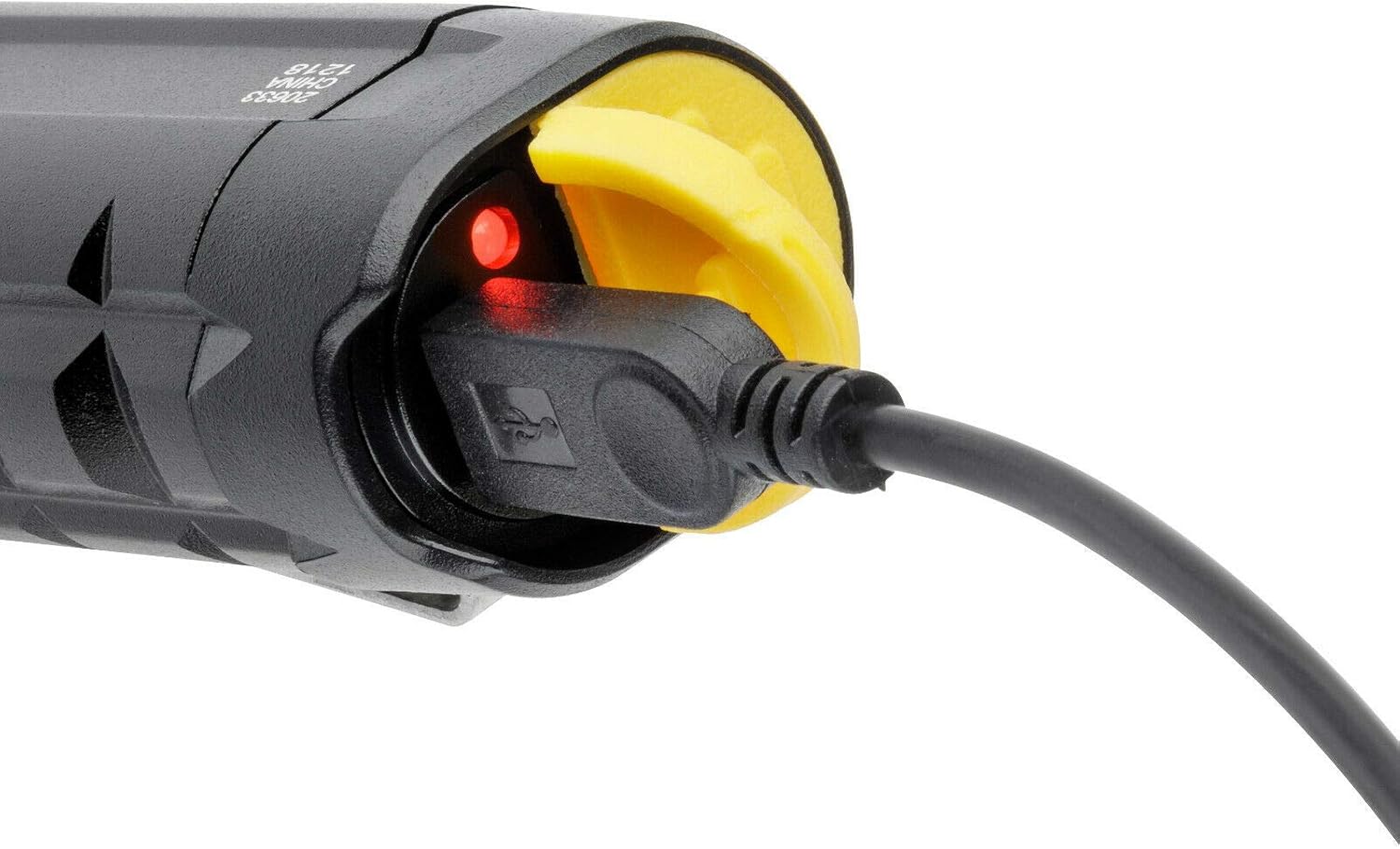
Figure 4: Flashlight connected to power, showing the red indicator light during charging.
- Once fully charged, the indicator light will turn green.

Figure 5: Flashlight fully charged, indicated by the green light.
- Disconnect the charging cable and securely close the rubber cover to protect the port from dust and moisture.
Operating Instructions
Power On/Off and Mode Selection
The flashlight features multiple light modes: High, Medium, and Low.
- To turn the flashlight ON, press the power button located on the body of the flashlight.
- Each subsequent press of the power button will cycle through the light modes: High → Medium → Low.
- To turn the flashlight OFF, press the power button after cycling through all modes, or hold the button down for a few seconds in any mode.

Figure 6: The Hyper Tough flashlight in operation, demonstrating its powerful beam.
Using the Pocket Clip
The integrated steel pocket clip allows for convenient carrying and hands-free operation.
- Attach the flashlight to your belt, pocket, or tool bag for quick access.
- The anti-roll shape of the flashlight, combined with the clip, helps prevent it from rolling on flat surfaces, enabling hands-free working.
Maintenance
Recharging the Battery
To maintain optimal performance, recharge the flashlight when the light output becomes dim or when the battery is low. Refer to the "Initial Charging" section for detailed steps.
- A full charge provides approximately 3 hours of run time.
- Always ensure the rubber charging port cover is securely closed when not charging to protect against dust and moisture.
Cleaning and Storage
- Wipe the flashlight body with a soft, damp cloth. Do not use abrasive cleaners or solvents.
- Store the flashlight in a cool, dry place away from direct sunlight and extreme temperatures.
- For long-term storage, it is recommended to charge the battery every 3-6 months to preserve battery life.
Troubleshooting
| Problem | Possible Cause | Solution |
|---|---|---|
| Flashlight does not turn on. | Battery is depleted. | Recharge the flashlight fully. |
| Light is dim or flickers. | Low battery charge. | Recharge the flashlight. |
| Flashlight not charging. | USB cable not properly connected or faulty power source. | Ensure cable is securely connected to both flashlight and power source. Try a different USB port or wall adapter. |
| Charging indicator light not working. | Flashlight already fully charged, or connection issue. | Check if the light turns green (fully charged). Re-seat the USB cable. |
Specifications
| Feature | Detail |
|---|---|
| Brand | Hyper Tough |
| Model | B07X3W492K |
| Light Source Type | LED |
| Luminous Flux (Brightness) | 800 Lumens |
| Beam Distance | 96 Meters |
| Run Time | Up to 3 hours |
| Power Source | Battery Powered |
| Battery Type | Lithium-Ion (Integrated) |
| Charging | USB Rechargeable (Cable Included) |
| Material | Aluminum |
| Special Features | Impact Resistant (up to 1 meter), Steel Pocket Clip, Anti-roll shape |
| Dimensions (Package) | 20.7 x 13.2 x 2.8 cm |
| Weight (Package) | 197 g |
Warranty and Support
Specific warranty information for this product is not provided in the available data. Please refer to the product packaging or the manufacturer's official website for warranty details and customer support contact information.
For technical assistance or inquiries, please contact Hyper Tough customer service through their official channels.
Related documentsB07X3W492K


Ask a question about this manual
Ask about setup, troubleshooting, compatibility, parts, safety, or missing instructions. Manuals+ will review the question and use this page’s manual context to help answer it.