
Introduction
This instruction manual provides detailed guidance for assembling, operating, maintaining, and troubleshooting your CaDA C66021W Juventus Stadium/Allianz Stadium building set. Please read this manual thoroughly before beginning assembly to ensure a smooth and enjoyable building experience. Keep this manual for future reference.
Safety Information
- Choking Hazard: This product contains small parts and is not suitable for children under 3 years of age. Adult supervision is recommended during assembly.
- Handling: Handle all building blocks with care. Avoid forcing pieces together, as this may cause damage.
- Storage: Store unused parts and the assembled model in a safe, dry place away from direct sunlight and extreme temperatures.
- Electrical Components: The set includes USB lighting. Ensure proper connection to a compatible USB power source. Do not expose electrical components to water.
Package Contents
Your CaDA C66021W Juventus Stadium/Allianz Stadium building set package should contain:
- Building blocks (various shapes and sizes)
- Instruction manual (this document)
- USB lighting kit
- Any specialized parts required for the stadium structure
Please verify all parts are present before beginning assembly. If any parts are missing or damaged, refer to the troubleshooting section or contact customer support.
Setup and Assembly
The CaDA C66021W Juventus Stadium/Allianz Stadium is a detailed construction model. Follow the numbered steps in the included printed instruction booklet for precise assembly. The following general guidelines and images provide an overview of the process.
1. Preparation
- Unpack all components carefully.
- Organize the building blocks by color, size, or type to facilitate easier identification during assembly.
- Ensure you have a clean, well-lit, and spacious work area.
2. Core Structure Assembly
Begin by constructing the base and core structure of the stadium. Pay close attention to the orientation of each piece as indicated in the step-by-step instructions.

Image: Overview of the stadium's modular sections before final assembly.
3. Detailed Section Construction
Proceed with building the detailed sections, such as the stadium stands, roof, and exterior elements. The design features accurate representations of the actual stadium details.

Image: Detailed representation of stadium features.
4. Final Assembly and USB Lighting Integration
Once all major sections are complete, connect them according to the instructions. Integrate the USB lighting kit as directed to illuminate the stadium model. Ensure all connections are secure.
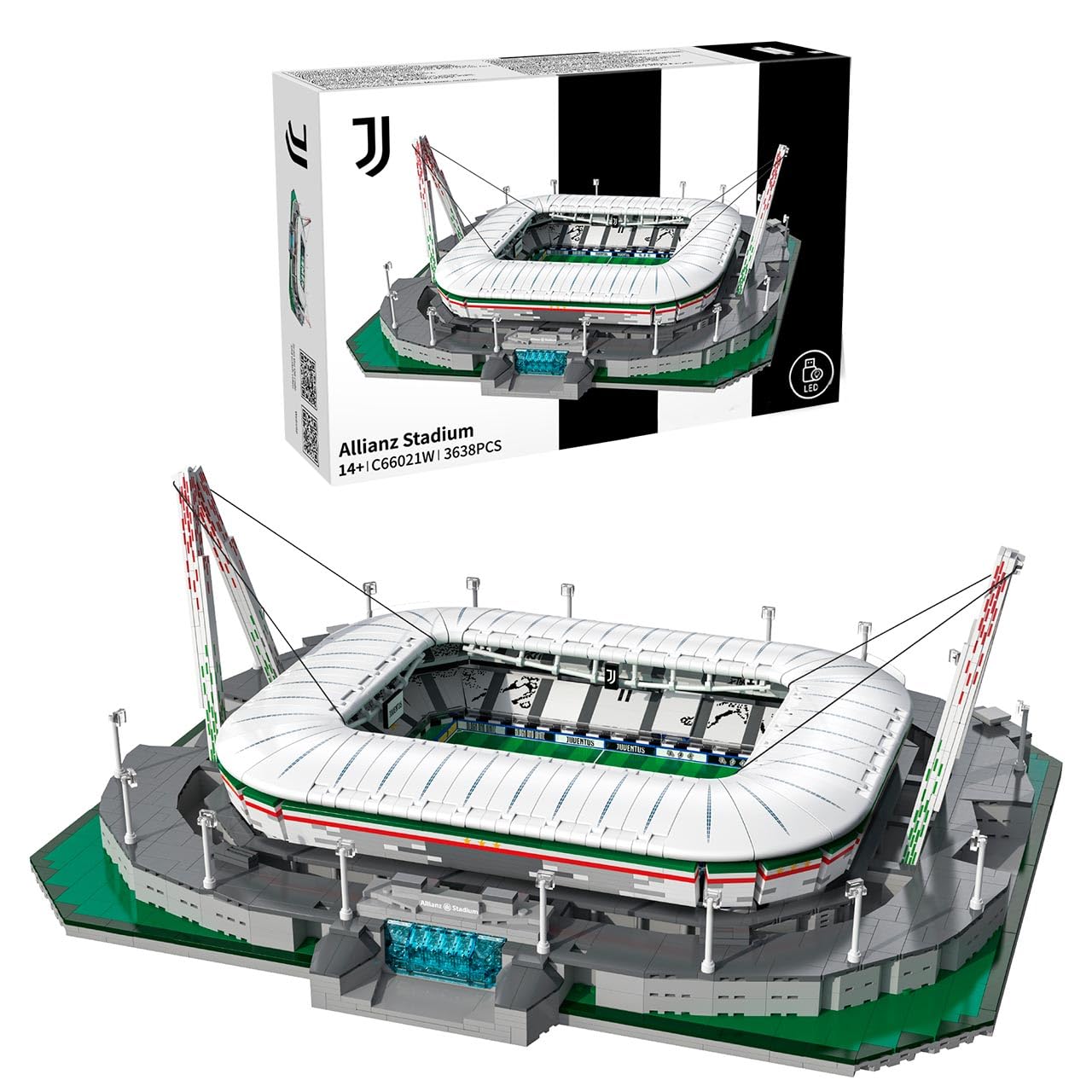
Image: The completed CaDA Juventus Stadium model.
Operating Features
Your CaDA Juventus Stadium model includes interactive features designed to enhance its display.
1. USB Lighting
- Connect the provided USB cable from the stadium model to a compatible USB power source (e.g., a USB wall adapter, power bank, or computer USB port).
- The stadium's internal lighting will illuminate, highlighting the architectural details.
- Disconnect the USB cable to turn off the lighting.
2. "Wave" Function
The model features a mechanical "wave" function in the stands, simulating a crowd wave.
- Locate the designated knob on the side of the stadium model.
- Gently turn the knob to activate the "wave" motion within the stands.
- Turn the knob in the opposite direction to reverse the motion or stop it.

Image: Operating the "wave" function by turning the knob.
Maintenance
- Cleaning: To clean the model, gently wipe it with a soft, dry cloth. For stubborn dust, a slightly damp cloth can be used, followed by immediate drying. Avoid harsh chemicals or abrasive cleaners.
- Dust Removal: Use a soft brush or compressed air (from a safe distance) to remove dust from intricate areas.
- Storage: When not on display, store the model in a cool, dry place, ideally in its original packaging or a protective container, to prevent dust accumulation and damage.
Troubleshooting
- Missing or Damaged Parts:
If you discover any missing or damaged parts upon opening the package, please refer to the manufacturer's customer support information (if available) or contact your retailer for assistance. Provide the product model number (C51305w) and a description of the missing/damaged part.
- Assembly Difficulties:
If you encounter difficulties during assembly, carefully re-examine the instruction booklet for the specific step. Ensure all pieces are correctly oriented and fully connected. Do not force pieces together.
- USB Lighting Not Working:
Check that the USB cable is securely connected to both the model and a functional USB power source. Try a different USB port or power adapter to rule out a faulty power source.
- "Wave" Function Not Operating Smoothly:
Ensure there are no obstructions preventing the mechanism from moving freely. Check that all connected parts for the wave function are correctly assembled and not overly tightened.
Specifications
| Brand | CaDA |
| Model Name | Juventus Stadium/Allianz Stadium |
| Model Number | C51305w (also referred to as C66021W in product title) |
| ASIN | B07X3VN5Q1 |
| Material | Plastic |
| Number of Pieces | 402 |
| Product Dimensions (L x W x H) | 44.7 x 53.6 x 20.8 cm (17.6 x 21.1 x 8.2 inches) |
| Item Weight | 1.6 Kilograms (3.53 lbs) |
| Recommended Age | Manufacturer recommended age: 0 - 1002 years (Note: Due to small parts, typically 8+ years for building sets) |
| Educational Objective | Spatial reasoning, Dexterity |
| Special Feature | Complete building kit, USB lighting, "Wave" function |
| Operation Mode | Manual |
| Indoor/Outdoor Use | Indoor |
Warranty and Support
Information regarding specific warranty terms or direct manufacturer support contact details was not provided with the product data. For warranty claims or technical assistance, please refer to the documentation included in your product packaging or contact the retailer from whom you purchased the item. They can provide the most current information on warranty coverage and how to obtain support for your CaDA building set.