
FANGOR U1011A
Contents
FANGOR 10.5 Dual Portable DVD Player Instruction Manual
Model: U1011A
Your ultimate entertainment companion for car and home.
Introduction
Thank you for choosing the FANGOR 10.5 Dual Portable DVD Player. This manual provides comprehensive instructions for setting up, operating, and maintaining your device to ensure optimal performance and enjoyment. This system is designed to provide seamless entertainment on the go, perfect for long car trips or home use.
What's in the Box
- 1 x Main DVD Player
- 1 x Slave Monitor
- 2 x Mounting Brackets
- 2 x Headrest Straps
- 1 x AC Adapter
- 1 x Car Charger
- 1 x Remote Control
- 1 x AV Cable
- 1 x DC Cable
- 1 x User Manual

Image: All components included in the FANGOR Dual Portable DVD Player package.
Setup Guide
Connecting the Main Player and Slave Monitor
The FANGOR Dual Portable DVD Player system consists of a main DVD player and a slave monitor. To enable simultaneous playback on both screens, connect them using the provided AV and DC cables.
- Connect the DC cable from the DC OUT port on the main DVD player to the DC IN port on the slave monitor.
- Connect the AV cable from the AV OUT port on the main DVD player to the AV IN port on the slave monitor.
- Ensure both units are powered on. The slave monitor will automatically display the content playing on the main DVD player.
Powering the Device
Your FANGOR DVD player can be powered in several ways:
- AC Adapter: For home use, plug the AC adapter into a standard wall outlet and connect it to the DC IN port on the main DVD player.
- Car Charger: For in-car use, connect the car charger to your vehicle's cigarette lighter socket and the DC IN port on the main DVD player.
- Built-in Battery: The main player features a built-in rechargeable lithium battery, providing up to 5 hours of playback when used alone, or 2.5-3 hours when both monitors are connected.
Car Installation
The dual screen DVD player comes with two customized mounting brackets and two headrest straps for easy and secure installation in your car. This ensures the players remain stable during bumpy rides.

Image: FANGOR Dual DVD Players securely mounted on car headrests.

Video: Demonstrates the installation of FANGOR Car DVD Players on headrests, highlighting their suitability for entertaining children during car trips.
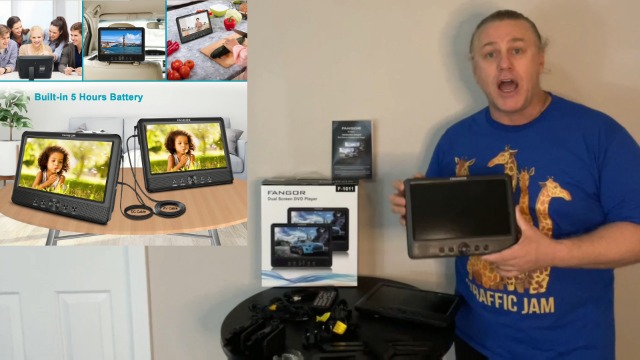
Video: An unboxing video of the FANGOR 10.5'' Dual Car DVD Player, showing the contents and initial setup steps.
Operating Instructions
Media Playback
The FANGOR DVD player supports a wide range of media formats and regions:
- Disc Formats: Play all regions discs from CD, DVD, CD-R/RW, DVD -R/+R, DVD+RW/-RW, VCD, SVCD (RW). (Note: Blu-ray discs and MP4 files are not supported directly from disc).
- USB & SD Card: Utilize the USB and SD card slots (max 32GB FAT32) to play digital media. Supported formats include pictures (JPG, JPEG), audio (MP3/WMA), and videos (VOB, AVI, MPEG 1, MPEG 2, MPG, 3GP, DAT).
Last Memory Function
The player features a convenient last memory function. This means you don't have to worry about starting from the beginning; the device will resume playback from where you left off, ensuring a continuous viewing experience.
Audio and Visual Experience
Equipped with dual powerful stereo speakers (2*1.5W on each monitor), the headrest DVD player delivers louder and clearer sound. For a broader visual experience, you can sync playback to a big TV or projector using the AV OUT function.

Image: Demonstrates syncing the FANGOR DVD player to a TV or projector for a larger viewing experience.
Maintenance
To ensure the longevity and optimal performance of your FANGOR DVD player, follow these maintenance guidelines:
- Cleaning: Use a soft, dry cloth to clean the screens and exterior surfaces. For stubborn smudges, slightly dampen the cloth with water. Avoid using abrasive cleaners or solvents.
- Disc Care: Handle discs by their edges to prevent fingerprints and scratches. Store discs in their cases when not in use. If a disc is dirty, clean it with a soft, lint-free cloth from the center outwards.
- Storage: When not in use for extended periods, store the DVD player in a cool, dry place away from direct sunlight and extreme temperatures.
- Battery Care: For optimal battery life, avoid fully discharging the battery frequently. Charge the device regularly, even if not in active use.
Troubleshooting
If you encounter issues with your FANGOR DVD player, refer to the following common solutions:
- No Power: Ensure the AC adapter or car charger is securely connected and the power outlet/socket is functional. Check if the power button on the main player is pressed.
- No Disc / Loading Error: Ensure the disc is inserted correctly with the label side facing up. Check if the disc is clean and free from scratches or damage. Try a different disc to rule out a disc-specific issue.
- Slave Monitor Not Displaying: Verify that the AV and DC cables connecting the main player to the slave monitor are securely plugged into the correct ports. Ensure both units are powered on.
- Skipping During Playback (Bumpy Rides): While the player is designed to minimize skipping, extreme bumps can still affect playback. Ensure the mounting brackets and straps are tightly secured to prevent excessive movement. One customer reported success by applying a 1mm rubber pad to the movement switch post to reduce skipping.
- No Sound / Low Sound: Check the volume levels on both the main player and the slave monitor. Ensure no headphones are plugged in if you intend to use the built-in speakers.
- Remote Control Not Working: Check and replace the remote control battery. Ensure there are no obstructions between the remote and the player's IR receiver.
If the issue persists after trying these steps, please contact FANGOR customer support for further assistance.
Specifications
| Feature | Detail |
|---|---|
| Product Dimensions | 10 x 5 x 11.8 inches |
| Item Weight | 4.53 pounds |
| Item Model Number | U1011A |
| Batteries | 1 Lithium Metal battery required |
| Brand | FANGOR |
| Media Type Supported | DVD, DVD-R/+R, DVD-RW/DVD+RW, USB, SD, MMC, SVCD, VCD, CD, CD-R/+R, CD-RW/+RW |
| Color | Black |
| Screen Size | 10.5 Inches |
| Display Type | LCD |
| Visible Screen Diagonal | 11" / 27 cm |
| Manufacturer | FANGOR |
| Date First Available | September 6, 2019 |
Warranty and Support
FANGOR is committed to providing high-quality products and excellent customer service. Your FANGOR 10.5 Dual Portable DVD Player comes with a 12-MONTHS warranty from the date of purchase.
For any further information, technical support, or to address any problems not covered by the FAQ section, please do not hesitate to contact us:
- Email: uzmj@fangor.cn (for US/CA customers)
- Email: eu-pvd@fangor.cn (for EU customers)
We aim to reply within 12 working hours and provide professional technical support. FANGOR offers lifetime customer service and technical support for its products.
You can also refer to the official User Guide (PDF) for additional details.
Documents and downloads
Ask a question about this manual
Ask about setup, troubleshooting, compatibility, parts, safety, or missing instructions. Manuals+ will review the question and use this page’s manual context to help answer it.