
1. Introduction
The iBall Musi Bar is a compact, high-power soundbar designed to deliver a powerful stereo audio experience. It offers multiple playback options including Bluetooth, USB, MicroSD, AUX, and FM Radio, along with a built-in microphone for hands-free calling. This manual provides detailed instructions for setting up, operating, and maintaining your soundbar.

Figure 1: iBall Musi Bar Soundbar and Remote Control
2. Package Contents
Please check the box for the following items:
- Speaker – 1 N
- Remote Control – 1 N
- Charging Cable – 1 N
- User Manual – 1 N
3. Product Overview
The iBall Musi Bar features a sleek design and intuitive controls. Understand its components and features for optimal use.
3.1 Key Features
- Powerful 10W stereo sound output.
- Lightweight and portable design.
- Up to 15 hours of playback time on a single charge.
- Built-in microphone for hands-free calling in Bluetooth mode.
- Multiple playback options: Bluetooth (BT), USB, MicroSD, AUX, and FM Radio.
- Wireless Bluetooth communication with a range of up to 10 meters.
3.2 Controls and Ports

Figure 2: Top Panel Controls and Dimensions
The top panel includes buttons for Power, Volume Up/Down, and Source selection. The rear panel houses various input ports.
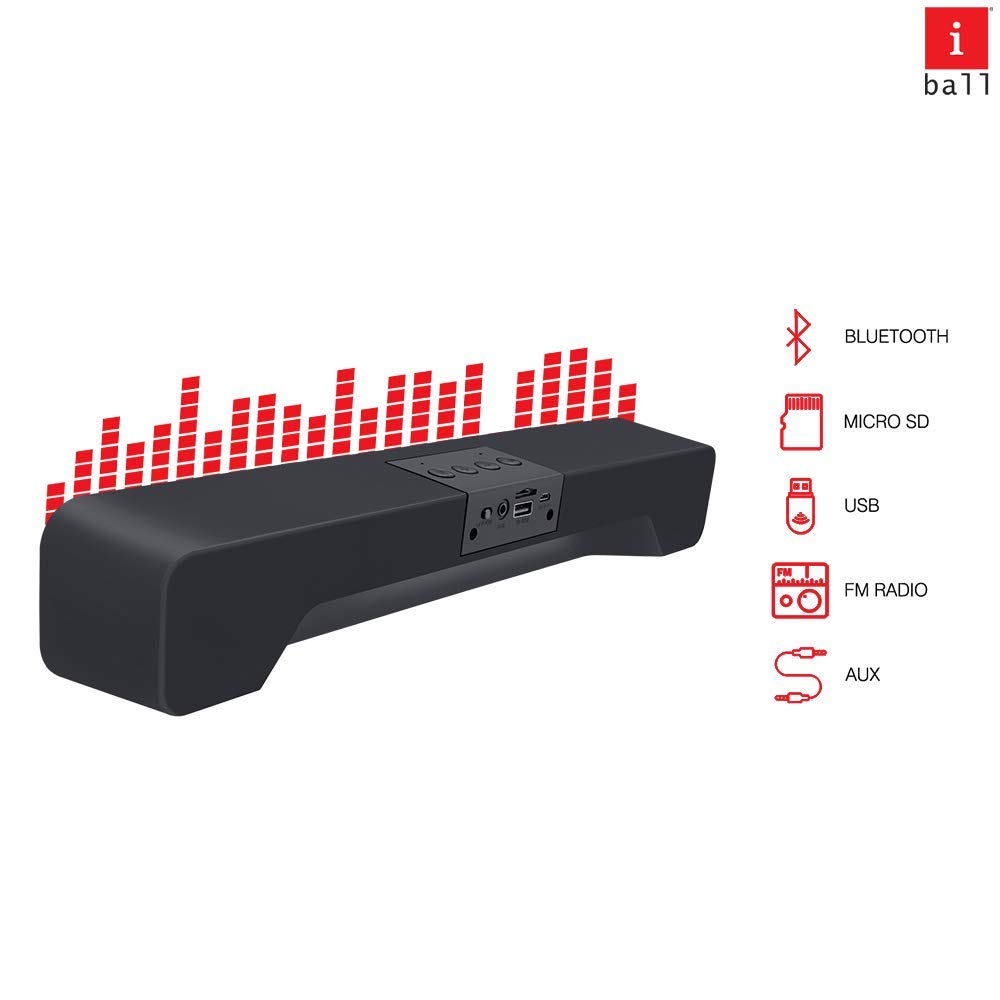
Figure 3: Playback Options and Ports
4. Setup
4.1 Charging the Soundbar
- Connect the provided charging cable to the soundbar's charging port.
- Connect the other end of the charging cable to a 5V, 1A USB power adapter (not included).
- The LED indicator will show charging status. A full charge provides up to 15 hours of audio playback.
4.2 Powering On/Off
- To power on, press and hold the Power button on the top panel or remote control.
- To power off, press and hold the Power button again.
5. Operating Instructions
5.1 Bluetooth Mode
To connect your soundbar via Bluetooth:
- Power on the soundbar. It will automatically enter Bluetooth pairing mode, indicated by a flashing LED.
- On your smartphone or other Bluetooth-enabled device, enable Bluetooth and search for available devices.
- Select "iBall Musi Bar" from the list of devices.
- Once paired, the LED indicator will stop flashing, and you will hear an audio confirmation.
- You can now stream audio wirelessly from your device to the soundbar.
Video 1: Overview of the iBall Musi Bar Soundbar and its features.
5.2 USB/MicroSD Card Mode
- Insert a USB drive or MicroSD card (with MP3 files) into the corresponding port on the soundbar.
- The soundbar will automatically switch to USB or MicroSD mode and begin playing music.
- Use the playback controls (Play/Pause, Next/Previous Track) on the soundbar or remote.
5.3 AUX Mode
- Connect an audio device (e.g., TV, computer) to the soundbar's AUX port using a 3.5mm audio cable (not included).
- Press the 'Source' button on the soundbar or remote until 'AUX' mode is selected.
- Audio from your connected device will now play through the soundbar.
5.4 FM Radio Mode
- Press the 'Source' button on the soundbar or remote until 'FM' mode is selected.
- To auto-scan and save FM channels, press and hold the Play/Pause button.
- Use the Next/Previous Track buttons to navigate through saved channels.
6. Maintenance
- Clean the soundbar with a soft, dry cloth. Do not use abrasive cleaners or solvents.
- Avoid exposing the device to extreme temperatures, direct sunlight, or moisture.
- Do not attempt to disassemble or repair the soundbar yourself, as this will void the warranty.
7. Troubleshooting
| Problem | Possible Solution |
|---|---|
| No power | Ensure the soundbar is charged or connected to a power source. Press and hold the Power button to turn on. |
| No sound | Check volume levels on both the soundbar and the connected device. Ensure the correct source mode is selected. |
| Bluetooth pairing fails | Ensure the soundbar is in pairing mode (flashing LED). Turn off and on Bluetooth on your device. Move closer to the soundbar. |
| FM radio static/poor reception | Ensure the soundbar is in an open area away from interference. Perform an auto-scan for channels again. |
8. Specifications
| Feature | Detail |
|---|---|
| Model | Musi Bar |
| Speaker Type | Soundbar |
| Output Power | 10 Watts |
| Connectivity | Bluetooth, USB, MicroSD, AUX, FM |
| Bluetooth Range | 10 Meters |
| Power Source | Battery Powered |
| Battery Type | Lithium Ion (2 included) |
| Battery Life | Up to 15 hours (audio excellence) / 3 hours (average life) |
| Dimensions (LxWxH) | 38.3 x 5.8 x 6.5 cm |
| Item Weight | 625 g |
| Control Method | Remote, Touch |
| Water Resistance | Not Water Resistant |
9. Warranty and Support
The iBall Musi Bar comes with a standard 1 Year Warranty from the date of purchase. For warranty claims, technical assistance, or further information, please contact iBall customer support.
Toll-free Number: 18002666409
For additional details, please refer to the product page on the official iBall website or the retailer's website where the product was purchased.