1. Introduction
This manual provides detailed instructions for the setup, operation, maintenance, and troubleshooting of your Nobsound Douk Audio G5 Stereo HiFi Bluetooth Amplifier. Please read this manual thoroughly before using the product to ensure proper function and to prevent damage.
2. Safety Instructions
- Do not expose the device to water, moisture, or extreme temperatures.
- Ensure proper ventilation to prevent overheating.
- Use only the specified power adapter. Incorrect voltage can damage the device.
- Do not attempt to disassemble or modify the amplifier. This will void the warranty and may cause electric shock.
- Keep out of reach of children.
- Disconnect power during lightning storms or when unused for long periods.
3. Package Contents
Please check the package for the following items:
- Douk Audio G5 Amplifier Unit
- Power Adapter
- Bluetooth Antenna
- User Manual (this document)
4. Product Overview
4.1 Front Panel
The front panel features the main controls and indicators.
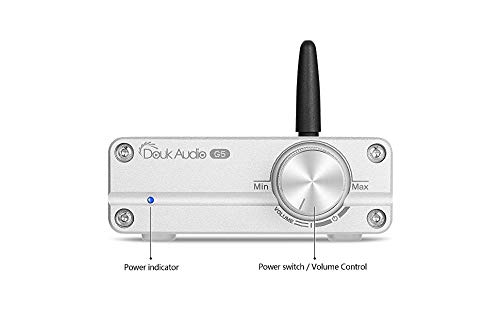
Figure 1: Front Panel Layout
- Power Indicator: A blue LED light indicates when the unit is powered on.
- Power Switch / Volume Control: Rotate to adjust volume. Press to power the unit on or off.
4.2 Rear Panel
The rear panel provides all input and output connections.
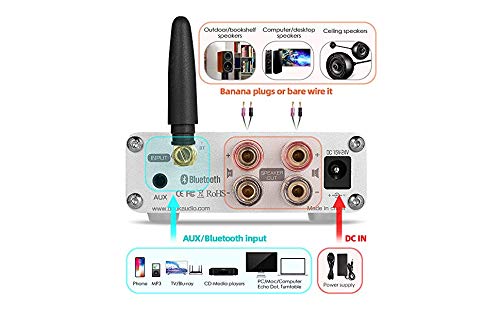
Figure 2: Rear Panel Connections
- Bluetooth Antenna Connector: For attaching the included Bluetooth antenna.
- AUX Input: 3.5mm stereo audio input for wired connections.
- Speaker Output: Binding posts for connecting passive speakers.
- DC IN: Power input for the external power adapter.
4.3 Key Features
- Dual Input Modes: Supports standard 3.5mm AUX input and Bluetooth 5.0 for versatile connectivity.
- High Power Output: Utilizes a TPA3116 chip, delivering up to 50W x 2 (at 24V/6A, 4 ohms) for clear audio.
- Advanced Bluetooth: Features a Qualcomm 3003 Bluetooth chip for faster and more stable wireless transmission.
- Replaceable Op-Amps: Equipped with 2 NE5532 Op-Amps, designed for easy replacement to customize sound.
- Compact Design: Mini size with a durable aluminum alloy chassis for better protection and versatile placement.
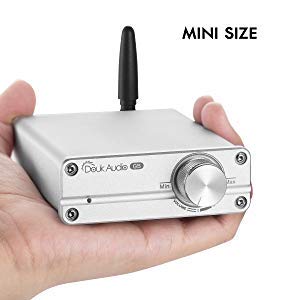
Figure 3: Compact Size of the Amplifier
5. Setup
5.1 Connecting Speakers
- Ensure the amplifier is powered off.
- Connect your passive speakers to the speaker output binding posts on the rear panel. Ensure correct polarity (+ to + and - to -) for each speaker.
- Tighten the binding posts securely.
5.2 Connecting Audio Sources
The amplifier supports both AUX and Bluetooth inputs.

Figure 4: Connecting Audio Sources
5.2.1 AUX Input
- Connect a 3.5mm audio cable from your audio source (e.g., PC, CD player, MP3 player) to the AUX input jack on the rear panel.
5.2.2 Bluetooth Input
- Attach the included Bluetooth antenna to the connector on the rear panel.
- Power on the amplifier.
- On your Bluetooth device (e.g., smartphone, tablet), enable Bluetooth and search for available devices.
- Select "Douk Audio G5" (or similar name) from the list to pair.
- Once paired, audio will be streamed wirelessly to the amplifier.
Note: Bluetooth input has priority. If both AUX and Bluetooth are connected, the amplifier will default to Bluetooth. To use AUX, ensure Bluetooth is disconnected from any paired device.
5.3 Power Connection
- Connect the power adapter to the DC IN port on the rear panel of the amplifier.
- Plug the power adapter into a suitable wall outlet.
6. Operating Instructions
6.1 Power On/Off
- To power on, press the volume control knob on the front panel. The blue power indicator will illuminate.
- To power off, press the volume control knob again. The power indicator will turn off.
6.2 Volume Control
- Rotate the volume control knob clockwise to increase the volume.
- Rotate the volume control knob counter-clockwise to decrease the volume.
6.3 Input Selection
The amplifier automatically prioritizes Bluetooth input. To switch between inputs:
- For Bluetooth: Ensure your device is paired and connected. If an AUX cable is plugged in, disconnect it from the source or the amplifier.
- For AUX: Ensure no device is actively connected via Bluetooth to the amplifier. Plug in your 3.5mm audio cable.
7. Maintenance
- Cleaning: Use a soft, dry cloth to clean the amplifier's exterior. Do not use liquid cleaners or solvents.
- Storage: When not in use for extended periods, store the amplifier in a cool, dry place away from direct sunlight.
- Ventilation: Ensure the amplifier has adequate airflow around it to prevent heat buildup. Do not block ventilation openings.
8. Troubleshooting
| Problem | Possible Cause | Solution |
|---|---|---|
| No power | Power adapter not connected; Power outlet faulty; Amplifier not switched on. | Check power connections; Try a different outlet; Press the volume knob to power on. |
| No sound | Volume too low; Incorrect input selected; Speaker wires loose; Audio source issue. | Increase volume; Ensure Bluetooth is disconnected for AUX, or paired for Bluetooth; Check speaker connections; Verify audio source is playing. |
| Bluetooth not connecting | Amplifier not in pairing mode; Device too far; Already connected to another device. | Ensure amplifier is on; Move device closer; Disconnect from other Bluetooth devices and try pairing again. |
| Sound distortion | Volume too high; Poor audio source quality; Speaker impedance mismatch. | Reduce volume; Test with a different audio source; Ensure speakers are 4-8 ohms. |
9. Specifications
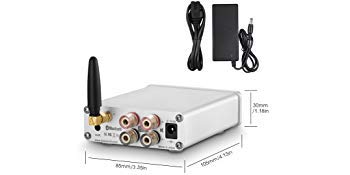
Figure 5: Amplifier Dimensions
| Feature | Detail |
|---|---|
| Model Number | DZ076_DE |
| Brand | Nobsound |
| Output Power | 50W x 2 (at 24V/6A, 4 ohms) |
| Bluetooth Version | 5.0 |
| Input Options | 3.5mm AUX, Bluetooth |
| Bluetooth Chip | Qualcomm 3003 |
| Amplifier Chip | TPA3116 |
| Op-Amp | 2 x NE5532 (replaceable) |
| Voltage | 19 Volts, 24 Volts (via external power adapter) |
| Number of Channels | 2 |
| Dimensions (L x W x H) | 105mm x 80mm x 30mm (approx. 4.13 x 3.15 x 1.18 inches) |
| Weight | 520 grams (approx. 1.15 lbs) |
| Color | Silver |
10. Warranty and Support
This product comes with a standard manufacturer's warranty. For specific warranty terms and conditions, please refer to the documentation provided with your purchase or contact your retailer.
For technical support or service inquiries, please contact the Nobsound customer service team through their official website or the contact information provided by your seller.


