
1. Introduction
Thank you for purchasing the Midea Water Dispenser YL1675S-W. This manual provides important information regarding the installation, operation, maintenance, and troubleshooting of your new water dispenser. Please read this manual thoroughly before using the appliance and retain it for future reference.
2. Safety Information
To ensure safe operation and reduce the risk of injury or damage, always follow these basic safety precautions:
- Read all instructions before using the appliance.
- Ensure the power supply matches the rating label on the dispenser.
- Do not operate the dispenser with a damaged cord or plug.
- Keep the dispenser away from direct sunlight and heat sources.
- Ensure proper ventilation around the unit.
- This appliance is equipped with a Child Safety Lock for the hot water faucet to prevent accidental burns. Always engage the child lock when not in use, especially if children are present.
- The dispenser has a Double Safety Device to prevent overheating.
- Do not immerse the appliance, cord, or plug in water or other liquids.
- Unplug the dispenser before cleaning or maintenance.
- Only use the dispenser for its intended purpose of dispensing hot and cold drinking water.
 Image: Close-up of the Midea Water Dispenser's dispensing area, highlighting the child safety lock mechanism on the hot water tap.
3. Product Overview
The Midea Water Dispenser YL1675S-W is a top-loading, floor-standing unit designed to provide instant access to hot and cold water. It features a durable stainless steel tank and efficient compressor cooling technology.
Components:
- Water Bottle Support (Top Loading)
- Hot Water Faucet with Child Safety Lock
- Cold Water Faucet
- Drip Tray and Grille
- Power Switch (Hot/Cold)
- Power Cord
- Stainless Steel Tank
- Efficient Compressor Cooling System
 Image: Front view of the Midea Water Dispenser, showing the top-loading design, hot and cold water taps, and indicator lights.
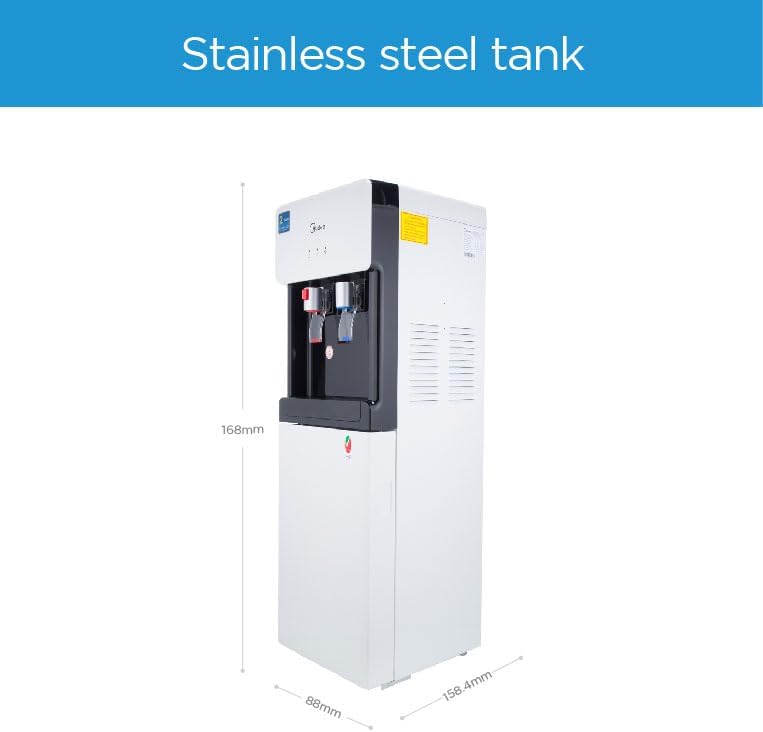 Image: Side view of the Midea Water Dispenser, illustrating its compact dimensions and stainless steel tank.
 Image: Diagram showing the internal components and features of the Midea Water Dispenser, including hot and cold water flow, food-grade material, stainless steel tank, and high-efficiency compressor cooling.
4. Setup
- Unpacking: Carefully remove the dispenser from its packaging. Retain packaging materials for future transport if needed.
- Placement: Place the dispenser on a flat, stable surface in a well-ventilated area, away from direct sunlight and heat sources. Ensure there is at least 10 cm (4 inches) of space from walls for proper ventilation.
- Power Connection: Ensure the power switch is in the "OFF" position. Plug the power cord into a grounded electrical outlet.
- Install Water Bottle: Remove the cap from a standard 5-gallon (or similar compatible size) water bottle. Invert the bottle and place it firmly onto the water bottle support on top of the dispenser. The bottle's stopper will be pushed in, allowing water to flow into the dispenser's tanks.
- Initial Priming: Before turning on the heating or cooling functions, dispense water from both the hot and cold faucets until water flows continuously. This ensures the tanks are filled and prevents dry heating.
 Image: The Midea Water Dispenser with a 5-gallon water bottle correctly installed on top, positioned in a typical home or office environment.
5. Operating Instructions
- Power On: After priming, turn on the power switch located at the back of the dispenser.
- Hot Water: To dispense hot water, push the hot water faucet lever. Remember to engage the child safety lock after use by pushing the red button down and sliding it to the locked position.
- Cold Water: To dispense cold water, push the cold water faucet lever.
- Indicator Lights: The dispenser has indicator lights for power, heating, and cooling status. Refer to the product overview section for their specific locations.
- Replacing Water Bottle: When the water bottle is empty, lift it off the dispenser. Place a new, full water bottle onto the support.
6. Maintenance
Regular maintenance ensures optimal performance and longevity of your water dispenser.
- Cleaning the Exterior: Wipe the exterior surfaces with a soft, damp cloth. Do not use abrasive cleaners or solvents.
- Cleaning the Drip Tray: The drip tray should be emptied and cleaned regularly to prevent overflow and bacterial growth. Remove the grille, empty the tray, wash with mild soap and water, rinse thoroughly, and replace.
- Descaling (Recommended Annually): Over time, mineral deposits can build up in the hot water tank. To descale, unplug the unit, drain all water, and follow a descaling procedure using a food-grade descaling solution or a mixture of water and white vinegar. Rinse thoroughly multiple times after descaling.
- General Hygiene: Always ensure the water bottle and its opening are clean before placing it on the dispenser.
7. Troubleshooting
If you encounter issues with your Midea Water Dispenser, refer to the table below for common problems and solutions.
| Problem | Possible Cause | Solution |
|---|---|---|
| No hot water | Hot water switch off; Heating element malfunction; Overheat protection activated. | Ensure hot water switch is ON. Check if the reset button (if available) has popped out. If problem persists, contact service. |
| No cold water | Cold water switch off; Compressor malfunction. | Ensure cold water switch is ON. Allow sufficient time for cooling (at least 30 minutes after initial setup). If problem persists, contact service. |
| Water leaking | Water bottle cracked or improperly seated; Drip tray full; Internal leak. | Check water bottle for cracks and ensure it's seated correctly. Empty and clean drip tray. If internal leak, unplug and contact service. |
| Unusual noise | Compressor operation (normal); Unit not level; Loose parts. | Some compressor noise is normal. Ensure the unit is on a level surface. Check for any loose components. |
| Water tastes strange | New unit (plastic taste); Contaminated water bottle; Needs cleaning. | For new units, dispense several liters of water. Use fresh, clean water bottles. Perform a thorough cleaning and descaling. |
8. Specifications
| Feature | Detail |
|---|---|
| Brand | Midea |
| Model | YL1675S-W |
| Type | Top Loading, Floor Standing |
| Dimensions (L x W x H) | 36 x 31 x 98 cm |
| Weight | 14.4 kg |
| Capacity | Designed for 5 Gallon bottles |
| Water Temperature | Hot & Cold (Ice Cold Technology down to 3°C) |
| Tank Material | Stainless Steel |
| Safety Features | Child Safety Lock for Hot Water, Double Safety Device (Overheat Protection) |
| Color | White |
| Material Type | Food grade material |
9. Warranty and Support
The Midea Water Dispenser YL1675S-W comes with a 2-year warranty. Please refer to the warranty card included with your purchase for detailed terms and conditions.
For technical support, service, or warranty claims, please contact Midea customer service through their official channels. Keep your purchase receipt as proof of purchase.
 Image: A close-up of the Midea Water Dispenser showing a "2 Years Warranty" sticker, indicating the product's warranty period.


