
1. Product Overview
This manual provides essential information for the safe and efficient use of your Drone-Clone Xperts 7.6V 3400mAh Intelligent Battery. Designed for compatibility with Limitless 2 and Limitless 3 Drones, this high-capacity LiPo battery ensures extended flight times and reliable performance.

Image 1.1: The 7.6V 3400mAh Intelligent Battery integrated into a compatible drone.
The intelligent design includes 4 LED lights to indicate the remaining battery power, allowing for easy monitoring. Constructed from durable and fire-proof materials, this battery is built for longevity and safety during operation.
2. Setup and Charging
2.1 Unboxing and Initial Inspection
- Carefully remove the battery from its packaging.
- Inspect the battery for any visible damage. Do not use if damaged.
- Ensure the battery is clean and dry before use or charging.
2.2 Charging the Battery
Before first use, fully charge the battery. Use only the charger provided with your drone or a compatible charger recommended by Drone-Clone Xperts.
- Connect the battery to the appropriate charging cable.
- Plug the charger into a power source.
- The LED indicators on the battery will show the charging status. A full charge is indicated when all 4 LEDs are solid.
- Disconnect the battery once fully charged. Do not overcharge.

Image 2.1: The battery features LED indicators for power status.
2.3 Installing the Battery
Refer to your specific Limitless 2 or Limitless 3 Drone manual for detailed battery installation instructions. Generally, the battery slides into a dedicated compartment on the drone until it clicks securely into place.
3. Operating the Battery
This intelligent battery is designed for seamless integration with your Limitless 2 or Limitless 3 Drone, providing approximately 25 minutes of flight time on a single charge.
3.1 Checking Battery Status
Press the button on the battery to activate the LED power status lights. Each light represents approximately 25% of the battery's charge.
- 4 LEDs solid: 75-100% charge
- 3 LEDs solid: 50-75% charge
- 2 LEDs solid: 25-50% charge
- 1 LED solid: 0-25% charge (recharge soon)

Image 3.1: The battery provides extended flight duration for your drone.
3.2 Flight Considerations
- Always ensure the battery is fully charged before a flight.
- Monitor battery levels during flight using the drone's remote control or companion app.
- Land the drone immediately if the battery level becomes critically low to prevent unexpected power loss.
4. Maintenance and Storage
4.1 General Care
- Keep the battery clean and free from dust and debris.
- Avoid exposing the battery to extreme temperatures (hot or cold).
- Do not puncture, drop, or disassemble the battery.
- The battery is made from fire-proof materials for enhanced safety.
4.2 Storage
- For long-term storage, charge the battery to approximately 50-60% capacity.
- Store the battery in a cool, dry place away from direct sunlight and flammable materials.
- Do not store the battery fully charged or fully discharged for extended periods.
5. Troubleshooting
If you encounter issues with your battery, refer to the following common problems and solutions:
- Battery not charging:
Ensure the charging cable and adapter are securely connected and functional. Try a different power outlet. If the issue persists, the battery or charger may be faulty. - Short flight time:
Ensure the battery is fully charged before flight. Extreme weather conditions (cold, wind) can reduce flight time. Check for any obstructions on the drone's propellers or motors that might increase power consumption. - LED indicators not working:
Press the power status button firmly. If the LEDs still do not light up, the battery may be completely discharged or faulty. - Battery not fitting in drone:
Ensure you have the correct battery model for your Limitless 2 or Limitless 3 Drone. Do not force the battery into the compartment.
For further assistance, please contact Drone-Clone Xperts customer support.
6. Specifications
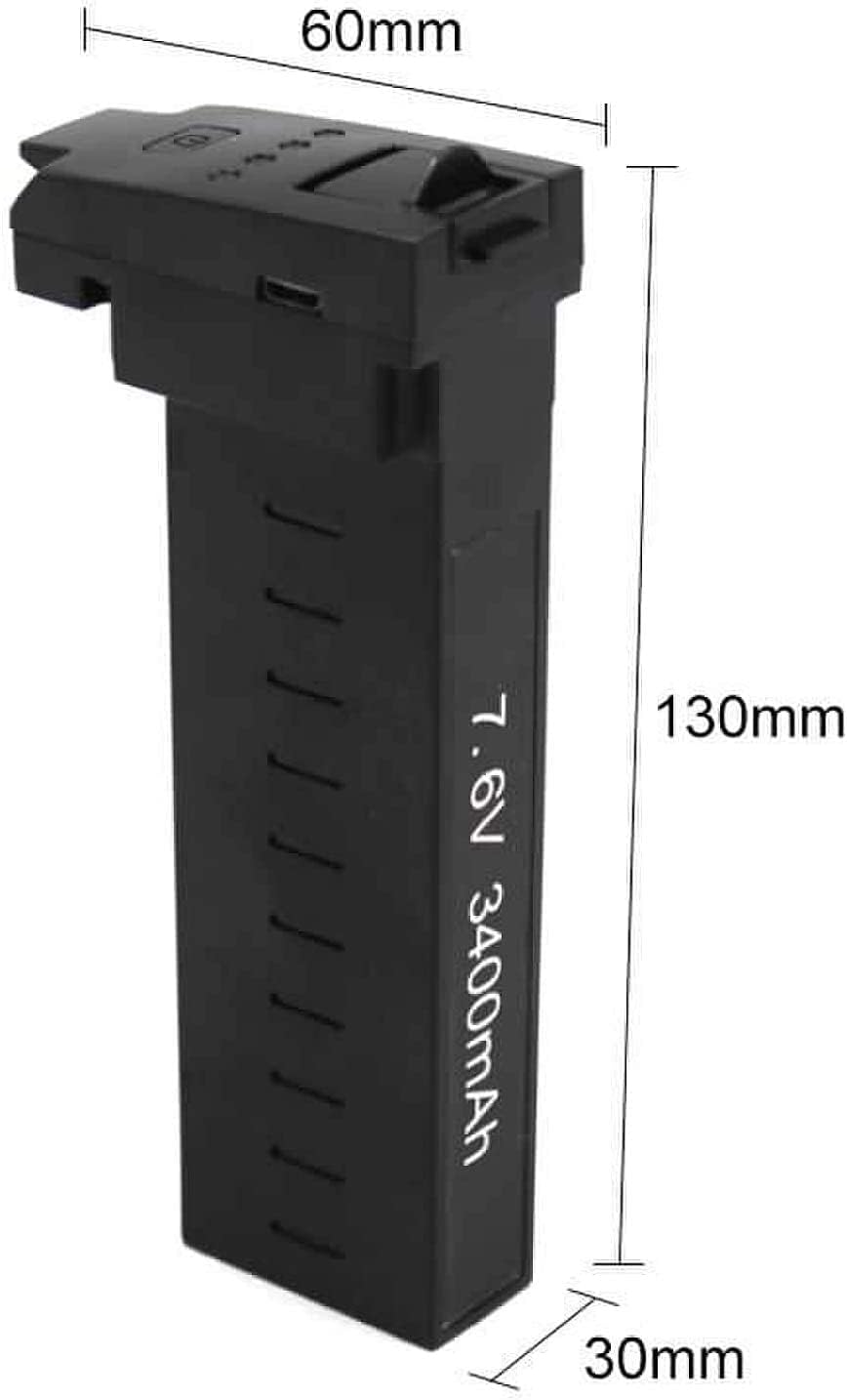
Image 6.1: Physical dimensions of the intelligent battery.
| Feature | Detail |
|---|---|
| Brand | Drone-Clone Xperts |
| Model Name | 7.6V 3400mAh Intelligent Battery |
| Compatibility | Limitless 2 and Limitless 3 Drones |
| Voltage | 7.6V |
| Capacity | 3400mAh |
| Battery Cell Composition | Lithium Ion (LiPo) |
| Estimated Flight Time | Up to 25 minutes |
| Special Features | LED Power Status Lights, Durable Construction, Fire-proof Materials |
| Item Weight | 0.16 Kilograms (5.6 ounces) |
| Package Dimensions | 6.26 x 2.36 x 1.85 inches |
7. Warranty Information
Drone-Clone Xperts products are manufactured to high-quality standards. For specific warranty terms and conditions, please refer to the warranty card included with your original drone purchase or visit the official Drone-Clone Xperts website. Keep your proof of purchase for any warranty claims.
8. Support and Contact
If you have any questions, require technical assistance, or need to report an issue, please contact Drone-Clone Xperts customer support through the following channels:
- Website: Visit the official Drone-Clone Xperts website for FAQs and support resources.
- Email: Refer to your product packaging or the official website for customer service email addresses.
- Phone: Contact numbers may be available on the official website for direct support.
Please have your product model and purchase information ready when contacting support.
