
1. Product Overview
The LEVOIT Vital 100 Air Purifier is designed to improve indoor air quality by filtering airborne particles. It features a 3-stage filtration system, quiet operation, and user-friendly controls.

Image: Front view of the LEVOIT Vital 100 Air Purifier, a white rectangular unit with a control panel on top.
Key Features:
- AHAM VERIFIDE: Independently tested for air cleaning performance, safety, and energy efficiency.
- Coverage Area: Cleans up to 788 ft² per hour.
- 3-Stage Filtration: Includes a washable pre-filter, an efficient filter, and an activated carbon filter.
- Quiet Operation: Noise levels as low as 24 decibels.
- User-Friendly Controls: Features a timer (2, 4, or 8 hours), display off function, and a Check Filter Indicator.
- Ozone-Free: Purifies air without producing harmful UV light or ozone.
2. Setup and Installation
Follow these steps to set up your LEVOIT Vital 100 Air Purifier:
- Unpack the Air Purifier: Carefully remove the air purifier and all packaging materials from the box.
- Remove Filter Packaging: The 3-stage filter comes pre-installed. Before first use, open the filter compartment and remove any plastic wrapping from the filter.
- Reinstall Filter: Place the filter back into the air purifier, ensuring it is seated correctly. Close the filter compartment cover securely.
- Position the Unit: Place the air purifier on a flat, stable surface. Its compact design and top-facing air vents allow for placement near walls or in room corners. Ensure there is adequate space around the air intake and outlet for optimal airflow.
- Connect to Power: Plug the power cord into a standard electrical outlet.

Image: The LEVOIT Vital 100 Air Purifier with icons highlighting its features: purifies 788 sq ft/hr, 3-stage filtration, quiet operation (24dB), and timer settings.
3. Operating Instructions
The LEVOIT Vital 100 Air Purifier features an intuitive control panel for easy operation.

Image: A close-up diagram of the LEVOIT Vital 100 control panel, showing buttons for On/Off, Speed, Display Off, Timer, and Check Filter Indicator.
Control Panel Functions:
- On/Off Button: Press to turn the air purifier on or off.
- Speed Button: Cycles through 3 fan speeds (Low, Medium, High).
- Display Off Button: Turns off the display lights for undisturbed sleep.
- Timer Button: Sets the operating timer for 2, 4, or 8 hours. The unit will automatically turn off when the timer expires.
- Check Filter Indicator: Illuminates when it's time to check or replace the filter.
Air Purification Performance:
The Vital 100 is AHAM VERIFIDE, ensuring reliable performance. It effectively removes dust, pollen, smoke, and pet dander from the air.

Image: A table illustrating AHAM Certified performance, showing how quickly the air purifier cleans different room sizes (e.g., 788 sq ft in 60 minutes for 1 ACH).
The unit operates without producing UV light or ozone, making it safe for individuals with ozone sensitivities.

Image: A woman relaxing in a living room with the LEVOIT Vital 100 Air Purifier, emphasizing its ozone-free operation.
Video: LEVOIT Vital 100 Air Purifier Overview
Video: An official LEVOIT video providing a general overview of the Vital 100 Air Purifier's features and benefits.
4. Maintenance
Regular maintenance ensures optimal performance and extends the lifespan of your air purifier.
Filter Maintenance:
- Check Filter Indicator: The indicator light will signal when it's time to check or replace the filter.
- Washable Pre-Filter: The pre-filter can be cleaned monthly with a brush or vacuum to remove accumulated hair and dust. Do not wash the pre-filter with water.
- Main Filter Replacement: The main 3-in-1 filter (Efficient filter and activated carbon filter) should be replaced every 6–8 months, depending on usage. Search for "Vital 100-RF" to purchase genuine LEVOIT replacement filters.

Image: A detailed diagram illustrating the three stages of filtration: washable pre-filter, efficient filter, and activated carbon filter.
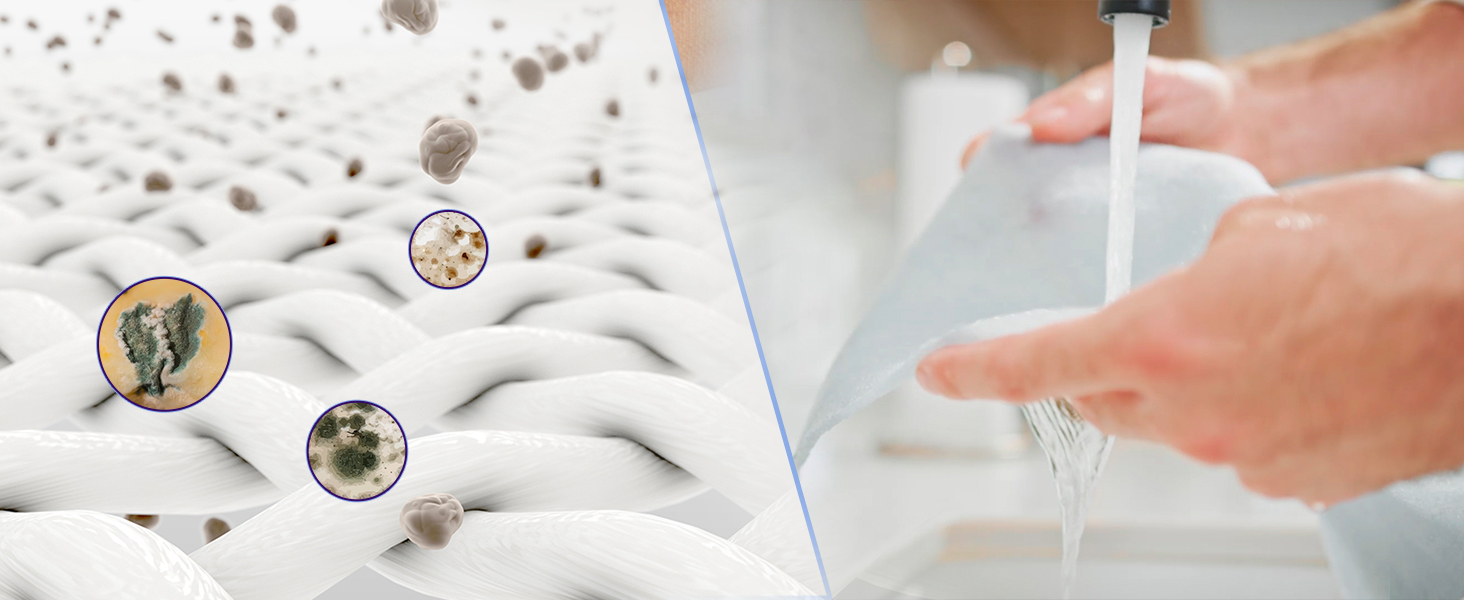
Image: A hand cleaning the washable pre-filter under running water, demonstrating the cleaning process.
General Cleaning:
- Wipe the outside of the air purifier with a dry cloth.
- Do not clean with water or any other liquid to avoid the risk of electric shock.
Important: Only use genuine LEVOIT replacement filters. Using off-brand filters may compromise performance and void your warranty.
5. Troubleshooting
If you encounter issues with your LEVOIT Vital 100 Air Purifier, refer to the following common solutions:
- Unit Not Turning On:
- Ensure the power cord is securely plugged into a working electrical outlet.
- Verify that the filter's plastic packaging has been removed and the filter is correctly installed.
- Reduced Airflow or Odor:
- Check the pre-filter for excessive dust or pet hair buildup and clean it.
- If the Check Filter Indicator is on, replace the main filter.
- Ensure only genuine LEVOIT filters are used.
- Unusual Noise:
- Ensure the unit is on a flat, stable surface.
- Check for any obstructions in the air intake or outlet.
- International Use (Voltage Compatibility):
- The LEVOIT Vital 100 is rated for 110V. If using in regions with 220-240V electrical systems (e.g., UK, Europe), a voltage converter (240V to 110V) is required. Using only a plug adapter without a voltage converter can damage the unit and pose a safety risk.
6. Specifications
| Brand | LEVOIT |
| Model Number | Vital 100 |
| Color | Cream White |
| Product Dimensions | 6.4"D x 12.8"W x 16.1"H |
| Item Weight | 9.3 pounds |
| Floor Area Coverage | 788 Square Feet |
| Noise Level | 24 dB |
| Wattage | 38 watts |
| Particle Retention Size | 0.3 Micron |
| Controller Type | Hand Control |
| Specification Met | CARB Certified |
| Assembly Required | No |
| Batteries Required | No |
| Included Components | 1 × Air Purifier, 1 × 3-Stage Filter (Pre-Installed), 1 × User Manual |
7. Warranty and Support
Warranty Information:
The LEVOIT Vital 100 Air Purifier comes with a 1-year warranty. You have the option to extend this warranty by an additional year. Please refer to the warranty card included in your packaging or visit the official LEVOIT website for details on how to register your product and extend the warranty.
Customer Support:
For further assistance, product inquiries, or to purchase genuine replacement parts, please visit the official LEVOIT store or contact their customer support:
- LEVOIT Official Store: Visit the LEVOIT Store on Amazon
- Refer to the contact information provided in your product packaging for direct support channels.


