
Sanpyl STC-3000
Sanpyl STC-3000 Digital Temperature Controller User Manual
Brand: Sanpyl | Model: STC-3000
1. Introduction
This manual provides detailed instructions for the installation, operation, and maintenance of the Sanpyl STC-3000 Digital Temperature Controller. This electronic thermostat is designed for precise temperature control with high accuracy, suitable for various applications requiring stable temperature management. It features a touch interface and is available in 110V to 220V 10A and 30A variants.

Figure 1.1: Sanpyl STC-3000 Digital Temperature Controller (Angled View)
This image shows the Sanpyl STC-3000 Digital Temperature Controller from an angled perspective, highlighting its compact design, digital display, and touch buttons. The orange side clips for mounting are visible.
2. Safety Information
Please read all safety warnings and instructions carefully before installing or operating this device. Failure to follow these instructions may result in electric shock, fire, or serious injury.
- Ensure the power supply voltage matches the controller's specifications (110V-220V AC).
- All wiring should be performed by a qualified electrician in accordance with local electrical codes.
- Disconnect power before making any wiring connections or performing maintenance.
- Do not operate the controller in environments with excessive moisture, dust, or corrosive gases.
- Do not exceed the maximum current rating (10A or 30A, depending on model).
- Keep the device away from children.
3. Package Contents
Verify that all items are present and undamaged upon opening the package:
- 1 x Sanpyl STC-3000 Digital Temperature Controller
- 1 x NTC Temperature Sensor Probe
4. Product Features
- High accuracy digital temperature control (0.1°C).
- Wide temperature measurement and control range: -55°C to 120°C (-67°F to 248°F).
- Touch-sensitive buttons for easy operation.
- Clear digital display for temperature readings.
- Supports both heating and cooling control modes.
- Available in 10A and 30A relay output versions.
- Compact design for panel mounting.

Figure 4.1: Front Panel of STC-3000 Controller
This image provides a clear front view of the STC-3000 controller, showing the digital display, "SET" and "RST" buttons on the left, and "Up" and "OK/Down" buttons on the right. The model number "STC-3000" is printed below the display.
5. Setup and Installation
The STC-3000 is designed for panel mounting. Follow these steps for proper installation and wiring:
5.1 Panel Mounting
- Cut a rectangular opening in your panel with dimensions approximately 71mm x 29mm (2.80in x 1.14in).
- Insert the controller into the opening.
- Secure the controller using the orange mounting clips on the sides. Push them inwards until they lock into place against the panel.
5.2 Wiring Diagram
Refer to the diagram below for correct wiring connections. Ensure all connections are secure and insulated.
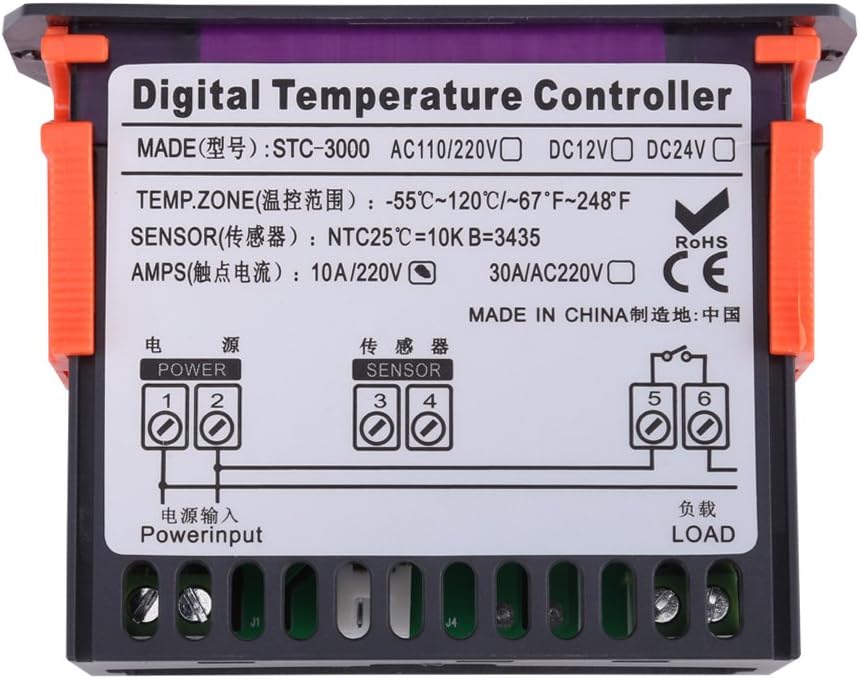
Figure 5.1: STC-3000 Wiring Diagram
This image displays the wiring diagram located on the back of the STC-3000 controller. It clearly labels terminals for "Power Input" (1, 2), "Sensor" (3, 4), and "Load" (5, 6), indicating how to connect the power supply, temperature sensor, and the device to be controlled (e.g., heater or cooler).
- Power Input (Terminals 1 & 2): Connect your AC power supply (110V-220V) to these terminals.
- Sensor (Terminals 3 & 4): Connect the NTC temperature sensor probe to these terminals. The sensor is non-polar, so connection order does not matter.
- Load (Terminals 5 & 6): Connect the device you wish to control (e.g., heater, cooler, fan) to these terminals. This is a relay output, acting as a switch. Ensure the load's power requirements do not exceed the controller's maximum current rating (10A or 30A).

Figure 5.2: Rear View with Sensor Connection
This image shows the rear of the STC-3000 controller with the NTC temperature sensor connected to its designated terminals. The screw terminals for power input and load are also visible, providing a practical view of the connection points.
6. Operating Instructions
The STC-3000 features a user-friendly touch interface. Here's how to operate it:
6.1 Button Functions
- SET: Enters/Exits parameter setting mode. Short press to view current set temperature. Long press (3 seconds) to enter parameter setting.
- RST: Resets the controller. Long press (3 seconds) to restore factory settings.
- ▲ (Up Arrow): Increases parameter value or navigates up in menus.
- ▼ (Down Arrow) / OK: Decreases parameter value or navigates down in menus. Also acts as an "OK" button to confirm settings when in parameter mode.
6.2 Setting Temperature
- Short press the SET button. The display will show the current set temperature.
- Long press the SET button for 3 seconds until the display flashes.
- Use the ▲ or ▼ buttons to adjust the desired temperature setpoint.
- Press the SET button again or wait 5 seconds for the setting to be saved automatically and return to normal display mode.
6.3 Parameter Settings (Advanced)
Long press SET for 3 seconds to enter parameter setting mode. Use ▲ and ▼ to navigate between parameters (P0-P6). Press SET to select a parameter, then use ▲ and ▼ to adjust its value. Press SET again to confirm and move to the next parameter, or wait to exit.
| Parameter | Description | Default Value | Range |
|---|---|---|---|
| P0 | Heating/Cooling Mode (H/C) | C (Cooling) | H/C |
| P1 | Hysteresis Setting (Differential) | 2.0°C | 0.1-30.0°C |
| P2 | Upper Temperature Limit | 120°C | -55°C to 120°C |
| P3 | Lower Temperature Limit | -55°C | -55°C to 120°C |
| P4 | Temperature Correction | 0.0°C | -10.0°C to 10.0°C |
| P5 | Delay Start Time (Minutes) | 0 minutes | 0-10 minutes |
| P6 | High Temperature Alarm | OFF | ON/OFF |
Note: The specific default values and ranges might vary slightly between production batches. Always refer to the on-screen display for the exact options.
7. Maintenance
To ensure the longevity and accurate performance of your STC-3000 controller, follow these maintenance guidelines:
- Cleaning: Wipe the display and casing with a soft, dry cloth. Do not use abrasive cleaners or solvents.
- Sensor Care: Keep the temperature sensor probe clean and free from debris. Avoid bending or damaging the sensor cable.
- Connections: Periodically check all wiring connections to ensure they are tight and free from corrosion. Disconnect power before checking connections.
- Environment: Ensure the operating environment remains within the specified temperature and humidity ranges to prevent damage.
8. Troubleshooting
If you encounter issues with your STC-3000 controller, refer to the following common problems and solutions:
| Problem | Possible Cause | Solution |
|---|---|---|
| Display is blank or not powering on. | No power supply; incorrect wiring; faulty unit. | Check power connections (Terminals 1 & 2). Ensure voltage matches specifications. Verify wiring against diagram. If problem persists, contact support. |
| Temperature reading is inaccurate or "LLL" / "HHH" displayed. | Sensor disconnected or damaged; sensor short-circuited; temperature out of range. | Check sensor connections (Terminals 3 & 4). Ensure sensor cable is not damaged. Replace sensor if necessary. Verify ambient temperature is within controller's range. |
| Load (e.g., heater/cooler) does not turn on/off. | Incorrect temperature setpoint or hysteresis; faulty load wiring; load exceeding current rating; relay failure. | Verify set temperature and P1 (Hysteresis) settings. Check load wiring (Terminals 5 & 6). Ensure load current is within 10A/30A limit. Test the load directly if possible. |
| Buttons are unresponsive or difficult to use. | Dust/debris on touch surface; static electricity; internal issue. | Clean the touch surface with a soft, dry cloth. Ensure hands are dry. If persistent, try power cycling the device. |
If the issue is not resolved by the above steps, please contact Sanpyl customer support.
9. Specifications
| Parameter | Value |
|---|---|
| Model | STC-3000 |
| Working Principle | Electronic thermostat, Digital thermostat |
| Power Supply | AC 110V-220V |
| Current Rating (Optional) | 10A / 30A (AC220V) |
| Temperature Range | -55°C to 120°C (-67°F to 248°F) |
| Accuracy | 0.1°C |
| Sensor Type | NTC 25°C=10K B=3435 |
| Dimensions (L x W x H) | 85 x 35 x 65mm (3.34 x 1.38 x 2.56 inches) |
| Weight | 121g - 136g (depending on model) |
| Manufacturer | Sanpyl |
| ASIN | B07X1SCN3P |
| UPC | 706092881243 |
10. Warranty and Support
For warranty information and technical support, please refer to the documentation provided with your purchase or visit the official Sanpyl store.
Sanpyl Store: https://www.amazon.com/stores/Sanpyl/page/EA2471F4-E5E3-4186-9EEB-1F4A1C18E435
Related Documents - STC-3000
 |
STC-3000 Digital Temperature Controller Thermostat - User Manual and Specifications Detailed information on the STC-3000 digital temperature controller, thermostat, and thermoregulator. Includes specifications, operating instructions, wiring diagrams, and safety guidelines for incubators, refrigerators, and other temperature-sensitive applications. |
 |
STC-3028 Digital Temperature & Humidity Controller - Shenzhen Hongxin Detailed specifications and instructions for the Shenzhen Hongxin STC-3028 digital temperature and humidity controller, suitable for incubators and greenhouses. Features dual display, AC 110-220V input, and 10A relay output. |
 |
STC-200+ Thermostat User Manual: Refrigeration, Heating, and Alarm Control Comprehensive user manual for the STC-200+ thermostat, detailing its specifications, installation, configuration, and operation for refrigeration, heating, and alarm output control. Learn how to set temperature ranges, understand function codes, and troubleshoot common errors. |
 |
amiciSmart STC-3028 Temperature and Humidity Control Thermostat Detailed specifications, wiring diagram, and operating instructions for the amiciSmart STC-3028 Temperature and Humidity Control Thermostat, featuring AC 110-220V power, a wide temperature range (-20°C to +80°C), and humidity control (00%RH to 100%RH) with a 10A relay output. |
 |
STC-3028 Dual LED Temperature Humidity Controller Specifications, wiring, and settings for the STC-3028 AC 110-220V 10A Dual LED Temperature and Humidity Controller. Features include a wide measurement range, high accuracy, and relay outputs for heating and cooling applications. |
 |
STC-9200 Digital Temperature Controller: Precise Thermostat for Refrigeration, Incubation & More Discover the GAQQEE STC-9200, a versatile digital temperature controller and thermostat. Featuring high precision, multiple power inputs (12V, 24V, 110V, 220V), and extensive applications for freezers, incubators, and industrial uses. |
Ask a question about this manual
Ask about setup, troubleshooting, compatibility, parts, safety, or missing instructions. Manuals+ will review the question and use this page’s manual context to help answer it.