
Sicce Space EKO 300
SICCE Space EKO 300 Canister Filter Instruction Manual
Brand: Sicce | Model: Space EKO 300
1. Introduction
The SICCE Space EKO 300 is a high-performance external canister filter designed for both freshwater and saltwater aquariums. This filter system offers a unique easy start-up, large filter capacity, and quiet operation, making it suitable for various aquarium setups. It is engineered for long-lasting performance with proper maintenance.
This manual provides essential information for the safe and efficient installation, operation, and maintenance of your Space EKO 300 canister filter.
2. Safety Information
Please read all safety instructions carefully before operating the filter. Failure to follow these instructions may result in electric shock, fire, or serious injury.
- Always disconnect the power supply before performing any maintenance or cleaning.
- Ensure the filter is placed on a stable, level surface below the aquarium water level to facilitate proper operation.
- Do not operate the filter if the power cord or plug is damaged.
- This appliance is intended for indoor use only.
- Keep out of reach of children.
- Ensure all connections are secure and leak-free before powering on the unit.
3. Package Contents
Verify that all components are present and undamaged upon unpacking. The Space EKO 300 canister filter package typically includes:
- Space EKO 300 Canister Filter Unit
- All necessary tubing and connectors
- Filter media (mechanical, biological, and chemical)
- Quick disconnect system
- Media baskets
- Heavy-duty locking clips

Figure 3.1: Exploded view diagram showing all components of the Space EKO filter, including the canister body, head unit, media baskets, tubing, and connectors.
4. Setup Instructions
Follow these steps for the initial setup of your Space EKO 300 canister filter:
- Prepare the Filter Media: Open the filter head by releasing the locking clips. Remove the media baskets. Rinse all filter media thoroughly under tap water to remove any dust or debris. Arrange the media in the baskets according to the manufacturer's recommendations (typically mechanical filtration at the bottom, followed by biological and chemical).
- Assemble the Canister: Place the filled media baskets back into the canister body. Ensure the sealing gasket on the filter head is clean and properly seated. Secure the filter head to the canister body using the heavy-duty locking clips.
- Connect Tubing: Attach the inlet and outlet tubing to the quick disconnect system on the filter head. Ensure a tight fit to prevent leaks. The quick disconnect system allows for easy removal of the filter for maintenance.

Figure 4.1: Detailed view of the quick disconnect system on the filter head, showing the secure attachment points for the inlet and outlet hoses.
- Install Inlet and Outlet Pipes: Position the inlet pipe (with strainer) and outlet pipe (with spray bar or nozzle) inside your aquarium. Secure them using the provided suction cups. Ensure the inlet is submerged and the outlet is positioned to create good water circulation.
- Position the Filter: Place the canister filter on a stable surface below the aquarium water level. This is crucial for the self-priming function to work effectively.
- Priming the Filter: The Space EKO filter features a self-priming system. Before plugging in the unit, ensure the quick disconnect valve is open. To assist with priming, it is highly recommended to fill the canister completely with water before starting. Once filled, operate the priming handle (located on top of the filter head) by pushing it down and pulling it up repeatedly until water begins to flow into the filter and air is expelled from the outlet hose. This may require several pumps.

Figure 4.2: The priming handle, located on the top of the filter head, used to manually draw water into the system during initial setup.
- Power On: Once water is flowing steadily through the outlet hose and no large air bubbles are visible, plug the filter into a grounded electrical outlet. The filter should start operating quietly.

Figure 4.3: The Sicce Space EKO canister filter fully assembled with inlet and outlet hoses connected, illustrating its compact design.
5. Operating Instructions
The Space EKO 300 filter is designed for continuous operation to maintain optimal water quality in your aquarium. Once set up, it requires minimal intervention.
- Flow Control: The filter head may feature a flow control lever or valve to adjust the water flow rate. Adjust this as needed for your specific aquarium requirements.

Figure 5.1: The flow control lever on the filter head, allowing users to regulate the water output from the filter.
- Silent Operation: The Space EKO series is known for its quiet performance. Any unusual noise may indicate air trapped in the system or an issue with the impeller. Refer to the troubleshooting section if noise occurs.
- Monitoring: Regularly observe the water clarity and flow rate to ensure the filter is functioning correctly. A decrease in flow often indicates that the filter media requires cleaning.
6. Maintenance
Regular maintenance is crucial for the long-term performance and efficiency of your Space EKO 300 filter. Maintenance frequency depends on your aquarium's bioload and size, but typically every 2-4 weeks.
- Disconnect Power: Always unplug the filter from the power outlet before beginning any maintenance.
- Disconnect Hoses: Close the quick disconnect valve on the filter head and then detach the entire quick disconnect assembly from the filter head. This prevents water from spilling.
- Open Canister: Release the locking clips and carefully lift the filter head off the canister body.
- Clean Media Baskets: Remove the media baskets. Rinse mechanical filter media (e.g., sponges, filter floss) in old aquarium water (not tap water, to preserve beneficial bacteria) to remove trapped debris. Replace filter floss as needed. Biological media should only be gently rinsed if heavily clogged, again using old aquarium water. Chemical media (e.g., activated carbon) should be replaced according to its lifespan, typically every 2-4 weeks.
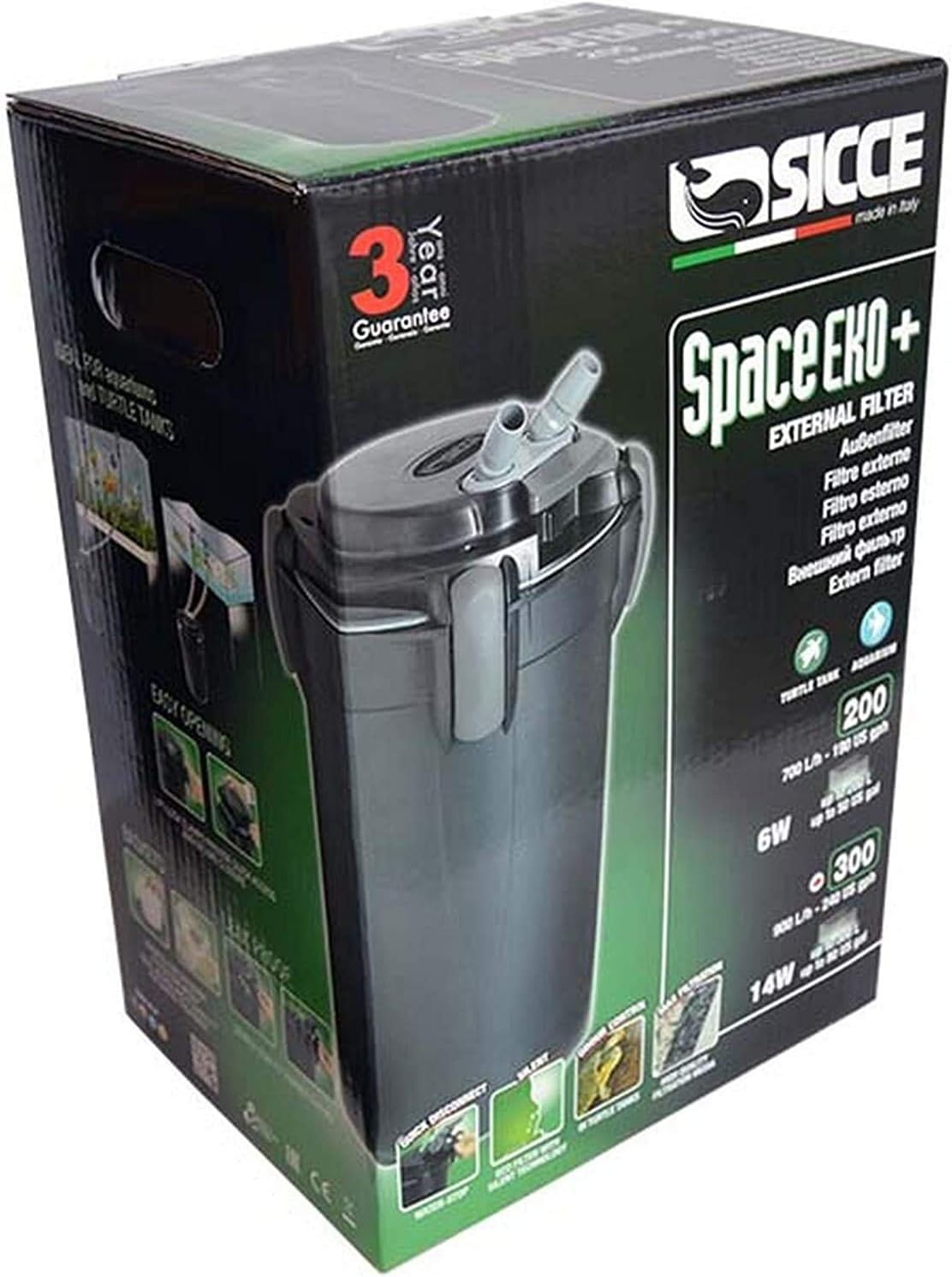
Figure 6.1: The floating filter media baskets, designed for easy removal and replacement of various filter media types.
- Clean Impeller: Inspect and clean the impeller and impeller housing located within the filter head. Remove any debris, hair, or slime that may impede its rotation.
- Clean Canister Body and Hoses: Rinse the inside of the canister body. Periodically clean the inlet and outlet pipes and hoses to prevent buildup that can restrict flow.
- Reassemble: Reassemble the filter in reverse order, ensuring all seals and gaskets are clean and properly seated. Reconnect the quick disconnect assembly and open the valve.
- Restart: Follow the priming steps from Section 4.6 to restart the filter.
7. Troubleshooting
This section addresses common issues you might encounter with your Space EKO 300 filter.
| Problem | Possible Cause | Solution |
|---|---|---|
| Filter not priming / No water flow | Air trapped in system; Canister not filled with water; Quick disconnect valve closed; Clogged inlet/outlet. | Ensure canister is filled with water before priming. Operate priming handle repeatedly. Check quick disconnect valve is fully open. Inspect inlet/outlet pipes for blockages. Ensure filter is below water level. |
| Reduced water flow | Clogged filter media; Dirty impeller; Kinked hoses; Biofilm buildup in hoses. | Clean or replace filter media. Clean impeller and housing. Check hoses for kinks. Clean hoses thoroughly. |
| Loud operation / Vibrations | Air trapped in system; Impeller damaged or dirty; Filter not level. | Re-prime the filter to remove air. Clean or inspect impeller for damage. Ensure filter is on a stable, level surface. If impeller is damaged, contact support for replacement. |
| Water leaks | Improperly sealed filter head; Damaged O-ring; Loose hose connections; Cracked housing/components. | Ensure locking clips are fully engaged. Inspect O-ring for damage or improper seating; lubricate if dry. Tighten all hose connections. If housing is cracked, contact customer support. |
8. Specifications
Key technical specifications for the SICCE Space EKO 300 Canister Filter:
| Feature | Specification |
|---|---|
| Model Name | SIC619 |
| Flow Rate | 240 GPH (Gallons Per Hour) |
| Power Source | Corded Electric |
| Product Dimensions (L x W x H) | 6.2"L x 6.2"W x 11"H (Canister body) |
| Item Weight | 9.13 pounds |
| Installation Type | Freestanding |
| Color | Black |
| Target Audience | Fish (Freshwater and Saltwater) |
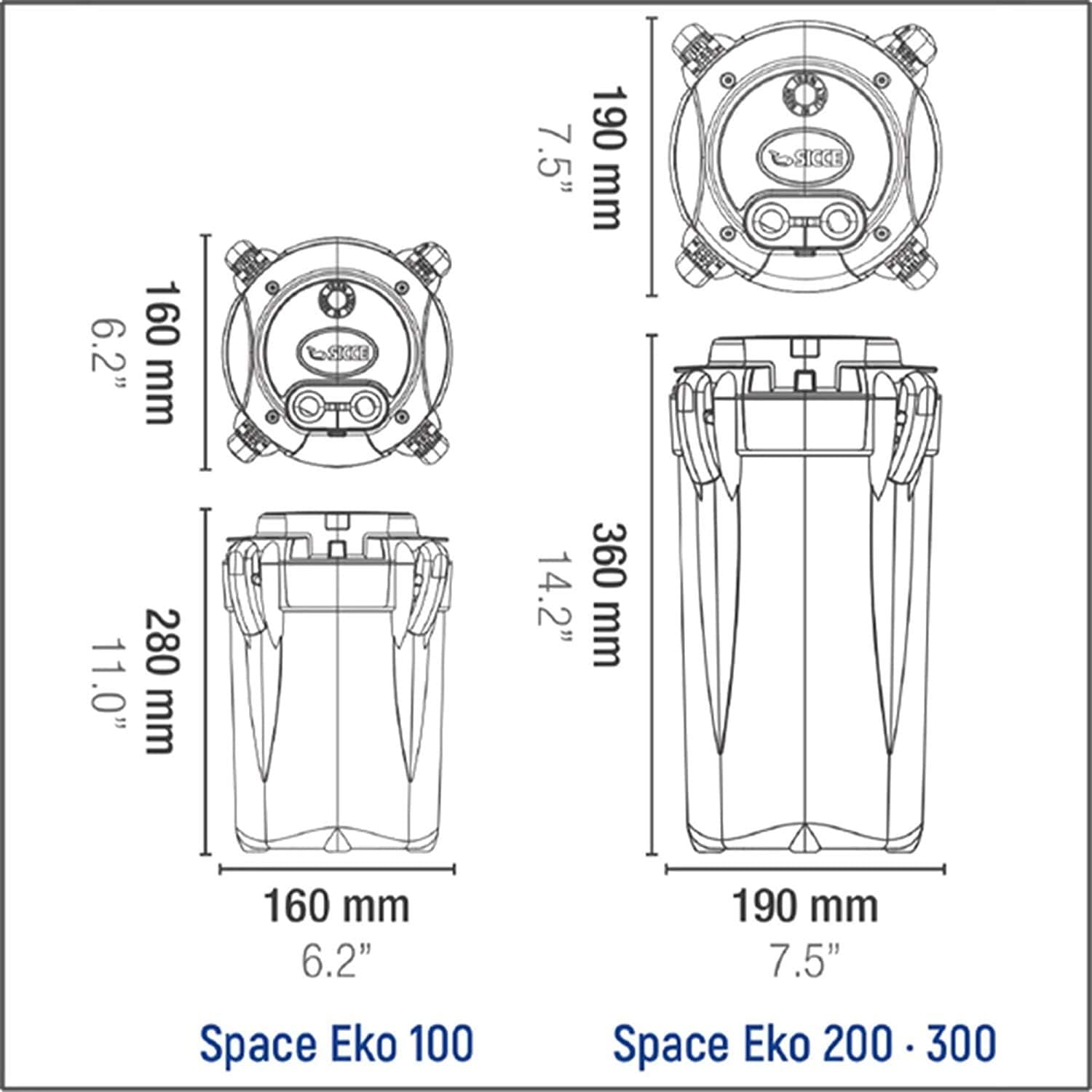
Figure 8.1: Dimensional diagram illustrating the sizes of Space EKO 100, 200, and 300 models. The Space EKO 300 shares dimensions with the 200 model.
9. Warranty and Support
The SICCE Space EKO 300 Canister Filter comes with a manufacturer's warranty. Please refer to the warranty card included in your product packaging for specific terms and conditions, including warranty duration and coverage details.
For technical assistance, spare parts, or warranty claims, please contact Sicce customer support. You can find more information and contact details by visiting the official Sicce store or website:
Related documentsSpace EKO 300


Ask a question about this manual
Ask about setup, troubleshooting, compatibility, parts, safety, or missing instructions. Manuals+ will review the question and use this page’s manual context to help answer it.