
Introduction
This manual provides essential instructions for the safe and efficient installation, operation, and maintenance of your Ice-O-Matic CIM0520FA Elevation Series Full-Cube Ice Maker. Please read this manual thoroughly before operating the unit and retain it for future reference. The CIM0520FA is a modular, air-cooled ice machine designed to produce up to 561 pounds of full-cube ice per 24 hours, featuring a space-saving 22.25-inch width and a Smart Harness control board for simplified diagnostics. It includes integrated PURE ICE protection, an LED status display, one-touch descaling/sanitizing controls, and dishwasher-safe food zone components.
Safety Information
Important Safety Instructions:
- Always disconnect power before performing any service or maintenance.
- Ensure the unit is properly grounded to prevent electrical shock.
- Installation and service must be performed by qualified personnel only.
- Do not store or use gasoline or other flammable vapors and liquids in the vicinity of this or any other appliance.
- Keep all ventilation openings clear of obstructions.
- This appliance is not intended for use by persons (including children) with reduced physical, sensory or mental capabilities, or lack of experience and knowledge, unless they have been given supervision or instruction concerning use of the appliance by a person responsible for their safety.
Setup and Installation
Proper installation is crucial for the optimal performance and longevity of your ice maker. Follow these steps carefully:
- Unpacking: Carefully remove the ice maker from its packaging. Inspect for any shipping damage. Report any damage immediately to the carrier.
- Location:
- Place the unit on a strong, level surface capable of supporting its weight when full of ice.
- Ensure adequate air circulation. The CIM0520FA features a unique dual exhaust system, allowing hot air discharge from both the side and top, increasing installation flexibility. Maintain proper clearances around the unit for ventilation.
- Avoid direct sunlight or heat sources.
- Operating ambient temperature range: 50°F to 100°F (10°C to 38°C).
- Electrical Connection:
- The unit requires a dedicated 115 Volt, 60 Hz, single-phase electrical supply.
- A qualified electrician must perform the electrical connection in accordance with all local and national codes.
- Ensure the circuit is properly fused and grounded.
- Water Supply:
- Connect to a potable cold water supply with a pressure between 20 psi and 80 psi.
- Install a water filter system to ensure ice quality and reduce mineral buildup.
- Use a shut-off valve for easy maintenance.
- Drainage:
- Connect the ice maker's drain line to an open, vented drain.
- Ensure proper slope for gravity drainage.
- Initial Cleaning: Before first use, clean the ice maker's interior surfaces as described in the "Maintenance" section.
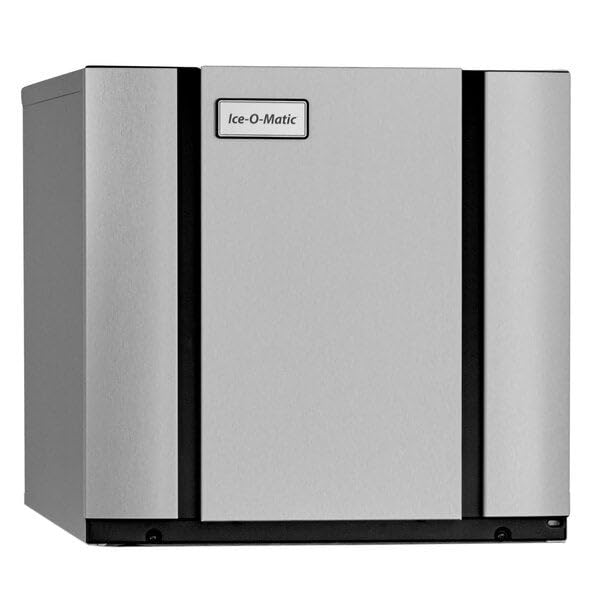
Figure 1: Internal view of the Ice-O-Matic CIM0520FA, showing the evaporator and water distribution system. This view is helpful for understanding component layout during setup and maintenance.
Operating Instructions
Once installed and connected, your Ice-O-Matic CIM0520FA is ready for operation.
- Power On: Ensure the main power switch is in the "ON" position. The unit will begin its startup sequence.
- Ice Production Cycle:
- The ice maker will automatically fill with water and begin the freezing cycle.
- Water flows over the evaporator plate, forming full-cube ice.
- Once the ice cubes reach the desired thickness, the harvest cycle initiates, releasing the ice into the storage bin (bin sold separately).
- The unit will continue to produce ice until the bin is full, at which point a sensor will pause production.
- Controls and Status Display:
- The unit features an LED status display that provides operational feedback and diagnostic information.
- One-touch descaling and sanitizing controls simplify routine maintenance procedures.
- The Smart Harness universal control board offers improved access and digital diagnostics.

Figure 2: Example of the full-cube ice produced by the CIM0520FA.

Figure 3: Full-cube ice is ideal for various beverages, ensuring slow melt and consistent cooling.
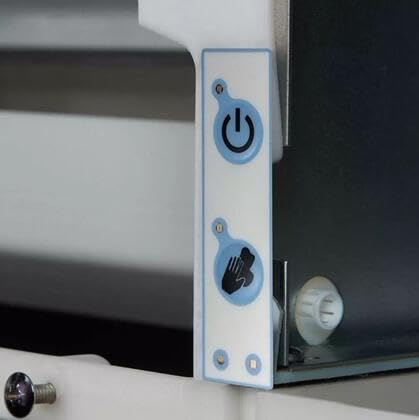
Figure 4: The user-friendly control panel with one-touch buttons for power and cleaning functions.
Maintenance and Cleaning
Regular maintenance ensures optimal performance, ice quality, and extends the life of your ice maker. Always disconnect power before cleaning.
- Daily/Weekly Cleaning:
- Clean the exterior surfaces with a mild soap and water solution.
- Wipe down the interior of the ice storage bin.
- Monthly/Quarterly Cleaning (Descaling and Sanitizing):
- The CIM0520FA features one-touch descaling and sanitizing controls. Refer to the detailed instructions provided with your cleaning solution.
- The plastic food zone eliminates hard-to-clean corners and crevices, allowing for easy and lasting sanitation. Many food zone components are dishwasher-safe for thorough cleaning.
- Use only approved ice machine cleaner and sanitizer solutions.
- Condenser Cleaning:
- For air-cooled models, the condenser fins can accumulate dust and debris, reducing efficiency.
- Periodically clean the condenser fins with a brush or vacuum cleaner. Ensure the power is disconnected.
- Water Filter Replacement:
- If a water filter is installed, replace cartridges according to the manufacturer's recommendations, typically every 3-6 months.
Troubleshooting
Before contacting service, review the following common issues and solutions:
| Problem | Possible Cause | Solution |
|---|---|---|
| Unit does not start | No power, tripped breaker, loose connection. | Check power supply, reset breaker, ensure unit is plugged in securely. |
| No ice production | No water supply, clogged water filter, high ambient temperature, dirty condenser. | Check water supply valve, replace water filter, ensure proper ventilation, clean condenser. |
| Low ice production | Dirty condenser, high ambient temperature, low water pressure, scale buildup. | Clean condenser, ensure proper ventilation, check water pressure, descale unit. |
| Ice cubes are soft or hollow | Low water flow, high water temperature, dirty evaporator. | Check water supply, ensure proper water temperature, clean evaporator. |
| Water leaks | Loose water connections, clogged drain line. | Inspect and tighten all water connections, clear drain line. |
If the problem persists after attempting these solutions, contact a qualified service technician.
Specifications
| Feature | Detail |
|---|---|
| Brand | Ice-O-Matic |
| Model | CIM0520FA |
| Ice Production (24 hrs) | Up to 561 lbs (at 70°F air/50°F water) |
| Ice Type | Full-Cube |
| Dimensions (W x D x H) | 22.25 inches (Width) - Depth and Height not explicitly provided, common to refer to product sheet |
| Voltage | 115 Volts |
| Wattage | 115 watts |
| Refrigerant | R404a |
| Item Weight | 165 Pounds |
| UPC / GTIN | 746060913644 |
| Certifications | CULus, NSF, CE |
Warranty and Support
Warranty Information:
Ice-O-Matic products are manufactured to high-quality standards. Specific warranty terms and conditions are provided with your purchase documentation. Please refer to the warranty card or contact Ice-O-Matic customer service for detailed information regarding coverage and duration.
Customer Support:
For technical assistance, parts, or service inquiries, please contact Ice-O-Matic customer support or your authorized dealer. Have your model number (CIM0520FA) and serial number ready when contacting support.
Contact information can typically be found on the manufacturer's website or in your product registration materials.


