
1. Product Overview
The V BESTLIFE Car Kit Digital Audio Broadcast DAB DAB+ Box Radio Receiver Adapter is designed to bring high-quality digital audio broadcasting to your car's audio system. It features a professional high-performance digital broadcasting processor and built-in encoding to modulate and transmit DAB and DAB+ signals. This device ensures stable reception and delivers stereo, high-quality sound.
It is compatible with Android 5.1 and later systems and is powered via a USB port, requiring no additional power cable. The included antenna provides powerful receiving capabilities through its MCX port.

Image 1.1: Overview of the V BESTLIFE DAB+ Box, including the main unit, USB power cable, and antenna.
2. Package Contents
Please verify that all items listed below are included in your package:
- 1 x DAB+ Box
- 1 x USB Power Cable (1 meter length)
- 1 x Antenna (3 meters cable length)
- 1 x User Manual (this document)

Image 2.1: The package contents, showing the DAB+ box, USB cable (1 meter), and antenna (3 meters).
3. Setup and Installation
Follow these steps to properly set up and install your V BESTLIFE DAB/DAB+ Car Radio Receiver:
- Connect the Antenna: Locate the MCX port on the DAB+ Box. Connect the antenna cable to this port. Ensure a secure connection.
- Position the Antenna: The antenna is designed for optimal reception. Position it in a location within your vehicle that provides clear line of sight, typically on the windshield or a non-metallic surface. The antenna has an adhesive backing for secure mounting.
- Connect Power: Plug the USB power cable into the USB port on the DAB+ Box. Connect the other end of the USB cable to a 5V USB power source in your vehicle (e.g., a car charger, car stereo USB port).
- Connect to Android Device: Connect the DAB+ Box to your Android device (e.g., car stereo head unit, tablet) via its USB connection. Ensure your Android device is running Android 5.1 or later.
- Install DAB+ Application: You will need a compatible DAB+ application installed on your Android device to control the receiver and tune into stations. Refer to your Android device's app store or the manufacturer's recommendations for suitable applications.

Image 3.1: Detail of the antenna's MCX connector.

Image 3.2: The DAB+ box with its USB power input and MCX antenna input clearly visible.
4. Operating Instructions
Once the DAB+ Box is installed and connected, operate it through the dedicated DAB+ application on your Android device.
- Launch Application: Open the DAB+ application on your Android car stereo or tablet.
- Scan for Stations: Within the application, initiate a scan for available DAB/DAB+ stations. The receiver will automatically detect and list all receivable digital radio channels in your area.
- Select Station: Browse the list of available stations and select your desired channel. The audio will be transmitted to your car's audio system.
- Adjust Volume: Volume control is typically managed through your car's audio system or the Android device's volume settings.
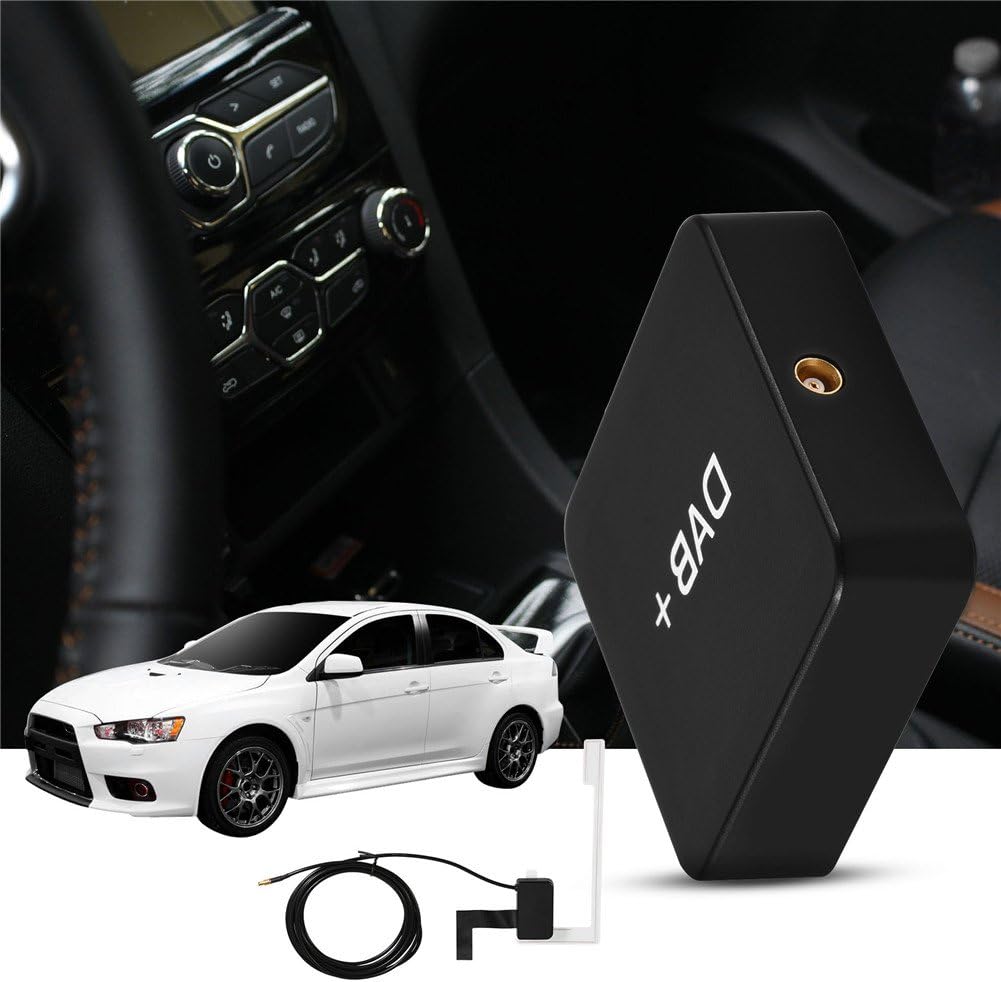
Image 4.1: The V BESTLIFE DAB+ box positioned within a car's interior, demonstrating its compact size and discreet placement.
Note on Regional Compatibility: This device is designed for use in countries that support DAB/DAB+ digital audio broadcasting. These include, but are not limited to: Australia, Belgium, Czech Republic, Denmark, France, Germany, Hong Kong, Ireland, Italy, Kuwait, Malta, Morocco, Netherlands, Norway, Poland, Slovenia, South Korea, Spain, Sweden, Switzerland, and the UK.
5. Maintenance
The V BESTLIFE DAB/DAB+ Car Radio Receiver requires minimal maintenance to ensure optimal performance and longevity.
- Cleaning: Use a soft, dry cloth to wipe the exterior of the DAB+ Box. Do not use liquid cleaners or abrasive materials, as they may damage the surface or internal components.
- Cable Care: Ensure that all cables (USB and antenna) are not kinked, pinched, or subjected to excessive tension. Damaged cables can affect performance.
- Temperature: Operate and store the device within the specified working temperature range of -20℃ to +70℃ (-4°F to +158°F). Extreme temperatures can affect electronic components.
6. Troubleshooting
If you encounter issues with your V BESTLIFE DAB/DAB+ Car Radio Receiver, please refer to the following common troubleshooting steps:
| Problem | Possible Cause | Solution |
|---|---|---|
| No DAB/DAB+ signal or poor reception. | Antenna not properly connected or positioned. Outside of DAB/DAB+ coverage area. Interference. | Ensure antenna is securely connected to the MCX port. Reposition the antenna for better line of sight. Check if you are in a region with DAB/DAB+ broadcast. Move away from sources of electromagnetic interference. |
| Device not powering on. | USB power cable not connected or faulty. USB power source insufficient. | Verify the USB cable is securely connected to both the DAB+ Box and the power source. Try a different USB port or power adapter. Ensure the power source provides 5V. |
| No sound or distorted sound. | Volume too low on Android device/car stereo. Incorrect audio output settings on Android device. | Increase the volume on your Android device and car stereo. Check audio output settings on your Android device to ensure sound is routed correctly. |
| DAB+ application not recognizing the device. | Android OS version incompatible. USB connection issue. | Ensure your Android device is running Android 5.1 or later. Reconnect the USB cable between the DAB+ Box and the Android device. Restart the Android device and the DAB+ application. |
7. Specifications
| Feature | Detail |
|---|---|
| Model Number | VBESTLIFEusmgb50pro |
| Color | Black |
| Material | ABS |
| Dimensions (DAB+ Box) | Approx. 45 x 45 x 13 mm (1.77 x 1.77 x 0.5 inch) |
| Product Dimensions (Packaged) | 6.69 x 5.51 x 1.97 inches |
| Item Weight | 5.6 ounces (Approx. 171g packaged) |
| Working Temperature | -20℃ to +70℃ (-4°F to +158°F) |
| Power Supply | 5V, USB Port |
| Frequency Range | 174-240MHz |
| Channel Separation | 55dB |
| Channel Difference | +/-3dB |
| Input Impedance | 50Ω |
| Antenna Input Type | MCX |
| USB Cable Length | 1 Meter |
| Antenna Cable Length | 3 Meters |
| Compatible Systems | Android 5.1 and later (Not compatible with WinCE system) |

Image 7.1: Physical dimensions of the V BESTLIFE DAB+ Box.
8. Warranty and Support
For warranty information and technical support, please refer to the purchase documentation or contact your retailer. V BESTLIFE products are designed for reliability and performance.
Manufacturer: V BESTLIFE
ASIN: B07WTZ6NVJ
Date First Available: August 22, 2019