
1. Introduction
This manual provides essential information for the safe and efficient operation, maintenance, and troubleshooting of your Xiaomi Viomi V2 V-RVCLM21B Robot Vacuum Cleaner. Please read this manual thoroughly before using the product and retain it for future reference.
2. Product Overview
The Xiaomi Viomi V2 V-RVCLM21B is a versatile robot vacuum cleaner designed for both sweeping and mopping functions. It features advanced navigation and powerful suction to ensure thorough cleaning of your home.
Key Features:
- Powerful suction up to 2100 Pa for effective cleaning.
- Covers a cleaning area of up to 150 m².
- Automatic resume cleaning from where it left off after recharging.
- Virtual wall creation to define restricted cleaning areas.
- Compact design with a diameter of 35 cm and a height of 9.5 cm.
Components and Sensors:
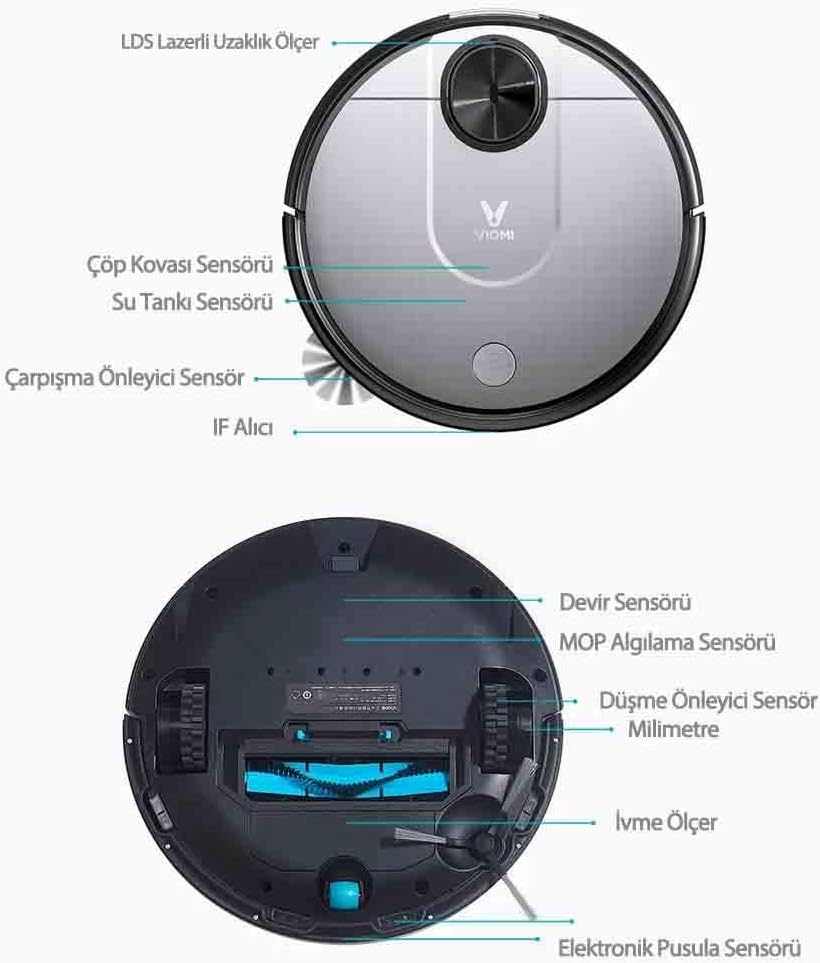
Image: Top and bottom view of the robot vacuum cleaner, highlighting various sensors and components. The top view shows the LDS Laser Distance Sensor, Dustbin Sensor, Water Tank Sensor, Anti-collision Sensor, and IR Receiver. The bottom view displays the Rotation Sensor, Mop Detection Sensor, Anti-drop Sensor, Accelerometer, and Electronic Compass Sensor.
3. Setup
3.1 Unpacking and Placement
- Carefully remove the robot vacuum cleaner and all accessories from the packaging.
- Choose a suitable location for the charging dock. Ensure it is placed against a wall, with at least 0.5 meters of clear space on either side and 1.5 meters in front, free from obstacles.
- Connect the power adapter to the charging dock and plug it into a power outlet.
3.2 Initial Charging
Place the robot onto the charging dock. Ensure the charging contacts on the robot align with those on the dock. The robot will automatically begin charging. For first-time use, fully charge the robot before operation.
3.3 App Connection
Download the Xiaomi Home app from your device's app store. Follow the in-app instructions to add your Viomi V2 V-RVCLM21B robot vacuum cleaner. This will enable advanced features such as remote control, scheduling, and virtual wall setup.
3.4 Virtual Walls
Using the Xiaomi Home app, you can create virtual walls or restricted zones to prevent the robot from entering specific areas. This is useful for protecting delicate items or preventing access to certain rooms.
4. Operating Instructions
4.1 Starting and Pausing Cleaning
- To Start: Press the power button on the robot or use the Xiaomi Home app to initiate a cleaning cycle. The robot will automatically map its environment using its laser navigation system.
- To Pause: Press the power button during a cleaning cycle to pause the robot. Press it again to resume.
- To Stop: Press and hold the power button to stop the cleaning cycle and send the robot back to its charging dock.

Image: The robot vacuum cleaner actively mapping its surroundings with a blue laser beam, illustrating its navigation capabilities.
4.2 Cleaning Modes
The robot supports multiple cleaning modes, including vacuuming, mopping, and a combined sweep-and-mop function. Select the desired mode via the Xiaomi Home app.

Image: The robot vacuum cleaner on a dark floor, with graphical representations of its multi-purpose cleaning capabilities, including smart laser mapping, defining cleaning areas, combined sweeping and mopping, and integration with other smart home devices.
4.3 Automatic Recharging
When the battery level is low, the robot will automatically return to its charging dock. After recharging, it will resume cleaning from the point where it stopped, ensuring complete coverage.

Image: The robot vacuum cleaner approaching its charging dock, demonstrating its automatic return-to-charge function. Also shown is a cleaning tool with a brush and blade for maintenance.
4.4 Obstacle Navigation
The robot is designed to navigate various household obstacles. Its upgraded wheels allow it to overcome obstacles up to 2 cm in height, such as low door sills, thick carpets, and floor cables.

Image: The robot vacuum cleaner demonstrating its ability to climb over a small elevation, with icons indicating its capacity to handle low door sills, thick carpets, and floor cables.
5. Maintenance
Regular maintenance ensures optimal performance and extends the lifespan of your robot vacuum cleaner.
5.1 Dustbin and Filter
- Empty the dustbin after each cleaning cycle.
- Clean the filter regularly by tapping out debris or rinsing with water (if washable) and allowing it to air dry completely before reinstallation.
5.2 Brushes
- Remove the main brush and side brush periodically.
- Use the provided cleaning tool to remove tangled hair and debris from the brushes. The tool includes a small blade for cutting through hair.
5.3 Water Tank and Mop Pad
- After mopping, empty any remaining water from the tank.
- Remove and clean the mop pad. It can typically be hand-washed or machine-washed.
5.4 Sensors and Charging Contacts
- Wipe all sensors (LDS, anti-drop, anti-collision) and charging contacts on both the robot and the dock with a clean, dry cloth. This prevents dust accumulation from affecting performance.
6. Troubleshooting
If you encounter issues with your robot vacuum cleaner, refer to the following common solutions:
- Robot not charging: Ensure the charging dock is powered on and the robot's charging contacts are clean and properly aligned with the dock.
- Robot not starting: Check if the battery is sufficiently charged. Ensure no objects are obstructing the power button.
- Robot getting stuck frequently: Clear obstacles from the cleaning path. Ensure virtual walls are correctly set up in the app for problematic areas. Clean the anti-collision sensors.
- Poor cleaning performance: Empty the dustbin, clean or replace the filter, and remove any tangled hair from the main and side brushes.
- App connectivity issues: Ensure your Wi-Fi network is stable and the robot is within range. Restart both the robot and your router, then attempt to reconnect via the app.
For persistent issues, consult the Xiaomi Home app's help section or contact customer support.
7. Specifications
| Feature | Detail |
|---|---|
| Brand | Xiaomi |
| Model Number | V2 V-RVCLM21B |
| Color | Black |
| Product Type | Robot Vacuum Cleaner |
| Special Features | Wireless, Sweeping and Mopping Function |
| Compatible Devices | Xiaomi Home App |
| Item Weight | 3.9 Kilograms |
| Power Source | Battery Powered |
| Voltage | 3.7 Volts |
| Battery Composition | Lithium-ion |
| Controller Type | SmartThings (via Xiaomi Home App) |
| Surface Recommendation | Hard floors, low-pile carpets |
Dimensions:

Image: Technical drawing showing the dimensions of the robot vacuum cleaner (350mm diameter, 94.5mm height) and its charging dock (153.9mm width, 99.5mm height, 74.6mm depth).
8. Warranty and Support
8.1 Manufacturer Warranty
This product is covered by a manufacturer's warranty. Please refer to the warranty card included in your product packaging for specific terms, conditions, and duration. Retain your proof of purchase for warranty claims.
8.2 Customer Support
For technical assistance, troubleshooting not covered in this manual, or warranty inquiries, please contact Xiaomi customer support through their official website or the Xiaomi Home app. Provide your product model number (V2 V-RVCLM21B) and purchase details when seeking support.


