1. Introduction
Thank you for purchasing the Blaupunkt MS70BT Bluetooth Speaker System. This manual provides essential information for the safe and efficient operation of your device. Please read it thoroughly before use and keep it for future reference.
1.1. Safety Information
- Do not expose the device to rain, moisture, or extreme temperatures.
- Ensure proper ventilation around the speaker.
- Do not open the casing; refer all servicing to qualified personnel.
- Keep out of reach of children.
- Use only the power adapter supplied with the device.
1.2. Package Contents
Verify that all items are present in the package:
- Blaupunkt MS70BT Speaker System
- Power Cable
- User Manual
2. Setup
2.1. Connecting to Power
- Locate the power input port on the back of the Blaupunkt MS70BT speaker.
- Connect the power cable to the speaker.
- Plug the other end of the power cable into a standard electrical outlet.
- The speaker is now ready to be powered on.
2.2. Initial Placement
Place the speaker on a stable, flat surface. For optimal sound quality, avoid placing it in enclosed spaces or directly against walls, which can affect bass response. Ensure there is adequate space for ventilation.
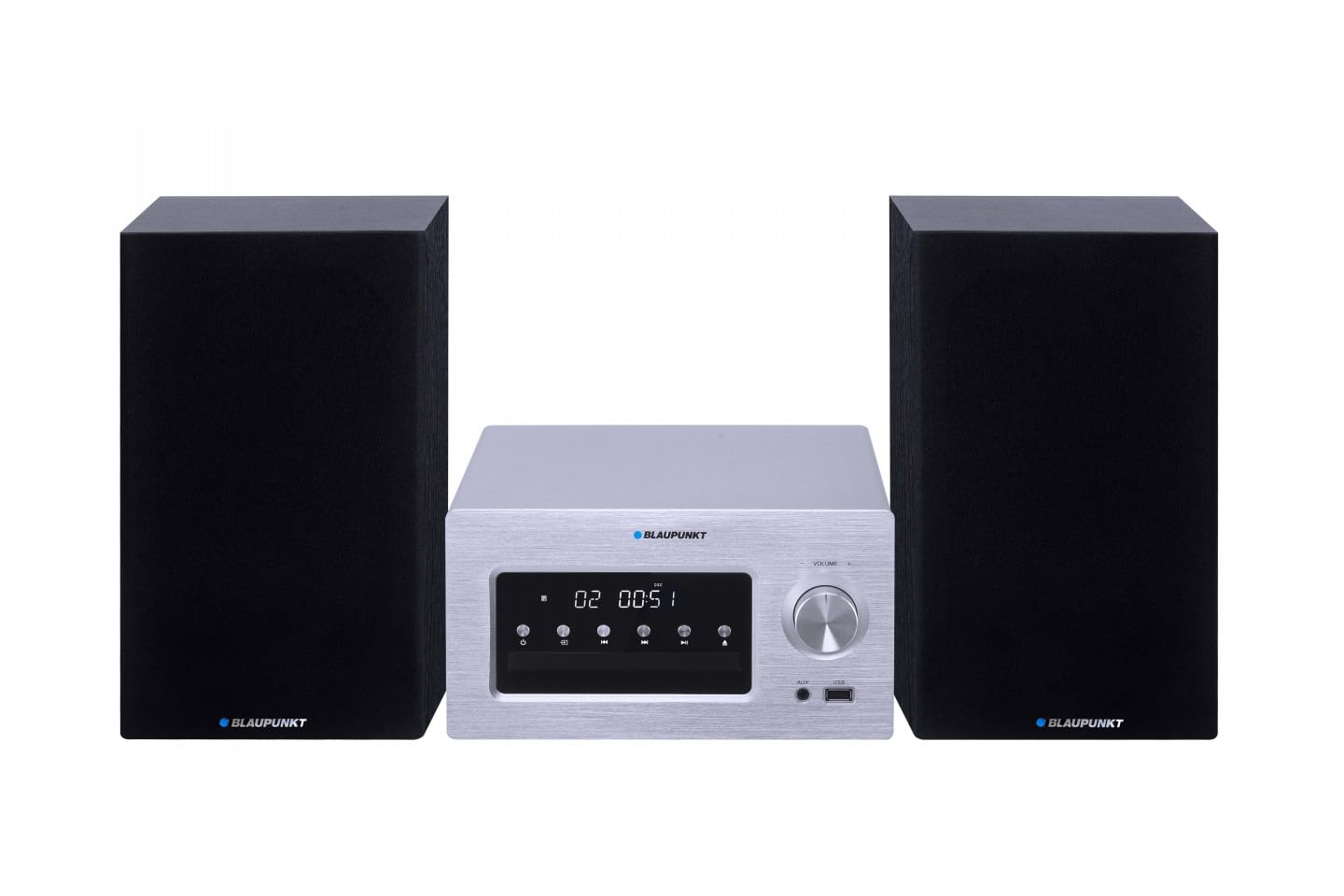
Figure 1: Front view of the Blaupunkt MS70BT speaker system. This image displays the main unit with its speaker grilles and the integrated control panel, illustrating its compact stereo design.
3. Operating Instructions
3.1. Powering On/Off
Press the Power button located on the control panel to turn the speaker on or off. An indicator light will illuminate when the device is powered on.
3.2. Bluetooth Pairing
To connect your device via Bluetooth:
- Ensure the speaker is powered on and in Bluetooth mode. If not, press the Mode button until the Bluetooth indicator flashes.
- On your smartphone or MP3 player, enable Bluetooth and search for available devices.
- Select "Blaupunkt MS70BT" from the list of devices.
- Once paired, the Bluetooth indicator light on the speaker will become solid, and you will hear a confirmation tone.
- You can now play audio from your connected device through the speaker.
3.3. USB Playback
The Blaupunkt MS70BT supports audio playback from USB storage devices.
- Insert a USB drive containing compatible audio files (MP3, WMA, AAC, WAV) into the USB port on the speaker.
- Press the Mode button to select USB input.
- The speaker will automatically begin playing the audio files from the USB drive.
- Use the Play/Pause, Next Track, and Previous Track buttons to control playback.
3.4. Volume Control
Adjust the volume using the Volume Up and Volume Down buttons on the speaker's control panel. You can also control the volume from your connected Bluetooth device.
4. Maintenance
4.1. Cleaning
- Before cleaning, ensure the speaker is powered off and unplugged from the power outlet.
- Use a soft, dry cloth to wipe the exterior surfaces of the speaker.
- Do not use liquid cleaners, aerosols, or abrasive chemicals, as these can damage the finish or internal components.
- For stubborn dirt, lightly dampen the cloth with water, then wipe dry immediately.
4.2. Storage
When not in use for extended periods, store the speaker in a cool, dry place, away from direct sunlight and extreme temperatures. It is recommended to keep the original packaging for storage and transport.
5. Troubleshooting
If you encounter issues with your Blaupunkt MS70BT, refer to the following common problems and solutions:
| Problem | Possible Solution |
|---|---|
| No power | Ensure the power cable is securely connected to both the speaker and a working electrical outlet. Try a different outlet. |
| No sound | Check the volume level on both the speaker and the connected device. Ensure the correct input mode (Bluetooth/USB) is selected. Confirm Bluetooth device is properly paired. |
| Bluetooth device won't pair | Make sure the speaker is in Bluetooth pairing mode (indicator flashing). Disable and re-enable Bluetooth on your device. Move your device closer to the speaker. Remove "Blaupunkt MS70BT" from your device's Bluetooth list and try pairing again. |
| USB playback not working | Ensure the USB drive is formatted correctly and contains supported audio files (MP3, WMA, AAC, WAV). Try a different USB drive. |
6. Specifications
| Feature | Detail |
|---|---|
| Brand | BLAUPUNKT |
| Model Number | BLAUPUNKTMS70BT |
| Connectivity Technology | Bluetooth, USB |
| Compatible Devices | Smartphone, MP3 Player |
| Speaker Type | Stereo |
| Power Output | 140 Watts |
| Item Weight | 10.03 Kilograms |
| Item Dimensions (L x W x H) | 28 x 246 x 165 millimeters |
| Supported Audio Formats | MP3, WMA, AAC, WAV |
| Bluetooth Compatible | Yes |
| Battery Requirement | 1 Lithium-ion battery (requires batteries) |
7. Warranty and Support
Blaupunkt products are designed and manufactured to the highest quality standards. For information regarding warranty coverage, please refer to the warranty card included with your product or visit the official Blaupunkt website.
For technical support, service inquiries, or to obtain replacement parts, please contact Blaupunkt customer service through their official channels. Contact information can typically be found on the manufacturer's website or in the product packaging.


