
ILM 902BT/902BT PRO
ILM Bluetooth Motorcycle Helmet User Manual
Model: 902BT/902BT PRO
Brand: ILM
1. Introduction
This manual provides essential information for the safe and effective use of your ILM Bluetooth Motorcycle Helmet. It covers features such as Bluetooth connectivity for calls, music, FM radio, and GPS navigation, as well as an intercom system. Please read this manual thoroughly before using the helmet.
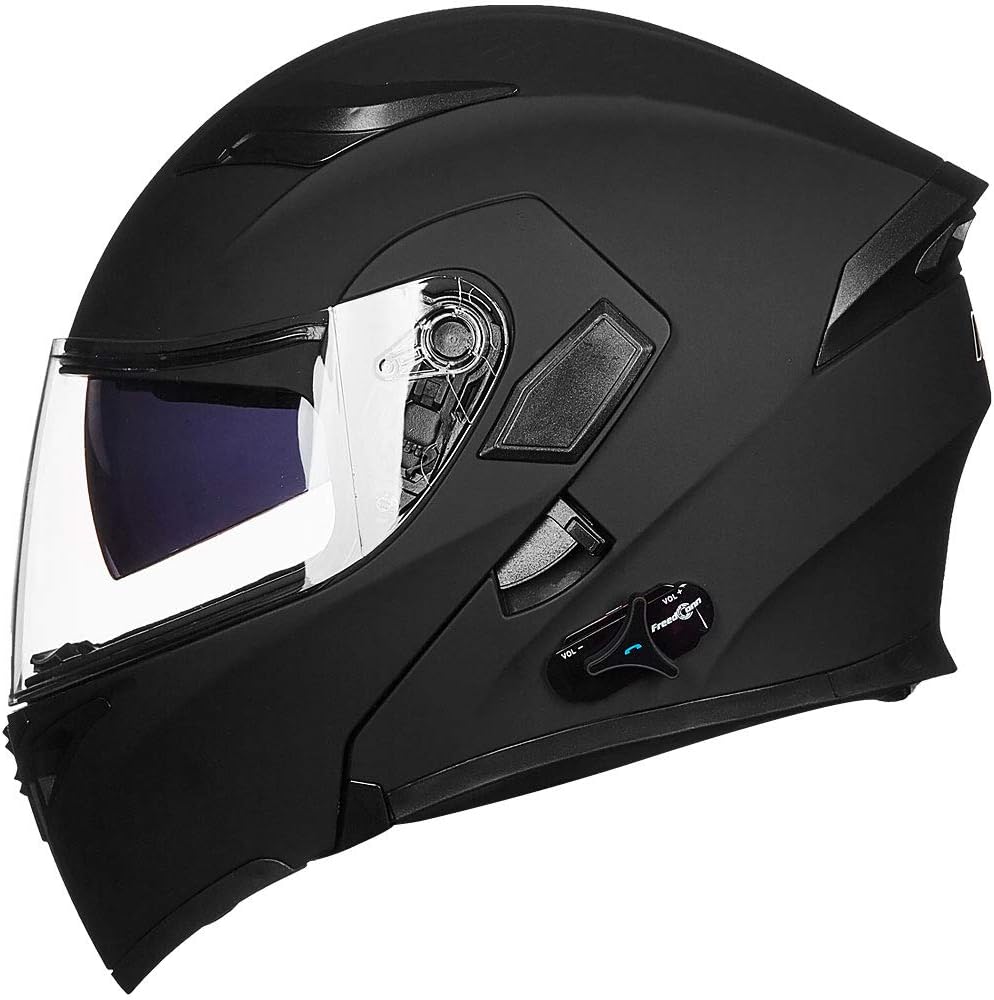
Image 1.1: Side view of the ILM Bluetooth Motorcycle Helmet, showcasing its modular design and integrated Bluetooth unit.
2. Safety Information
The ILM Bluetooth Motorcycle Helmet meets or exceeds FMVSS 218 DOT safety standards. Proper fit and maintenance are crucial for your safety. Always ensure the helmet is securely fastened before riding.
2.1 Proper Fit
The modular helmet is designed to fit snugly to optimize noise reduction. If you prefer a slightly looser fit, consider purchasing a larger size. Refer to the size chart below for guidance.

Image 2.1: Size chart for ILM Motorcycle Helmets, showing head circumference in inches and centimeters, and corresponding hat sizes.
Different sizes of helmets may use the same outer ABS shell, with size adjustments made through inner pads. If the helmet does not fit correctly, contact ILM customer service for assistance with fitted size inner pads.
3. Package Contents
Upon unpacking, verify that all items listed below are present:
- ILM Bluetooth Motorcycle Helmet (1 unit)
- Bluetooth Battery (1 unit)
- USB Charging Cable (1 unit)
- User Manual (1 unit)
- Black Helmet Bag (1 unit)

Image 3.1: Contents of the ILM Bluetooth Helmet package, including the helmet, accessory box, USB cable, and instruction manual.
4. Setup
4.1 Charging the Bluetooth System
Before initial use, fully charge the integrated Bluetooth system. Connect the provided USB cable to the charging port on the Bluetooth unit and to a suitable USB power source. A full charge provides approximately 12 hours of phone talk time, 8 hours of intercom talk time, and 110 hours of standby.

Image 4.1: Visual representation of the Bluetooth helmet's battery performance: 12 hours phone talk time, 8 hours intercom talk time, and 110 hours standby time.
4.2 Pairing with Mobile Device
To connect your helmet to a mobile phone:
- Ensure the helmet's Bluetooth system is powered on and in pairing mode (refer to the Bluetooth unit's specific instructions for pairing mode activation).
- On your mobile phone, navigate to Bluetooth settings and search for available devices.
- Select the ILM helmet from the list of devices to complete pairing.
The Bluetooth range between your phone and the helmet is up to 10 meters (33 feet).

Image 4.2: Close-up of the Bluetooth control unit on the helmet, showing volume controls and the call button.
4.3 Intercom Pairing
The helmet supports intercom communication for up to 3 riders, with 2 riders communicating simultaneously. The maximum intercom range is up to 500 meters (1640 feet).
For specific intercom pairing instructions, refer to the detailed guide provided with your Bluetooth unit. Note that rider-to-rider intercom communication is only compatible with ILM 953 Bluetooth helmets (B019PU4T7K) and ILM TCOM-SC Motorcycle Helmet Bluetooth Intercom (B088ZQ5547).

Image 4.3: Diagram illustrating intercom communication between 2-3 riders.
5. Operation
5.1 Bluetooth Functions
Once paired, the Bluetooth 3.0 technology allows for one-touch control of various functions:
- Answering/Rejecting Calls: Use the dedicated button on the Bluetooth unit.
- Last Number Redialing: Typically activated by a double-press of the call button.
- Music Playback: Stream music from your mobile device.
- FM Radio: Listen to FM radio stations.
- GPS Navigation Audio: Receive voice prompts from your GPS application.
The built-in speaker and noise-canceling microphones are designed to provide clear audio during calls and music playback.

Image 5.1: The helmet with icons representing its Bluetooth capabilities: mobile phone connectivity, phone calls, music, GPS navigation audio, intercom, and FM radio.
5.2 Modular Flip-Up Function
The helmet features a modular flip-up design, allowing the chin bar and visor to be raised for convenience when not riding or at low speeds. To operate, locate the release mechanism (usually a button or lever near the chin bar) and lift the front section upwards until it locks into place. To close, press the release mechanism again and lower the chin bar until it securely latches.
5.3 Dual Visor System
Your helmet is equipped with a dual visor system: an outer clear visor and an inner tinted sun visor. The outer clear visor can be raised or lowered manually. The inner tinted sun visor is typically operated by a slider mechanism located on the side of the helmet, allowing you to deploy or retract it as needed for varying light conditions.
5.4 Ventilation System
The helmet includes an air ventilation system to enhance comfort. Vents are typically located on the chin bar and top of the helmet. These can be opened or closed using small sliders or switches to control airflow.
6. Maintenance
6.1 Cleaning the Helmet
- Outer Shell: Clean with a soft cloth, mild soap, and water. Avoid harsh chemicals or abrasive cleaners.
- Inner Liners: The helmet features replaceable liners. These can be removed and hand-washed with mild soap and water. Allow them to air dry completely before reinstallation.
- Visors: Clean visors with a soft, damp cloth and mild soap. Do not use abrasive materials or window cleaners, as they can damage the visor coating. The clear outer visor is anti-fog.

Image 6.1: Illustration of removable helmet padding being hand-washed, emphasizing ease of cleaning.

Image 6.2: A clear anti-fog visor, highlighting its feature for improved visibility.
6.2 Battery Care
If the helmet's Bluetooth system has not been used for an extended period, the battery may enter a deep sleep mode. To reactivate the battery, charge it for approximately half an hour. This will restore Bluetooth functionality.
7. Troubleshooting
7.1 Bluetooth Connection Issues
- Ensure the helmet's Bluetooth is powered on and in pairing mode.
- Check that your mobile device's Bluetooth is enabled.
- Try unpairing and re-pairing the helmet with your device.
- Ensure the helmet battery is sufficiently charged.
7.2 Intercom Problems
- Verify that all helmets involved are ILM 953 Bluetooth helmets (B019PU4T7K) or ILM TCOM-SC Motorcycle Helmet Bluetooth Intercom (B088ZQ5547), as compatibility is limited to these models.
- Ensure helmets are within the 500-meter (1640 feet) communication range.
- Re-attempt intercom pairing following the specific instructions for your Bluetooth unit.
7.3 Battery Not Waking Up
If the battery has entered deep sleep mode due to prolonged disuse, charge the Bluetooth system for at least 30 minutes to reactivate it.
7.4 Fit Issues
If the helmet does not fit comfortably, contact ILM customer service. They can provide assistance with obtaining appropriately sized inner pads.
8. Specifications
| Feature | Detail |
|---|---|
| Model Name | ILM Bluetooth Motorcycle Helmet |
| Part Number | 902BT-MB-L-CA (for Large Matte Black) |
| Safety Standard | FMVSS 218 DOT Certified |
| Shell Material | Acrylonitrile Butadiene Styrene (ABS) |
| Helmet Type | Modular Flip-Up, Full Face |
| Visor Type | Dual Visor (Clear Outer, Tinted Inner Sun Visor) |
| Bluetooth Version | 3.0 |
| Bluetooth Functions | Phone Calls, Music, FM Radio, GPS Navigation Audio |
| Intercom Support | 3 Riders Pairing, 2 Riders Intercom Simultaneously |
| Intercom Range | Up to 500 Meters (1640 Feet) |
| Phone Talk Time | Approx. 12 hours |
| Intercom Talk Time | Approx. 8 hours |
| Standby Time | Approx. 110 hours |
| Item Weight | 1.94 Kilograms |
| Item Dimensions (LxWxH) | 15 x 11 x 11 inches |

Image 8.1: Rear view of the helmet, displaying the ILM brand logo, DOT certification, and model information.
9. Warranty
Different sizes of helmets are made of the same size of outer ABS shell, and the difference is the size of inner pads. Please contact ILM customer service if you feel the helmet doesn't fit, and we will offer you the fitted size inner pads.
10. Customer Support
For any questions, concerns, or assistance with your ILM Bluetooth Motorcycle Helmet, please contact ILM customer service. Refer to the product packaging or the official ILM website for contact details.
Related documents902BT/902BT PRO


Ask a question about this manual
Ask about setup, troubleshooting, compatibility, parts, safety, or missing instructions. Manuals+ will review the question and use this page’s manual context to help answer it.