
AOPUTTRIVER AP-770HC
AOPUTTRIVER AP-770HC Digital Multimeter User Manual
Model: AP-770HC | Brand: AOPUTTRIVER
1. Introduction and Overview
The AOPUTTRIVER AP-770HC is a True RMS digital multimeter designed for accurate measurement of various electrical parameters. It features a 6000-count display and auto-ranging capabilities, making it suitable for a wide range of applications from professional electrical work to home appliance troubleshooting.
Key functions include AC/DC voltage, AC/DC current, resistance, diode, capacitance, frequency, temperature, and continuity testing. The device also incorporates a Non-Contact Voltage (NCV) function for enhanced safety and a unique mechanical blocking system to prevent incorrect test lead insertion.

Figure 1: AOPUTTRIVER AP-770HC Digital Multimeter and included accessories.
2. Package Contents
Verify that all items are present in the package:
- 1 x AP-770HC Digital Multimeter
- 2 x Test Leads (Red and Black)
- 1 x Carrying Bag
- 1 x 9V (6F22) Battery
- 1 x Small Screwdriver
- 1 x Temperature Probe
- 1 x User Manual (English)

Figure 2: Unboxing and package contents of the AP-770HC multimeter.
3. Product Features and Components
The AP-770HC multimeter is designed with user-friendly features and robust construction.
- True RMS: Provides accurate readings for non-sinusoidal AC waveforms.
- 6000 Counts Display: High-resolution digital display.
- Auto Ranging: Automatically selects the correct measurement range.
- Data Hold: Freezes the displayed reading.
- NCV Function: Non-Contact Voltage detection for safety.
- Auto Power Off: Conserves battery life.
- Backlight Display: Improves visibility in low-light conditions.
- Mechanical Blocking System: Prevents incorrect test lead insertion for certain functions.
- Integrated Kickstand: For convenient hands-free operation.

Figure 3: Front panel layout and key functions of the AP-770HC.
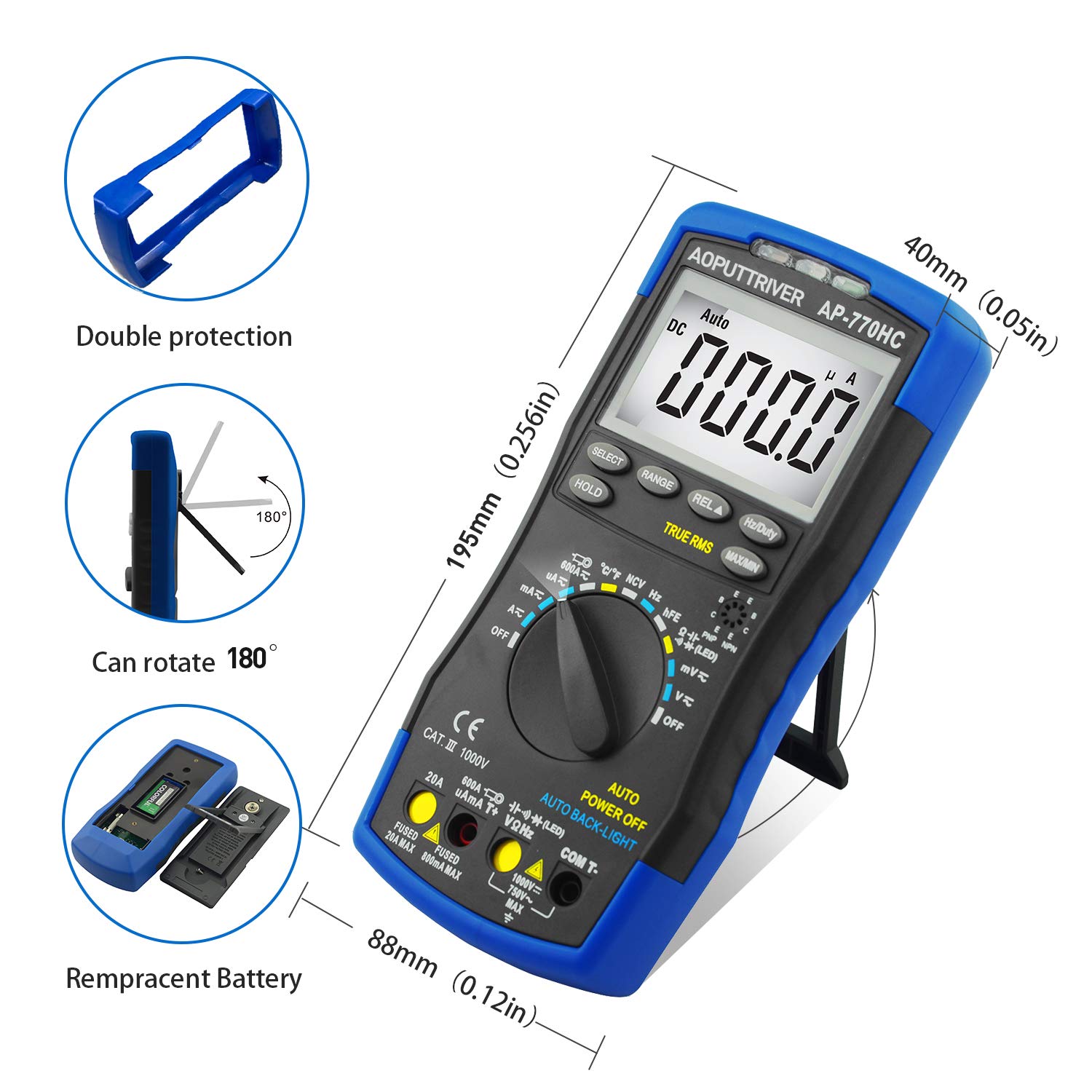
Figure 4: Physical features including dimensions, protective casing, and battery access.
4. Setup and Initial Use
4.1 Battery Installation
The multimeter requires a 9V (6F22) battery. To install or replace the battery:
- Ensure the multimeter is turned OFF.
- Locate the battery compartment on the back of the device (refer to Figure 4).
- Use the provided small screwdriver to open the battery cover.
- Insert the 9V battery, observing correct polarity.
- Replace the battery cover and secure it with the screw.
4.2 Test Lead Connection
Always ensure test leads are securely connected to the correct input jacks before taking measurements.
- The black test lead should always be connected to the "COM" (Common) jack.
- For most voltage, resistance, continuity, diode, capacitance, and frequency measurements, connect the red test lead to the "VΩHz" jack.
- For current measurements (mA/µA), connect the red test lead to the "µAmA" jack.
- For high current measurements (up to 20A), connect the red test lead to the "20A" jack.
The mechanical blocking system prevents incorrect insertion of test leads into current jacks when the rotary switch is set to non-current functions, and vice-versa. Always turn the rotary switch to the desired function before inserting test leads to avoid damage.
5. Operating Instructions
5.1 Continuity Test
To check for continuity in a circuit or component:
- Turn the rotary switch to the continuity/diode/resistance position (often marked with a diode symbol or Ω).
- Press the "SELECT" button until the continuity symbol (a speaker icon) appears on the display.
- Connect the test leads across the component or circuit. A continuous beep indicates continuity.
Video 1: This placeholder video demonstrates various functions of the AP-770HC multimeter, including unboxing, mechanical protection, continuity testing, AC/DC voltage measurement, NCV function, diode testing, resistance measurement, and temperature measurement. (Note: This is a placeholder video as specific video URLs were not provided in the product data.)
5.2 AC/DC Voltage Measurement
To measure AC or DC voltage:
- Turn the rotary switch to the V~ (AC Voltage) or V- (DC Voltage) position. The meter will auto-range.
- Connect the test leads in parallel with the circuit or component to be measured.
- Read the voltage value on the display.
5.3 Non-Contact Voltage (NCV) Measurement
The NCV function allows for detection of AC voltage without direct contact, enhancing safety.
- Turn the rotary switch to the NCV position.
- Bring the top of the multimeter near the conductor or electrical outlet.
- The NCV indicator light will illuminate and an audible beep will sound when AC voltage is detected (typically above 90V RMS).

Figure 5: Using the Non-Contact Voltage (NCV) function to detect live wires.
5.4 Diode Test
To test diodes for proper function:
- Turn the rotary switch to the continuity/diode/resistance position.
- Press the "SELECT" button until the diode symbol appears on the display.
- Connect the red test lead to the anode and the black test lead to the cathode of the diode. A forward voltage drop will be displayed.
- Reverse the test leads. An "OL" (Overload) reading indicates a good diode.
5.5 Resistance Measurement
To measure resistance:
- Turn the rotary switch to the continuity/diode/resistance position.
- Press the "SELECT" button until the Ω (Ohm) symbol appears on the display.
- Connect the test leads across the component whose resistance is to be measured.
- Read the resistance value on the display.
5.6 Temperature Measurement
To measure temperature using the included temperature probe:
- Turn the rotary switch to the °C/°F position.
- Insert the temperature probe into the "COM" and "VΩHz" jacks, observing polarity.
- Place the tip of the temperature probe on or in the object whose temperature is to be measured.
- Read the temperature value on the display. Use the "SELECT" button to switch between Celsius (°C) and Fahrenheit (°F).

Figure 6: Measuring temperature with the AP-770HC multimeter.
5.7 Other Functions
- Data Hold (HOLD button): Press to freeze the current reading on the display. Press again to release.
- MAX/MIN: Press to record the maximum or minimum value during a measurement.
- REL (Relative Value): Used for relative measurement, displaying the difference between the current reading and a stored reference value.
- Hz/Duty: For frequency and duty cycle measurements.
6. Maintenance
6.1 Cleaning
Wipe the meter with a damp cloth and mild detergent. Do not use abrasives or solvents.
6.2 Battery Replacement
When the low battery indicator appears on the display, replace the 9V battery as described in Section 4.1.
6.3 Fuse Replacement
If the current measurement function fails, the fuse may need replacement. Refer to the full user manual for detailed instructions on accessing and replacing the internal fuses.
7. Troubleshooting
If the multimeter does not function correctly, consider the following common issues:
- No display or dim display: Check battery charge and ensure proper installation.
- "OL" (Overload) reading: The measured value exceeds the selected range. Switch to a higher range or ensure correct function selection.
- Incorrect readings: Verify test lead connections, ensure the correct function is selected, and check for damaged test leads or components.
- No current measurement: Check the current fuses.
For persistent issues, consult the detailed troubleshooting section in the complete user manual or contact AOPUTTRIVER customer support.
8. Specifications
| Parameter | Value |
|---|---|
| Range Selection | Auto Ranging |
| Max Display | 6000 counts |
| DC Voltage | 60mV/600mV/6V/60V/600V ±(0.5%+2dgt) / 1000V ±(0.8%+2dgt) |
| AC Voltage | 60mV/600mV/6V/60V/600V ±(1.0%+10dgt) / 750V ±(1.5%+3dgt) |
| DC Current | 600µA/6000µA/60mA/600mA ±(1.5%+2dgt); 6A/20A (±2.5%+5dgt); 600A (±3.0%+5dgt) |
| AC Current | 600µA/6000µA/60mA/600mA ±(1.5%+3dgt); 6A/20A (±2.5%+5dgt); 600A (±3.0%+5dgt) |
| Resistance | 600Ω~60MΩ |
| Capacitance | 9.999nF~99.99mF |
| Frequency | 5.12Hz~5.12MHz (0.1%+5dgt) |
| Temperature | -20℃~1000℃ (-4℉~1832℉) |
| Duty Cycle | 0.1%~99.9% |
| Power Source | Battery Powered (9V) |
| Item Model Number | AP-770HC |
| Manufacturer | AOPUTTRIVER |
| ASIN | B07WQGF835 |
| UPC | 748497170317 |
9. Warranty and Support
AOPUTTRIVER provides a 2-Year Warranty and lifetime technical support for the AP-770HC Digital Multimeter. If you encounter any problems with the product, please contact AOPUTTRIVER customer service for assistance. They aim to resolve issues within 24 hours.
For further information or support, please visit the official AOPUTTRIVER store or contact their customer service department.
Related documentsAP-770HC


Ask a question about this manual
Ask about setup, troubleshooting, compatibility, parts, safety, or missing instructions. Manuals+ will review the question and use this page’s manual context to help answer it.