1. Introduction
Thank you for purchasing the IRIS OHYAMA Ceramic Fan Heater JCH-12TD4-P. This ceramic fan heater is designed to provide quick and efficient warmth with a large air volume, making it suitable for various spaces. It incorporates a human motion sensor for energy efficiency and several safety features for secure operation. Please read this manual thoroughly before use to ensure proper operation and maintenance.
2. Safety Precautions
To prevent injury, electric shock, fire, or damage to the product, always observe the following safety precautions:
- Tip-Over Automatic Power OFF Function: The unit will automatically turn off if it is accidentally tipped over.
- Auto-Off Prevention Function: When the human sensor is active, if no motion is detected for 12 hours, the power will automatically turn off to prevent accidental prolonged operation.
- Child Lock: This feature prevents unintended operation by children. Refer to the operating instructions for activation.
- Overheating Prevention Function: The heater is equipped with a mechanism to automatically shut off if it detects an abnormal temperature rise, preventing overheating.
- Always ensure the heater is placed on a stable, flat surface.
- Do not cover the air intake or outlet vents. Maintain adequate clearance from walls and furniture.
- Do not use in wet environments such as bathrooms or near water sources, unless specifically designed for such use.
- Unplug the unit from the power outlet before cleaning or performing any maintenance.
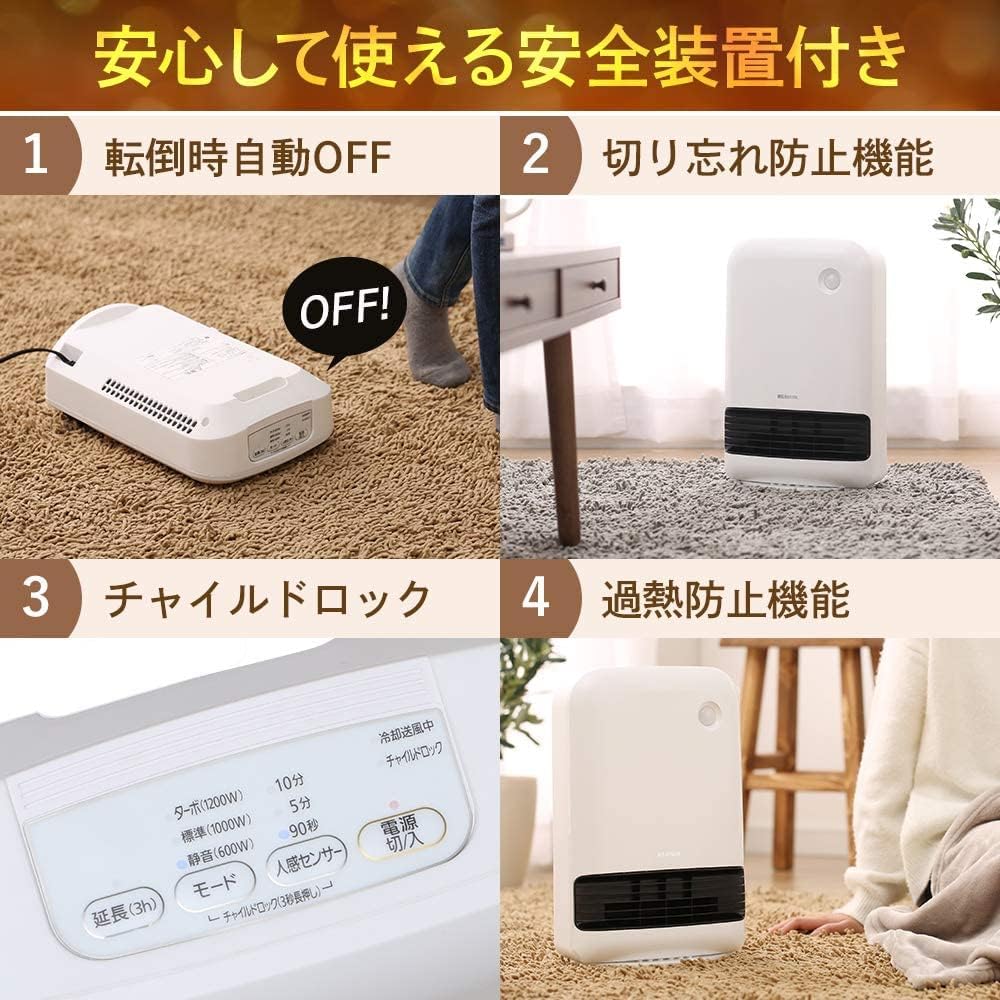
Figure 2.1: Safety Features Overview
3. Product Components
The product package typically includes:
- IRIS OHYAMA Ceramic Fan Heater Unit (JCH-12TD4-P)
- Power Cord (integrated)
- Instruction Manual (this document)
4. Setup
- Unpacking: Carefully remove the heater from its packaging. Retain the packaging for future storage or transport.
- Placement: Place the heater on a firm, level surface. Ensure there is sufficient space around the unit for proper air circulation. Avoid placing it directly against walls, curtains, or other flammable materials. The compact design makes it convenient for use in smaller areas such as kitchens, dressing rooms, or under desks.
- Power Connection: Insert the power plug firmly into a standard electrical outlet. Ensure the voltage matches the product specifications.

Figure 4.1: Compact Design and Dimensions
5. Operating Instructions
The control panel is located on the top of the unit.
Figure 5.1: Control Panel Layout
- Power ON/OFF: Press the 'Power ON/OFF' button to turn the unit on or off.
- Mode Selection: Once powered on, select your desired heating mode:
- Turbo (1200W): For maximum heat output and rapid warming.
- Standard (1000W): For general heating.
- Quiet (600W): For reduced noise and lower power consumption.
- Human Sensor Operation: The human sensor automatically detects motion and turns the heater ON when a person is present and OFF when no one is detected for a set period. This contributes to energy saving.
- Child Lock: To activate the child lock, press and hold the 'Child Lock' button (often integrated with another button, e.g., power button, for 3 seconds). Repeat the action to deactivate.
- Timer Function: Some models may include a timer function, such as a 3-hour extension. Refer to the control panel for specific timer options.
6. Key Features
The IRIS OHYAMA Ceramic Fan Heater JCH-12TD4-P offers several key advantages:
- Energy Saving with Human Sensor: The integrated human sensor detects movement and automatically turns the heater ON/OFF, preventing unnecessary operation and saving energy. This eliminates worries about forgetting to turn it off.
- Quick Heating: The ceramic heating element provides immediate warmth upon power-on, quickly heating your space.
- Compact Design: Its space-saving design allows for easy placement in narrow areas, making it versatile for various room layouts.
- Enhanced Safety: Equipped with multiple safety features including tip-over automatic power off, auto-off prevention, child lock, and overheating prevention for peace of mind.

Figure 6.1: Human Sensor Functionality

Figure 6.2: Human Sensor Detection Range
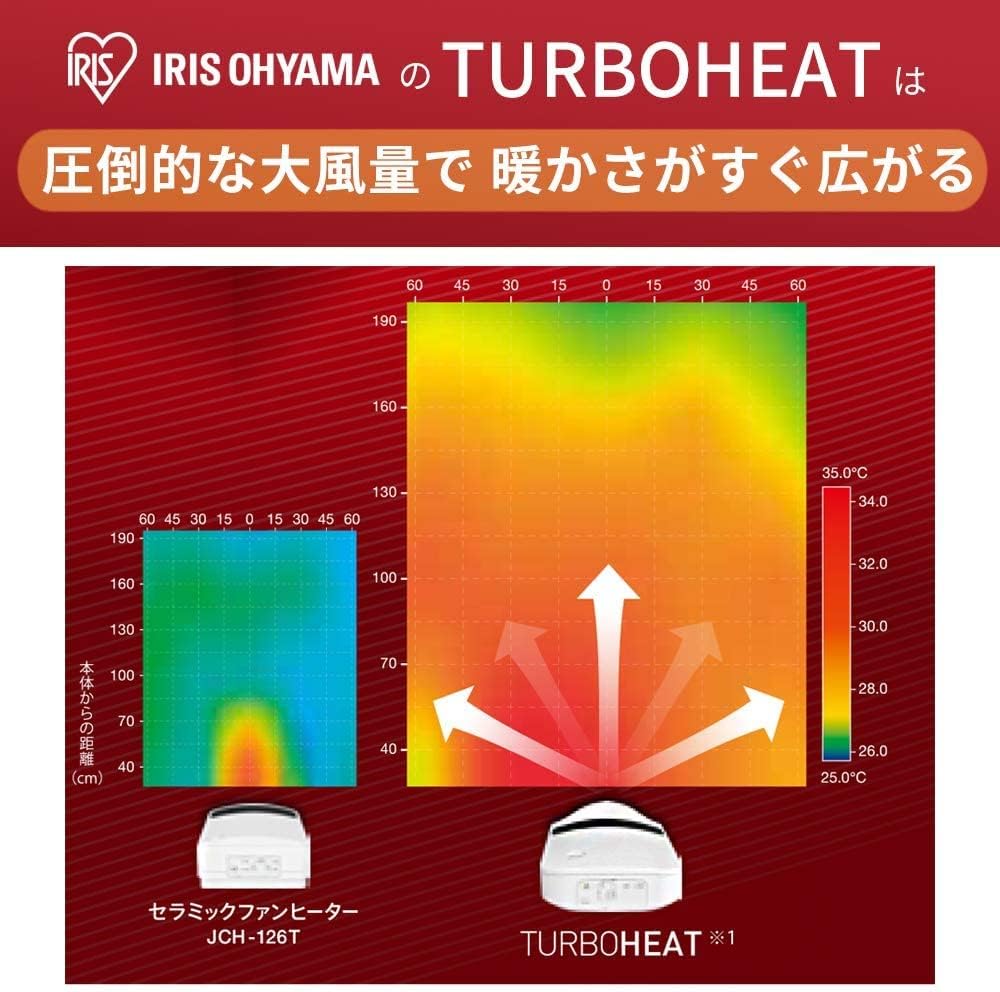
Figure 6.3: Rapid Heat Distribution
7. Maintenance
Regular cleaning and maintenance will ensure optimal performance and longevity of your heater.
- Before Cleaning: Always unplug the heater from the power outlet and allow it to cool completely before cleaning.
- Exterior Cleaning: Wipe the exterior of the unit with a soft, dry cloth. Do not use abrasive cleaners, solvents, or harsh chemicals, as these can damage the surface.
- Air Intake/Outlet Cleaning: Periodically clean the air intake and outlet vents to prevent dust buildup, which can affect performance and potentially cause overheating. Use a soft brush or a vacuum cleaner with a brush attachment to gently remove dust.
- Storage: When not in use for extended periods, clean the unit, unplug it, and store it in a dry, safe place, preferably in its original packaging.
8. Troubleshooting
If you encounter any issues with your heater, please refer to the following common problems and solutions:
| Problem | Possible Cause | Solution |
|---|---|---|
| Heater does not turn on. | No power supply. Tip-over switch activated. Overheating protection activated. | Check if the power plug is securely inserted. Ensure the unit is upright on a stable surface. Unplug, allow to cool for 30 minutes, then plug back in. Clear any obstructions from vents. |
| Heater turns off unexpectedly. | Human sensor activated (no motion detected). Tip-over switch activated. Overheating protection activated. | Check if the human sensor is enabled and if there's motion in its detection range. Ensure the unit is upright. Unplug, allow to cool, clear vents. |
| Weak airflow or insufficient heat. | Air intake/outlet blocked. Incorrect mode selected. | Clean air intake and outlet vents. Select a higher power mode (e.g., Turbo). |
If the problem persists after trying these solutions, please contact customer support.
9. Specifications
| Feature | Detail |
|---|---|
| Model Number | JCH-12TD4-P |
| Brand | IRIS OHYAMA |
| Dimensions (W x D x H) | 26 x 13.5 x 38.5 cm |
| Weight | 2.5 kg |
| Color | Pink |
| Material | Ceramic |
| Power Modes | Turbo (1200W), Standard (1000W), Quiet (600W) |
| Human Sensor Detection Range | Approx. 2m (60° horizontal, 90° vertical) |
| Safety Features | Tip-over auto-off, Auto-off prevention (12 hours), Child lock, Overheating prevention |
| Usage Environment | Indoor |

Figure 9.1: Product Dimensions
10. Warranty and Support
This product comes with a 1-year manufacturer's warranty from the date of purchase. Please retain your proof of purchase for warranty claims.
For technical support, warranty service, or any questions not covered in this manual, please contact IRIS OHYAMA customer service. Contact information can typically be found on the manufacturer's official website or on the product packaging.