
Introduction
This manual provides detailed instructions for the installation, operation, and maintenance of your Highwild 12-Volt Deer Feeder Digital Power Control Unit. This unit is designed to provide precise and scheduled feeding for wildlife, featuring a digital timer for customizable feeding schedules and durations. Please read this manual thoroughly before use to ensure proper function and longevity of the product.
Safety Information
General Safety Instructions:
- Always handle electrical components with care. Ensure the power source is disconnected before installation or maintenance.
- Avoid direct contact with wildlife while the feeder is in operation or being serviced.
- Adhere to all local regulations and guidelines regarding wildlife feeding and the placement of feeding stations.
- Keep children and pets away from the feeder during operation.
- Do not attempt to modify the unit. Unauthorized modifications can lead to malfunction and void the warranty.
Package Contents
Verify that all components are present and undamaged upon opening the package:
- Digital Timer
- 12V Motor
- Spinner Plate
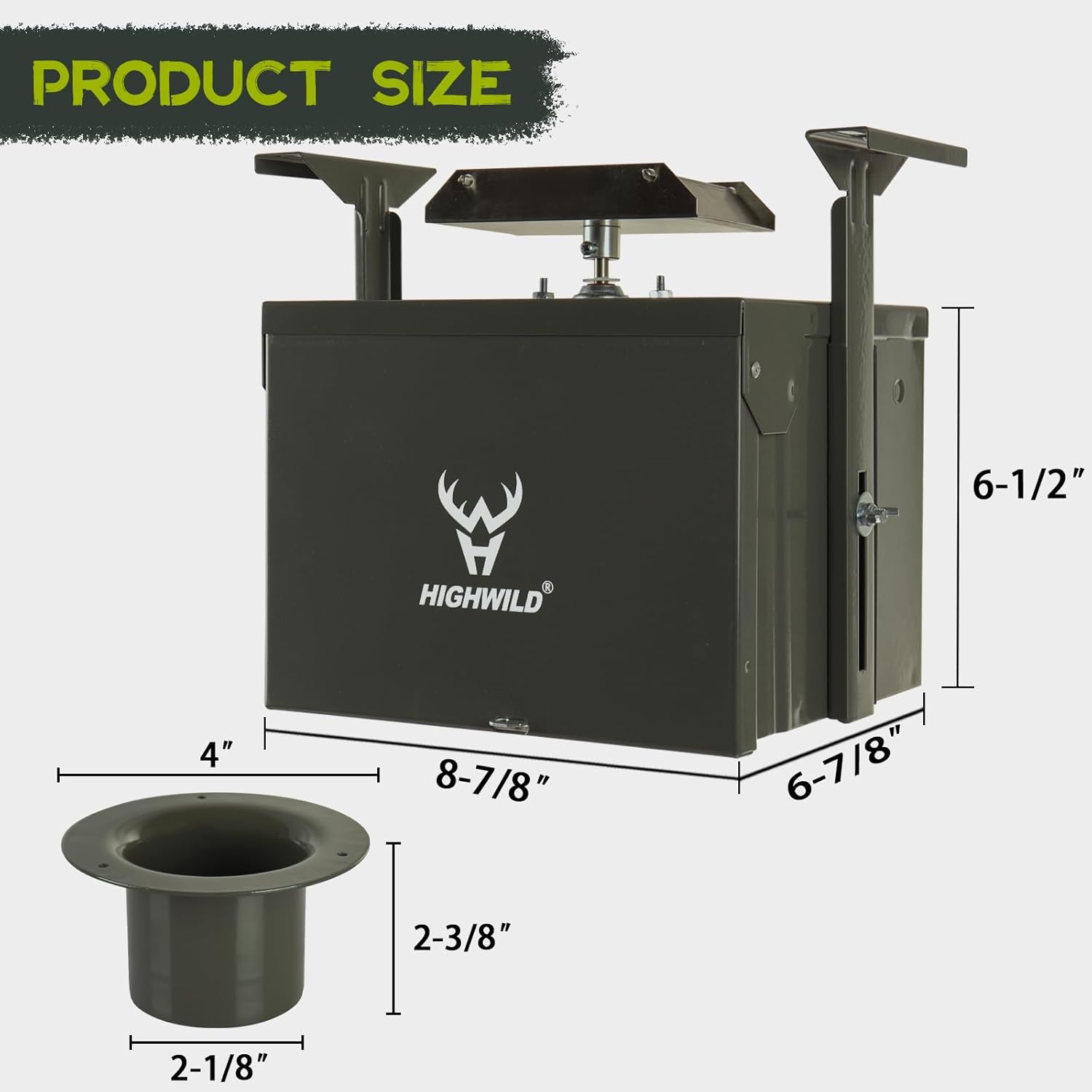
- Drop Funnel
- Protective Housing
- Mounting Hardware (bolts, nuts, washers, springs)

Product Overview
The Highwild 12-Volt Deer Feeder Digital Power Control Unit is designed for efficient and precise wildlife feeding. Key components include:
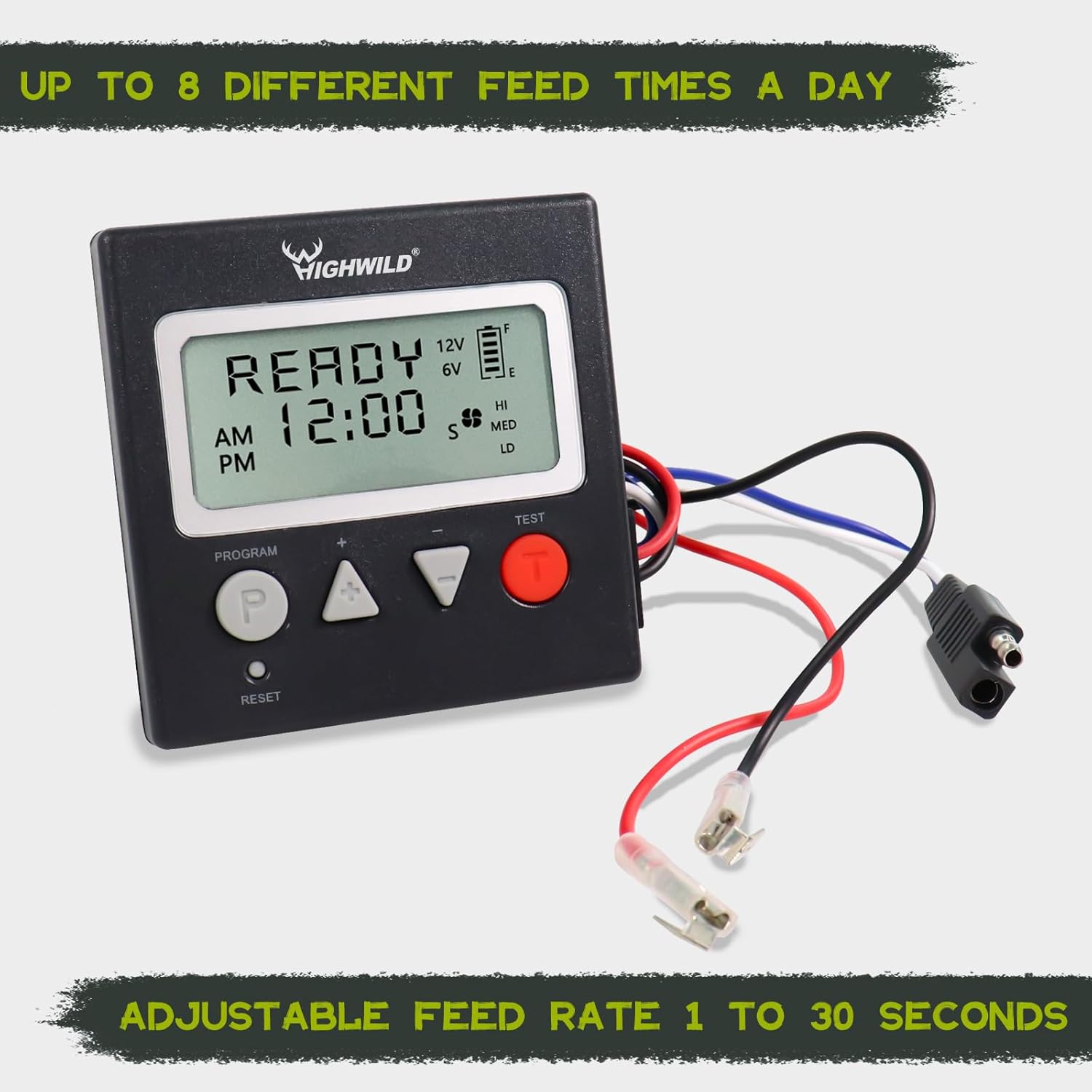
- Digital Timer: Allows programming of up to 8 daily feeding times and adjustable feed durations from 1 to 30 seconds.
- 12V Motor: Provides reliable power for dispensing feed.
- Spinner Plate: Distributes feed evenly.
- Protective Housing: Encases the electronic components, offering durability against various weather conditions.
- Drop Funnel: Directs feed from the hopper to the spinner plate.

Setup Instructions
Follow these steps for proper installation of your feeder control unit:
- Prepare the Feeder Housing: Ensure the protective housing is securely attached to your feeder's hopper or mounting structure. The unit is designed for pole mount applications.
- Install the Drop Funnel: Place the drop funnel inside the feeder hopper, ensuring it aligns with the opening for the spinner plate.
- Mount the Motor and Spinner Plate: Attach the 12V motor and spinner plate assembly to the bottom of the feeder housing, ensuring the spinner plate is positioned correctly to dispense feed. Use the provided mounting hardware (bolts, nuts, washers) to secure these components.
- Connect the Digital Timer: Connect the digital timer to the 12V motor using the provided wiring. Ensure all connections are secure and protected from moisture. The timer unit typically mounts to the side of the protective housing.
- Power Connection: Connect the unit to a compatible 12-volt power source (e.g., a 12V battery, not included). Ensure correct polarity.
- Test Functionality: Before filling with feed, perform a test run to ensure the motor and spinner plate operate correctly when activated by the timer.

Operating Instructions
The digital timer allows for precise control over feeding schedules.

Setting the Clock:
- Press the PROGRAM (P) button once. The hour digit will flash.
- Use the UP (▲) and DOWN (▼) buttons to adjust the hour.
- Press PROGRAM (P) again to move to the minute digit. Adjust with UP (▲) and DOWN (▼).
- Press PROGRAM (P) to save the time.
Programming Feeding Times:
The unit supports up to 8 different feeding times per day.
- From the main screen, press the PROGRAM (P) button repeatedly until you see "FEED 1" or the desired feed number.
- The hour digit for the feed time will flash. Use UP (▲) and DOWN (▼) to set the desired hour.
- Press PROGRAM (P) to move to the minute digit. Adjust with UP (▲) and DOWN (▼).
- Press PROGRAM (P) again to set the feed duration (seconds). Adjust from 1 to 30 seconds using UP (▲) and DOWN (▼).
- Repeat for up to 8 feeding times. To disable a feed time, set its duration to 0 seconds.
- After setting all desired feed times, press PROGRAM (P) until the display returns to the main clock screen to save settings.
Manual Test Function:
To manually test the feeder, press the TEST button. The motor will activate for a short duration (typically 2-3 seconds) to confirm functionality.
Maintenance
Regular maintenance ensures optimal performance and extends the lifespan of your feeder unit.
- Cleaning: Periodically clean the spinner plate and drop funnel to prevent feed buildup, which can obstruct dispensing. Use a dry brush or cloth.
- Battery Check: Monitor the battery level displayed on the digital timer. Replace or recharge the 12V battery as needed to ensure continuous operation.
- Wiring Inspection: Regularly inspect all wiring connections for signs of wear, corrosion, or damage. Ensure connections remain secure and waterproof.
- Housing Integrity: Check the protective housing for any damage that could compromise its weather resistance. The unit features anti-rust, powder-coated, and waterproof construction for durability.
- Environmental Factors: Ensure the feeder is positioned to minimize exposure to extreme weather conditions where possible, even though it is designed to be durable.

Troubleshooting
Refer to the following table for common issues and their solutions:
| Problem | Possible Cause | Solution |
|---|---|---|
| Feeder not dispensing feed. |
|
|
| Digital timer display is blank or showing "ER". |
|
|
| Feed dispenses at incorrect times or durations. |
|
|
Specifications
| Feature | Detail |
|---|---|
| Brand | Highwild |
| Model | 12-Volt Deer Feeder Digital Power Control Unit |
| Power Source | Electric (12V) |
| Target Species | Deer (also suitable for other wildlife/livestock) |
| Material | Steel |
| Special Features | Digital Technology, Versatile Functionality, Anti-Rust, Powder-Coated, Waterproof |
| Mounting Type | Pole Mount |
| Feeding Times | Up to 8 per day |
| Feed Rate Adjustment | 1 to 30 seconds |
| Item Weight | 8.12 pounds (3.69 Kilograms) |
| Package Dimensions | 10.63 x 10.12 x 7.87 inches |
| UPC | 725756752194 |
| ASIN | B07WN32BV4 |
Warranty and Support
Highwild products are manufactured to high-quality standards. For specific warranty information or technical support, please refer to the documentation included with your purchase or visit the official Highwild website. If you encounter issues not covered in the troubleshooting section, please contact Highwild customer service for assistance.
You can find more information and contact details on the Highwild Brand Store on Amazon.