
Introduction
This manual provides essential information for the safe and effective operation of your Yorkville ES15P 1800-Watt 15-Inch Powered Subwoofer. Please read these instructions thoroughly before installation and use to ensure optimal performance and longevity of your equipment.
Important Safety Instructions
- Read Instructions: Retain these instructions for future reference.
- Heed Warnings: Follow all warnings on the product and in the operating instructions.
- Clean: Clean only with a dry cloth.
- Ventilation: Do not block any ventilation openings. Install in accordance with the manufacturer's instructions.
- Heat: Do not install near any heat sources such as radiators, heat registers, stoves, or other apparatus (including amplifiers) that produce heat.
- Power Cord: Protect the power cord from being walked on or pinched, particularly at plugs, convenience receptacles, and the point where they exit from the apparatus.
- Accessories: Only use attachments/accessories specified by the manufacturer.
- Servicing: Refer all servicing to qualified service personnel. Servicing is required when the apparatus has been damaged in any way, such as power-supply cord or plug is damaged, liquid has been spilled or objects have fallen into the apparatus, the apparatus has been exposed to rain or moisture, does not operate normally, or has been dropped.
Setup
Unpacking
Carefully remove the subwoofer from its packaging. Inspect the unit for any signs of damage that may have occurred during transit. Retain the packaging for future transport or storage.
Placement
The Yorkville ES15P is designed for floor standing placement. For optimal sound performance, consider the following:
- Room Acoustics: Bass response can be significantly affected by room size and shape. Experiment with different positions to find the best sound.
- Corner Placement: Placing the subwoofer in a corner can often enhance bass output, but may also lead to 'boomy' sound.
- Proximity to Walls: Placing the subwoofer close to a wall can reinforce bass frequencies.
- Stability: Ensure the subwoofer is placed on a stable, level surface to prevent vibrations and movement during operation.
Connections
Before making any connections, ensure the subwoofer's power switch is in the OFF position and the power cord is disconnected from the electrical outlet.
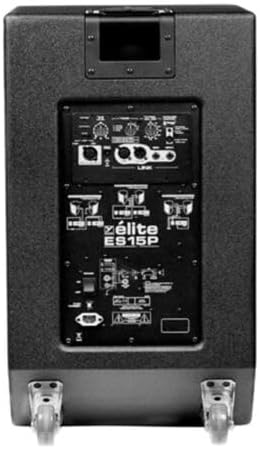
- Audio Input: Connect your audio source (e.g., mixer, audio interface) to the subwoofer's input jacks. The ES15P typically features XLR or TRS inputs. Use high-quality shielded cables for best results.
- Audio Output (Link): If you are connecting additional speakers or subwoofers, use the link output jacks to pass the audio signal.
- Power Connection: Once all audio connections are made, connect the supplied power cord to the subwoofer's AC inlet and then to a grounded electrical outlet.
Operating
Powering On/Off
- Power On: After all connections are secure, switch the power button on the rear panel to the 'ON' position. The power indicator light should illuminate.
- Power Off: To power off, switch the power button to the 'OFF' position. It is recommended to power off the subwoofer before disconnecting any cables.
Controls
The Yorkville ES15P features several controls on its rear panel to fine-tune its performance:
- Level/Gain Control: Adjusts the overall output volume of the subwoofer. Start with a low setting and gradually increase to match the level of your main speakers.
- Crossover Frequency Control: This knob sets the upper frequency limit for the subwoofer. Frequencies above this point will be sent to your main speakers (if using the link output with a high-pass filter). Adjust this to blend seamlessly with your main speakers. Common settings range from 80Hz to 120Hz.
- Phase Switch: This switch (0°/180°) helps to align the subwoofer's output with your main speakers. If the bass sounds weak or hollow, try flipping this switch to see if it improves the sound.

Maintenance
Cleaning
To maintain the appearance and performance of your subwoofer:
- Exterior: Use a soft, dry cloth to wipe down the exterior surfaces. Avoid abrasive cleaners or solvents, as they can damage the finish.
- Grille: A soft brush or vacuum cleaner with a brush attachment can be used to gently remove dust from the speaker grille.
- Ventilation: Ensure ventilation openings are free from dust and debris to prevent overheating.
Storage
If storing the subwoofer for an extended period, keep it in a cool, dry place, away from direct sunlight and extreme temperatures. It is recommended to use the original packaging for protection.
Troubleshooting
If you encounter issues with your Yorkville ES15P subwoofer, refer to the following common problems and solutions:
- No Power:
- Check if the power cord is securely connected to both the subwoofer and the electrical outlet.
- Verify that the electrical outlet is functional by plugging in another device.
- Ensure the power switch on the subwoofer is in the 'ON' position.
- No Sound:
- Confirm that the audio input cables are correctly connected to both the source and the subwoofer.
- Check the 'Level/Gain' control on the subwoofer; ensure it is not set to minimum.
- Verify that your audio source is sending a signal and its volume is turned up.
- If using a crossover, ensure it is configured correctly.
- Distorted Sound:
- Reduce the 'Level/Gain' control on the subwoofer or the output level from your audio source.
- Check for damaged audio cables.
- Ensure the subwoofer is not overdriven.
If these steps do not resolve the issue, please contact Yorkville customer support for further assistance.
Specifications
The following table details the technical specifications for the Yorkville ES15P Powered Subwoofer:
| Feature | Specification |
|---|---|
| Brand | Yorkville |
| Model Name | ES15P |
| Speaker Type | Subwoofer |
| Speaker Maximum Output Power | 1800 Watts |
| Woofer Diameter | 15 Inches |
| Subwoofer Connectivity Technology | Wired |
| Power Source | Corded Electric |
| Material | Wood/Metal (Enclosure), Polypropylene/Aluminum (Components) |
| Mounting Type | Floor Standing |
| Surround Sound Channel Configuration | 5.1, 7.1 |
| Signal-to-Noise Ratio | 71 dB |
| Control Method | Voice (Note: This typically refers to compatibility with voice-controlled systems, not direct voice control of the unit itself.) |
| Water Resistance Level | Water Resistant (Not Waterproof) |
| Item Weight | 149 pounds |
| Package Dimensions | 32 x 21 x 18 inches |
| UPC | 840402042891 |

Warranty and Support
Warranty Information
The Yorkville ES15P Powered Subwoofer comes with a Limited Warranty. Please refer to the warranty card included with your product for specific terms, conditions, and duration of coverage. Keep your proof of purchase for warranty claims.
Customer Support
For technical assistance, service, or warranty inquiries, please contact Yorkville Sound directly. Visit the official Yorkville Sound website for contact information and support resources.


