1. Introduction
Thank you for purchasing the Hoofun Batttlebus 3D Optical Illusion Night Light. This unique LED lamp creates a stunning 3D visual effect, perfect for enhancing the ambiance of any room, especially children's bedrooms or game rooms. With its 16 color options and multiple flash modes, controlled by either a remote or smart touch, it offers a versatile and engaging lighting experience.

Image 1.1: The Hoofun Batttlebus 3D Optical Illusion Night Light, showcasing its unique hot air balloon design and accompanying remote control.
2. Product Features
- Multicolor & Remote Control: Offers 16 single color modes and 4 dynamic flash modes (flash, strobe, fade, smooth), controllable via remote or smart touch.
- Atmosphere Creation: Helps children overcome fear of darkness and creates a suitable sleeping atmosphere. Ideal as a decorative lamp for children's rooms or bedside tables.
- Durable & Energy Efficient: Integrated LEDs have a lifespan of up to 10,000 hours. Low power consumption of 0.012 kWh/24 hours.
- Dual Power Options: Can be powered by USB cable (compatible with any USB power port) or batteries (not included). Safe to touch and does not overheat.
- Unique Design: Features a captivating 3D optical illusion of a hot air balloon, making it a perfect gift for game enthusiasts, children, or as a decorative piece.

Image 2.1: Visual representation of the 16 color options and 4 flash modes available with the 3D LED Night Light.
3. Package Contents
Please check the package contents upon unboxing to ensure all components are present:
- 1 x Acrylic Plate (Hot Air Balloon design)
- 1 x LED Base
- 1 x USB Cable
- 1 x Remote Control
- 1 x User Manual (this document)

Image 3.1: An illustration of all items included in the product package.
4. Setup Instructions
- Unpack: Carefully remove all components from the packaging.
- Remove Protective Film: Before use, gently peel off the transparent protective film from both sides of the acrylic plate.
- Insert Acrylic Plate: Insert the acrylic plate into the slot on the LED base. Ensure it is firmly seated.
- Power Connection: Choose one of the following power methods:
- USB Power: Connect the provided USB cable to the LED base and plug the other end into any standard USB power adapter (e.g., phone charger, computer USB port, power bank).
- Battery Power: Open the battery compartment on the bottom of the LED base and insert 3 x AA batteries (not included), ensuring correct polarity (+/-).
- Remote Control Preparation: If using the remote control, remove the clear plastic tab from the battery compartment at the bottom of the remote before first use.

Image 4.1: The two power options for the LED base: via USB cable or 3x AA batteries.
5. Operating Instructions
5.1 Using the Smart Touch Button (on LED Base)
- Power On/Off: Touch the button once to turn on the light. Touch and hold for 2-3 seconds to turn off.
- Change Color: Each short touch will cycle through the 16 available colors.
- Activate Flash Modes: Continue touching after the 16 colors to cycle through the 4 flash modes (Flash, Strobe, Fade, Smooth).
5.2 Using the Remote Control
The remote control offers more precise control over the light's functions:

Image 5.1: Detailed layout of the remote control buttons and their functions.
- ON/OFF Button: Press to turn the light on or off.
- Brightness +/-: Adjust the brightness level of the light.
- Color Buttons (R, G, B, W + 12 other colors): Directly select any of the 16 static single colors.
- Flash Mode Buttons:
- FLASH: Rapidly cycles through colors.
- STROBE: Flashes colors with pauses.
- FADE: Smoothly transitions between colors.
- SMOOTH: Gradually changes colors.
Note: For optimal remote control performance, ensure the plastic tab is removed from the remote's battery compartment.
6. Maintenance
- Cleaning: Use a soft, dry, lint-free cloth to gently wipe the acrylic plate and LED base. Avoid abrasive cleaners or solvents that may damage the surface.
- Dust Removal: For dust on the acrylic plate, a soft brush or compressed air can be used.
- Battery Replacement: If using battery power and the light dims or stops responding, replace the AA batteries in the LED base. Replace the remote control battery (CR2025, if applicable) if its range decreases.
- Storage: When not in use for extended periods, disconnect from power and store the lamp in a cool, dry place, preferably in its original packaging.
7. Troubleshooting
| Problem | Possible Cause | Solution |
|---|---|---|
| Light does not turn on. | No power supply; Batteries are dead or incorrectly inserted; USB cable is faulty or not connected properly. | Ensure USB cable is securely connected or replace batteries, checking polarity. Try a different USB port or adapter. |
| Remote control not working. | Plastic tab not removed from remote; Remote battery is dead; Obstruction between remote and lamp; Remote is too far. | Remove plastic tab. Replace remote battery (CR2025). Ensure clear line of sight. Move closer to the lamp. |
| Light flickers or dims. | Low battery power; Unstable USB power source. | Replace batteries or switch to USB power. Use a stable USB power adapter. |
| 3D effect is not clear. | Protective film still on acrylic plate; Surface is dirty or scratched. | Remove protective film from both sides. Clean the acrylic plate with a soft, dry cloth. |
8. Specifications
| Attribute | Detail |
|---|---|
| Brand | Hoofun |
| Model Number | Batttlebus |
| Product Dimensions (L x W x H) | 8.7 x 8.7 x 3.5 cm (approx. 3.4 x 3.4 x 1.4 inches) |
| Item Weight | 249.48 grams (approx. 8.8 ounces) |
| Material | Plastic (Base), Acrylic (Plate) |
| Light Source Type | LED |
| Number of Bulbs | 1 |
| Voltage | 5 Volts |
| Special Features | Color Changing, Remote Control, Smart Touch |
| Switch Style | Remote Control, Touch |
| Power Source | Corded Electric (USB Cable) or Battery Powered (3x AA, not included) |
| LED Lifespan | Up to 10,000 hours |
| Energy Consumption | 0.012 kWh/24 hours |
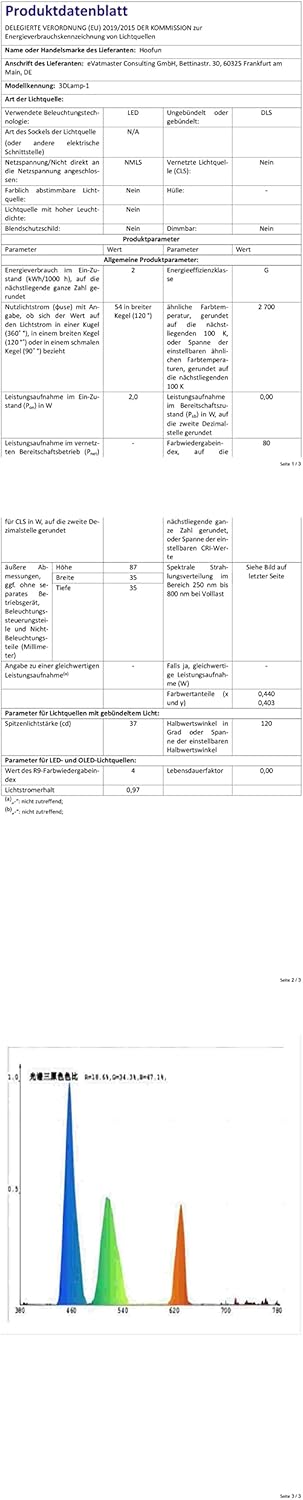
Image 8.1: Energy efficiency label for the Hoofun 3D Lamp, indicating a G class rating. More details can be found at eprel.ec.europa.eu/qr/1481019.
9. Warranty & Support
Hoofun products are designed for quality and reliability. For any issues or questions regarding your Batttlebus 3D Optical Illusion Night Light, please refer to the seller's return policy or contact the seller directly through your purchase platform for support.
The standard return policy for this product is 30 days for refund or replacement, as per the buybox winner information.