
Gigaset E290A
Gigaset E290A Cordless Phone with Answering Machine User Manual
Model: E290A | Brand: Gigaset
Introduction
The Gigaset E290A is a cordless telephone designed for ease of use, featuring an integrated answering machine. It combines a modern design with functions specifically developed for users with visual, auditory, or tactile needs. The large keys, highly readable backlit display, and ergonomic handset shape ensure comfortable operation for all ages. This manual provides essential information for setting up, operating, and maintaining your Gigaset E290A.
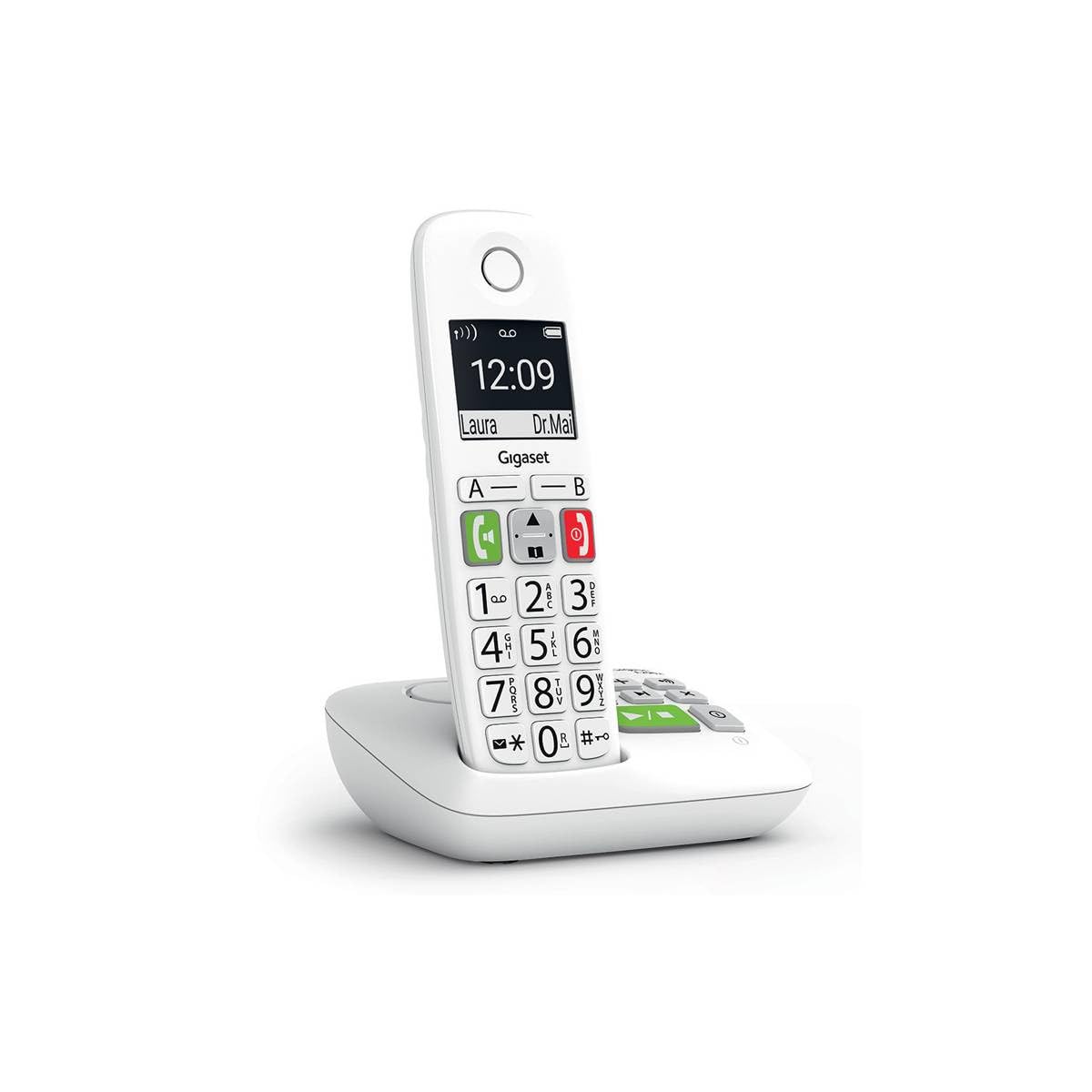
Image: The Gigaset E290A cordless phone, showing the handset and base station.
Safety Information
- Use only the power adapter and telephone cord supplied with the device.
- Do not expose the phone to extreme temperatures, direct sunlight, or high humidity.
- Avoid placing the phone near heat sources or in areas with strong electromagnetic fields.
- Use only approved rechargeable batteries. Do not dispose of batteries in fire.
- Do not open the device casing. Repairs should only be performed by authorized service personnel.
- Keep the phone out of reach of children.
Package Contents
Verify that your package contains the following items:
- 1 Gigaset E290A Handset
- 1 Gigaset E290A Base Station with integrated answering machine
- 1 Power Adapter for the base station
- 1 Telephone Line Cord
- 2 AAA Rechargeable Batteries
- 1 Battery Cover
- This User Manual
Setup
1. Connecting the Base Station
- Connect the power adapter to the base station and plug it into a wall outlet.
- Connect the telephone line cord to the base station and plug the other end into your telephone wall socket.
- Place the base station on a flat, stable surface, away from other electronic devices that might cause interference.

Image: The Gigaset E290A base station, illustrating the connection points for power and telephone line.
2. Inserting Batteries into the Handset
- Open the battery compartment cover on the back of the handset.
- Insert the two supplied AAA rechargeable batteries, ensuring correct polarity (+/-).
- Close the battery compartment cover.
- Place the handset on the base station to charge. The display will indicate charging status. Allow at least 8 hours for the initial charge.
3. Registering the Handset
The handset is usually pre-registered to the base station. If not, or if you are adding an additional handset:
- On the base station, press and hold the registration/paging key for approximately 3 seconds. The base station will enter registration mode.
- On the handset, navigate to the menu, select Settings, then Registration, and follow the on-screen prompts. You may need to enter a PIN (default is 0000).
- Once registered, the handset display will show the internal number (e.g., "HS 1").
Operating Instructions
Making and Receiving Calls
- Making a Call: Enter the phone number using the large keypad and press the green call key (📞).
- Receiving a Call: When the phone rings, press the green call key (📞) to answer.
- Ending a Call: Press the red end call key (⛔).
- Hands-free Calling: During a call, press the hands-free key (🔊) to activate the speakerphone.

Image: Close-up of the Gigaset E290A handset, highlighting the large, easy-to-read keys for dialing.
Using the Answering Machine
The Gigaset E290A features an integrated digital answering machine with up to 30 minutes of recording time.
- Activating/Deactivating: Access the answering machine menu on the handset or press the dedicated key on the base station.
- Playing Messages: Press the play key on the base station or navigate through the handset menu.
- Recording an Announcement: Follow the menu prompts to record your personal greeting.
Phonebook
Store up to 150 contacts in the phonebook.
- Adding a Contact: Go to the phonebook menu, select "New Entry," and enter the name and number.
- Quick Dial Keys: The phone has two direct access keys (A and B) for quickly calling two pre-stored numbers. Assign these numbers via the phonebook settings.
Call Blocking
Block unwanted calls by adding up to 32 numbers to a blacklist. You can also block anonymous calls.
- Adding to Blacklist: From the call list or phonebook, select a number and choose the "Block" option.
- Blocking Anonymous Calls: Enable this feature in the call blocking settings to automatically reject calls from hidden numbers.

Image: Illustration of the call blocking feature on the Gigaset E290A, showing how to manage unwanted calls.
Audio Settings
- Audio Boost Mode: Activate this mode for an even louder volume, facilitating high-definition listening.
- Hearing Aid Compatibility: The phone is compatible with hearing aids. You can also adjust the frequency range to suit personal hearing capabilities.
Display Settings
- Jumbo Mode: In Jumbo mode, all dialed digits appear in large characters on the 34 x 37 mm backlit black and white display, which has increased contrast for optimal readability.
- Menu Navigation: Menu navigation is also simplified with an adapted character size.

Image: The Gigaset E290A display showing large characters in Jumbo Mode for enhanced readability.
Maintenance
- Cleaning: Clean the handset and base station with a soft, damp cloth. Do not use abrasive cleaners or solvents.
- Battery Care: To maintain battery life, fully discharge and recharge the handset batteries periodically. If the phone will not be used for an extended period, remove the batteries.
- Storage: Store the phone in a cool, dry place when not in use.
Troubleshooting
| Problem | Possible Cause | Solution |
|---|---|---|
| No display on handset | Batteries are empty or incorrectly inserted. | Charge batteries for at least 8 hours. Check battery polarity. |
| No dial tone | Telephone line cord not connected or faulty. | Check telephone line connection to base and wall socket. Try a different cord. |
| Handset cannot register | Base station not in registration mode or incorrect PIN. | Ensure base is in registration mode. Re-enter default PIN (0000). |
| Poor sound quality | Handset too far from base, interference, or low battery. | Move closer to the base. Avoid other electronic devices. Charge handset. |
| Difficulty programming features | Complex menu navigation or unfamiliarity with settings. | Refer to the specific section in this manual for detailed steps. Contact support if issues persist. |
Specifications
| Brand | Gigaset |
| Model Number | E290A |
| Color | White |
| Phone Type | Cordless |
| Answering System Type | Digital |
| Compatible Devices | Telephone networks (PSTN, ISDN), external communication devices |
| Batteries Required | 2 AAA (Alkaline) |
| Material | Plastic |
| Power Source | Electrical Cable |
| Item Dimensions (LxWxH) | 22.4 x 16.6 x 8.8 cm |
| Item Weight | 169 Grams |
Warranty and Support
For warranty information, please refer to the warranty card included with your product or visit the official Gigaset website. Information regarding spare parts availability and software updates is not provided in this manual.
For technical support, frequently asked questions, or to download the full detailed manual, please visit the Gigaset Communication Store or the official Gigaset support website.
Related documentsE290A


Ask a question about this manual
Ask about setup, troubleshooting, compatibility, parts, safety, or missing instructions. Manuals+ will review the question and use this page’s manual context to help answer it.