1. Introduction
This manual provides detailed instructions for the operation and maintenance of your YONGNUO YN968N II Wireless On-Camera Flash Speedlite. Please read this manual thoroughly before using the product to ensure correct and safe operation. The YN968N II is a high-performance flash unit designed for Nikon cameras, featuring a high guide number, high-speed sync (HSS), TTL functionality, and integrated wireless capabilities.
2. Safety Information
- Do not disassemble or modify the flash unit. Repairs should only be performed by authorized service personnel.
- Keep the flash unit dry. Do not expose it to rain, moisture, or high humidity.
- Avoid direct eye exposure to the flash light, especially at close range, as it can impair vision.
- Use only specified batteries (4 AA batteries). Incorrect battery usage may lead to leakage, overheating, or explosion.
- Ensure the flash is securely mounted to the camera or stand to prevent accidental drops.
3. Package Contents
Verify that all items are present in the package:
- 1 * YN968N II Flash Speedlite
- 1 * LED color temperature converter
- 1 * Mini Stand
- 1 * Manual (English and Chinese)

Image: The YONGNUO YN968N II Flash Speedlite shown with its included accessories: a mini stand, a color temperature converter for the LED light, and the instruction manual.
4. Product Overview
The YONGNUO YN968N II is a versatile flash unit with a robust design and advanced features. It includes an integrated LED light, a clear LCD display, and various control buttons for easy operation.

Image: A front view of the YONGNUO YN968N II Flash Speedlite, highlighting its main body, flash head, and LCD screen.
4.1. Parts Identification

Image: A detailed diagram labeling the various components of the YN968N II, including the PC Port, External Power Source Port, USB Port, Wide Reflection Board, Wide Panel, Flash Head, LED Light, Optical Transmission Wireless Sensor, AF-assist Beam Emitter, Hot Shoe Contact, Battery Compartment, Dust-and-water Resistant Adapter, Lock-release Button, Mounting foot lock lever, Control Buttons/Knobs, LCD Panel, Link Lamp, and Bounce Angle Index.
4.2. Flash Head Movement
The flash head offers extensive flexibility for bounce flash photography, allowing rotation and tilt to direct light indirectly.
- Vertical Rotation: -7° to 150°
- Horizontal Rotation: 0° to 360°

Image: A visual representation of the YN968N II flash head's articulation, showing its ability to tilt vertically from -7 to 150 degrees and rotate horizontally 360 degrees.
5. Setup
5.1. Battery Installation
- Open the battery compartment cover located on the side of the flash unit.
- Insert four (4) AA-size batteries according to the polarity indicators inside the compartment.
- Close the battery compartment cover securely.
5.2. Mounting to Camera
- Slide the flash unit's hot shoe onto your camera's hot shoe mount.
- Rotate the mounting foot lock lever clockwise until the flash is securely fastened to the camera.
- To remove, rotate the lever counter-clockwise and press the lock-release button while sliding the flash off.
6. Operating Modes
The YN968N II supports various flash modes to accommodate different photographic needs.
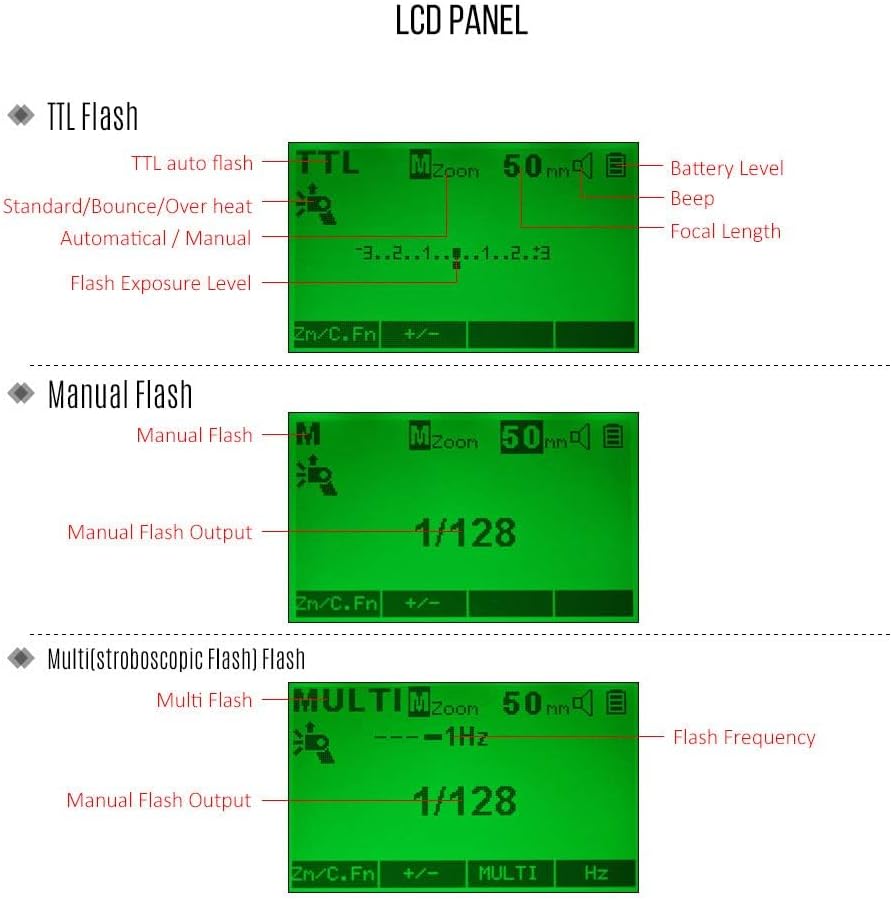
Image: Examples of the LCD panel display for different flash modes: TTL auto flash, Manual flash showing output level, and Multi (stroboscopic) flash showing frequency and output.
6.1. TTL (Through-The-Lens) Flash Mode
In TTL mode, the flash output is automatically controlled by the camera's metering system to achieve optimal exposure. This mode is ideal for quick shooting in varying light conditions.
- Press the MODE button until 'TTL' appears on the LCD.
- The flash will automatically adjust its output based on the camera's exposure settings.
- Flash Exposure Compensation (FEC) can be adjusted using the +/- buttons.
6.2. Manual (M) Flash Mode
Manual mode allows you to set the flash output power manually, providing precise control over lighting. This is suitable for consistent lighting setups or creative effects.
- Press the MODE button until 'M' appears on the LCD.
- Use the dial or buttons to adjust the flash output from 1/1 (full power) to 1/128 in 1/3 stop increments.
6.3. Multi (Stroboscopic) Flash Mode
Multi mode fires the flash multiple times during a single exposure, creating stroboscopic effects. You can set the flash frequency and number of flashes.
- Press the MODE button until 'MULTI' appears on the LCD.
- Adjust the flash output, frequency (Hz), and number of flashes according to your desired effect.
6.4. Wireless Flash Modes
The YN968N II supports various wireless systems, functioning as both a master and slave unit.
- YN622N Wireless System (Master/Slave): When used as a master, it can control and trigger YN968N(II), YN622N(II), and YN685N slave units. As a YN622 slave, it receives signals from YN968N(II), YN622N(II), YN622N-TX, and operates in TTL/M/Multi modes.
- YN560 Wireless System (Slave): When set as a YN560 slave, it receives signals from YN560-TX (II), RF603 (II), RF605, and operates in M/Multi modes.
- Optical Slave Function: Supports receiving YONGNUO, Canon, and Nikon's wireless optical master signals, including S1 and S2 flash modes.
7. Advanced Features
7.1. High-Speed Sync (HSS)
The YN968N II supports high-speed sync up to 1/8000s, allowing you to use wider apertures in bright conditions or freeze fast-moving subjects with flash.
7.2. Integrated LED Light
The flash unit is equipped with a high-power LED light, which can be used for continuous lighting in video recording or as a modeling light. Its brightness is adjustable, and a built-in diffuser and color conversion filter are included for versatility.

Image: A close-up view of the YN968N II's integrated LED light, demonstrating its three LED bulbs and the use of a color conversion filter to change the light's warmth.
7.3. Electric Zoom
The YN968N II features an upgraded electric zoom function, supporting both auto and manual zooming. The flash coverage can be adjusted between 20mm and 200mm to match your lens's focal length.
8. Maintenance
- Clean the flash unit regularly with a soft, dry cloth. Do not use solvents or abrasive cleaners.
- Remove batteries if the flash will not be used for an extended period to prevent leakage.
- Store the flash in a cool, dry place, away from direct sunlight and extreme temperatures.
9. Troubleshooting
If you encounter issues with your YN968N II, refer to the following common solutions:
- Flash does not fire: Check battery level, ensure batteries are inserted correctly, verify the flash is securely mounted, and confirm the camera's flash settings are appropriate.
- Flash output is inconsistent: Ensure the flash head is not obstructed. In TTL mode, check camera metering and flash exposure compensation. In Manual mode, verify the power setting.
- Wireless triggering issues: Confirm master and slave units are set to the correct channel and group. Ensure line of sight for optical triggering.
- Overheating: Excessive rapid firing can cause the flash to overheat. Allow the unit to cool down if an overheating warning appears.
10. Specifications
| Feature | Specification |
|---|---|
| Guide Number | GN60 (ISO100, 200mm) |
| Flash Sync Speed | Up to 1/8000 sec (HSS) |
| Flash Modes | TTL, M, Multi, Gr |
| Wireless Modes | YN622N (Master/Slave), YN560 (Slave), Optical S1/S2 |
| Zoom Range | Auto, 20-200mm |
| LED Light | High power, adjustable brightness, built-in diffuser, color conversion filter |
| Power Source | 4 x AA batteries |
| External Power Port | Yes |
| Firmware Upgrade | USB port supported |
| Dimensions | 8.74 x 3.98 x 3.62 inches |
| Weight | 1.39 pounds |
11. Firmware Update
The YN968N II supports firmware upgrades via its USB interface. This allows for performance improvements and compatibility updates. Please visit the official YONGNUO website for the latest firmware and instructions.
12. Warranty and Support
For warranty information and technical support, please refer to the warranty card included with your product or visit the official YONGNUO website. Keep your purchase receipt as proof of purchase for warranty claims.


