
1. Introduction
This manual provides detailed instructions for the safe and effective use of your U`King 36W Wireless Uplight. This versatile 18 LED RGB stage light features DMX512 and sound-activated modes, a rechargeable battery, and is designed for various events such as parties, weddings, and stage shows. Please read this manual thoroughly before operating the device and retain it for future reference.

Figure 1: U`King 36W Wireless Uplight with included remote control.
2. Safety Information
To ensure safe operation, please observe the following precautions:
- Do not expose the device to rain or moisture to prevent fire or electric shock.
- Ensure proper ventilation; do not block ventilation openings.
- Avoid direct eye exposure to the light source.
- Disconnect from power before cleaning or servicing.
- Use only the specified power adapter for charging.
- Keep out of reach of children.
- Do not attempt to repair or modify the device yourself. Refer all servicing to qualified personnel.
3. What's in the Box
Upon unpacking, verify that all components are present and undamaged:
- U`King 36W Wireless Uplight
- Remote Control
- Power Adapter
- Mounting Bracket
- Screws (for bracket attachment)
- Instruction Manual (this document)

Figure 2: Included components of the U`King Uplight package.
4. Setup
4.1 Initial Charging
Before first use, fully charge the uplight's built-in 5000mAh battery. Connect the provided power adapter to the DC12V input on the back of the light and plug it into a standard power outlet. The charging indicator light will be red during charging and turn green when fully charged. A full charge takes approximately 5-6 hours.

Figure 3: Illustration of the uplight connected to its charger, indicating battery status.
4.2 Mounting Options
The uplight can be placed on a flat surface or mounted using the included bracket. The bracket allows for floor mounting or attachment to a truss or stage light stand. Ensure the mounting surface or structure is stable and can support the weight of the light.
4.3 Power On/Off
Locate the power switch on the back of the unit. Flip the switch to the 'ON' position to power on the light. Flip to 'OFF' to power off.
5. Operating Instructions
The U`King Wireless Uplight offers multiple control modes for various lighting effects.
5.1 Remote Control Operation
The included remote control provides convenient access to all lighting functions. Point the remote directly at the front of the uplight for optimal response.

Figure 4: Remote control layout with button descriptions.
- ON/OFF: Powers the light on or off.
- FLASH: Activates strobe effect.
- COLOR: Cycles through fixed colors.
- FADE: Activates color fade mode.
- JUMP: Activates color jump mode.
- PULSE: Activates pulse effect.
- RGB Buttons (R, G, B): Selects Red, Green, or Blue static color.
- Other Color Buttons (Y, P, Cyan, W): Selects Yellow, Purple, Cyan, or White static color.
- SOUND: Activates sound-activated mode.
- DMX: Activates DMX control mode.
- +/- Buttons: Adjusts brightness, speed of effects, or DMX address.
- Timing Buttons (1H, 3H, 4H, 6H): Sets a timer for the light to turn off after 1, 3, 4, or 6 hours.
5.2 Control Modes
The uplight supports several control modes:
- Automatic Mode: The light cycles through various pre-programmed effects automatically.
- Sound-Activated Mode: The light reacts to music or sound, changing colors and patterns in sync with the beat. Activate using the 'SOUND' button on the remote.
- DMX512 Mode (7CH): For professional control, connect the uplight to a DMX controller using XLR cables. Refer to the DMX channel chart in the specifications section for detailed control parameters.
- Master-Slave Mode: Connect multiple uplights via DMX cables. Set one unit as the 'Master' and others as 'Slave' units. The slave units will mimic the master's effects.

Figure 5: Overview of various control functions and features.

Figure 6: Example of DMX device connection for advanced control.
5.3 Visual Demonstrations
Video 1: Demonstration of various color changes and lighting effects of the U`King 18 RGB LED Par Lights.
Video 2: Overview of the rechargeable par lights, showcasing wireless capabilities and different lighting modes.
6. Maintenance
6.1 Cleaning
Regularly clean the exterior of the light with a soft, dry cloth. Do not use abrasive cleaners or solvents. Ensure the device is powered off and unplugged before cleaning.
6.2 Storage
When not in use for extended periods, store the uplight in a cool, dry place, away from direct sunlight and extreme temperatures. It is recommended to partially charge the battery every few months to maintain its health.
7. Troubleshooting
If you encounter issues with your U`King Wireless Uplight, refer to the following common problems and solutions:
| Problem | Possible Cause | Solution |
|---|---|---|
| Light does not turn on. | Battery is depleted or power switch is off. | Charge the battery fully. Ensure the power switch is in the 'ON' position. |
| Remote control not working. | Remote battery low, obstructed signal, or not pointed correctly. | Replace remote battery. Ensure no obstructions between remote and light. Point remote directly at the light. |
| Light effects are not changing. | Incorrect mode selected or DMX signal issue. | Verify the selected mode (Auto, Sound, DMX). If using DMX, check cable connections and controller settings. |
| Short battery life. | Battery not fully charged or operating at full brightness (RGB). | Ensure battery is fully charged. Note that RGB full brightness consumes more power than single colors. |
8. Specifications
| Feature | Detail |
|---|---|
| Model Number | zq01525 |
| Brand | U`King |
| Power Source | Battery Powered |
| Battery Type | Built-in 5000mAh Rechargeable Lithium Manganese Dioxide |
| Charging Time | 5-6 hours |
| Battery Life (Full Charge) | RGB: 4 hours; Red: 22 hours; Green: 9 hours; Blue: 10 hours |
| Light Source Type | LED (18 LEDs) |
| Light Source Wattage | 1.8 Watts per LED (Total 36W) |
| Output Wattage | 18 Watts |
| Beam Angle | 30 Degrees |
| Control Modes | Remote Control, Sound-Activated, DMX512 (7CH), Automatic, Master-Slave |
| Product Dimensions | 7"L x 5"W x 5.2"H |
| Item Weight | 2.29 pounds |
| Material | Plastic (ABS) |
| Connector Type | XLR |
| Certification | FCC |
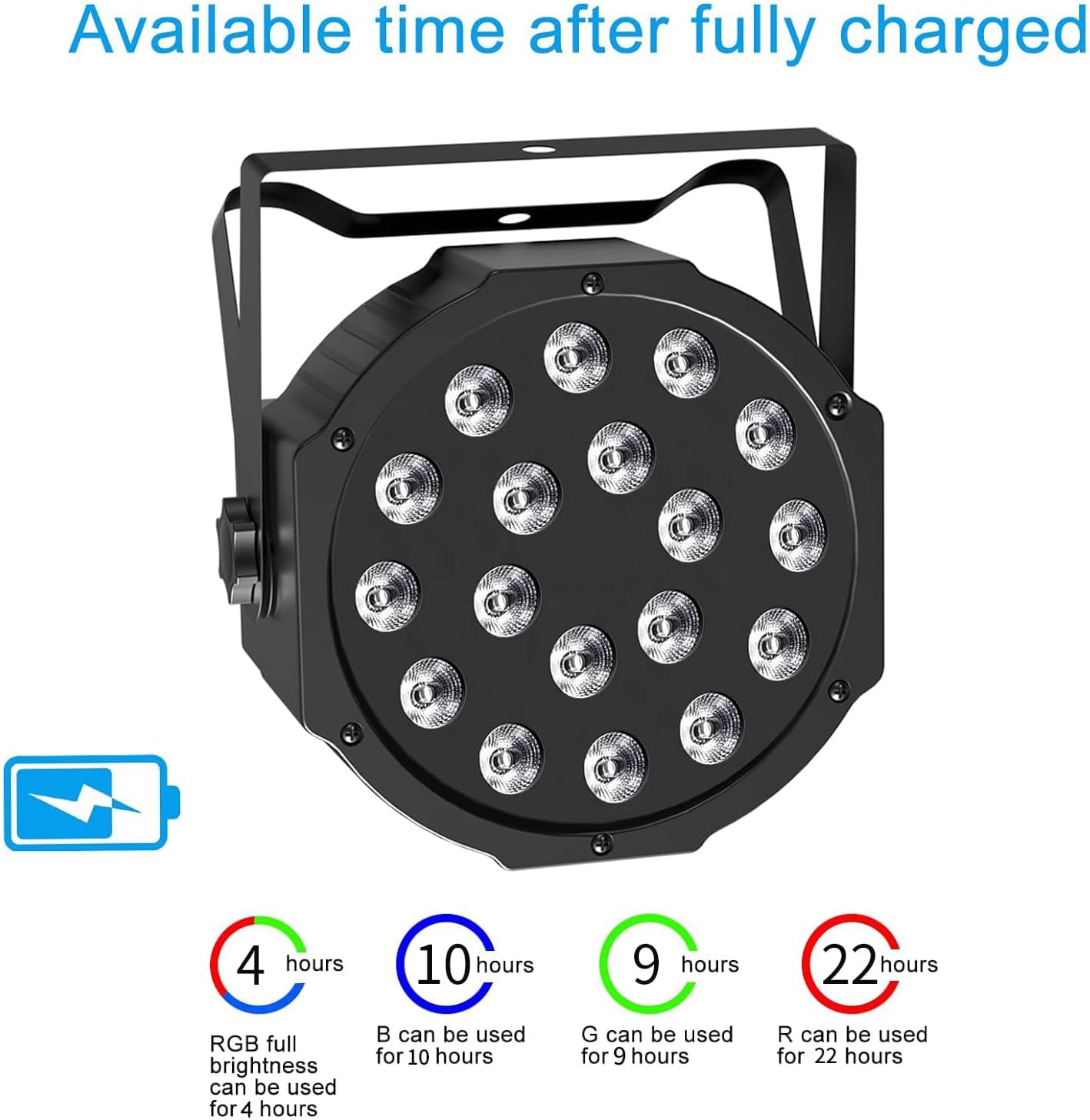
Figure 7: Battery life duration for various color settings.
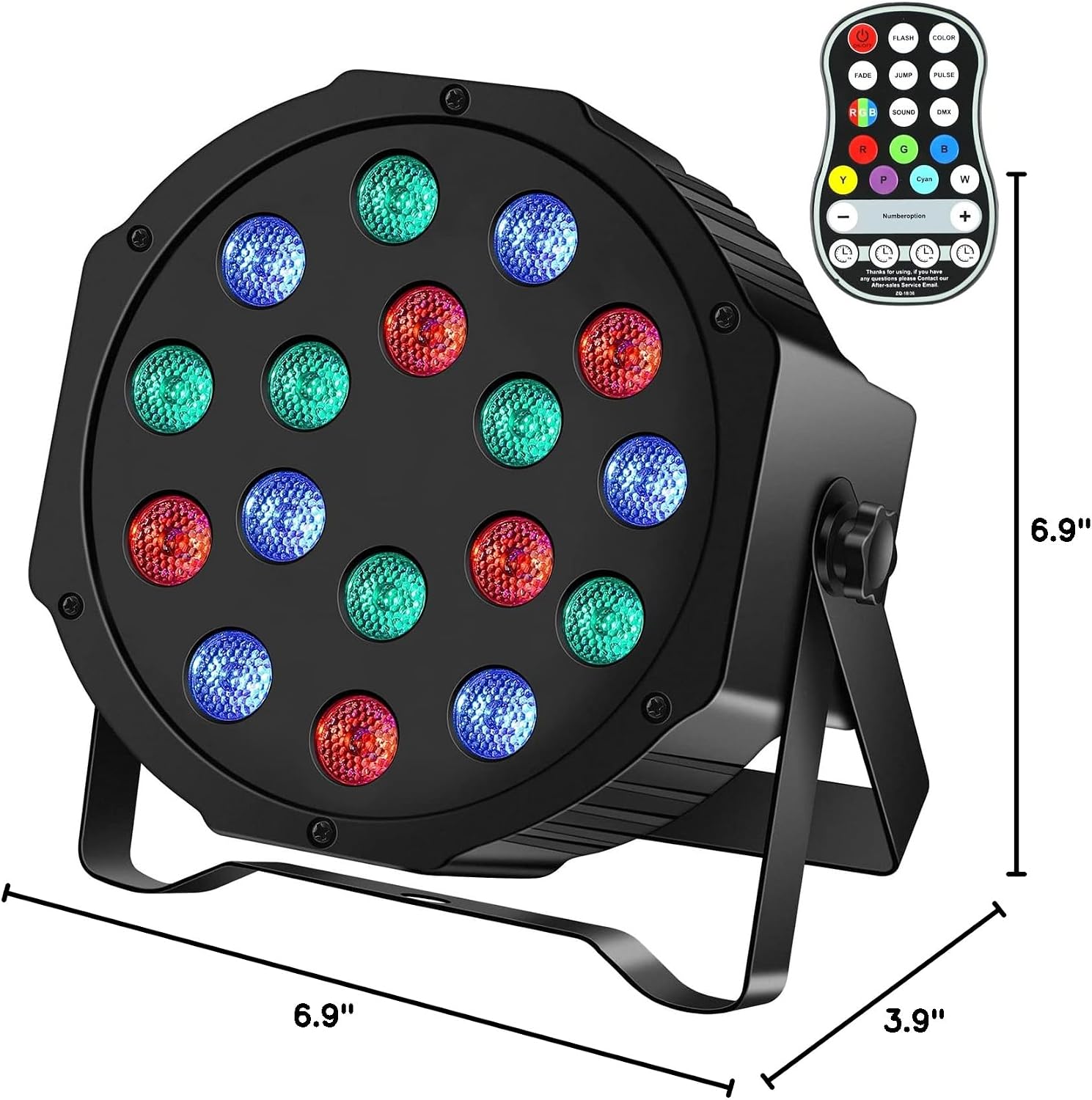
Figure 8: Product dimensions for installation planning.
9. Warranty & Support
U`King provides excellent after-sales service. The product includes a 180-day no-reason return policy. If you have any questions, require technical assistance, or need to claim warranty service, please contact U`King customer support. They are committed to responding within 24 hours.
For further assistance, please refer to the contact information provided with your purchase or visit the official U`King website.
