
1. Introduction
This manual provides detailed instructions for the setup, operation, and maintenance of your xingzhihua ZH/JT-01 Air Conditioner Remote Control. Please read this manual thoroughly before use to ensure proper functionality and longevity of the device.
The ZH/JT-01 remote control is designed for use with specific Chigo and VOLTAS air conditioning units, including models compatible with ZH/JT-03. It is important to verify that the buttons and model number of this remote match your original remote control before purchase and use, as it is not a universal remote.
2. Product Overview
The xingzhihua ZH/JT-01 remote control provides convenient access to various functions of your air conditioning unit.

Image 1: Front view of the xingzhihua ZH/JT-01 Air Conditioner Remote Control. This image displays the remote's ergonomic design, the LCD screen at the top, and all control buttons clearly labeled. Key buttons visible include MODE, ON/OFF, TEMP, FAN SPEED, SWING, AIR FLOW, TIMER, HOLD, SLEEP, TURBO, LAMP, and CLEAN. The LCD screen shows indicators for AUTO, COOL, DRY, HEAT, FAN, SLEEP, LAMP, TURBO, CLEAN, and HOLD modes.
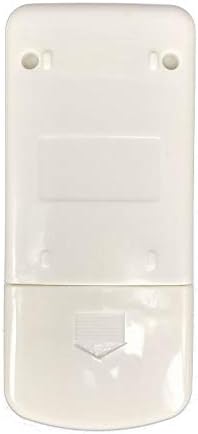
Image 2: Rear view of the xingzhihua ZH/JT-01 Air Conditioner Remote Control. This image highlights the smooth back casing and the battery compartment cover located at the bottom, indicated by an arrow for easy opening.
3. Setup
3.1 Battery Installation
- Locate the battery compartment on the back of the remote control. Refer to Image 2.
- Slide the battery compartment cover downwards in the direction of the arrow to open it.
- Insert two new AAA batteries (not included) according to the polarity indicators (+ and -) inside the compartment.
- Close the battery compartment by sliding the cover back into place until it clicks securely.
Note: Ensure batteries are inserted correctly. Incorrect polarity can damage the remote control. Do not mix old and new batteries, or different types of batteries.
4. Operating Instructions
Point the remote control directly at the air conditioner's receiver when operating.
4.1 Power On/Off
Press the ON/OFF button to turn the air conditioner on or off.
4.2 Mode Selection
Press the MODE button repeatedly to cycle through available operating modes: AUTO, COOL, DRY, HEAT, and FAN.
- AUTO: The unit automatically selects the operating mode based on the room temperature.
- COOL: Provides cooling to lower the room temperature.
- DRY: Dehumidifies the room.
- HEAT: Provides heating to raise the room temperature.
- FAN: Circulates air without heating or cooling.
4.3 Temperature Adjustment
Use the TEMP ▲ and TEMP ▼ buttons to increase or decrease the desired temperature. The display shows temperature in Celsius.
4.4 Fan Speed
Press the FAN SPEED button to adjust the fan speed (e.g., Low, Medium, High, Auto).
4.5 Swing Function
Press the SWING button to activate or deactivate the automatic louver swing function, which distributes air evenly.
4.6 Air Flow
Press the AIR FLOW button to adjust the direction of the airflow manually or automatically.
4.7 Timer Function
Press the TIMER button to set a timer for the air conditioner to turn on or off automatically.
4.8 Sleep Mode
Press the SLEEP button to activate sleep mode, which adjusts temperature and fan speed for comfortable sleep and energy saving.
4.9 Turbo Mode
Press the TURBO button for rapid cooling or heating.
4.10 Lamp Function
Press the LAMP button to control the display light on the air conditioner unit.
4.11 Clean Function
Press the CLEAN button to activate the self-cleaning function of the air conditioner (if supported by the unit).
4.12 Hold Function
Press the HOLD button to maintain the current settings.
5. Maintenance
5.1 Cleaning the Remote Control
Wipe the remote control with a soft, dry cloth. Do not use liquid cleaners or abrasive materials, as they may damage the surface or internal components.
5.2 Battery Replacement
Replace batteries when the remote control's range decreases or if the display becomes dim. Refer to the 'Battery Installation' section for instructions. Remove batteries if the remote will not be used for an extended period to prevent leakage.
6. Troubleshooting
- Remote not responding: Check battery polarity and replace with fresh batteries. Ensure there are no obstructions between the remote and the air conditioner's receiver. Confirm the remote is compatible with your specific AC unit model.
- Limited range: Replace batteries. Ensure the remote is pointed directly at the AC unit.
- Display issues: If the remote's display is dim or blank, replace the batteries.
- Functions not working: Verify that your air conditioner unit supports the specific function (e.g., CLEAN, LAMP). Some functions may be specific to certain AC models.
7. Specifications
- Model: ZH/JT-01
- Brand: xingzhihua
- Compatible Devices: Air Conditioner (Chigo, VOLTAS ZH/JT-03 compatible models)
- Connectivity Technology: Infrared
- Display: Celsius
- Power Source: 2 x AAA Batteries (not included)
- Special Feature: Replacement remote control
8. Warranty and Support
This product is a replacement remote control. For specific warranty information, please refer to the retailer or original manufacturer of the remote control. For technical support or inquiries, please contact the seller or refer to the support resources provided with your purchase.