
LUXCEO Q508A
LUXCEO RGB LED Photography Lighting Wand User Manual
Model: Q508A
1. Introduction
The LUXCEO RGB LED Photography Lighting Wand (Model Q508A) is a versatile and portable lighting solution designed for photography and video production. It features adjustable color temperature, a wide range of RGB colors, and various special lighting effects, all controllable via onboard buttons or a remote control. Its lightweight design and integrated rechargeable battery make it suitable for both studio and on-location use.

Image: The LUXCEO Q508A RGB LED Photography Lighting Wand, highlighting its ultra-bright output and remote control functionality.
2. Package Contents
Please verify that all items listed below are included in your package:
- 1 x LUXCEO RGB LED Light Wand (Model Q508A)
- 1 x Remote Control
- 1 x USB Charging Cable
- 1 x Lanyard
- 1 x User Manual
- 1 x Carrying Bag

Image: Contents of the product package, including the light wand, remote, cables, and accessories.
3. Product Features
- Portable and Lightweight Design: Weighing approximately 0.74 lbs (0.34 kg), the light wand is easy to handle for handheld operation or mounting on a tripod/camera (hot shoe adapter included).
- High Capacity Rechargeable Battery: Equipped with a built-in 7.4V 2600mAh (equivalent to 3.7V 5200mAh) lithium-ion battery. It supports up to 2 hours of operation at full power and up to 32 hours at lower brightness settings. Charging is via a Micro USB port.
- RGB Full Color and Adjustable CCT: Offers 36 distinct color modes and a color temperature range from 3000K (warm white) to 6000K (cool white). It provides a maximum brightness of 1000 lumens.
- High Color Rendering Index (CRI): Features a CRI of over 95 (RA>95), ensuring accurate color reproduction for professional results.
- 20 Special Light Effects: Includes pre-programmed effects such as police car lights, lightning, and candlelight to enhance creative video and photography scenarios.
- Remote Control Operation: The included remote control allows for convenient adjustment of color, brightness, and effects from a distance of up to 7 meters. Direct line of sight to the light surface is required for optimal remote functionality.
- Standard Mounting Options: A 1/4-inch standard nut hole at the bottom of the light allows for easy attachment to tripods, globoid holders, or cameras.
- Memory Function: The light retains the last used color temperature and emitting color settings when powered off and on again.

Image: The light wand in use, showcasing its ability to provide vibrant RGB illumination for creative photography.

Image: Explanation of the light's high CRI, indicating its capability for accurate color reproduction.
4. Setup
4.1 Charging the Battery
Before first use, fully charge the light wand. Connect the provided USB charging cable to the Micro USB port on the light wand and to a standard USB power adapter (not included) or a computer USB port. The charging indicator will show the charging status.
4.2 Mounting the Light Wand
The light wand can be used handheld or mounted:
- Handheld: Use the integrated handle for direct light positioning. A lanyard is included for secure handling.
- Tripod/Stand Mounting: Utilize the 1/4-inch standard nut hole located at the bottom of the light wand to attach it to any compatible tripod, light stand, or globoid holder.
- Camera Mounting: An included hot shoe adapter allows for direct mounting onto a camera's hot shoe.

Image: Detailed view of the light wand's components, including the USB charging port and 1/4-inch screw hole for mounting.

Image: The light wand positioned on a tripod within a photography studio setup.
5. Operating Instructions
5.1 Powering On/Off
Press and hold the power button on the light wand or the 'ON/OFF' button on the remote control to power the device on or off.
5.2 Adjusting Color Temperature (CCT Mode)
In CCT mode, use the 'CCT+' and 'CCT-' buttons on the light wand or the corresponding buttons on the remote to adjust the color temperature between 3000K (warm) and 6000K (cool).
5.3 Adjusting Brightness
Use the 'Brightness+' and 'Brightness-' buttons on the light wand or the remote control to adjust the light intensity across 30 levels.
5.4 Selecting RGB Colors and Effects
The light wand offers 36 color modes and 20 special effects. Use the 'Mode' button on the light wand or the remote to cycle through different color and effect presets. The remote control provides direct access to specific colors and effects.
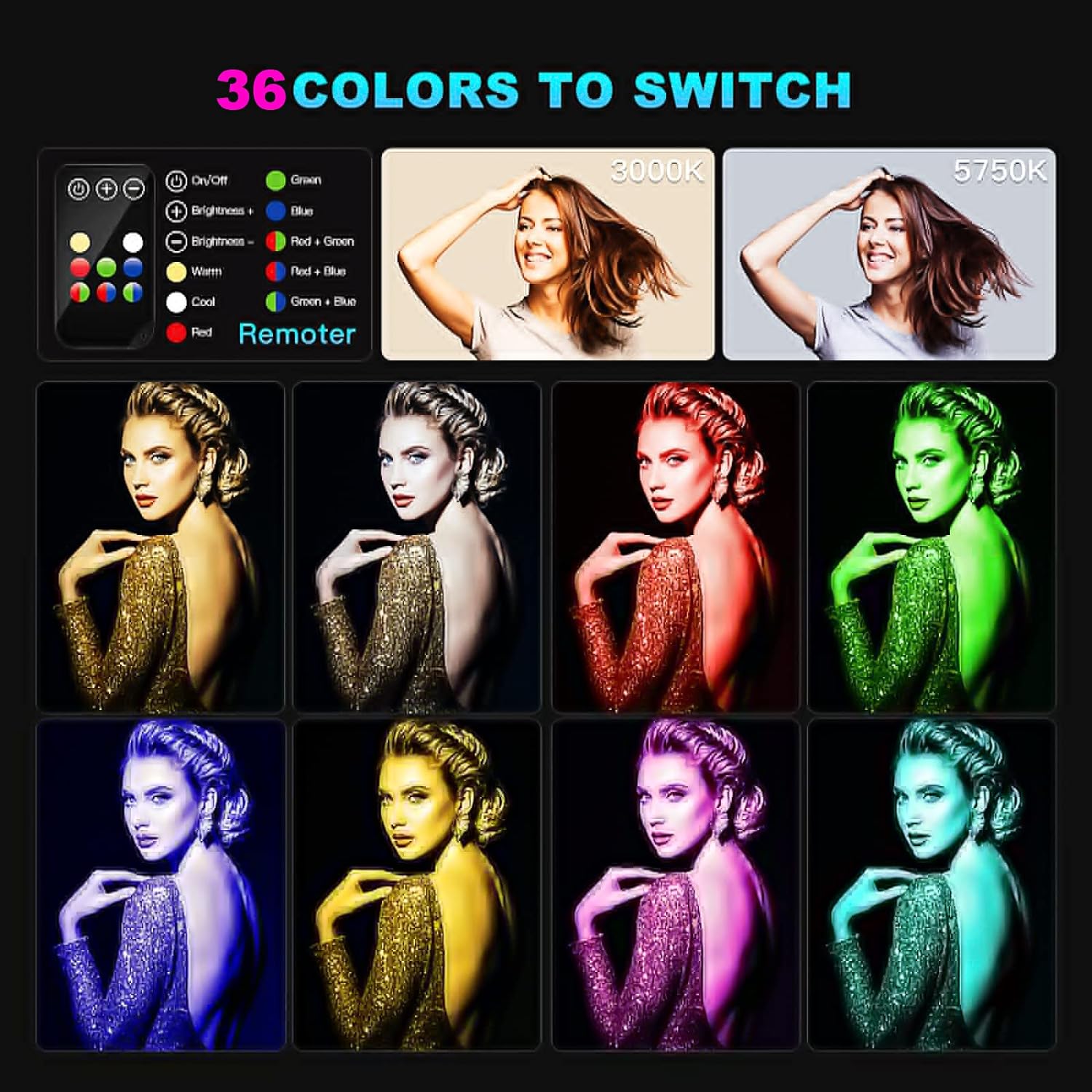
Image: The remote control interface and visual examples of the 36 available color options.

Image: A visual representation of the diverse color outputs achievable with the light wand, from warm to cool whites and various RGB blends.

Image: Demonstrating the use of the remote control for convenient operation of the light wand.
6. Maintenance
6.1 Battery Care
To prolong battery life, avoid fully discharging the battery frequently. If the light wand has been stored for an extended period and does not power on, the battery may need activation. Charge the device for 2-4 hours to reactivate the battery.

Image: Illustration detailing the internal battery and the light's memory function.
6.2 Cleaning
Wipe the light wand with a soft, dry cloth. Do not use abrasive cleaners or solvents, as they may damage the surface or internal components.
7. Troubleshooting
- Light does not turn on:
- Ensure the battery is charged. Connect the USB charging cable and allow it to charge for at least 2-4 hours, especially if it has been fully discharged for a long time.
- Verify that the power button is pressed firmly.
- Remote control not responding:
- Ensure the remote control is pointed directly at the light surface.
- Check the remote control's battery and replace if necessary.
- Ensure you are within the effective operating range (up to 7 meters).
- Inconsistent light output or flickering:
- Recharge the battery fully. Low battery can affect light stability.
- Ensure the light is not exposed to extreme temperatures.
8. Specifications
| Feature | Specification |
|---|---|
| Model Number | Q508A |
| Dimensions (L x W x H) | 21.65 x 1.14 x 1.38 inches (55 x 2.9 x 3.5 cm) |
| Item Weight | 0.74 lbs (0.34 kg) |
| Battery Type | Built-in 7.4V 2600mAh Lithium-ion |
| Charging Port | Micro USB |
| Operating Time (Full Power) | Approx. 2 hours |
| Operating Time (Low Brightness) | Up to 32 hours |
| Color Temperature Range | 3000K - 6000K |
| Brightness Levels | 30 levels |
| Max Lumens | 1000 Lumens |
| Color Rendering Index (CRI) | >95 |
| RGB Color Modes | 36 |
| Special Light Effects | 20 |
| Remote Control Range | Up to 7 meters (Infrared) |
| Mounting Thread | 1/4-inch standard nut hole |
| Date First Available | October 8, 2019 |
9. Warranty and Support
For any questions, concerns, or technical assistance regarding your LUXCEO RGB LED Photography Lighting Wand, please contact the seller directly through the "Contact Seller" button available in the "Your Orders" section of your purchase platform. Please refer to your purchase documentation for specific warranty terms and conditions, as these may vary.
Related documentsQ508A


Ask a question about this manual
Ask about setup, troubleshooting, compatibility, parts, safety, or missing instructions. Manuals+ will review the question and use this page’s manual context to help answer it.