
Introduction
Thank you for choosing the Kaiser MSA-7618 Amplified Rechargeable Speaker. This 18-inch speaker features KSR-Link technology for wireless pairing, Bluetooth connectivity, and a long-lasting rechargeable battery. This manual provides essential information for safe and effective use, including setup, operation, maintenance, and troubleshooting.

Image: Front view of the Kaiser MSA-7618 amplified speaker, showing the large speaker grille and horn tweeter.
Safety Information
- Read all instructions before operating the speaker.
- Do not expose the speaker to water or excessive moisture.
- Avoid placing the speaker near heat sources or in direct sunlight.
- Ensure proper ventilation; do not block any ventilation openings.
- Use only the power adapter supplied by the manufacturer.
- Do not attempt to open or repair the speaker yourself. Refer all servicing to qualified personnel.
- Keep out of reach of children.
Package Contents
Verify that all items are present in the package:
- Kaiser MSA-7618 Amplified Speaker
- Wireless Microphone
- Remote Control
- RCA Cable
- 3.5 mm Cable
- Charging Cable

Image: The wireless microphone included with the Kaiser MSA-7618 speaker.
Setup
1. Initial Charging
Before first use, fully charge the speaker's internal battery. Connect the charging cable to the speaker's power input and plug it into a suitable power outlet. The battery status LEDs on the control panel will indicate charging progress.
2. Speaker Placement
Place the speaker on a stable, flat surface. The MSA-7618 is designed for floor mounting and includes wheels and side handles for easy transport.

Image: Top view of the Kaiser MSA-7618 speaker, highlighting the integrated handles for portability.
3. Connecting Audio Sources
The speaker offers multiple input options:
- Bluetooth: Enable Bluetooth on your device and pair with "MSA-7618".
- RCA: Use the RCA cable to connect external audio devices.
- USB/SD: Insert a USB drive or SD card into the respective ports for direct playback.
- Microphone: Connect the wireless microphone receiver or a wired microphone to the XLR or 6.3mm input.

Image: Rear control panel of the Kaiser MSA-7618 speaker, showing various input ports (RCA, XLR, USB, SD) and controls.
Operating Instructions
1. Power On/Off
Locate the power switch on the rear control panel. Flip it to the 'ON' position to power on the speaker. Flip to 'OFF' to power down.
2. Volume Control
Adjust the 'General Volume' knob for overall sound output. Separate knobs are available for 'Microphone Volume' and 'MP3 Volume' (for USB/SD/Bluetooth sources).
3. Bluetooth Pairing
Turn on the speaker. The Bluetooth indicator will flash. On your mobile device, search for Bluetooth devices and select "MSA-7618" to pair. Once connected, the indicator will remain solid.
4. USB/SD Playback
Insert a USB drive or SD card into the corresponding port. The speaker will automatically switch to USB/SD mode and begin playback. Use the playback controls on the panel or remote control to manage tracks.
5. FM Radio
Press the 'Mode' button to switch to FM Radio mode. Use the playback controls to scan for stations.
6. Equalizer Adjustment
Use the 5-band graphic equalizer on the control panel to fine-tune the audio output to your preference.
KSR-Link Technology
The MSA-7618 features KSR-Link technology, allowing you to wirelessly connect two MSA-7618 speakers for a stereo sound experience without the need for cables between them.
Pairing Two Speakers:
- Ensure both MSA-7618 speakers are powered on and in Bluetooth mode.
- On one speaker (this will be the master), press and hold the 'KSR-Link' button until you hear a confirmation tone or see an indicator light.
- The master speaker will automatically search for and connect to the second speaker.
- Once connected, audio played via Bluetooth on the master speaker will be transmitted to both speakers, creating a stereo effect.

Image: Two Kaiser MSA-7618 speakers shown wirelessly connected using KSR-Link technology.
Maintenance
1. Cleaning
Wipe the speaker's exterior with a soft, dry cloth. Do not use abrasive cleaners or solvents. Ensure no liquids enter the speaker's openings.
2. Battery Care
To prolong battery life, avoid fully discharging the battery frequently. Recharge the speaker regularly, even if not in use for extended periods (e.g., once every 3 months).
3. Storage
Store the speaker in a cool, dry place away from direct sunlight and extreme temperatures.
Troubleshooting
| Problem | Possible Cause | Solution |
|---|---|---|
| No sound from speaker | Speaker not powered on; volume too low; incorrect input selected; audio source issue. | Ensure speaker is on and charged. Increase general and MP3/microphone volume. Select correct input mode. Check audio source device. |
| Bluetooth not connecting | Speaker not in Bluetooth mode; device too far; pairing issue. | Ensure speaker is in Bluetooth mode. Move device closer (within 10 meters). Forget device on your phone and re-pair. |
| Music interrupts or static heard | Interference; weak Bluetooth signal; faulty audio source. | Move speaker away from other electronic devices. Ensure Bluetooth device is within range. Try a different audio source or cable. |
| Battery life is shorter than expected | Battery not fully charged; aging battery; high volume usage. | Ensure battery is fully charged before use. Battery performance may degrade over time. High volume levels consume more power. |
| Remote control not working | Dead batteries in remote; obstruction between remote and speaker. | Replace remote control batteries. Ensure clear line of sight to the speaker's IR receiver. |
Specifications
| Model | MSA-7618 |
| Speaker Size | 18 inches |
| Audio Power (PMPO) | 35,000 W |
| Audio Power (RMS) | 12 W |
| Impedance | 4 Ohms |
| Connectivity | Bluetooth, KSR-Link |
| Bluetooth Range | 10 meters (approx.) |
| Inputs | RCA, XLR, 6.3mm (Microphone), USB, SD |
| Battery Life | Up to 9 hours (continuous playback) |
| Power Source | Rechargeable Battery, AC Power |
| Dimensions (L x W x H) | 60.5 x 58.5 x 94.5 cm |
| Weight | 23.95 kg |
| Special Features | 5-band graphic equalizer, multicolor LED lights, battery status indicators, wheels and side handles |
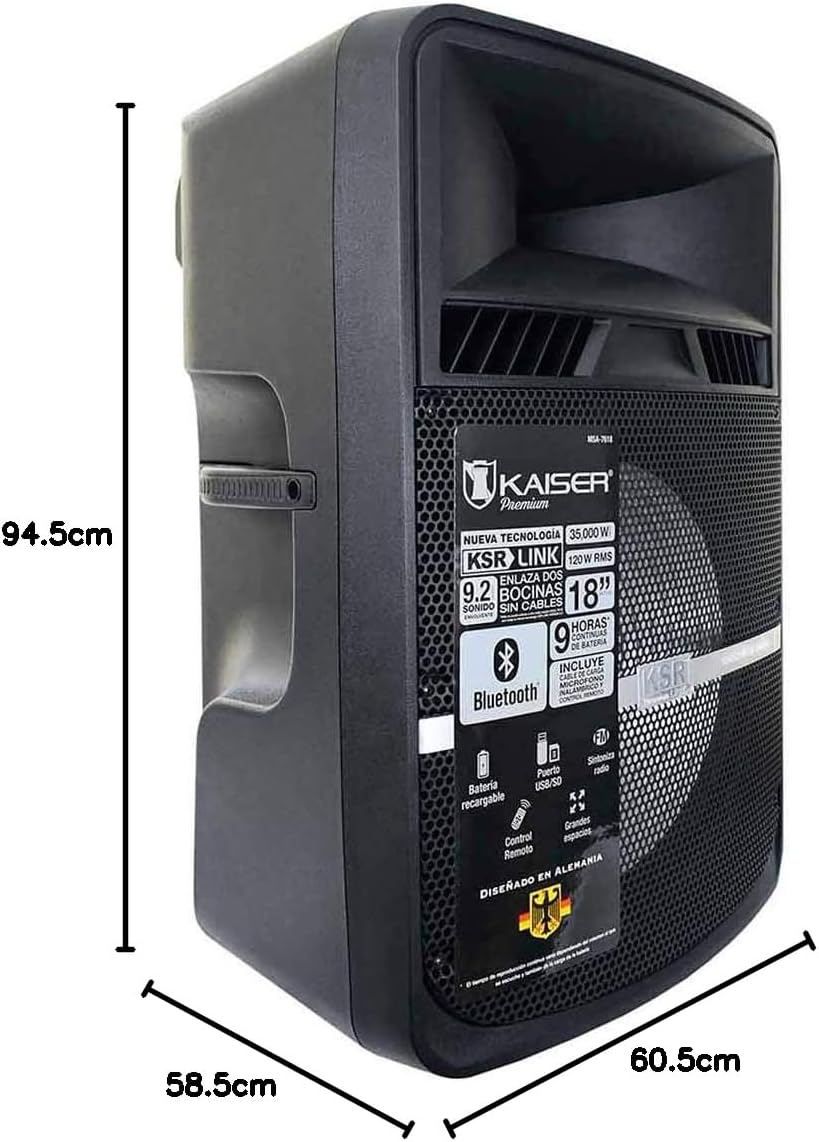
Image: Diagram showing the dimensions of the Kaiser MSA-7618 speaker: 94.5cm height, 58.5cm depth, 60.5cm width.
Warranty and Support
For warranty information or technical support, please refer to the documentation provided with your purchase or visit the official Kaiser website. Keep your proof of purchase for warranty claims.

