Introduction
This manual provides essential information for setting up, operating, maintaining, and troubleshooting your Dell Latitude 5420 Rugged Laptop. Please read these instructions carefully to ensure proper use and longevity of your device.
Product Overview
The Dell Latitude 5420 Rugged Laptop is designed for durability and performance in challenging environments. It features a 14-inch Full HD touchscreen display, an Intel Core i5-8350U processor, 16GB DDR4 RAM, and a 256GB SSD, running on Windows 10 Pro.

Figure 1: Dell Latitude 5420 Rugged Laptop, open view.
Setup
1. Initial Power-On
- Connect the AC Adapter: Plug the power adapter into the laptop's power port and then into a wall outlet.
- Power On: Open the laptop lid and press the power button, typically located on the top right of the keyboard deck.
- Operating System Setup: Follow the on-screen instructions to complete the Windows 10 Pro initial setup, including language, region, network connection, and user account creation.
2. Battery Installation/Removal
The Dell Latitude 5420 Rugged Laptop supports user-serviceable batteries. To install or remove the battery:
- Power Off: Ensure the laptop is powered off and disconnected from the AC adapter.
- Access Battery Compartment: Turn the laptop over. Locate the battery compartment latches, usually on the underside.
- Remove/Insert Battery: Slide the latches to unlock and carefully remove the battery. To install, align the battery with the compartment and push until it clicks into place.

Figure 2: Underside view showing battery compartments.
Operating Instructions
1. Basic Interaction
- Keyboard: Use the backlit keyboard for typing. Adjust backlight intensity using function keys (refer to your laptop's specific key combinations, often Fn + F10).
- Touchpad: Use the integrated touchpad for cursor control. Supports multi-touch gestures.
- Touchscreen: Interact directly with the display using touch gestures for navigation and input.
2. Connecting Peripherals
The laptop offers various ports for connectivity:
- USB 3.1 Gen 1 Type-A Ports: Connect USB devices such as external drives, mice, or keyboards. One port supports PowerShare for charging devices when the laptop is off.
- USB Type-C DisplayPort Alt Mode: Connect compatible displays or USB-C devices.
- 3.5 mm Universal Audio Port: Connect headphones or a headset.
- SD Card Reader: Insert SD cards for data transfer.
- RJ-45 Connector: Connect to a wired Ethernet network.
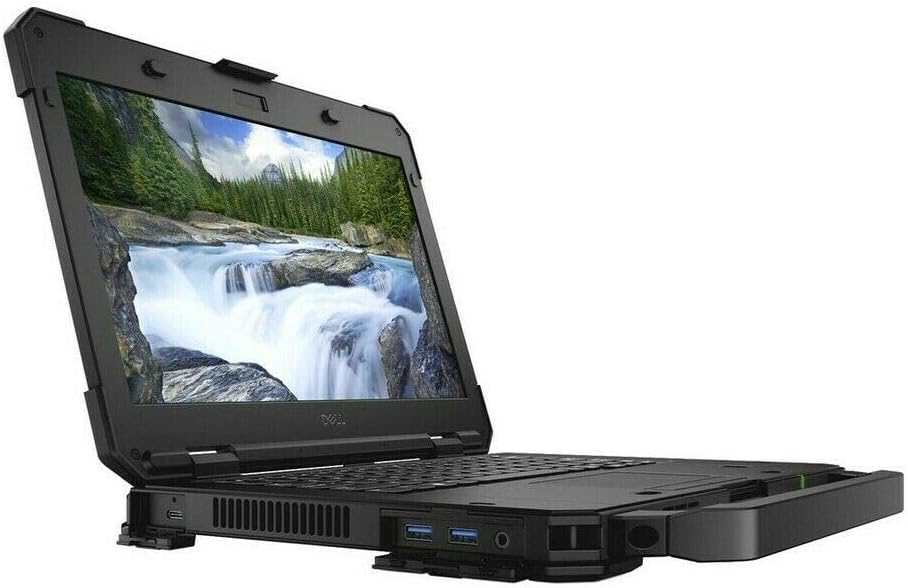
Figure 3: Side view with accessible ports.
3. Wireless Connectivity
- Wi-Fi (802.11ac): To connect to a wireless network, click the Wi-Fi icon in the taskbar, select your network, and enter the password if required.
- Bluetooth 4.2: To pair Bluetooth devices, go to Windows Settings > Devices > Bluetooth & other devices, and follow the pairing instructions.
Maintenance
1. Cleaning the Laptop
- Screen: Use a soft, lint-free cloth lightly dampened with water or a screen cleaner. Avoid harsh chemicals.
- Keyboard and Chassis: Use a soft cloth. For stubborn dirt, a slightly damp cloth with mild soap can be used, ensuring no liquid enters openings.
- Ports: Use compressed air to gently clear dust from ports.
2. Battery Care
- Avoid extreme temperatures.
- Do not fully discharge the battery frequently.
- For long-term storage, charge the battery to about 50% and store in a cool, dry place.
3. Software Updates
Regularly update your Windows operating system and drivers to ensure optimal performance and security. Access Windows Update via Settings > Update & Security.
Troubleshooting
This section addresses common issues you might encounter with your Dell Latitude 5420 Rugged Laptop.
- Laptop does not power on: Ensure the AC adapter is securely connected and the battery is charged. Try a different power outlet.
- Display issues: If the screen is blank, try connecting an external monitor to check if the issue is with the laptop's display. Restart the laptop.
- No Wi-Fi connection: Check if Wi-Fi is enabled in Windows settings. Restart your router and the laptop.
- Slow performance: Close unnecessary applications. Check for background updates. Ensure sufficient free space on the SSD.
For more complex issues, refer to Dell's official support website or contact their customer service.
Specifications
| Feature | Specification |
|---|---|
| Processor | Intel Core i5-8350U Quad-Core (1.7 GHz, up to 3.60 GHz Turbo) |
| RAM | 16GB DDR4 SDRAM |
| Storage | 256GB Solid State Drive (SSD) |
| Display | 14-inch Full HD (1920x1080) Touchscreen |
| Graphics | Integrated Intel Graphics |
| Operating System | Windows 10 Pro |
| Wireless Connectivity | 802.11ac Wi-Fi, Bluetooth 4.2 |
| Ports | USB 3.1 Gen 1 Type-A (with PowerShare), Two USB 3.1 Gen 1 Type-A, USB Type-C DisplayPort Alt mode, RJ-45, 3.5 mm Universal audio port, SD Card Reader |
| Camera | Integrated 1280x720 Camera |
| Keyboard | Backlit keyboard |
| Weight | Approximately 4.5 pounds |
| Dimensions (LxWxH) | 9.27 x 13.8 x 1.29 inches |
Warranty and Support
Warranty Information
This Dell Latitude 5420 Rugged Laptop is a renewed product and typically comes with a 90-day warranty from the seller. Please refer to your purchase documentation for specific warranty terms and conditions.
Customer Support
For technical assistance, driver downloads, or further support, please visit the official Dell Support website or contact Dell customer service directly. Have your laptop's service tag ready for quicker assistance.
Product Videos
Video 1: Dell Latitude 5420 Rugged Laptop overview (0:30 duration). This video provides a brief visual introduction to the laptop's features and design.
Video 2: Dell Latitude 5420 Rugged Laptop features demonstration (1:08 duration). This video highlights key functionalities and rugged design aspects of the laptop.


