
1. Introduction
This manual provides detailed instructions for the safe installation, operation, and maintenance of the BESTTEN 20 Amp Decorator Receptacle. Please read this manual thoroughly before installation and retain it for future reference. This product is designed for both residential and commercial applications.
2. Safety Information
WARNING: Risk of Electric Shock or Fire.
- Always turn off power at the circuit breaker or fuse box before installation, servicing, or removing the receptacle.
- Installation must be performed by a qualified electrician or in accordance with all local and national electrical codes.
- Use only with copper wire. Do not use with aluminum wire.
- Ensure all wire connections are secure and properly insulated.
- Do not exceed the specified electrical ratings of the device.
- This device is not tamper-resistant.
3. Package Contents
- BESTTEN 20 Amp Decorator Receptacle (Quantity as purchased)
- Decorator Wallplate(s)
- Mounting Screws

Figure 1: BESTTEN 20 Amp Decorator Receptacles with included wallplates.
4. Specifications
| Parameter | Value |
|---|---|
| Model Number | USP-20-B-20PK |
| Electrical Rating | 20A/125V/2500W |
| Material | Polycarbonate Thermoplastic, Solid Brass Internals |
| Color | White |
| Receptacle Dimensions (H x W x D) | 4.06" x 1.29" x 0.98" |
| Wallplate Dimensions (H x W) | 4.5" x 2.75" |
| Certifications | UL/cUL Listed |

Figure 2: Product Dimensions of the receptacle and wallplate.

Figure 3: Key features of the BESTTEN Decorator Receptacle.
5. Installation Instructions
Follow these steps carefully to install your BESTTEN 20 Amp Decorator Receptacle.
- Turn Off Power: Locate the circuit breaker or fuse that controls the power to the outlet where you will be installing the receptacle. Turn off the power completely. Verify power is off using a voltage tester.
- Remove Old Receptacle: Unscrew and carefully remove the existing wallplate and receptacle from the electrical box. Disconnect the wires from the old receptacle.
- Prepare Wires: Strip approximately 1/2 inch (12.7 mm) of insulation from the ends of the electrical wires (Hot, Neutral, Ground). For 20 Amp receptacles, only 12 AWG solid copper wire is permitted for side wiring connections.
- Connect Wires:
- Connect the Hot (Black) wire to the brass-colored screw terminal.
- Connect the Neutral (White) wire to the silver-colored screw terminal.
- Connect the Ground (Green or bare copper) wire to the green screw terminal.
Ensure all connections are tight and secure. The BESTTEN receptacle features side wiring with clamp connections for secure wire termination. Do not use push-in connections for 20 Amp receptacles.
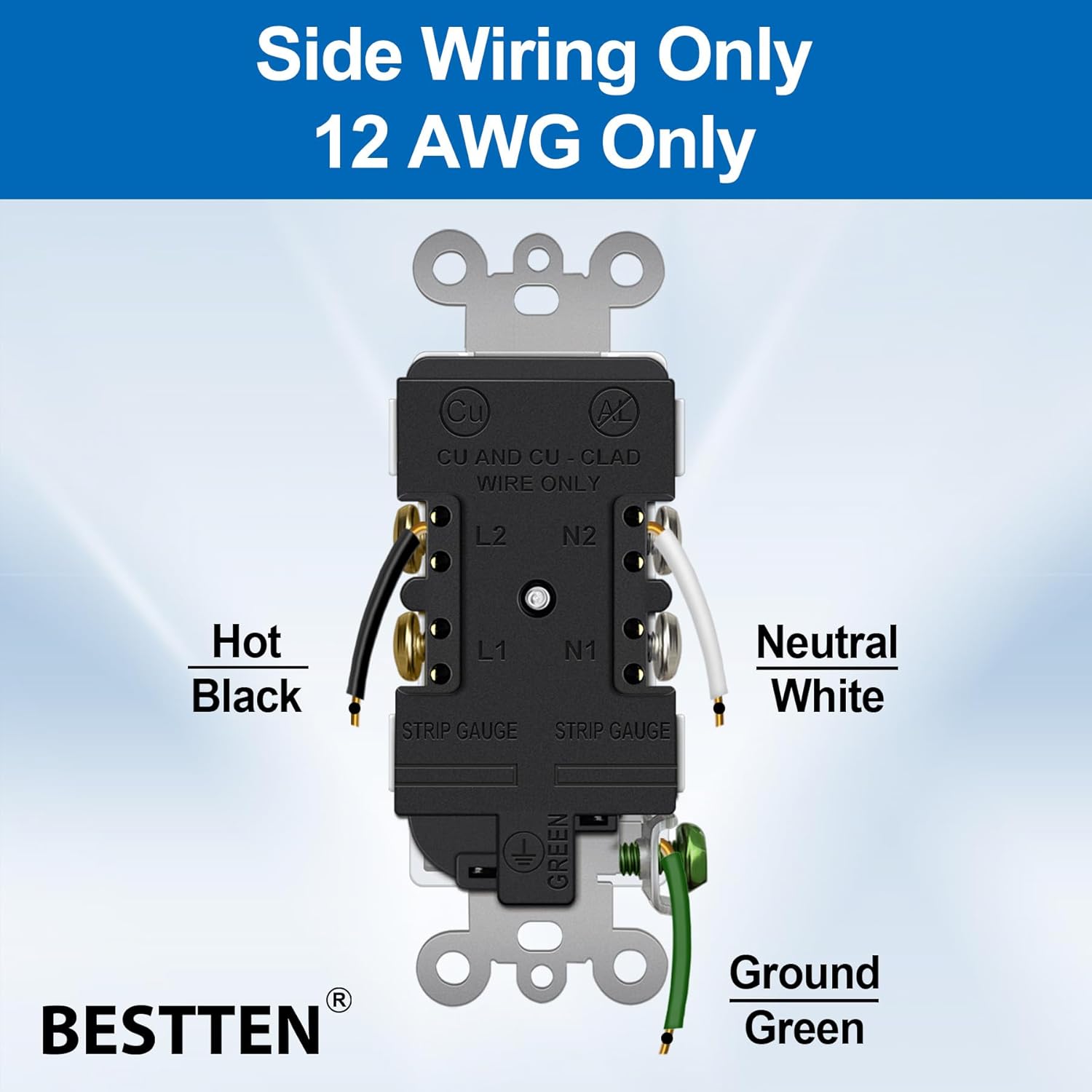
Figure 4: Side wiring connections for Hot, Neutral, and Ground.
- Break-Off Tabs (Optional for Split Receptacle): If you require a split receptacle (e.g., for a switched outlet), carefully break off the metal tab connecting the two hot terminals. Use pliers for this step.

Figure 5: Breaking off the tab for split receptacle configuration.
- Mount Receptacle: Carefully push the wired receptacle into the electrical box. Secure it with the provided mounting screws. The receptacle features break-off plaster ears for flush alignment with the wall surface.
- Install Wallplate: Attach the decorator wallplate over the receptacle using the provided screws.
- Restore Power: Turn the power back on at the circuit breaker or fuse box.
- Test: Plug a device into the newly installed receptacle to ensure it is functioning correctly.
6. Operating Instructions
The BESTTEN 20 Amp Decorator Receptacle functions as a standard electrical outlet. Simply insert the plug of your electrical device into the receptacle. Ensure the device's electrical requirements do not exceed the receptacle's rating of 20A/125V/2500W.

Figure 6: Receptacle in use in a kitchen setting.
7. Maintenance
- Cleaning: To clean the receptacle and wallplate, wipe with a soft, damp cloth. Do not use abrasive cleaners or solvents. Ensure power is off before cleaning.
- Inspection: Periodically inspect the receptacle for any signs of damage, such as cracks, discoloration, or loose connections. If any damage is observed, turn off power and replace the receptacle.
8. Troubleshooting
- No Power to Receptacle:
- Check the circuit breaker or fuse box to ensure the power is on.
- Verify that the wires are securely connected to the receptacle terminals.
- Ensure the correct voltage is supplied to the circuit.
- Loose Plug Connection:
- If plugs feel loose, the receptacle may be worn and require replacement.
- Receptacle is Hot to the Touch:
- This could indicate an overload or a loose connection. Immediately unplug devices, turn off power, and inspect wiring. If the issue persists, consult a qualified electrician.
9. Warranty and Support
For warranty information or technical support, please refer to the official BESTTEN website or contact BESTTEN customer service directly. Keep your purchase receipt as proof of purchase.
Contact Information:
- Visit the BESTTEN Store on Amazon for more products and support.
