1. Introduction
Thank you for choosing the VTSYIQI XY15MB Electronic Weight Counting Scale. This manual provides essential information for the proper setup, operation, and maintenance of your new scale. Please read this manual thoroughly before using the device to ensure accurate measurements and safe operation. Keep this manual for future reference.
2. Safety Information
- Operate the scale on a stable, level surface to ensure accurate readings.
- Avoid exposing the scale to extreme temperatures, humidity, or direct sunlight.
- Do not overload the scale beyond its maximum capacity of 16kg.
- Keep the scale away from strong electromagnetic fields, which can interfere with its operation.
- Clean the scale with a soft, damp cloth. Do not use abrasive cleaners or immerse the unit in water.
- Ensure the power adapter is correctly connected and used with the specified voltage.
3. Package Contents
Please check the package contents upon receipt to ensure all items are present:
- VTSYIQI XY15MB Electronic Weight Counting Scale Unit
- Power Adapter
- User Manual
4. Product Overview
4.1 Key Features
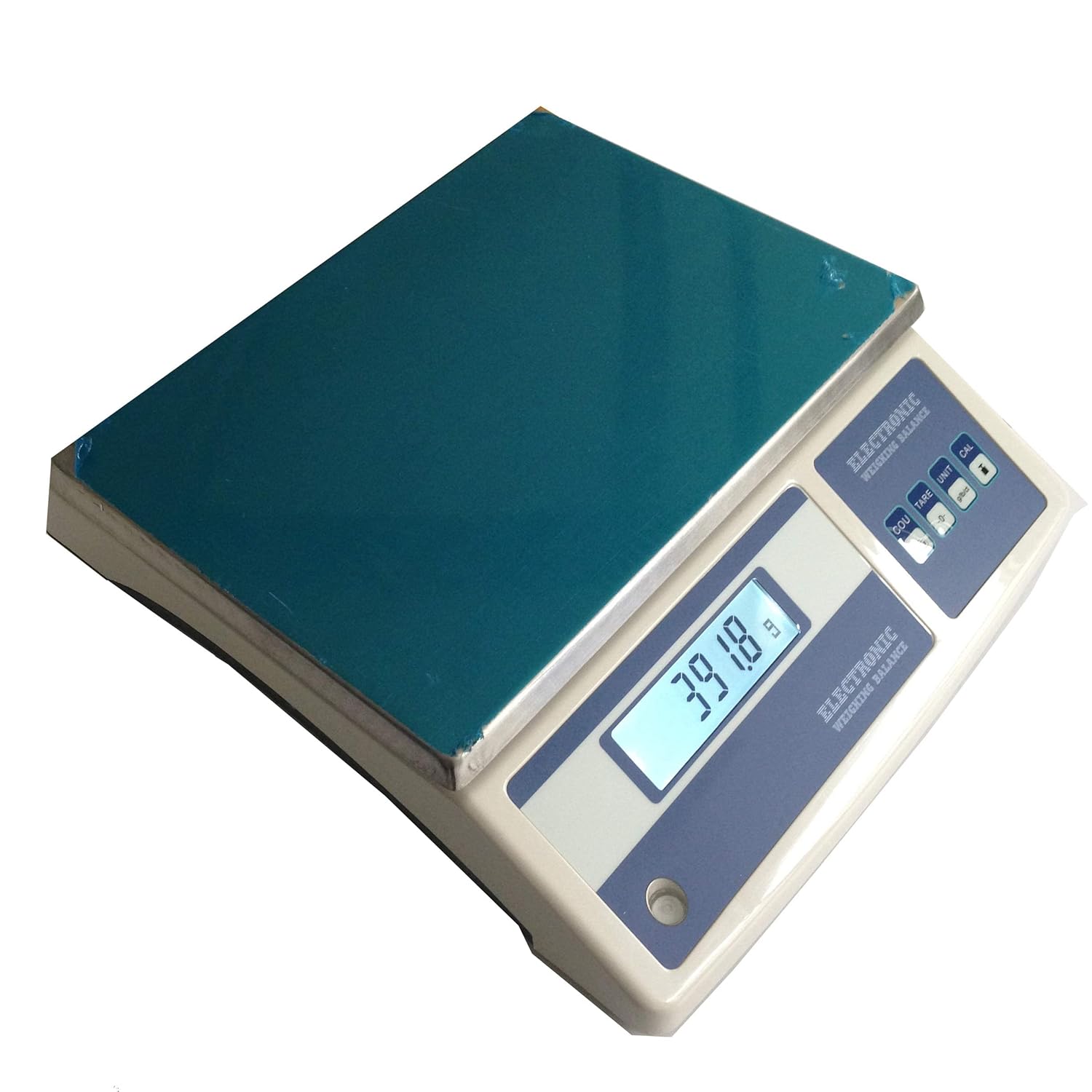
- Large stainless steel weighing pan for stability and durability.
- High precision with 0.1g resolution and a maximum capacity of 16kg.
- Clear LCD display for easy reading of measurements.
- Integrated spirit bubble for precise leveling.
- Functions include Tare, Counting, and External Calibration.
- Rechargeable battery for portable operation.
- Overload alarm to prevent damage.
4.2 Components
The VTSYIQI XY15MB scale features a user-friendly design with a clear display and intuitive control panel.


5. Setup
5.1 Unpacking
- Carefully remove the scale and all accessories from the packaging.
- Inspect the scale for any signs of damage during transit. If damage is found, contact your supplier immediately.
- Place the scale on a firm, level, and vibration-free surface.
5.2 Power Connection
- Connect the provided power adapter to the scale's power input port.
- Plug the power adapter into a suitable electrical outlet.
- The scale can also operate on its internal rechargeable battery. Ensure the battery is charged before portable use.
5.3 Leveling the Scale
Accurate weighing requires the scale to be perfectly level.
- Locate the spirit bubble on the scale's base.
- Adjust the adjustable feet at the bottom of the scale until the air bubble is centered within the circle of the spirit level.
6. Operating Instructions
6.1 Power On/Off
Press the [ON/OFF] button to turn the scale on or off. The display will show a self-test sequence before settling at zero.
6.2 Basic Weighing
- Ensure the scale is level and powered on, displaying '0.0g'.
- Gently place the item to be weighed on the center of the weighing pan.
- Wait for the reading to stabilize (indicated by a stable icon on the display, if available).
- Read the weight displayed on the LCD.
6.3 Tare Function
The Tare function allows you to subtract the weight of a container, so only the net weight of the contents is measured.
- Place an empty container on the weighing pan.
- Press the [TARE] button. The display will reset to '0.0g'.
- Add the items to be weighed into the container. The display will show the net weight of the items.
6.4 Counting Function
The Counting function allows you to count a large number of identical items based on a sample weight.
- Place a known quantity of items (e.g., 10, 20, 50 pieces) on the weighing pan.
- Press the [COU] button. The display will prompt you to select the sample quantity.
- Use the appropriate buttons (refer to specific model instructions if available, typically TARE or UNIT) to select the sample quantity (e.g., '10', '20', '50').
- Press [COU] again to confirm the sample. The display will now show the count of items.
- Add more items to the pan, and the scale will display the total count.
6.5 Unit Conversion
To switch between available weighing units (e.g., grams, kilograms, pounds, carats), press the [UNIT] button repeatedly until the desired unit is displayed.
6.6 External Calibration
Calibration ensures the accuracy of your scale. It should be performed periodically or if you suspect inaccurate readings. An external calibration weight (not included) is required.
- Ensure the scale is powered on and stable, with nothing on the pan.
- Press and hold the [CAL] button until the display shows 'CAL' or a calibration prompt.
- The display will then indicate the required calibration weight (e.g., '10000g' for 10kg).
- Carefully place the specified calibration weight onto the center of the weighing pan.
- Wait for the scale to process the calibration. The display will typically show 'PASS' or return to '0.0g' once calibration is complete.
- Remove the calibration weight.
7. Maintenance
7.1 Cleaning
- Always disconnect the scale from the power source before cleaning.
- Wipe the weighing pan and scale body with a soft, slightly damp cloth.
- For stubborn dirt, a mild detergent can be used, but ensure no liquid enters the scale's internal components.
- Do not use abrasive materials, solvents, or harsh chemicals, as these can damage the finish and internal parts.
7.2 Storage
- When not in use for extended periods, store the scale in a dry, dust-free environment.
- Avoid placing heavy objects on the weighing pan during storage.
- If the scale has a rechargeable battery, ensure it is charged periodically to maintain battery health.
8. Troubleshooting
If you encounter issues with your scale, refer to the table below for common problems and solutions.
| Problem | Possible Cause | Solution |
|---|---|---|
| Scale does not turn on | No power, discharged battery, faulty power adapter | Check power connection, charge battery, try a different outlet. |
| Inaccurate readings | Scale not level, not calibrated, unstable surface, air currents | Level the scale, perform external calibration, move to a stable location, shield from drafts. |
| Display shows 'O_Ld' or 'Err' | Overload | Remove excess weight immediately. Do not exceed 16kg capacity. |
| Counting function is incorrect | Incorrect sample quantity set, items not uniform | Ensure correct sample quantity is entered, use uniform items for counting. |
If the problem persists after attempting these solutions, please contact customer support.
9. Specifications
| Parameter | Value |
|---|---|
| Model | XY15MB |
| Capacity | 16 kg |
| Resolution | 0.1 g |
| Stable Time | ≤ 3 seconds |
| Pan Size | 230 x 315 mm |
| Operation Temperature | 5 - 35 ℃ |
| Repeatability | 0.2 g |
| Linearity | 0.3 g |
| Gross Weight (Packing) | 4 kg |
| Material | Alloy Steel (Pan) |
| Display | LCD |
| Power Source | AC Adapter / Rechargeable Battery |
| Optional Accessories | RS232C Interface, Printer |
10. Warranty and Support
VTSYIQI products are manufactured to high-quality standards. For warranty information, please refer to the documentation provided with your purchase or contact your retailer. If you require technical assistance or have questions not covered in this manual, please contact VTSYIQI customer support through the official website or your point of purchase.


