
1. Introduction
This manual provides essential instructions for the safe and effective use of your PK Power AC DC Adapter, Model 19348R. This adapter is designed to provide power to compatible LG TV models, specifically 49LJ510M, 49LJ510M-UB, 49LJ5100, and 49LJ5100-UC.
Package Contents:
- 1 x PK Power AC DC Adapter (Model 19348R)
2. Safety Information
Please read and understand all safety instructions before using this product. Failure to follow these instructions may result in electric shock, fire, or damage to the product or connected devices.
- Do not expose the adapter to rain, moisture, or extreme temperatures.
- Do not disassemble or modify the adapter.
- Ensure the adapter is connected to a properly grounded power outlet.
- Keep the adapter away from heat sources and direct sunlight.
- Disconnect the adapter from the power outlet when not in use for extended periods.
- This adapter features Over Voltage Protection (OVP), Over Current Protection (OCP), and Short Circuit Protection (SCP) to safeguard your devices.

Image 2.1: PK Power AC DC Adapter displaying input voltage, frequency, and safety certifications.
3. Product Overview
The PK Power AC DC Adapter is a compact power supply unit designed for specific LG TV models. It converts AC household current to the DC voltage required by your television.

Image 3.1: Full view of the PK Power AC DC Adapter, including the main adapter unit, detachable AC input cable, and DC output cable.

Image 3.2: Detailed view of the adapter's main block and the DC output cable, highlighting the barrel connector.
4. Setup
Follow these steps to properly connect your AC DC Adapter to your LG TV:
- Verify Compatibility: Ensure your LG TV model is one of the compatible models listed (49LJ510M, 49LJ510M-UB, 49LJ5100, 49LJ5100-UC).
- Connect AC Input Cable: Insert the figure-8 connector of the AC input cable into the corresponding port on the adapter unit.
- Connect DC Output Cable: Plug the barrel connector of the DC output cable into the power input port on your LG TV.
- Connect to Power Outlet: Insert the two-prong plug of the AC input cable into a standard 100-240V AC wall outlet.
- Power On TV: Once connected, you can power on your LG TV using its remote control or power button.

Image 4.1: The PK Power AC DC Adapter with its separate AC input and DC output cables, illustrating how they connect to the main adapter unit.
5. Operating Instructions
Once the adapter is correctly connected to your LG TV and a power outlet, the TV should receive power. No additional operation is required for the adapter itself. It functions automatically to provide stable power to your television.
6. Maintenance
Proper maintenance ensures the longevity and safe operation of your adapter.
- Cleaning: Disconnect the adapter from the power outlet and your TV before cleaning. Use a soft, dry cloth to wipe the exterior. Do not use liquid cleaners or abrasive materials.
- Storage: Store the adapter in a cool, dry place when not in use. Avoid wrapping cables too tightly to prevent damage.
- Inspection: Periodically inspect the cables and adapter housing for any signs of damage, such as cuts, fraying, or cracks. If damage is found, discontinue use and replace the adapter.
7. Troubleshooting
If you encounter issues with your adapter, refer to the following troubleshooting steps:
- No Power to TV:
- Ensure all cable connections are secure at both the adapter and the TV.
- Verify the AC input cable is firmly plugged into a working wall outlet.
- Test the wall outlet with another device to confirm it has power.
- Adapter Feels Hot:
- It is normal for the adapter to feel warm during operation. However, if it is excessively hot to the touch, disconnect it immediately and contact support.
- Ensure the adapter is in a well-ventilated area and not covered.
- Flickering Screen/Unstable Power:
- Check for loose connections.
- Ensure the adapter is compatible with your specific TV model.
- If the issue persists, the adapter may be faulty and require replacement.
8. Specifications
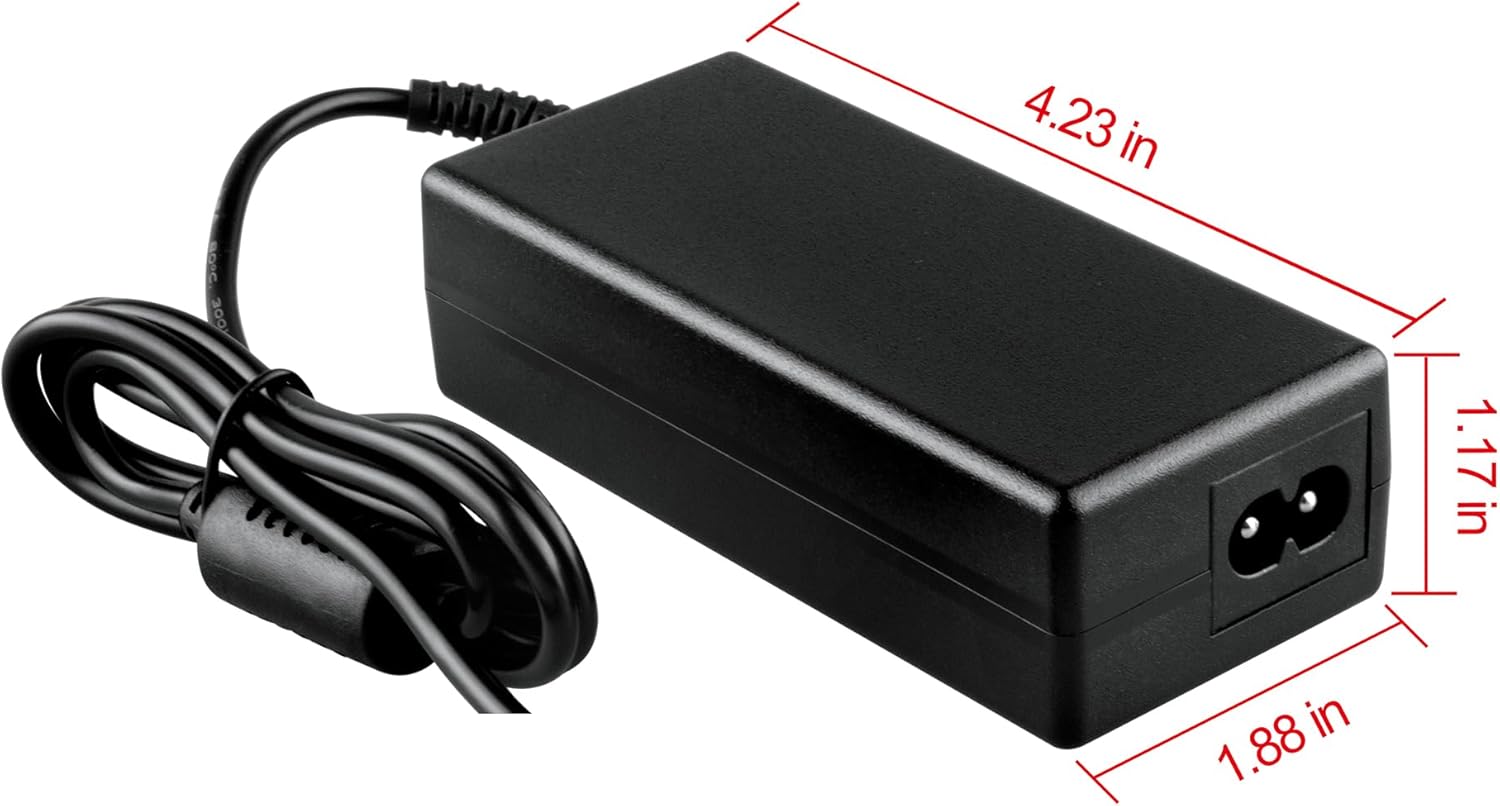
Image 8.1: Dimensions of the PK Power AC DC Adapter unit.
| Feature | Detail |
|---|---|
| Model Number | 19348R |
| Input Voltage | 100-240V AC, 50-60Hz |
| Amperage | 0.15 Amps |
| Connector Type | Barrel Connector |
| Compatible Devices | LG TV 49LJ510M, 49LJ510M-UB, 49LJ5100, 49LJ5100-UC |
| Special Features | OVP, OCP, SCP Protection (Over Voltage, Over Current, Short Circuit Protection) |
| Certifications | CE / FCC / RoHS |
| Item Weight | 11 ounces |
| Color | Black |
9. Warranty and Support
PKPOWER products are designed for reliability. For warranty information or technical support, please refer to the manufacturer's official website or contact their customer service directly. Our friendly and reliable customer service will respond to you within 24 hours for any inquiries.
For further assistance, please visit the PKPOWER Store on Amazon.