
Victrola VBB-25-SLV
Contents
Victrola VBB-25-SLV Mini Bluetooth Boombox User Manual
Model: VBB-25-SLV
Important Safety Instructions
- Read these instructions thoroughly before operating the unit.
- Keep these instructions for future reference.
- Heed all warnings on the product and in the operating instructions.
- Follow all instructions.
- Do not use this apparatus near water.
- Clean only with a dry cloth.
- Do not block any ventilation openings. Install in accordance with the manufacturer's instructions.
- Do not install near any heat sources such as radiators, heat registers, stoves, or other apparatus (including amplifiers) that produce heat.
- Protect the power cord from being walked on or pinched, particularly at plugs, convenience receptacles, and the point where they exit from the apparatus.
- Only use attachments/accessories specified by the manufacturer.
- Unplug this apparatus during lightning storms or when unused for long periods of time.
- Refer all servicing to qualified service personnel. Servicing is required when the apparatus has been damaged in any way, such as power-supply cord or plug is damaged, liquid has been spilled or objects have fallen into the apparatus, the apparatus has been exposed to rain or moisture, does not operate normally, or has been dropped.
Product Overview
The Victrola VBB-25-SLV is a compact boombox designed for versatile audio playback. It features a classic design combined with modern functionalities.

Figure 1: Front view of the Victrola VBB-25-SLV Mini Bluetooth Boombox, showing the radio tuner, cassette compartment, speaker, and control buttons.
Key Features:
- Wireless Bluetooth Connectivity: Stream audio wirelessly from compatible devices.
- AM/FM Radio: Analog tuner for local radio stations.
- Cassette Player & Recorder: Play your favorite cassette tapes and record new audio.
- USB Port: For MP3 playback from USB storage devices.
- Headphone Jack: For private listening.
- Dual Power Options: Operates via AC power or batteries for portability.
Product Overview Video:
Video Description: A brief overview of the Victrola VBB-25-SLV Mini Bluetooth Boombox, highlighting its features and design.
Setup
Powering Your Boombox
The Victrola VBB-25-SLV can be powered using either AC power or C-size batteries.
AC Power Operation:
- Ensure the unit is switched OFF.
- Insert the AC power cord into the AC IN jack located on the back of the unit.
- Plug the other end of the AC power cord into a standard wall outlet (120V ~ 60Hz).
Battery Operation:
For portable use, the boombox requires 4 x 1.5V "C" size batteries (not included).
- Ensure the unit is switched OFF and disconnected from AC power.
- Open the battery compartment cover located on the back of the unit.
- Insert four "C" size batteries, ensuring correct polarity (+/-) as indicated inside the compartment.
- Close the battery compartment cover securely.
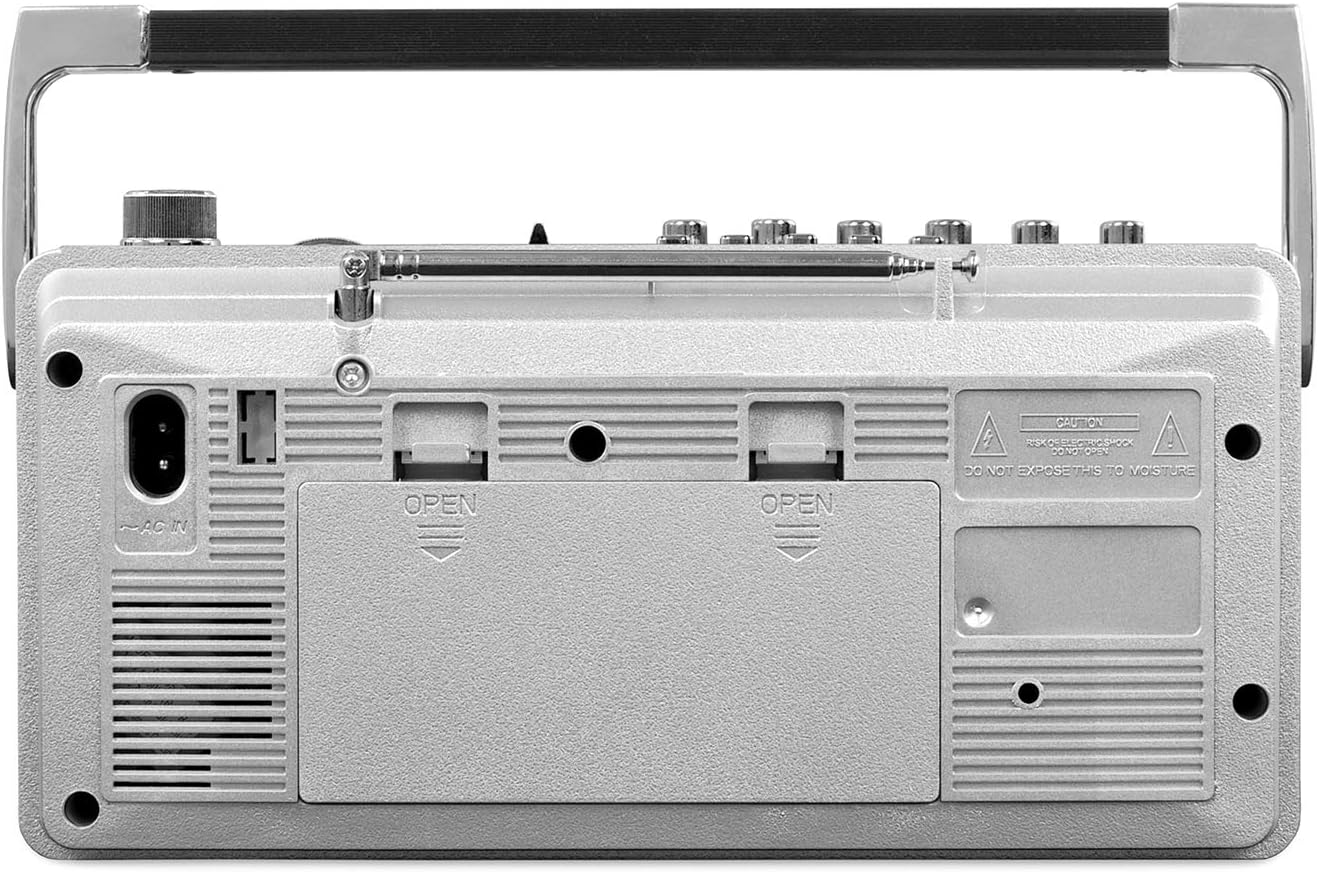
Figure 2: Rear view of the boombox, showing the AC IN port and the battery compartment.
Note: When the AC power cord is connected, battery power is automatically disconnected. Remove batteries if the unit will not be used for an extended period to prevent leakage.
Operating Instructions
Powering On/Off
To turn the unit ON, slide the Function Selector switch to any desired mode (BT, FM, AM, TAPE). To turn the unit OFF, slide the Function Selector switch to the "OFF" position.
Radio Operation (AM/FM)
- Slide the Function Selector switch to "FM" or "AM".
- Extend the telescopic antenna for optimal FM reception. For AM, rotate the unit for best reception.
- Rotate the TUNING knob to select your desired radio station.
- Adjust the VOLUME knob to your preferred listening level.
Cassette Player/Recorder Operation

Figure 3: Side view of the boombox with the cassette compartment open, showing the tape mechanism.
Playing a Cassette:
- Slide the Function Selector switch to "TAPE".
- Press the STOP/EJECT button to open the cassette door.
- Insert a cassette tape with the exposed tape facing upwards.
- Close the cassette door.
- Press the PLAY button to begin playback.
- Use the F.FWD (Fast Forward) and REW (Rewind) buttons to navigate the tape.
- Press PAUSE to temporarily stop playback, and press again to resume.
- Press STOP/EJECT to stop playback and eject the tape.
Recording to Cassette:
You can record from the built-in microphone, radio, or Bluetooth source onto a blank cassette tape.
- Insert a blank, recordable cassette tape into the cassette compartment.
- Select the desired input source (FM, AM, or BT).
- Press the REC (Record) button. The PLAY button will also engage automatically.
- Recording will begin. Ensure the volume of the source is appropriate.
- To stop recording, press the STOP/EJECT button.
Bluetooth Operation
- Slide the Function Selector switch to "BT" (Bluetooth). The Bluetooth indicator light will flash.
- Enable Bluetooth on your external device (e.g., smartphone, tablet).
- Search for "Victrola VBB-25-SLV" in your device's Bluetooth settings and select it to pair.
- Once paired, the Bluetooth indicator light will stop flashing and remain solid.
- You can now play audio from your Bluetooth device through the boombox.
- Adjust the volume on both your Bluetooth device and the boombox for optimal sound.
USB Playback
- Insert a USB flash drive containing MP3 audio files into the USB port.
- The unit should automatically switch to USB playback mode. If not, cycle through modes until USB is active.
- Use the playback control buttons (Play, Pause, Skip) on the boombox to control your music.
Headphone Use
For private listening, plug standard 3.5mm headphones into the HEADPHONE jack located on the side of the unit. The main speaker will be muted automatically.
Maintenance
Cleaning the Unit:
- Wipe the exterior of the unit with a soft, dry cloth.
- Do not use harsh chemicals, cleaning solvents, or strong detergents.
Cassette Deck Care:
- To ensure optimal sound quality and prevent tape damage, regularly clean the tape heads, capstan, and pinch roller.
- Use a cotton swab lightly moistened with isopropyl alcohol or a specialized tape head cleaning fluid.
- Avoid touching the tape heads with bare hands.
Battery Care:
- Remove batteries if the unit will not be used for an extended period to prevent potential leakage and damage.
- Do not mix old and new batteries, or different types of batteries.
Troubleshooting
| Problem | Possible Cause | Solution |
|---|---|---|
| No power. | AC cord not properly connected; Batteries are dead or incorrectly inserted. | Check AC cord connection. Replace batteries or ensure correct polarity. |
| Poor radio reception. | Antenna not extended (FM); Unit position (AM); Weak signal. | Fully extend the FM antenna. Rotate the unit for better AM reception. Try moving the unit to a different location. |
| Cassette tape not playing or sounds distorted. | Tape inserted incorrectly; Tape heads are dirty; Tape is damaged. | Ensure tape is inserted correctly. Clean tape heads, capstan, and pinch roller. Try a different tape. |
| Bluetooth device not pairing. | Boombox not in BT mode; Device's Bluetooth is off; Device too far. | Ensure Function Selector is on "BT". Turn on Bluetooth on your device. Move device closer to the boombox (within 30 feet). |
| USB playback not working. | USB drive not inserted correctly; Incompatible file format; USB drive corrupted. | Re-insert USB drive. Ensure files are MP3 format. Try a different USB drive. |
| Low volume with headphones. | Headphone volume setting; Headphone impedance. | Adjust volume on the boombox. Ensure headphones are functioning correctly. |
Specifications
- Model: VBB-25-SLV
- Power Supply: AC 120V ~ 60Hz or 4 x 1.5V "C" size batteries
- Connectivity: Bluetooth, USB
- Radio Frequencies: FM 87.5 - 108 MHz, AM 520 - 1710 KHz
- Speaker Type: Stereo
- Product Dimensions (L x W x H): 9.8 x 3.35 x 6.3 inches
- Item Weight: 2.94 pounds
- Manufacturer: Victrola
- Color: Silver
Warranty Information
For detailed warranty information, please refer to the warranty card included with your product or visit the official Victrola website.
Support
If you encounter any issues or have questions regarding your Victrola VBB-25-SLV Mini Bluetooth Boombox, please contact Victrola Customer Support:
- Website: www.victrola.com/support
- Phone: Refer to your product packaging or the Victrola website for regional contact numbers.
Documents and downloads
Ask a question about this manual
Ask about setup, troubleshooting, compatibility, parts, safety, or missing instructions. Manuals+ will review the question and use this page’s manual context to help answer it.