
Introduction
The Garmin vivoactive 4S is a smaller-sized GPS smartwatch designed to help you monitor your health, track your fitness activities, and stay connected. It offers a broad range of all-day health monitoring features, music storage, and on-screen animated workouts to support your wellness goals.
Package Contents
Upon opening your Garmin vivoactive 4S package, you should find the following items:
- Garmin vivoactive 4S Smartwatch
- Charging/Data Cable
- Documentation (Quick Start Manual, Safety Information)
Please inspect all items for any damage and ensure all components are present before proceeding with setup.
Key Features
- Comprehensive Health Monitoring: Tracks energy levels (Body Battery), Pulse Ox (not a medical device), respiration, menstrual cycle, stress, sleep, estimated heart rate, and hydration.
- Music Storage: Easily download songs and playlists from Spotify, Amazon Music, or Deezer (premium subscription may be required) for phone-free listening with headphones (sold separately).
- Preloaded Sports Apps: Over 20 preloaded GPS and indoor sports apps, including yoga, running, swimming, and more.
- Animated Workouts: Easy-to-follow animated workouts for strength, cardio, yoga, and Pilates directly on your watch screen.
- Extended Battery Life: Up to 7 days in smartwatch mode; up to 5 hours in GPS and music mode.
- Customization: Personalize your watch with thousands of free watch faces, apps, and widgets from the Connect IQ store.
- Garmin Pay: Contactless payment solution for purchases (not all countries and payment networks are eligible).
- Safety & Tracking: Features like incident detection (during select activities) and assistance (when paired with a compatible device) send real-time location to emergency contacts.
- Smart Notifications: Receive calls, text messages, and calendar reminders when paired with a compatible device.
- Garmin Coach: Free 5K, 10K, and half-marathon training plans that adapt to your performance.
Setup
- Charging the Device: Connect the charging/data cable to the charging port on the back of your vivoactive 4S and plug the other end into a USB power source. The watch will display the charging status. Ensure the device is fully charged before initial use.
- Powering On: Press and hold the top right button to power on the device.
- Initial Setup: Follow the on-screen prompts to select your language, pair with your smartphone via the Garmin Connect app, and set up basic preferences.
- Garmin Connect App: Download the Garmin Connect app from your smartphone's app store. This app is essential for syncing data, customizing settings, and accessing advanced features.
Operating Instructions
Basic Navigation
- Touchscreen: Swipe up or down to scroll through widgets, features, and menus. Tap to select an option.
- Top Right Button: Press to open the activity list. Hold to open the controls menu.
- Bottom Right Button: Press to return to the previous screen. Hold to view the watch face and device settings.
Activity Tracking
To start an activity, press the top right button, select an activity from the list (e.g., Run, Walk, Bike), and press the button again to begin. The watch will track relevant metrics such as distance, time, heart rate, and calories burned.
Music Playback
Download music to your watch via Wi-Fi using the Garmin Connect app. Once downloaded, connect Bluetooth headphones to your watch (hold the top right button, select the music icon, then connect headphones) and control playback directly from your wrist.
Health Monitoring
Your vivoactive 4S continuously monitors various health metrics. View your Body Battery, heart rate, stress level, and more by swiping through the widgets on your watch face. Detailed data and historical trends are available in the Garmin Connect app.
Garmin Pay
Set up Garmin Pay in the Garmin Connect app by adding your credit or debit cards. To make a payment, hold the top right button to access the controls menu, select the wallet icon, enter your passcode, and hold your wrist near the contactless reader.
Maintenance
- Cleaning: Regularly clean your watch and band with a soft, damp cloth. Avoid harsh chemicals or abrasive materials.
- Charging Port: Keep the charging contacts clean and dry to prevent corrosion and ensure proper charging.
- Storage: Store the device in a cool, dry place away from direct sunlight and extreme temperatures.
- Water Resistance: The device is water-rated to 5 ATM, suitable for splashes, rain, showering, and swimming. Avoid high-velocity water activities or submersion beyond specified depths.
Troubleshooting
- Device Not Turning On: Ensure the device is fully charged. If it still doesn't turn on, try connecting it to a power source and holding the top right button for 15 seconds.
- GPS Signal Issues: Ensure you are in an open area with a clear view of the sky. Sync your device with the Garmin Connect app regularly to update satellite data.
- Heart Rate Inaccuracy: Ensure the watch is worn snugly but comfortably on your wrist, above the wrist bone. Clean the sensor regularly.
- Syncing Problems: Check your smartphone's Bluetooth settings and ensure the Garmin Connect app is open and running. Try restarting both your watch and smartphone.
Specifications
| Feature | Detail |
|---|---|
| Product Dimensions | 1.57 x 1.57 x 0.5 inches |
| Item Weight | 1.28 ounces |
| Item Model Number | 010-02172-01 |
| Batteries | 1 Lithium Polymer batteries required (included) |
| OS | Proprietary OS |
| Wireless Communication Technologies | Bluetooth, Wi-Fi |
| GPS | True |
| Human Interface Input | Touchscreen |
| Scanner Resolution | 218 x 218 |
| Color | Silver w/ Gray Band |
| Manufacturer | Garmin |
| Date First Available | September 5, 2019 |
| Standing Screen Display Size | 1.1 Inches |
| Memory Storage Capacity | 8000 MB |
| Screen Size | 1.1 Inches |
Product Visuals

The Garmin vivoactive 4S smartwatch in silver with a gray band, displaying the watch face with time and date.

Two vivoactive 4S smartwatches side-by-side, showcasing the ability to download music from services like Spotify and Amazon Music.
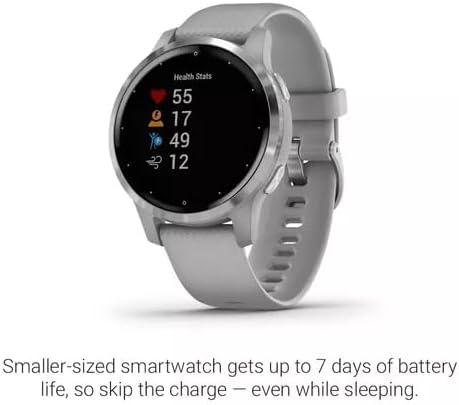
A close-up of the vivoactive 4S watch face displaying various health statistics, including heart rate, body battery, and stress levels.
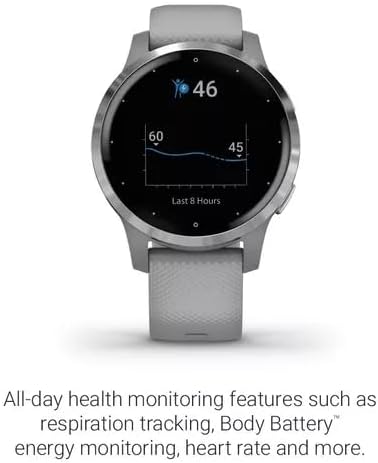
The vivoactive 4S watch face showing the Body Battery energy monitoring feature, with a graph indicating energy levels over time.
Warranty and Support
Garmin provides a limited warranty for the vivoactive 4S. For detailed warranty information, please refer to the official documentation included in your package or visit the Garmin support website.
For further assistance, troubleshooting, or to access the full user manual, please refer to the official Garmin support resources:
- Official User Manual (PDF): Download PDF Manual
- Garmin Support Website: Visit Garmin.com/support for FAQs, product registration, and contact information.