
1. Introduction
This manual provides essential instructions for the safe and efficient operation, installation, and maintenance of your Arctic King WWK05CM01N Window Air Conditioner. Please read this manual thoroughly before using the appliance and retain it for future reference.
The Arctic King WWK05CM01N is a compact window air conditioner designed to cool areas up to 150 square feet, offering 5,000 BTU of cooling power. It features an 11.0 Combined Energy Efficiency Rate (CEER).
2. Safety Information
Always follow basic safety precautions when using electrical appliances to reduce the risk of fire, electric shock, and injury.
- Ensure the unit is properly grounded.
- Do not operate the unit with a damaged power cord or plug.
- Do not insert fingers or objects into the air inlet/outlet.
- Unplug the unit before cleaning or servicing.
- Do not attempt to repair or modify the unit yourself. Refer all servicing to qualified personnel.
- Keep flammable materials away from the unit.
3. Package Contents
Verify that all components are present before beginning installation:
- Arctic King WWK05CM01N Window Air Conditioner Unit
- Window Mounting Kit (side panels, top rail, sash lock, foam seals, screws)
- User Manual
4. Setup and Installation
The Arctic King WWK05CM01N is designed for easy installation in standard double-hung windows. A screwdriver is required for installation. For some window frames, pilot holes may be recommended before installing screws.
Window Requirements:
- Window Width: 23 inches to 36 inches
- Minimum Window Opening Height: 13 inches
Installation Steps:
- Prepare the window by cleaning the sill and frame.
- Attach the top rail to the unit using the provided screws.
- Install the accordion side panels into the side channels of the unit.
- Carefully place the unit into the window opening, ensuring the bottom rail rests securely on the window sill.
- Extend the side panels to fill the window opening and secure them with screws to the window frame.
- Install the sash lock to secure the window sashes.
- Apply foam seals to prevent air leakage.

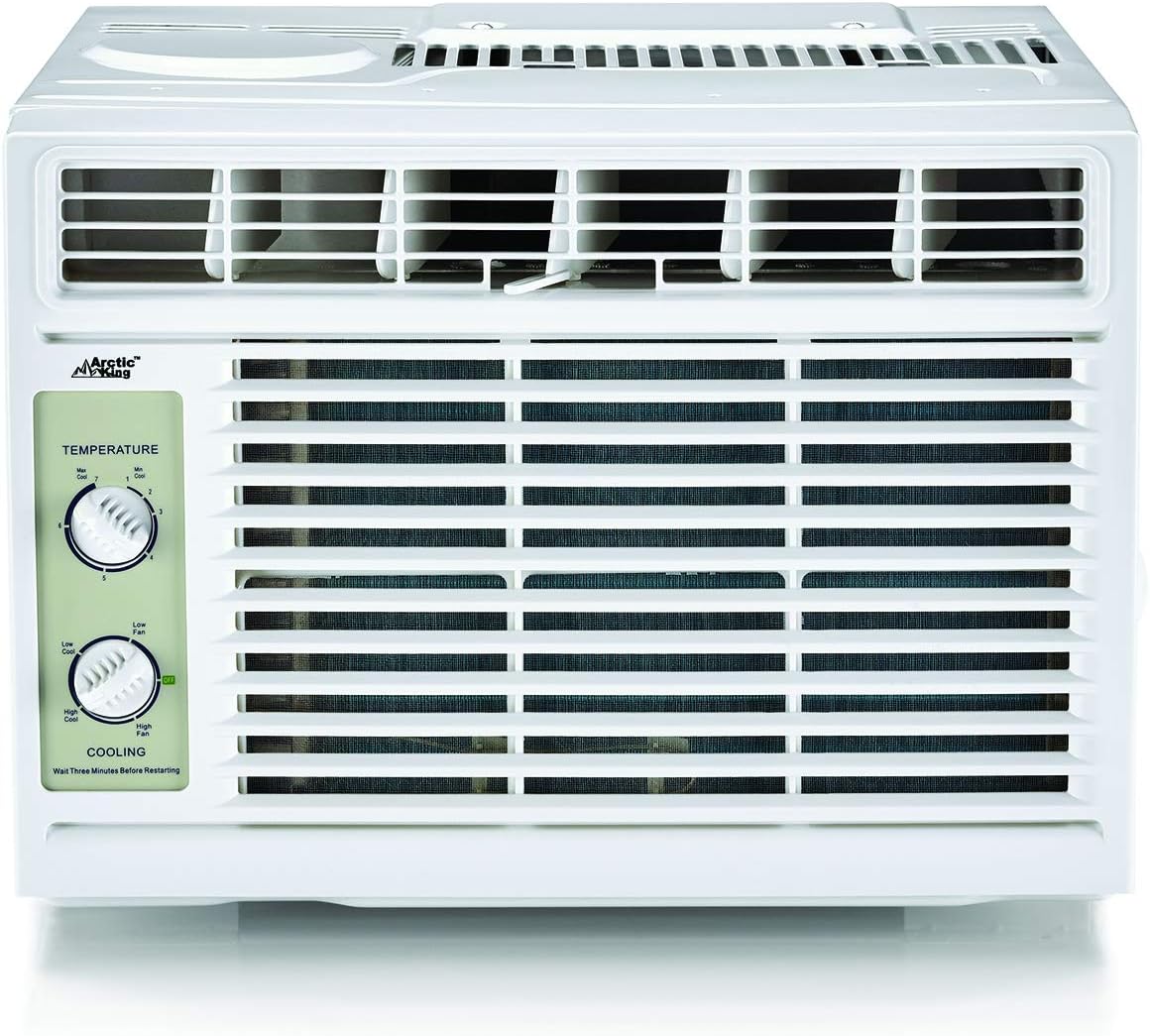
5. Operating Instructions
Your Arctic King WWK05CM01N air conditioner features simple manual controls for temperature and fan settings.
Control Panel:

Settings:
- Temperature Dial: This dial allows you to select one of 7 temperature settings, from 'Min Cool' to 'Max Cool'. Rotate the dial to adjust the desired cooling level.
- Cooling/Fan Dial: This dial controls the operating mode and fan speed. It includes settings for 'OFF', 'Low Fan', 'High Fan', 'Low Cool', and 'High Cool'.
- OFF: Turns the unit off.
- Low Fan / High Fan: Operates the fan without cooling, circulating air.
- Low Cool / High Cool: Activates the compressor for cooling at either a low or high fan speed.
- Air Direction: The unit features 2-way adjustable air direction louvers. Manually adjust these louvers to direct the airflow horizontally.
Important: After turning the unit off or changing modes, wait approximately three minutes before restarting to protect the compressor.
6. Maintenance
Regular maintenance ensures optimal performance and longevity of your air conditioner.
Cleaning the Air Filter:
The air filter should be cleaned regularly, typically every two weeks, or more often depending on usage and air quality. A dirty filter can reduce cooling efficiency and airflow.
- Unplug the air conditioner from the power outlet.
- Open the front grille and carefully remove the air filter.
- Wash the filter with warm, soapy water. Rinse thoroughly.
- Allow the filter to air dry completely before reinstalling.
Cleaning the Exterior:
Wipe the exterior casing with a soft, damp cloth. Do not use harsh chemicals or abrasive cleaners.
Condensation Drainage:
The unit is designed to manage condensation. In some environments, or if excessive water accumulates, it may be beneficial to drill small drain holes in the bottom of the unit's outer casing to facilitate drainage and prevent water buildup, which can lead to algae or mold growth. Consult a qualified technician if unsure.
7. Troubleshooting
Before contacting customer service, review the following common issues and solutions:
| Problem | Possible Cause | Solution |
|---|---|---|
| Unit does not turn on | No power; Plug not fully inserted; Circuit breaker tripped | Check power cord connection; Reset circuit breaker; Test outlet with another device |
| Unit not cooling effectively | Dirty air filter; Room too large; Temperature setting too high; Blocked air vents; Doors/windows open | Clean air filter; Ensure unit is appropriate for room size; Lower temperature setting; Clear obstructions; Close doors/windows |
| Loud buzzing/humming sound | Compressor attempting to start too quickly; Loose parts; Unit not level | Ensure 3-minute delay between cycles; Check for loose components; Verify unit is level in window |
| Water dripping inside | Unit not tilted slightly outwards; Drain holes clogged or absent | Ensure proper tilt during installation; Inspect and clear drain holes or consider drilling new ones if necessary |
8. Specifications
| Model Number | WWK05CM01N |
| Cooling Power | 5000 British Thermal Units (BTU) |
| Floor Area Coverage | 150 Square Feet |
| Seasonal Energy Efficiency Ratio (SEER) | 11.2 |
| Combined Energy Efficiency Rate (CEER) | 11.0 |
| Voltage | 120 Volts |
| Wattage | 450 W |
| Noise Level | 60 Decibels |
| Product Dimensions (W x D x H) | 15.98 x 13.19 x 12.05 inches |
| Item Weight | 39.5 pounds |
| Refrigerant | R 410A |
| Form Factor | Window |
| Special Feature | Compact |

9. Warranty and Support
Your Arctic King WWK05CM01N Window Air Conditioner is covered by a one-year limited warranty on parts and labor from the original purchase date. This warranty covers manufacturing defects and malfunctions under normal use.
For warranty claims, technical support, or to inquire about replacement parts, please contact Arctic King customer service. Keep your purchase receipt as proof of purchase.
For further assistance, please visit the official Arctic King support website or contact their customer service department. Contact Support


