
Introduction
This instruction manual provides essential information for the proper use and care of your OtterBox Strada Series Case for iPhone 11. Please read this manual thoroughly before installation and operation to ensure optimal protection and functionality for your device.
Setup: Case Installation
Follow these steps to correctly install your iPhone 11 into the OtterBox Strada Series Case.
- Prepare your device: Ensure your iPhone 11 is clean and free of dust or debris.
- Open the folio cover: Gently open the leather folio cover of the Strada Series case.
- Insert the iPhone: Align your iPhone 11 with the polycarbonate shell. Start by inserting the top edge of the phone into the case, ensuring the camera module aligns with the case cutout.
- Secure the phone: Gently press the remaining edges of your iPhone into the case until it is fully seated and secure. Ensure all buttons and ports are accessible and aligned with the case openings.
- Close the folio cover: Close the leather folio cover. The magnetic latch will secure it in place, protecting your screen.
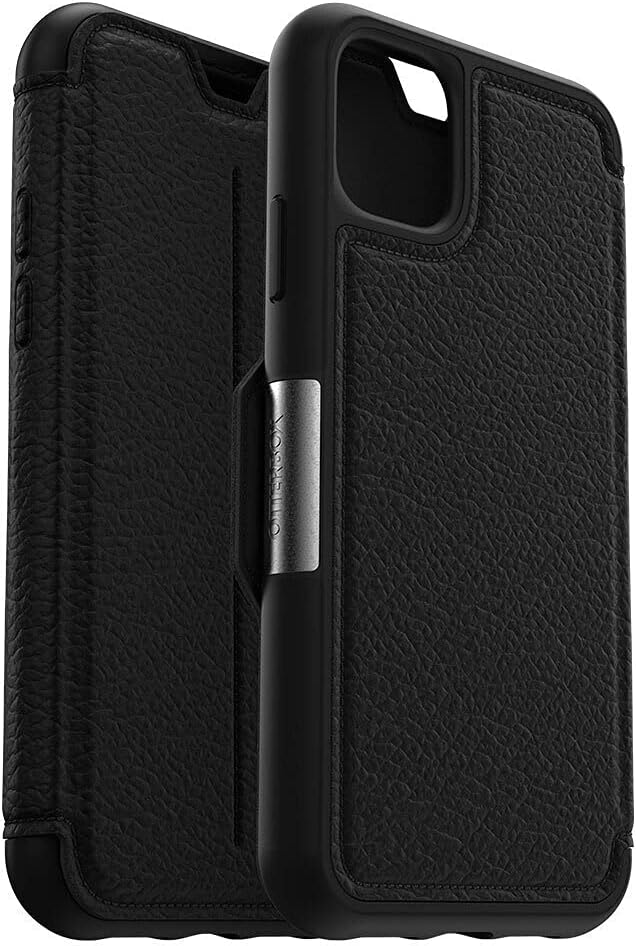
Figure 1: Side view of the OtterBox Strada Series Case with the folio cover open, illustrating the phone insertion process.

Figure 2: Rear view of the installed OtterBox Strada Series Case, highlighting the camera cutout and textured leather.
Operating Instructions
The OtterBox Strada Series Case is designed for daily use, offering protection and convenience.
- Screen Protection: Keep the folio cover closed when not actively using your iPhone 11 to protect the screen from scratches and impacts. The magnetic latch ensures the cover stays securely closed.
- Card Slot Usage: The integrated vertical slot inside the folio cover is designed to hold one card or a small amount of cash. Avoid overfilling the slot, as this may prevent the cover from closing properly or stretch the material.
- Button and Port Access: The case provides precise cutouts for all buttons, speakers, and charging ports, ensuring full functionality without removing the case.
- Wireless Charging: The case is compatible with wireless charging. Ensure proper alignment of your iPhone 11 with the wireless charging pad for efficient charging.

Figure 3: Interior view of the OtterBox Strada Series Case, displaying the integrated card slots within the folio cover.

Figure 4: Front view of the OtterBox Strada Series Case with the folio cover closed, secured by the magnetic latch.
Maintenance and Care
Proper care will extend the life and appearance of your OtterBox Strada Series Case.
- Cleaning the Leather: For the premium leather exterior, wipe gently with a soft, damp cloth. Avoid harsh chemicals, abrasive cleaners, or excessive moisture, as these can damage the leather finish.
- Cleaning the Polycarbonate Shell: The inner polycarbonate shell can be cleaned with a soft, slightly damp cloth.
- Avoid Extreme Conditions: Do not expose the case to extreme temperatures, direct sunlight for prolonged periods, or sharp objects, which can cause damage or discoloration.
Troubleshooting
Refer to these common issues and solutions for your Strada Series Case.
- Folio cover does not close completely:
Ensure that the card slot is not overfilled. Remove any excess cards or cash that may be preventing the magnetic latch from engaging fully.
- Wireless charging is inconsistent:
Verify that your iPhone 11 is correctly centered on the wireless charging pad. The case is designed to be compatible with wireless charging, but proper alignment is crucial.
- Buttons are difficult to press:
Ensure your iPhone 11 is fully seated within the polycarbonate shell and properly aligned. Remove the phone and re-install it, ensuring a snug fit.
Specifications
| Product Dimensions | 6.16 x 3.25 x 0.6 inches |
| Item Weight | 5.6 ounces |
| Model Number | 77-62479 |
| Special Features | Wireless Charging Compatible |
| Form Factor | Basic Case (Folio) |
| Color | SHADOW (BLACK/PEWTER) |
| Compatible Devices | iPhone 11 |
| Material | Premium leather, Metal latch, Polycarbonate shell |
| Manufacturer | Otter Products |
Warranty Information
OtterBox provides a limited warranty that covers material and workmanship defects for the Strada Series Case. For detailed information regarding warranty terms, conditions, and how to file a claim, please refer to the official OtterBox website or contact their customer support.
Customer Support
For further assistance, product inquiries, or technical support, please visit the official OtterBox website. You can typically find FAQs, support articles, and contact information for their customer service team there.
Official Website: www.otterbox.com


