
1. Introduction
The Moukey 1-Channel 48V Phantom Power Supply is designed to provide stable 48V phantom power for condenser microphones, enabling them to operate correctly with audio mixers, sound cards, and other recording equipment. This unit also features a convenient USB charging capability for external devices.
2. Product Overview
2.1 Key Features
- USB Charging Capability: Features a DC 5V USB output jack for powering mobile phones or power banks. Includes a durable 5ft/1.5M USB cable.
- Professional 48V Phantom Power: Provides reliable and stable power for condenser microphones and transfers sound signals to sound cards and audio mixers.
- 10ft/3M XLR Audio Cable: Universal XLR input and output compatible with various microphone music recording equipment. The 3-Pin XLR Male to XLR Female Cable helps reduce interference and excess noise.
- Durable Construction: Made of gray aluminum for robust and long-lasting performance.
- Simple Operation: Equipped with an On/Off power switch (requires a long press for 3 seconds to activate) and an LED indicator for ease of use.
- Certificated Adapter: Includes a certified power adapter for safe and durable operation.
2.2 Components and Controls
The Moukey Phantom Power Supply unit includes the following components and controls:
- Power Switch Button: Located on the top panel, used to turn the unit on or off.
- Indicator Light: An LED light on the top panel that illuminates when the unit is powered on.
- XLR Input Jack: For connecting your condenser microphone.
- XLR Output Jack: For connecting to your audio mixer or sound card.
- USB DC 5V Power Input: For connecting the provided power adapter.
- USB DC 5V Output Jack: For charging external USB-powered devices.

Figure 2.1: Moukey 1-Channel 48V Phantom Power Supply with accessories.

Figure 2.2: Top and front panel details of the Moukey Phantom Power Supply, highlighting the power button, indicator light, and input/output ports.
3. Setup
Follow these steps to set up your Moukey Phantom Power Supply:
- Connect your condenser microphone to the XLR Input jack on the phantom power supply using the provided XLR cable.
- Connect the XLR Output jack of the phantom power supply to the XLR input of your audio mixer, sound card, or other recording device.
- Plug the provided power adapter into the USB DC 5V Power Input on the phantom power supply, and then into a standard wall outlet.
- To power on the unit, long press the Power button for 3 seconds. The indicator light will illuminate.

Figure 3.1: Connection diagram for the Moukey Phantom Power Supply with a microphone and sound card.
4. Operating Instructions
4.1 Powering On/Off
- To turn on the unit, press and hold the Power button for approximately 3 seconds until the indicator light turns on.
- To turn off the unit, press and hold the Power button for approximately 3 seconds until the indicator light turns off.
4.2 USB Charging Function
The phantom power supply includes a USB output for charging compatible devices:
- Connect your mobile phone, power bank, or other USB-powered device to the USB DC 5V Output Jack using a compatible USB cable.
- Note: The USB charging port and the XLR output port cannot be used simultaneously for optimal performance.

Figure 4.1: Using the USB charging function to power a smartphone.
5. Maintenance
To ensure the longevity and optimal performance of your Moukey Phantom Power Supply:
- Keep the unit clean by wiping it with a soft, dry cloth. Avoid using abrasive cleaners or solvents.
- Store the unit in a cool, dry place away from direct sunlight and extreme temperatures.
- Ensure all cables are properly connected and not strained.
- Always use the provided certificated adapter to power the unit.
6. Troubleshooting
If you encounter issues with your Moukey Phantom Power Supply, refer to the following common problems and solutions:
| Problem | Possible Cause | Solution |
|---|---|---|
| Unit does not power on. | Power button not pressed long enough; power adapter issue. | Ensure you long press the power button for 3 seconds. Verify the power adapter is securely connected and functioning. Use the provided adapter. |
| No sound or weak sound from microphone. | Incorrect connections; faulty XLR cable; microphone not condenser type. | Check all XLR connections are secure. Ensure you are using a condenser microphone that requires 48V phantom power. Test with a different XLR cable if possible. |
| Interference or noise in audio. | Grounding issues; unshielded cables; external electrical interference. | Ensure all connections are tight. Use the provided XLR cable which is designed to reduce interference. Keep the unit away from other electronic devices that may cause interference. |
| USB charging not working. | Simultaneous use of XLR output; device incompatibility. | Ensure the XLR output is not in use when attempting to charge via USB. Check if your device is compatible with 5V USB charging. |
7. Specifications
| Feature | Specification |
|---|---|
| Product Dimensions | 8.54 x 5.12 x 1.97 inches (21.7 x 13 x 5 cm) |
| Item Weight | 1.1 pounds (0.5 Kilograms) |
| Brand | Moukey |
| Model Number | M4811 |
| Color | White (Unit is silver/gray, but product listing states 'white') |
| Material | Aluminum |
| Connector Type | 3 Pin XLR, USB 2.0 |
| Power Output | 48V DC (XLR), 5V DC (USB) |
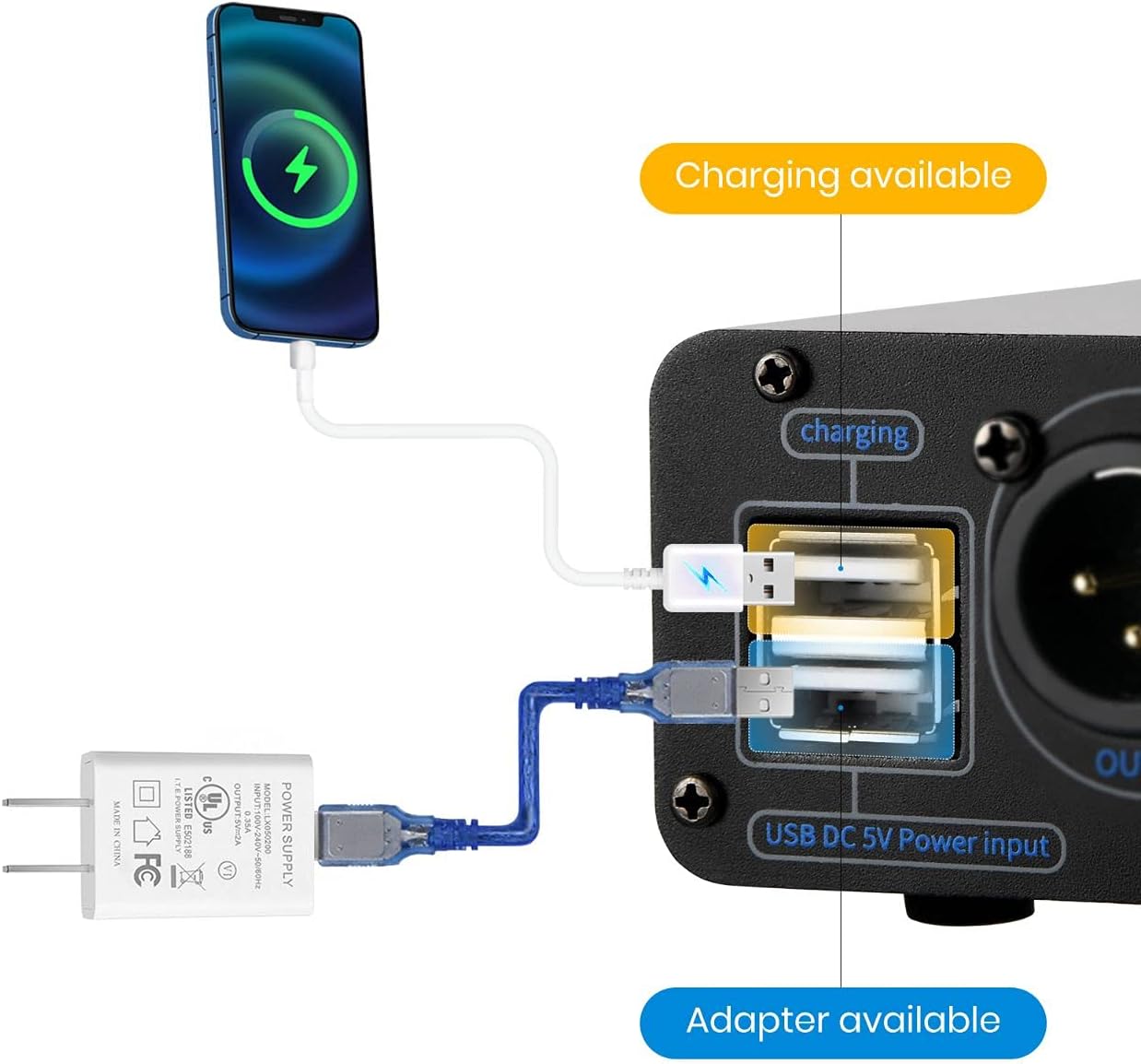
Figure 7.1: Physical dimensions of the Moukey Phantom Power Supply.
8. Warranty and Support
Moukey products are designed for reliability and performance. For any questions, technical support, or warranty inquiries, please refer to the contact information provided with your product packaging or visit the official Moukey website. Keep your purchase receipt for warranty claims.