
1. Introduction
The Roland DJ-707M is a highly versatile DJ controller designed for a wide range of applications, including mixing, scratching, livestreaming, content creation, remixing, event production, and karaoke. Its robust design and comprehensive feature set make it a powerful tool for both professional and aspiring DJs.

Figure 1.1: Overview of the Roland DJ-707M Controller.
2. Key Features
The DJ-707M incorporates a variety of features to enhance performance and flexibility:
- Versatile Applications: Suitable for mixing, scratching, livestreaming, content creation, remixing, event production, and karaoke.
- Extensive Connectivity: Abundance of inputs and outputs for microphones, audio sources, and direct streaming to devices like iPhones or iPads.
- Vocal Effects: Sixteen hardware vocal effects and pristine EQs for vocal enhancement, including Auto Pitch and other special effects.
- Integrated Drum Machine: Features 128 patterns derived from Roland’s TR collection (TR-808, TR-909, TR-707, TR-606), with MIDI clock for syncing external instruments.
- Event Production Capabilities: Ability to route any input to any output, apply separate EQs or multi-band compressors for system tuning, and add anti-feedback for microphones.
- Scene Slots: Save up to 10 custom settings for quick recall during events.
- Auxiliary Inputs: Front-facing dual 1/4-inch jacks and 1/8-inch stereo aux input for connecting guest musicians or performers without reconfiguring the main setup.
- Hardware Effects: Assignable Filter/FX knob on each channel with effects including Filter, Dub Echo, Jet, Noise, Reverb, Delay, Bit Crush, Phaser, and more.
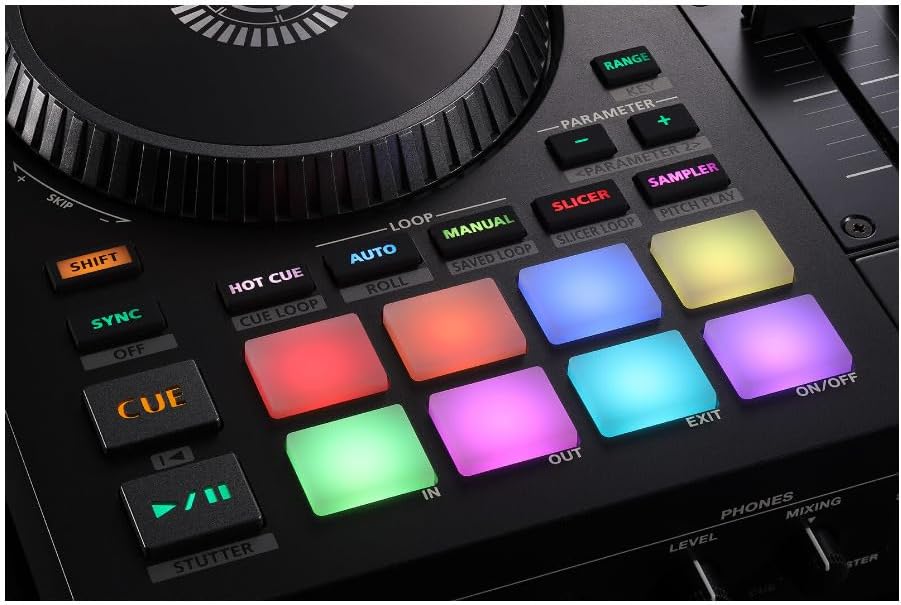
Figure 2.1: Performance Pads and Controls.
3. Setup Guide
3.1 Unpacking and Initial Inspection
Carefully remove the DJ-707M from its packaging. Inspect the unit for any signs of damage during transit. Ensure all included accessories, such as the power adapter and USB cable, are present.
3.2 Connecting Power and USB
- Connect the provided power adapter to the DC IN port on the rear panel of the DJ-707M.
- Plug the power adapter into a suitable electrical outlet.
- Connect one end of the USB cable to either the PC A or PC B USB port on the rear panel of the DJ-707M.
- Connect the other end of the USB cable to an available USB port on your computer.
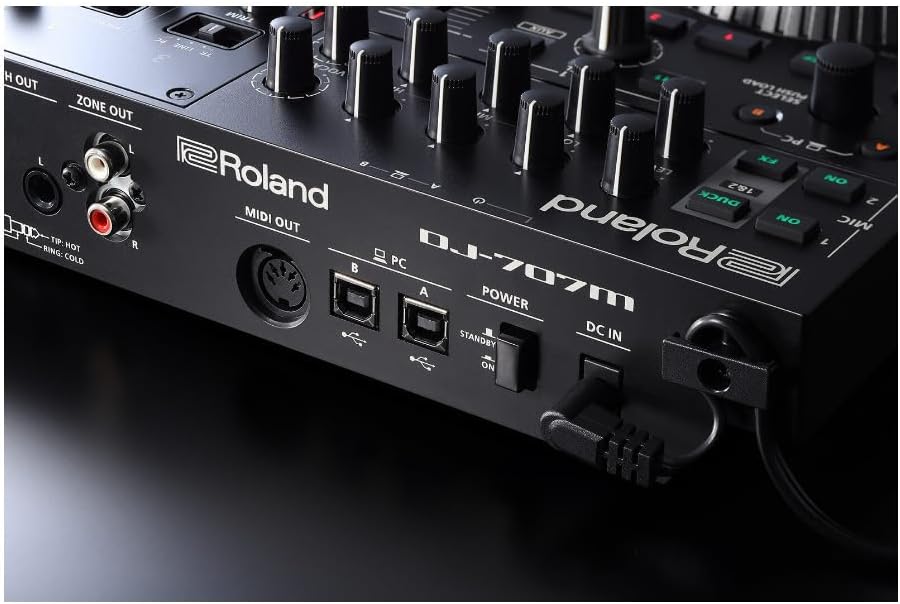
Figure 3.1: Rear Panel Connections.
3.3 Audio Connections
Connect your speakers, headphones, and any external audio sources (microphones, CDJs, turntables) to the appropriate inputs and outputs on the DJ-707M. The controller offers multiple master, booth, and zone outputs for flexible audio routing.

Figure 3.2: Audio Output Routing Diagram.
3.4 Software Installation (Serato DJ Pro)
The DJ-707M is designed to work seamlessly with Serato DJ Pro. Ensure you have the latest version of Serato DJ Pro installed on your computer. Drivers for the DJ-707M are typically installed automatically when Serato DJ Pro is launched with the controller connected. Refer to the official Roland support website for the latest driver and firmware updates.
4. Operating Instructions
4.1 Basic DJ Functions
- Loading Tracks: Use the browse knob and load buttons to select and load tracks onto the desired deck in Serato DJ Pro.
- Mixing: Adjust channel faders, crossfader, and EQ knobs to blend tracks smoothly.
- Scratching: Utilize the jog wheels for precise scratching and cueing.
- Performance Pads: The multi-color performance pads allow for triggering hot cues, loops, rolls, and samples.
4.2 Advanced Features
- Vocal Effects: Access and apply vocal effects via the dedicated VOCAL FX section. Adjust parameters using the corresponding knobs.
- Drum Machine: Activate the on-board drum machine to add TR-series drum patterns to your mixes. Sync with your tracks using MIDI clock.
- Scene Memory: Save and recall up to 10 complete controller configurations using the scene memory function. This is ideal for different event types or setups.
- Hardware Effects: Apply various hardware effects like Filter, Dub Echo, and Reverb using the FILTER/FX knob on each channel.
5. Maintenance
To ensure the longevity and optimal performance of your Roland DJ-707M, follow these maintenance guidelines:
- Cleaning: Regularly wipe the surface of the controller with a soft, dry cloth. For stubborn dirt, use a slightly damp cloth and then dry thoroughly. Avoid abrasive cleaners or solvents.
- Dust Protection: When not in use, cover the controller with a dust cover to prevent dust and debris from accumulating in faders, knobs, and buttons.
- Storage: Store the unit in a cool, dry place away from direct sunlight, extreme temperatures, and high humidity.
- Cable Management: Ensure cables are not kinked or strained. Disconnect cables by pulling the plug, not the cable itself.
6. Troubleshooting
If you encounter issues with your DJ-707M, refer to the following common troubleshooting steps:
- No Power:
- Ensure the power adapter is securely connected to both the controller and a working electrical outlet.
- Verify the power switch on the rear panel is in the "ON" position.
- No Sound Output:
- Check all audio cable connections to your speakers, headphones, and the controller.
- Ensure master, booth, and channel volume levels are turned up.
- Verify that the correct output is selected in your Serato DJ Pro software settings.
- Confirm that the audio drivers are correctly installed and recognized by your operating system.
- Software Not Recognizing Controller:
- Ensure the USB cable is securely connected to both the controller and your computer.
- Try a different USB port on your computer.
- Restart both the DJ-707M and your computer.
- Update your Serato DJ Pro software and the DJ-707M firmware to the latest versions from the Roland website.
- Sync Button Issues (as reported by some users):
- If the sync function behaves erratically, ensure your music files have accurate BPM information.
- Consider manually beatmatching if automatic sync is inconsistent.
- Check for any known software bugs or updates from Serato or Roland that address sync stability.
- Equalizer/Cue Light Issues:
- If EQ indicators or cue lights are not functioning as expected, verify that the channel is properly assigned and active in Serato DJ Pro.
- Perform a factory reset if the issue persists (refer to the full Roland manual for specific instructions).
For more detailed troubleshooting or issues not covered here, please consult the comprehensive manual available on the official Roland support website or contact Roland customer support.
7. Specifications
| Attribute | Value |
|---|---|
| Item Weight | 11.02 pounds (approx. 5 kg) |
| Product Dimensions (L x W x H) | 13.03 x 18.66 x 2.87 inches (approx. 33.1 x 47.4 x 7.3 cm) |
| Model Number | DJ-707M |
| ASIN | B07W2ZJ7RT |
| Channels | Four-Channel |
| Decks | Four-Deck |
| First Available Date | August 13, 2019 |
8. Warranty and Support
For information regarding the product warranty, please refer to the warranty card included with your Roland DJ-707M or visit the official Roland website. For technical support, driver downloads, firmware updates, and additional resources, please visit the Roland support portal:
Always ensure you are using official Roland resources for support and downloads to maintain product integrity and performance.