
Antari Z-350
Antari Z-350 Fazer Machine User Manual
Model: Z-350 | Brand: Antari
1. Introduction
The Antari Z-350 Fazer Machine is a state-of-the-art device designed to produce dry haze effects for various applications. Utilizing advanced air pump technology, this unit ensures efficient haze generation and incorporates a self-cleaning function for enhanced longevity and performance. Its compact and lightweight design, combined with an extremely low fluid consumption rate, makes it an ideal choice for extended operation.

Figure 1: Front view of the Antari Z-350 Fazer Machine.
2. Safety Information
Please read and understand all safety instructions before operating the Antari Z-350 Fazer Machine. Failure to follow these instructions may result in electric shock, fire, or serious injury.
- Disconnect Power: Always disconnect the unit from the power supply before cleaning, servicing, or when not in use.
- Fluid Use: Use only Antari fog fluid. Do not add flammable substances or any other liquids to the fluid reservoir.
- Ventilation: Ensure adequate ventilation around the unit during operation. Do not block any ventilation openings.
- Indoor Use Only: This machine is designed for indoor use only. Do not expose to rain or moisture.
- Fuse Replacement: To reduce the risk of fire, replace the fuse only with the same size and type of fuse (T7A 250V).
- Operation without Fluid: Do not operate without liquid.
- Supervision: Do not operate without adult supervision.
- California Proposition 65 Warning: This product may contain chemicals known to the State of California to cause cancer and birth defects or other reproductive harm.
3. Product Features
- Built-in Air Pump: Produces dry haze and includes a self-cleaning function for the heater.
- DMX Control: Features 5-pin DMX In/Out for integration with DMX consoles.
- Fluid Efficiency: Extremely low fluid consumption rate, allowing for extended operation (e.g., 430 minutes at maximum output with a 1.3 Liter tank).
- Heater Design: Larger diameter tube substantially reduces the risk of heater clog.
- Adjustable Output: Independent controls for haze output (smoke) and fan speed.
4. Setup
Follow these steps to set up your Antari Z-350 Fazer Machine:
- Placement: Place the machine on a stable, flat surface in a well-ventilated area. Ensure there is sufficient space around the unit for air circulation.
- Fluid Filling: Unscrew the cap of the fluid reservoir located on the top of the unit. Carefully pour Antari fog fluid into the reservoir. Do not overfill. The fluid level indicator on the back of the unit will show the current level. Securely replace the cap.
- Power Connection: Connect the provided power cable to the "POWER INPUT" port on the rear of the machine and then to a suitable electrical outlet (120VAC, 50/60Hz).
- DMX Connection (Optional): If using DMX control, connect your DMX console to the "DMX IN" port using a 5-pin DMX cable. You can daisy-chain to other DMX devices using the "DMX OUT" port.
- Remote Control (Optional): If using a remote control, connect it to the "REMOTE CONTROL" jack.
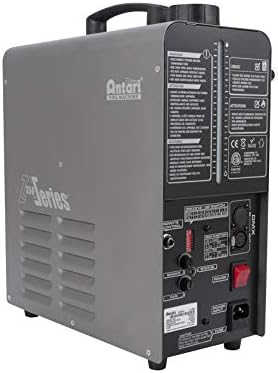
Figure 2: Rear view showing fluid level indicator, power input, and DMX connections.
5. Operating Instructions
Once the unit is set up, follow these steps for operation:
- Power On: Flip the red "POWER" switch on the rear panel to the ON position. The switch will illuminate. The machine will begin to heat up automatically. Allow several minutes for the unit to reach operating temperature. The "STATUS" indicator will change when ready.
- Adjust Haze Output: Use the "SMOKE" knob to adjust the desired level of haze output. Turning the knob clockwise increases the output.
- Adjust Fan Speed: Use the "FAN" knob to control the speed of the internal fan, which disperses the haze. Turning the knob clockwise increases the fan speed.
- DMX Control:
- DMX Console OFF: If the DMX console is off, the unit will run its self-clean process and automatically turn off.
- DMX Console ON: If the DMX console is on, the unit will turn on and start to heat up automatically.
- DMX Function (Example):
- CH 1: HAZE (0-4 = OFF, 5-255 = 1-100%)
- CH 2: FAN (0-4 = 20%, 5-255 = 21-100%)
- DIP Switch: Use the DMX512 DIP SWITCHes to set the DMX address as per your lighting system's requirements.
- Power Off: When finished, flip the "POWER" switch to the OFF position.
6. Maintenance
Regular maintenance ensures optimal performance and longevity of your Fazer Machine:
- Self-Cleaning Function: The built-in air pump technology includes a self-cleaning function for the heater. This helps prevent clogs and maintains efficient operation.
- Fluid Management: Always ensure there is sufficient Antari fog fluid in the reservoir during operation. Operating the machine without fluid can cause damage.
- Storage: When storing the machine for extended periods, ensure the fluid reservoir is empty and the unit is clean and dry.
- Exterior Cleaning: Clean the exterior of the unit with a soft, dry cloth. Do not use abrasive cleaners or solvents.
7. Troubleshooting
If you encounter issues with your Antari Z-350 Fazer Machine, consider the following common solutions:
- No Haze Output:
- Check if the power cable is securely connected and the power switch is ON.
- Verify that the fluid reservoir contains sufficient Antari fog fluid.
- Allow adequate time for the unit to heat up. The "STATUS" indicator should confirm readiness.
- Ensure the "SMOKE" knob is turned up.
- If using DMX, check DMX connections and settings on your console.
- Weak Haze Output:
- Ensure the "SMOKE" knob is set to maximum.
- Check fluid level.
- The unit might require a longer warm-up time.
- Fan Not Operating:
- Ensure the "FAN" knob is turned up.
- If using DMX, check DMX settings for the fan channel.
- Unusual Noises:
- Ensure the unit is on a stable surface.
- Check for any obstructions around the fan or output nozzle.
If problems persist, contact qualified service personnel.
8. Specifications
| Feature | Detail |
|---|---|
| Model Number | Z-350 |
| Item Weight | 21.5 pounds |
| Package Dimensions | 17.6 x 16.38 x 9.65 inches |
| Input Voltage | 120VAC |
| Frequency | 50/60Hz |
| Input Power | 700W |
| Fuse | T7A 250V |
| Fluid Tank Capacity | 1.3 Liters (approx.) |
| Max Haze Output Duration | 430 minutes (at maximum output) |
| DMX Connectivity | 5-pin DMX In/Out |
9. Warranty and Support
For warranty information, technical support, or service inquiries, please contact Antari customer service or refer to the official Antari website. Keep your purchase receipt as proof of purchase for any warranty claims.
Note: Unauthorized repairs or modifications may void the product warranty.
Related documentsZ-350


Ask a question about this manual
Ask about setup, troubleshooting, compatibility, parts, safety, or missing instructions. Manuals+ will review the question and use this page’s manual context to help answer it.