
Autel MaxiTPMS TS408S
Autel MaxiTPMS TS408S TPMS Relearn Tool User Manual
Model: MaxiTPMS TS408S
1. Introduction
The Autel MaxiTPMS TS408S is an advanced TPMS (Tire Pressure Monitoring System) service tool designed to activate all known OEM and universal TPMS sensors, program Autel MX-Sensors, and perform TPMS relearn procedures. This tool is an upgraded version, offering enhanced functionality for comprehensive TPMS maintenance and repair.

Image: The Autel MaxiTPMS TS408S device, its protective carrying case, and two tires, illustrating the product's primary function in tire maintenance.
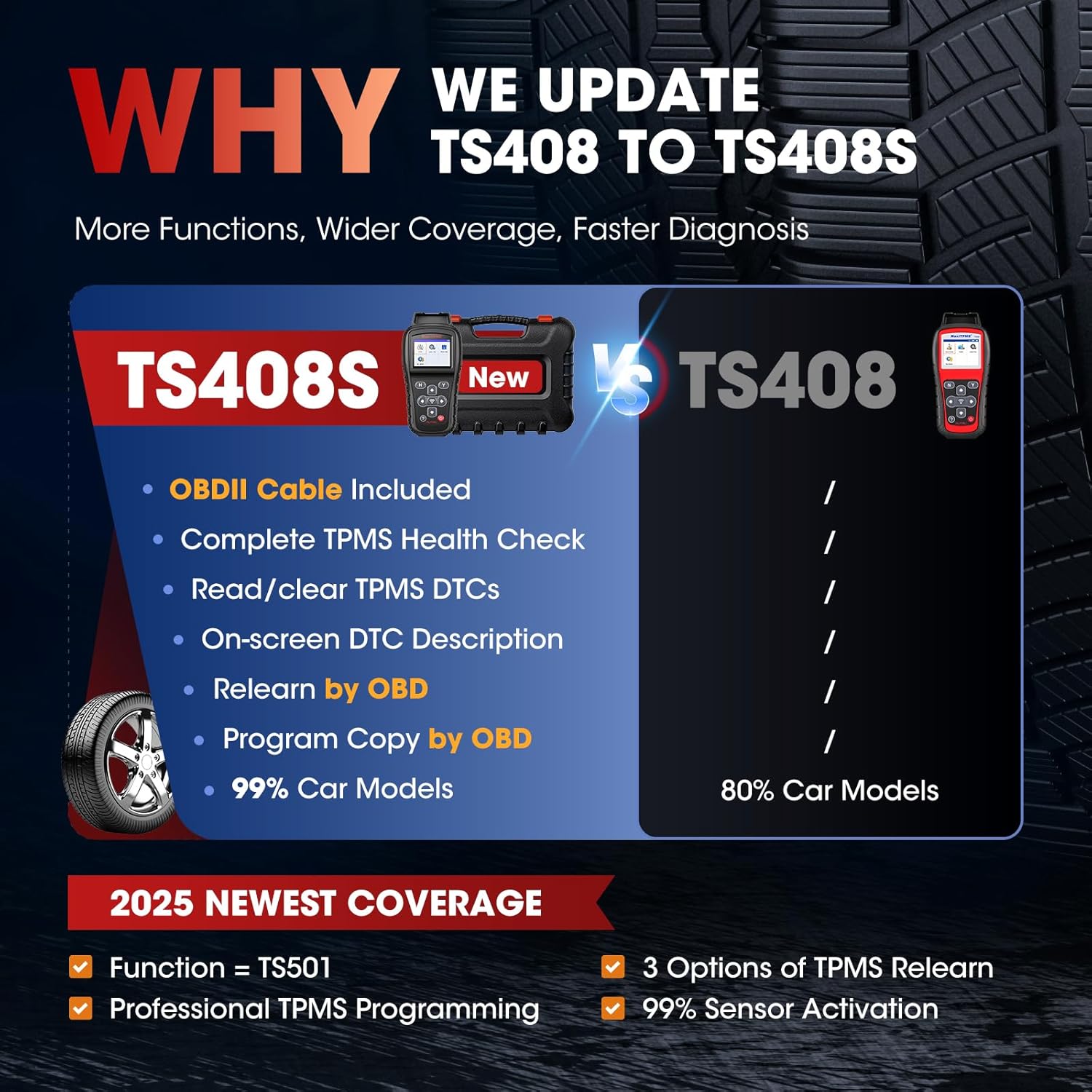
Image: A comparison chart highlighting the upgraded features of the TS408S over the TS408, including OBDII cable, complete TPMS health check, and wider car model coverage.
2. Setup
2.1 Package Contents
- MaxiTPMS TS408S Unit
- Main Cable (OBDII Cable)
- Mini USB Cable
- Power Adapter
- Quick Start Guide
- Carrying Case

Image: A visual representation of the complete kit for the Autel MaxiTPMS TS408S, including the device, cables, power adapter, quick guide, and carrying case.
2.2 Initial Power On and Charging
Connect the power adapter to the TS408S unit and a power outlet to charge the internal Lithium Polymer battery. Ensure the device is fully charged before first use for optimal performance.
2.3 Software Update
Before initial use, it is crucial to register and update the device. Connect the TS408S to a computer using the Mini USB cable. Visit the official Autel website to download the Maxi PC Suite software. Follow the on-screen instructions within the software to register your device and download the latest software updates. This ensures access to the most current vehicle coverage and functions.
3. Operating Instructions
3.1 TPMS Sensor Programming
The TS408S supports programming of Autel MX-Sensors using two primary methods:
- Auto Create: This mode allows programming of 1 to 16 sensors simultaneously, significantly improving efficiency.
- Copy by OBD: This method reads the existing sensor ID directly from the vehicle's OBDII system and writes it to a new MX-Sensor, ensuring seamless replacement without manual ID input.

Image: An illustration detailing the two programming methods for MX-Sensors: 'Copy by OBD' for direct ID transfer and 'Auto Create' for batch programming of up to 16 sensors.

Image: A visual guide explaining the steps and advantages of both 'Copy by OBD' and 'Auto Create' methods for MX-Sensor programming.
3.2 TPMS Sensor Relearn
After replacing or rotating TPMS sensors, they must be relearned to the vehicle's ECU to clear warning lights. The TS408S supports three relearn methods:
- Stationary Relearn: Requires the vehicle to be in a stationary position.
- Automatic Relearn: Sensors are relearned by driving the vehicle.
- OBD Relearn: Sensor IDs are transferred directly to the vehicle's ECU via the OBDII port. This is often the fastest and most reliable method.
The tool provides guided, step-by-step procedures for over 1000 vehicle models, making the relearn process straightforward.

Image: A graphic illustrating the three main TPMS sensor relearn options: OBD Relearn, Automatic Relearn, and Stationary Relearn, with a mechanic giving a thumbs up.

Image: A detailed diagram outlining the three relearn options (OBD, Stationary, Automatic) and emphasizing the 1000+ on-tool relearn guides.
3.3 TPMS Sensor Activation
The TS408S can wirelessly activate 99% of OEM and aftermarket TPMS sensors (315MHz and 433MHz). To activate a sensor:
- Select the correct vehicle make, model, and year on the tool.
- Place the TS408S near the tire valve stem (within 1 inch of the antenna).
- Press the activation button on the tool.
- Repeat for each sensor.
Upon successful activation, the tool displays detailed sensor data including ID, pressure, temperature, battery status, position, and frequency.

Image: A graphic illustrating the 99% sensor activation capability, showing the tool reading various sensor data points like ID, pressure, temperature, and battery status.

Image: A visual emphasizing the speed of sensor data reading, indicating it takes only 30 seconds to retrieve information such as sensor ID, tire pressure, and temperature.
3.4 TPMS Diagnosis and DTCs
The TS408S connects to the vehicle's OBDII system to perform a complete TPMS health check. It can read and clear TPMS Diagnostic Trouble Codes (DTCs) with clear descriptions, helping to identify issues such as low tire pressure, faulty control modules, or unidentified sensors.

Image: A scenario depicting a mechanic using the TS408S for a one-press TPMS diagnosis, addressing a flashing TPMS light and showing the tool's capabilities to read/erase DTCs and turn off the TPMS light.

Image: A visual demonstrating the tool's ability to read and erase TPMS DTCs, including turning off the TPMS MIL, reading ECU sensor IDs, and checking ID matching.
4. Maintenance
4.1 Software Updates
Autel provides lifetime free software updates for the TS408S. Regularly updating your device ensures it supports the latest vehicle models, adds new functions, corrects bugs, and maintains optimal performance. Connect the tool to your computer and use the Maxi PC Suite software for updates.

Image: A graphic highlighting the benefit of lifetime free upgrades for the TS408S, ensuring no extra subscription fees, added car models, new functions, and bug fixes.
4.2 General Care
Keep the device clean and free from dust and moisture. Store it in its protective carrying case when not in use. Avoid dropping the device or exposing it to extreme temperatures.
5. Troubleshooting
5.1 Device Not Powering On
- Ensure the battery is charged. Connect the power adapter and allow it to charge for at least 30 minutes.
- Check the power button for proper function.
5.2 Sensor Not Activating/Reading
- Verify the sensor type (315MHz or 433MHz) matches the tool's setting.
- Ensure the tool's antenna is placed correctly and close to the sensor (within 1 inch).
- Check if the sensor battery is dead or if the sensor is faulty.
- Confirm the vehicle's make, model, and year are correctly selected on the tool.
5.3 Relearn Procedure Failure
- Follow the on-screen instructions precisely for the selected relearn method.
- Ensure the vehicle is in the correct relearn mode (if applicable).
- For OBD relearn, ensure the OBDII cable is securely connected to both the tool and the vehicle's OBDII port.
5.4 Software Update Issues
- Ensure a stable internet connection during the update process.
- Temporarily disable any antivirus software that might interfere with the update.
- Verify that the Maxi PC Suite software is installed correctly on your computer.
6. Specifications
| Feature | Specification |
|---|---|
| Model | Autel Newest MaxiTPMS TS408S |
| Item Weight | 2 pounds |
| Product Dimensions | 8.46 x 4.13 x 1.46 inches |
| Batteries | 1 Lithium Polymer battery required |
| Voltage | 3.7 Volts |
| Operating System | Android 4.4 (for internal software) |
| Sensor Coverage | 99% of OEM and aftermarket 315MHz/433MHz sensors |
| Vehicle Coverage | 150+ makes, 99% coverage (1996-2025 models) |
| Programming Methods | Auto Create, Copy by OBD |
| Relearn Methods | Stationary, Automatic, OBD Relearn |
| Updates | Lifetime Free Updates |

Image: A map illustrating the extensive vehicle coverage of the Autel TS408S, indicating compatibility with over 150 makes and 99% of car models.

Image: A graphic emphasizing the 99% extensive vehicle coverage of the TS408S, categorizing compatible brands by Europe, America, and Asia.

Image: A visual indicating the availability of a 19-language menu for the device, promoting universal use and ease of access for non-English speakers.
7. Warranty and Support
7.1 Warranty Information
The Autel MaxiTPMS TS408S comes with a 1-year quality backup and a 30-day return or replacement guarantee for worry-free purchase. Please refer to the official Autel warranty policy for full details.
7.2 Technical Support
Autel provides 24/7 technical support, including weekends and holidays. For vehicle compatibility inquiries or any technical assistance, please contact Autel customer service. You can also refer to the official Autel website for additional resources and FAQs.

Image: A graphic highlighting Autel's comprehensive support services, including a 1-year quality backup, 30-day return and replacement policy, and lifetime upgrades.
8. Important Information
The TS408S Scanner supports most car models but is not universal. To confirm compatibility with your specific car model, please visit the Autel website, navigate to Products > TPMS Service > Coverage, or contact Autel customer support.
The TS408S only programs Autel MX-Sensors. It will copy a lot of different OEM/aftermarket sensors but will only program/clone Autel MX-Sensors.
Ask a question about this manual
Ask about setup, troubleshooting, compatibility, parts, safety, or missing instructions. Manuals+ will review the question and use this page’s manual context to help answer it.