
1. Introduction
The Nalbantov N-Drive eXtreme is a modern USB floppy drive emulator designed to replace outdated floppy disk drives in various musical instruments and industrial equipment. This manual provides comprehensive instructions for installing, operating, and maintaining your N-Drive eXtreme, specifically configured for Emu Emax SE (or rack) and OS E-mu systems. It allows you to utilize a standard USB flash drive for storing and accessing your data, offering increased reliability and storage capacity compared to traditional floppy disks.
2. Key Features
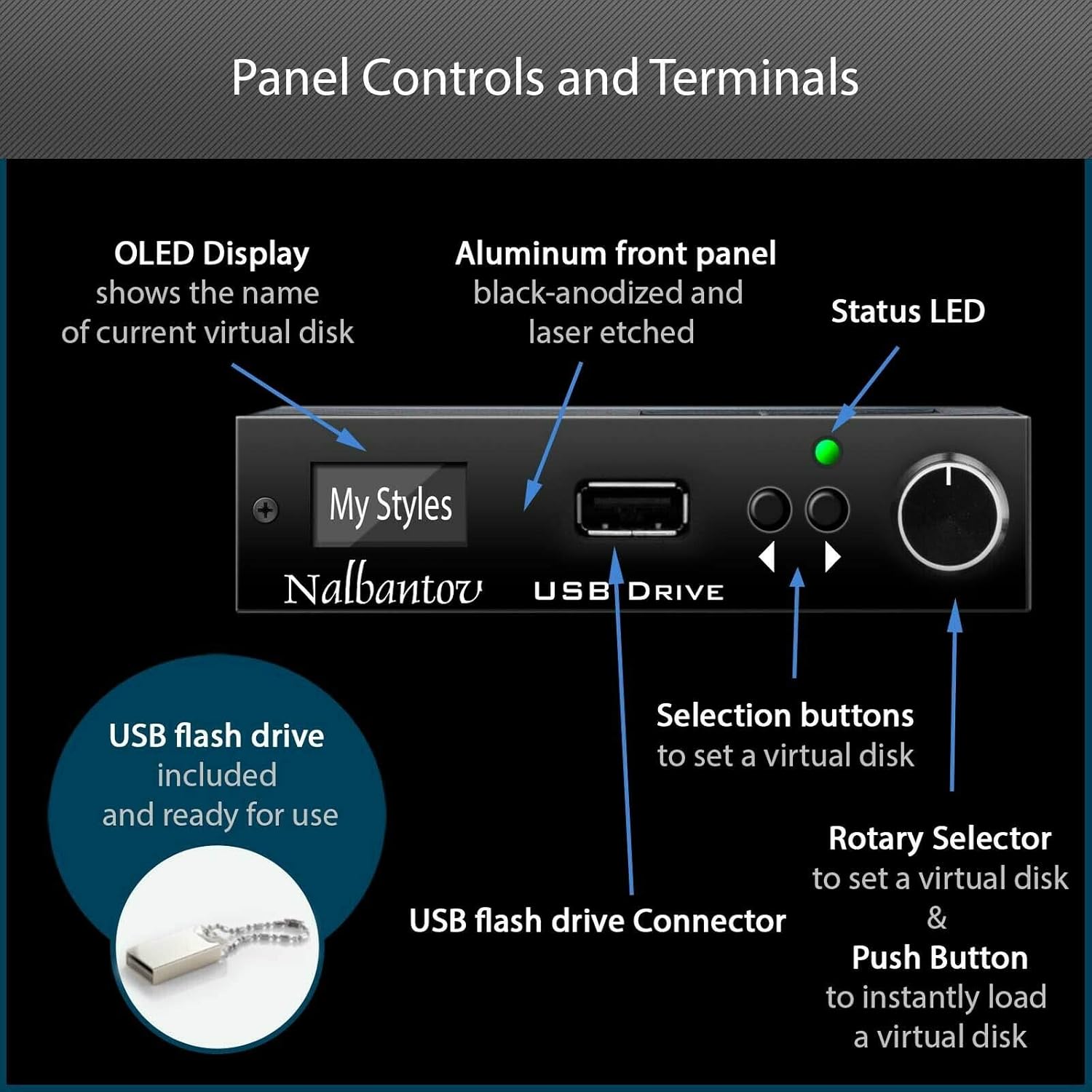
- Enhanced Display: Features a graphical display that lists virtual floppy names, allowing for easier content identification.
- Rotary Selector: Equipped with a rotary selector for quick and intuitive selection of content.
- Plug & Play: Pre-configured for the specified equipment, ensuring direct compatibility with existing size and connectors. No additional drivers are required.
- Durable Design: Constructed with an aluminum front panel, black-anodized and laser-etched, for a premium and robust build.
- Reliable Storage: Utilizes USB flash drives, eliminating moving parts and enhancing data security and longevity.
- Software Compatibility: Includes software compatible with both PC (Windows) and Apple (MAC OS) for advanced file management.
- Instant Usage: Supports instant usage of floppy disk functions (read/write/copy/delete) directly from your equipment.
3. Package Contents
Upon receiving your Nalbantov N-Drive eXtreme, please verify that all the following items are included:
- Nalbantov N-Drive eXtreme emulator (pre-configured for your equipment)
- USB flash memory (formatted and configured with virtual floppies)
- Software compatible with PC (Windows) and Apple (MAC OS)
- User's Manual and Mounting Instruction
- Assembly components (may include suitable connectors, ribbon cables, operating system, boot disk, specific virtual image files, etc., depending on your equipment)

4. Setup and Installation
The N-Drive eXtreme is designed for straightforward installation. It has the same size and connectors as a standard floppy drive, allowing for a direct replacement without extensive modifications.
4.1 Replacing Your Floppy Drive
To install the N-Drive eXtreme, carefully remove your existing floppy disk drive from your Emu Emax SE (or rack) system. The N-Drive eXtreme will fit into the same slot and connect using the existing floppy interface cables. Ensure the power is off before beginning installation.

4.2 Installation Examples
The following videos demonstrate the installation and use of Nalbantov USB floppy emulators in various musical instruments. While your specific model may differ, these examples illustrate the general process and benefits.
Video: Orla GT8000 upgraded with N-Drive eXtreme
This video demonstrates the N-Drive eXtreme being installed and used with an Orla GT8000 organ, showcasing the selection of sounds and playback functionality.
Video: Ensoniq Mirage and EPS upgraded with N-Drive eXtreme
This video illustrates the upgrade process of an Ensoniq Mirage and EPS sampler with the N-Drive eXtreme, demonstrating how the system loads operating systems and sounds from the USB drive.
Video: Happy client using N-Drive eXtreme on Disklavier MX100B
This video features a customer demonstrating the N-Drive eXtreme installed in a Yamaha Disklavier MX100B piano, showing how to load and play music from the USB drive.
Video: Satisfied customer using N-Drive eXtreme on Hammond XT172
This video shows the N-Drive eXtreme in operation with a Hammond XT172 organ, highlighting its seamless integration and ease of use for accessing musical content.
Video: Satisfied customer using N-Drive 100 on Yamaha VL1
This video demonstrates the N-Drive 100 (a similar Nalbantov product) installed in a Yamaha VL1 synthesizer, showing the process of loading patches and sounds from the USB drive.
5. Operating Instructions
The N-Drive eXtreme offers both basic and advanced modes of operation to manage your musical data.
5.1 Basic Operation
In basic mode, the N-Drive eXtreme functions like a traditional floppy drive, allowing your equipment to read, write, copy, and delete files directly from the USB flash drive. The graphical display shows the names of your virtual disks, and the rotary selector allows for easy navigation.



5.2 Advanced Operation
For more advanced file management, the included software (compatible with PC and MAC) allows you to transfer files between your computer and the USB flash drive. This is useful for performing backups, managing virtual disk image files, and organizing your content.

6. Maintenance
The Nalbantov N-Drive eXtreme is designed with no moving parts, contributing to its durability and reliability. Regular maintenance is minimal:
- Keep the unit clean and free from dust. Use a soft, dry cloth for cleaning.
- Ensure the USB flash drive is properly inserted and removed to prevent damage to the port or data corruption.
- Store the USB flash drive in a safe place when not in use.
7. Troubleshooting
This section addresses common issues you might encounter with your N-Drive eXtreme.
7.1 "ERROR: Can't read disk."
If your equipment displays an error message such as "ERROR: Can't read disk," it typically indicates an issue with the virtual disk image on the USB drive or the USB drive itself. This is a common problem with traditional floppy disks, which the N-Drive eXtreme aims to mitigate.

Possible Solutions:
- Ensure the USB flash drive is fully inserted into the N-Drive eXtreme.
- Try re-selecting the virtual disk using the rotary selector.
- If the issue persists, try using a different USB flash drive or re-formatting the current one using the provided software.
- Verify that the virtual disk image files are not corrupted.
8. Specifications
| Feature | Detail |
|---|---|
| Brand | Nalbantov |
| Model | N-Drive eXtreme |
| Body Material | Aluminum |
| Material Type | Aluminum |
| Connector Type | USB |
| UPC | 726962414654 |
| Manufacturer | Nalbantov Electronics Ltd. |
9. Warranty
The Nalbantov N-Drive eXtreme comes with a 3-year warranty. This includes a 1-year standard guarantee, with an additional 2 years provided upon online product registration. Please refer to the Nalbantov Electronics website for detailed warranty terms and conditions.
10. Support
Nalbantov Electronics is committed to providing timely and professional support. If you encounter any issues or have questions regarding your N-Drive eXtreme, please contact their customer service team. They offer extensive experience and assistance for installation, software usage, and general troubleshooting.
For support, you can typically reach out via email. Customers have reported excellent response times, often within 24 hours, with dedicated assistance for various technical inquiries.
Video: Great Customer Service Story by Carol G
This video features a customer, Carol G, sharing her positive experience with Nalbantov's customer service while installing the N-Drive eXtreme on her Yamaha Disklavier piano. She highlights the helpfulness and responsiveness of the support team, particularly mentioning assistance with software and music loading.