
Introduction
Thank you for choosing the NETUM Adjustable Barcode Scanner Stand. This stand is designed to provide a stable and flexible solution for hands-free barcode scanning, enhancing efficiency in various environments such as retail stores, libraries, warehouses, and supermarkets. It is compatible with several NETUM barcode scanner models, including NT-1698W, NT1698LY, NT-1228BL, and NT-1228BC.
Constructed from highly durable industrial-grade plastics, this stand is shock-resistant and robust, ensuring long-lasting performance. Its flexible design allows for easy installation, dismantling, and transport, while the high-quality clamp mechanism ensures effective position stabilization for your scanning device.
Product Overview
Key Features:
- Molded from highly durable industrial type plastics, ensuring shock-resistance and robustness.
- Compatible with NETUM NT series barcode scanners: NT-1698W, NT1698LY, NT-1228BL, NT-1228BC.
- Flexible design for easy and convenient installation, dismantling, and transport.
- High-quality clamp mechanism for effective position stabilization of the scanner.
- Flexible holding arm allows simple modification of the angle and position of your scanning device.
- Features four anti-slip mats at the bottom for enhanced stability.
Components:
The NETUM Adjustable Barcode Scanner Stand consists of three main components:
- Base: Provides stability for the stand.
- Flexible Goose Neck Arm: Allows for adjustable height and angle.
- Scanner Holder: Securely cradles the barcode scanner.

Figure 1: Stand Components and Non-slip Rubber Base
This image displays the disassembled components of the stand, including the base, the flexible goose neck arm, and the scanner holder. A detailed inset highlights the non-slip rubber feet on the base, which provide enhanced stability during use.

Figure 2: Product Dimensions
This image illustrates the key dimensions of the barcode scanner stand, including the overall height, the width and length of the base, and the internal dimensions of the scanner holder, providing a clear understanding of its physical size.
Setup
Follow these steps to assemble your NETUM Adjustable Barcode Scanner Stand:
- Attach the Goose Neck Arm to the Base: Carefully screw the threaded end of the flexible goose neck arm into the designated opening on the top of the stand's base. Ensure it is securely tightened to prevent wobbling.
- Attach the Scanner Holder to the Goose Neck Arm: Align the scanner holder with the top end of the goose neck arm and firmly attach it. It should click or screw into place, providing a stable platform for your scanner.
- Place the Stand: Position the assembled stand on a flat, stable surface. The anti-slip rubber feet on the base will help prevent movement.
- Insert Your Barcode Scanner: Gently place your compatible NETUM barcode scanner (e.g., NT-1698W, NT1698LY, NT-1228BL, NT-1228BC) into the scanner holder. Ensure it rests securely within the cradle.
- Adjust the Arm: Bend the flexible goose neck arm to achieve the desired height and angle for optimal scanning.

Figure 3: Assembled Stand with Scanner
This image demonstrates a NETUM barcode scanner correctly positioned on the fully assembled adjustable stand, highlighting the secure fit and the overall structure.
Operating Instructions
The NETUM Adjustable Barcode Scanner Stand is designed to facilitate hands-free scanning, especially when combined with barcode scanners that feature an auto-sensing or automatic scanning mode.
- Power On Scanner: Ensure your barcode scanner is powered on and connected to your system (e.g., computer, POS terminal).
- Activate Auto-Sensing Mode (if applicable): If your scanner has an auto-sensing or continuous scanning mode, activate it according to your scanner's specific instructions. This allows the scanner to automatically detect and read barcodes when an item is presented.
- Position Items for Scanning: Place the item with the barcode directly in front of the scanner's reading window. The flexible goose neck arm allows you to adjust the scanner's position to best suit your workflow and the size of the items being scanned.
- Hands-Free Operation: With the scanner in its holder and auto-sensing mode active, you can simply pass items under the scanner's beam without needing to pick up the scanner, freeing your hands for other tasks.
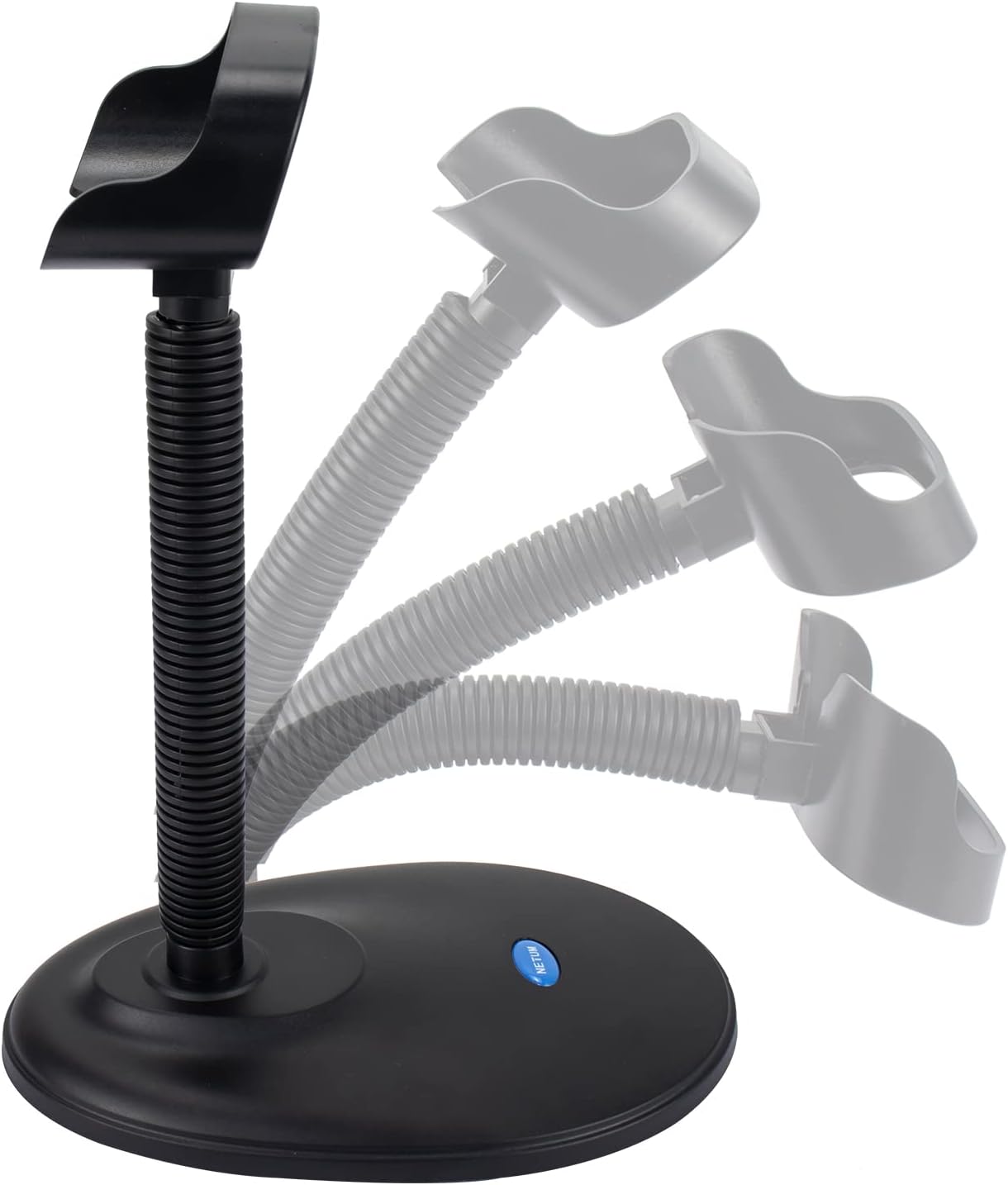
Figure 4: Flexible Arm Adjustment
This image illustrates the flexibility of the stand's goose neck arm, demonstrating how it can be bent and adjusted to various angles to accommodate different scanning needs and user preferences.

Figure 5: Hands-Free Scanning in Use
This image depicts the barcode scanner stand in an operational setting, demonstrating how an item is scanned hands-free by simply passing it under the scanner, illustrating the efficiency of the setup.
Maintenance
To ensure the longevity and optimal performance of your NETUM Adjustable Barcode Scanner Stand, follow these simple maintenance guidelines:
- Cleaning: Wipe the stand regularly with a soft, damp cloth to remove dust and dirt. Avoid using harsh chemicals or abrasive cleaners, as these can damage the plastic finish.
- Inspection: Periodically check all connection points (base to arm, arm to holder) to ensure they remain secure. If any part feels loose, gently tighten it.
- Stability: Ensure the stand is always placed on a flat, stable surface. The anti-slip feet are designed to prevent movement, but uneven surfaces can compromise stability.
- Storage: When not in use for extended periods, store the stand in a clean, dry environment away from extreme temperatures.
Troubleshooting
If you encounter any issues with your NETUM Adjustable Barcode Scanner Stand, please refer to the following common problems and solutions:
| Problem | Possible Cause | Solution |
|---|---|---|
| Stand feels unstable or wobbles. | Loose connections; uneven surface; scanner not properly seated. |
|
| Scanner falls out of the holder easily. | Incompatible scanner model; improper placement. |
|
| Goose neck arm does not hold position. | Over-tightening or damage to the flexible arm. |
|
Specifications
- Product Dimensions: 8.35 x 6.02 x 2.24 inches
- Item Weight: 12 ounces
- Model Number: NT STAND
- Manufacturer: NETUM
- Compatible Devices: NETUM NT-1698W, NT1698LY, NT-1228BL, NT-1228BC Barcode Scanners
- Material: Durable Industrial Plastics
- Connectivity Technology: Stand is passive; compatible scanners use USB Cable or Wireless (Bluetooth)
Warranty and Support
NETUM provides a 1-year replacement warranty for the barcode scanner stand. This warranty covers manufacturing defects and ensures that you receive a replacement if your stand experiences issues due to faulty materials or workmanship within one year of purchase.
For technical support, warranty claims, or any questions regarding your NETUM product, please contact NETUM customer service through the retailer where you purchased the product or visit the official NETUM website for contact information. Please have your purchase receipt and product model number (NT STAND) ready when contacting support.


