
Proscenic T21
Contents
Proscenic T21 Air Fryer User Manual
Model: T21
1. Introduction
Welcome to the world of healthier cooking with your new Proscenic T21 Air Fryer. This XL 5.8 QT smart electric air fryer is designed for home use, featuring 1700W power for efficient oilless roasting, preheating, and keep warm functions. Its multi-functional digital touchscreen, along with Alexa and WiFi APP control, makes cooking easy and convenient. This manual provides essential information for safe and effective operation.
2. Safety Information
Please read all instructions carefully before using the appliance to prevent personal injury or property damage. Keep this manual for future reference.
Important Safeguards:
- Always place the appliance on a stable, heat-resistant surface.
- Do not immerse the cord, plug, or appliance in water or other liquid.
- Ensure the voltage indicated on the appliance corresponds to your local mains voltage.
- Supervise children closely when the appliance is in use.
- Unplug from outlet when not in use and before cleaning.
- Do not operate any appliance with a damaged cord or plug.
- This product contains chemicals known to the State of California to cause cancer and birth defects or other reproductive harm.
3. Product Components
The Proscenic T21 Air Fryer consists of the main unit, a removable non-stick basket, and an intuitive digital touchscreen control panel.
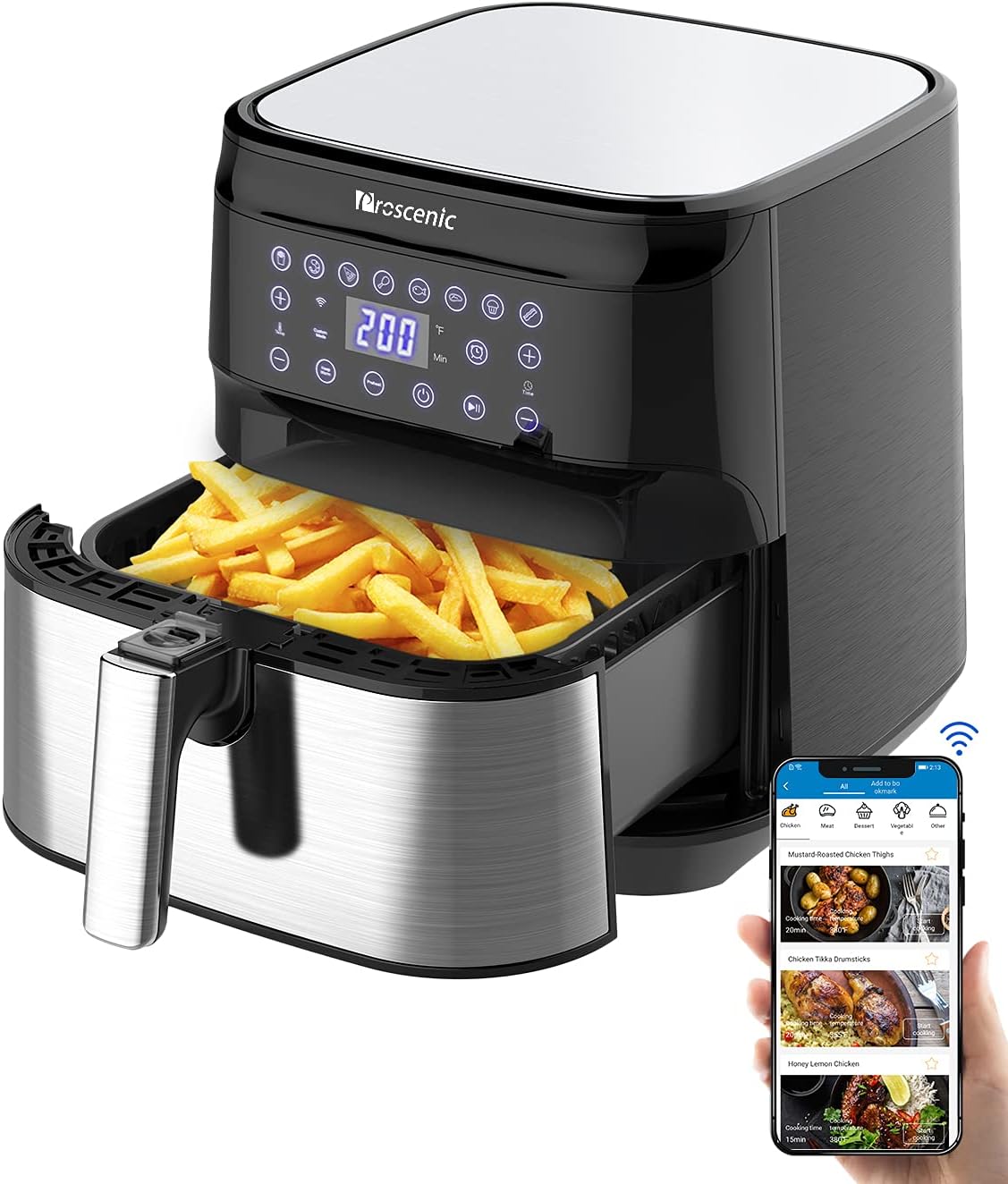
Figure 3.1: Proscenic T21 Air Fryer with its main components visible. The image shows the main unit, the pull-out basket filled with fries, and the digital control panel.
- Main Unit: Houses the heating element and fan for 360° hot air circulation.
- Digital Touchscreen: Features various preset cooking modes, temperature, and time controls.
- Removable Non-Stick Basket: 5.8 QT capacity, designed for easy food placement and cleaning. Made from food-safe materials without BPA & PFOA.
4. Setup
Before first use, ensure all packaging materials are removed. Clean the basket and main unit as described in the "Maintenance & Cleaning" section. Place the air fryer on a stable, level, heat-resistant surface, away from walls or other appliances to allow for proper air circulation.
Initial Power-On:
- Plug the air fryer into a grounded electrical outlet.
- The digital display will illuminate, indicating it's ready for use.
App and Voice Control Setup:
The Proscenic T21 Air Fryer offers convenient control via the Proscenic Home app, Alexa, and Google Assistant. Follow these steps to connect:
- Download the "Proscenic Home" app from your smartphone's app store.
- Create an account and log in.
- In the app, navigate to your profile and select "Amazon Alexa" or "Google Home" under "3rd party smart-voice assistant".
- Follow the on-screen instructions to link your Proscenic account with your Amazon or Google account. This typically involves signing in with your Amazon/Google credentials and granting necessary permissions.
- Once linked, you can use voice commands (e.g., "Alexa, turn on the air fryer" or "Hey Google, start cooking chicken") to control your appliance.
Video 4.1: Official Proscenic guide on how to connect the T21 Air Fryer to Google Home for voice control.
Video 4.2: Official Proscenic guide on how to connect the T21 Air Fryer to Amazon Alexa for voice control.
5. Operating Instructions
The Proscenic T21 Air Fryer offers various cooking options through its digital touchscreen and smart app control.
Basic Operation:
- Place food in the non-stick basket. Do not overfill.
- Slide the basket back into the main unit until it clicks into place.
- Press the power button to turn on the display.
- Select a preset cooking mode or manually adjust temperature and time using the +/- buttons.
- Press the start/pause button to begin cooking.

Figure 5.1: The digital touchscreen control panel of the Proscenic T21 Air Fryer, displaying various cooking presets like fries, shrimp, pizza, chicken, fish, steak, cake, and bacon.
Preheat Function:
The exclusive Preheat function helps save cooking time and ensures food cooks faster, reducing water loss and maintaining original flavor with a crunchy taste. Preheat the machine for 3-5 minutes before cooking for optimal results.
Keep Warm Function:
The Keep Warm button allows you to set a desired time and temperature after automatic shutdown, ensuring your food remains hot until serving.
Combination Functions:
Engineered with three combination functions: Schedule + Menu + Keep Warm. You can choose any one, two, or all three depending on your needs for automated cooking.

Figure 5.2: Visual representation of the combination functions (Menu, Schedule, Keep Warm) available on the Proscenic T21 Air Fryer.
Online Recipes:
The Proscenic app offers dozens of original and preset recipes. You can also customize your recipes directly on the app, allowing for tasty, healthy, and easy-to-digest fried food. Discover hundreds of step-by-step recipes delivered directly from nutrition experts for your everyday cooking.

Figure 5.3: A user interacting with the Proscenic app on a smartphone, showcasing the availability of various online recipes for the air fryer.
Video 5.4: A demonstration of the Proscenic T21 Smart Air Fryer's features, including baking bread and making french fries, highlighting the smart app control and online recipes.
6. Maintenance & Cleaning
Proper maintenance ensures the longevity and optimal performance of your air fryer.
Cleaning the Basket:
The detachable and non-stick square basket is without BPA & PFOA and is dishwasher safe, making cleaning easy. For manual cleaning, use a soft sponge with warm soapy water. Avoid abrasive cleaners or scouring pads that could damage the non-stick coating.

Figure 6.1: The non-stick detachable basket being washed in a sink, demonstrating its ease of cleaning.
Cleaning the Main Unit:
Wipe the exterior of the air fryer with a damp cloth. Do not immerse the main unit in water or any other liquid.
7. Troubleshooting
If you encounter any issues with your Proscenic T21 Air Fryer, please refer to the common solutions below. If the problem persists, contact customer support.
| Problem | Possible Cause | Solution |
|---|---|---|
| App connection issues | Incorrect Wi-Fi password, 5Ghz network not supported, device not in pairing mode. | Ensure correct 2.4Ghz Wi-Fi network. Re-enter password. Follow app instructions to put device in pairing mode (press and hold power button for 5 seconds until Wi-Fi icon flashes). |
| Food not cooking evenly | Basket overloaded, food not shaken/flipped. | Do not overload the basket. Shake or flip food halfway through cooking for even results. |
| Appliance not turning on | Not plugged in, power outlet issue. | Ensure the appliance is properly plugged into a working outlet. Check circuit breaker. |
8. Specifications
| Feature | Detail |
|---|---|
| Brand | Proscenic |
| Model Name | T21 |
| Capacity | 5.8 Quarts |
| Output Wattage | 1700 Watts |
| Voltage | 110 Volts |
| Control Method | Voice (Alexa, Google Assistant), Digital Touchscreen |
| Material | Food grade material, Stainless Steel with Non-stick Coating |
| Product Dimensions | 12"D x 12"W x 12.7"H |
| Item Weight | 15 Pounds |
| Dishwasher Safe | Yes (Basket) |
9. Warranty & Support
Proscenic offers comprehensive support for its products.
- Warranty: Up to 12-months Warranty.
- Customer Service: If you have any problems or concerns about the product, please feel free to contact us via Messages or After-sales Email on instruction. We will resolve it within 24 hours.
- Online Resources: You can find the recipe and PDF instruction on the product page.
Documents and downloads
Ask a question about this manual
Ask about setup, troubleshooting, compatibility, parts, safety, or missing instructions. Manuals+ will review the question and use this page’s manual context to help answer it.