
NICRON FLU-B70
Contents
NICRON B71Pro Flashlight User Manual
Model: FLU-B70
Brand: NICRON
1. Introduction
This user manual provides detailed instructions for the safe and effective operation, maintenance, and troubleshooting of your NICRON B71Pro High Performance Three Color Rechargeable Flashlight. Please read this manual thoroughly before using the product to ensure optimal performance and longevity.
The NICRON B71Pro is designed for versatility and durability, featuring a 90-degree twist head, magnetic base, and multiple illumination modes, making it suitable for various outdoor, professional, and everyday carry applications.
2. Product Overview
The NICRON B71Pro is a high-performance flashlight equipped with a CREE XP-L HI V2 LED, offering 950 lumens output and a 200-meter beam distance. Its unique design includes a patented 90-degree twist head and a strong magnetic base for hands-free operation.

Figure 2.1: Detailed view of the NICRON B71Pro flashlight with labeled components.
This image provides a detailed view of the B71Pro flashlight, indicating its overall length and head diameter. Key components such as the anti-burst lens, power switch, non-slip handle, 360-degree rotatable clip, and high-strength magnetic base are clearly labeled.
Key Features:
- Three Color Output: White, Red, and Green light modes.
- High Brightness: Up to 950 lumens with a 200-meter beam distance.
- Adjustable Head: Patented 90-degree twist design for versatile illumination.
- Magnetic Base: Strong magnetic tail for hands-free attachment to metal surfaces.
- Rechargeable: Integrated Micro USB charging port for the included 18650 Li-Ion 2600mAh battery.
- Durable Construction: IP65 water resistant, dust resistant, and 1.2m drop resistant anodized aluminum body.
- Multiple Operating Modes: Low, Med, High, Turbo, Green, Red, Red Strobe, Strobe, and SOS with Smart Memory Switch.
3. Setup
Before first use, ensure the battery is properly installed and fully charged.

Figure 3.1: Package Contents.
This image shows all items included in the product package: the NICRON B71Pro flashlight, a 2600mAh 18650 Li-Ion battery, a USB charging cable, and the instruction manual.
3.1 Battery Installation
- Unscrew the tail cap of the flashlight by turning it counter-clockwise.
- Insert the included 18650 Li-Ion 2600mAh battery with the positive (+) end facing towards the head of the flashlight.
- Screw the tail cap back on clockwise until it is securely tightened.
3.2 Initial Charging
The flashlight comes with an inbuilt Micro USB charging port.
- Locate the Micro USB charging port on the side of the flashlight, usually protected by a rubber cover.
- Open the rubber cover.
- Connect the provided USB cable to the flashlight's Micro USB port and the other end to a USB power source (e.g., computer, wall adapter).
- The power button will illuminate to indicate charging status. Refer to the battery level indication light for charging progress (e.g., red for charging, green for fully charged).
- Once fully charged, disconnect the USB cable and securely close the rubber cover to maintain water resistance.
4. Operating Instructions
4.1 Power On/Off
- To Turn On: Press the power switch located on the body of the flashlight.
- To Turn Off: Press and hold the power switch for approximately 1 second.
4.2 Mode Switching (White Light)
When the flashlight is on, short press the power switch to cycle through the white light modes:
- Low → Medium → High → Turbo
The Smart Memory Switch will remember your last used white light mode when the flashlight is turned off and on again.
4.3 Special Modes (Green, Red, Strobe, SOS)

Figure 4.1: Illumination Modes.
This graphic illustrates the nine distinct illumination modes available on the B71Pro flashlight: four white light levels (Low, Med, High, Turbo), green light, red light, red strobe, white strobe, and SOS signal.
- To Access Green/Red Light: From any white light mode, double-press the power switch quickly to cycle through Green → Red → Red Strobe.
- To Access Strobe/SOS: From any white light mode, triple-press the power switch quickly to cycle through Strobe → SOS.
- To return to white light modes, single-press the power switch.
4.4 90-Degree Twist Head

Figure 4.2: 90-Degree Twist Head and Charging.
This graphic details the flashlight's 90-degree adjustable head, providing a table of performance metrics including brightness, runtime, beam distance, and water resistance. It also shows the integrated Micro USB charging port and battery level indicator.
The head of the flashlight can be twisted 90 degrees to convert it from a straight torch to an L-shaped light. This feature is useful for directing light when the flashlight is clipped to clothing or used with its magnetic base.
4.5 Magnetic Base
The tail cap of the flashlight contains a high-strength magnet. This allows the flashlight to be securely attached to ferrous metal surfaces for hands-free illumination, such as during vehicle maintenance or in workshops.
5. Maintenance
Proper maintenance ensures the longevity and reliable performance of your NICRON B71Pro flashlight.
5.1 Cleaning
- Wipe the flashlight body with a clean, soft cloth.
- For stubborn dirt, use a slightly damp cloth. Avoid harsh chemicals or abrasive cleaners.
- Keep the lens clean for optimal light output. Use a lens cleaning cloth if necessary.
5.2 Battery Care
- Recharge the battery when the battery level indicator shows low power.
- For long-term storage, charge the battery to approximately 50% and store the flashlight in a cool, dry place.
- Avoid fully discharging the battery frequently, as this can reduce its lifespan.
5.3 Water and Dust Resistance
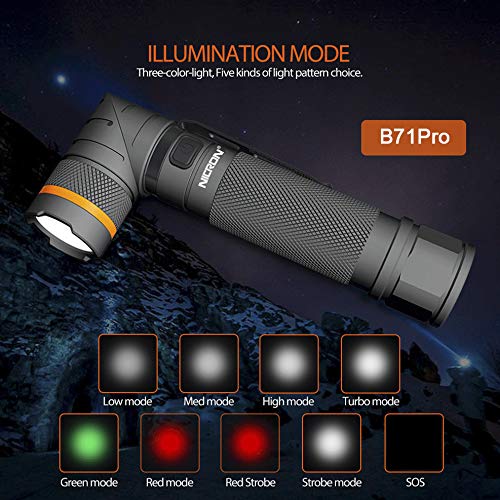
Figure 5.1: IP65 Water Resistance.
The image depicts the NICRON B71Pro flashlight being exposed to water, visually confirming its IP65 water-resistant rating, suitable for use in wet conditions.
- The NICRON B71Pro is rated IP65, meaning it is protected from dust ingress and low-pressure water jets from any direction.
- Ensure the Micro USB charging port's rubber cover is securely closed when not charging to maintain water and dust resistance.
- Do not submerge the flashlight in water.
5.4 Drop Resistance
The flashlight is designed to be resistant to drops from up to 1.2 meters. While durable, avoid unnecessary drops to prevent potential damage.
6. Troubleshooting
If you encounter issues with your NICRON B71Pro flashlight, refer to the following common problems and solutions:
| Problem | Possible Cause | Solution |
|---|---|---|
| Flashlight does not turn on. | Battery is depleted or incorrectly installed. | Charge the battery. Ensure the battery is inserted with the positive (+) end towards the head and the tail cap is fully tightened. |
| Light is dim or flickers. | Low battery. Loose connections. | Recharge the battery. Ensure the tail cap is tightened. Clean battery contacts if necessary. |
| Flashlight does not charge. | USB cable or power source issue. Charging port obstruction. | Try a different USB cable or power adapter. Ensure the charging port is clean and free of debris. |
| Mode switching is erratic. | Switch malfunction or low battery. | Ensure battery is fully charged. If problem persists, contact customer support. |
If the issue persists after attempting these solutions, please refer to the Warranty and Support section for further assistance.
7. Specifications
Detailed technical specifications for the NICRON B71Pro flashlight:
| Feature | Specification |
|---|---|
| Model Number | FLU-B70 |
| Light Source | CREE XP-L HI V2 LED |
| Brightness (White) | 950 Lumens (Max) |
| Beam Distance | 200 Meters |
| Power Source | 18650 Li-Ion 2600mAh Battery (Included) |
| Runtime | Up to 100 hours (Low mode) |
| Charging Port | Micro USB |
| Material | Aluminium |
| Color | Black |
| Water Resistance | IP65 (Water Resistant, Dust Resistant) |
| Drop Resistance | 1.2 meters |
| Dimensions (LxWxH) | 15 x 2 x 2 cm |
| Item Weight | 166 Grams |
8. Warranty and Support
8.1 Manufacturer Warranty
The NICRON B71Pro flashlight comes with a 1-year Manufacturer Warranty from the date of purchase. This warranty covers defects in materials and workmanship under normal use.
The warranty does not cover damage caused by misuse, accident, unauthorized modification, or failure to follow the instructions in this manual.
8.2 Customer Support
For warranty claims, technical assistance, or any questions regarding your NICRON B71Pro flashlight, please contact the seller or NICRON customer support through the official channels provided at the point of purchase or on the manufacturer's website.
Please have your purchase receipt and product model number (FLU-B70) ready when contacting support.
Ask a question about this manual
Ask about setup, troubleshooting, compatibility, parts, safety, or missing instructions. Manuals+ will review the question and use this page’s manual context to help answer it.