1. Introduction
This manual provides essential information for the proper setup, operation, and maintenance of your IVANKY 8K DisplayPort Cable 1.4. This VESA-certified cable is designed to deliver high-resolution video and audio performance for compatible devices.
Please read this manual thoroughly before using the product to ensure optimal performance and longevity.
2. Setup Instructions
The IVANKY 8K DisplayPort Cable 1.4 is designed for direct connection between devices equipped with DisplayPort interfaces. Ensure both your source device (e.g., desktop, laptop, graphics card) and display device (e.g., monitor, TV) have DisplayPort ports.
2.1 Connecting the Cable
- Identify the DisplayPort output on your source device and the DisplayPort input on your display device.
- Gently insert one end of the IVANKY DisplayPort cable into the DisplayPort output of your source device.
- Insert the other end of the cable into the DisplayPort input of your display device.
- Ensure both connections are secure. The latch-free design allows for easy and safe disconnection without damaging ports.
Important Notes:
- This cable is a DisplayPort to DisplayPort cable and is not compatible with HDMI or Mini DisplayPort without appropriate adapters, which may reduce performance.
- Avoid using extensions or additional adapters as they can degrade signal quality and performance.

Figure 1: The IVANKY 8K DisplayPort 1.4 Cable with its braided design and gold-plated connectors.

Figure 2: Connection diagram showing DisplayPort to DisplayPort setup and supported resolutions.
3. Operating Instructions
Once connected, your IVANKY DisplayPort cable facilitates high-performance video and audio transmission. The cable supports various advanced display technologies.
3.1 Supported Resolutions and Refresh Rates
- 8K (7680x4320) at 60Hz
- 5K at 60Hz
- 4K (3840x2160) at 144Hz
- 2K (2560x1440) at 240Hz
- 1080P (1920x1080) at 240Hz
The cable utilizes HBR3 (High Bit Rate 3) technology, providing a bandwidth of 32.4 Gbps to support these high resolutions and refresh rates.

Figure 3: Visual representation of 8K and 4K resolution capabilities.
3.2 Advanced Display Technologies
The cable supports:
- Dynamic HDR: Optimizes dark and bright scenes for enhanced detail and color accuracy.
- HDCP 2.2: High-bandwidth Digital Content Protection for secure transmission of copyrighted content.
- FreeSync and G-Sync: Compatible with adaptive sync technologies to eliminate screen tearing and stuttering for smoother visuals.

Figure 4: Demonstration of Dynamic HDR and 3D visual enhancements.
4. Maintenance and Care
To ensure the longevity and optimal performance of your IVANKY DisplayPort cable, follow these maintenance guidelines:
- Handle with Care: Despite its durable construction, avoid excessive bending, twisting, or pulling on the cable, especially near the connectors.
- Clean Connectors: If necessary, gently clean the gold-plated connectors with a dry, lint-free cloth to remove dust or debris.
- Storage: When not in use, coil the cable loosely and store it in a clean, dry environment away from extreme temperatures.
- Latch-Free Design: The cable features a latch-free design for easy and safe disconnection. Simply pull the connector straight out from the port. Do not force or wiggle the connector.
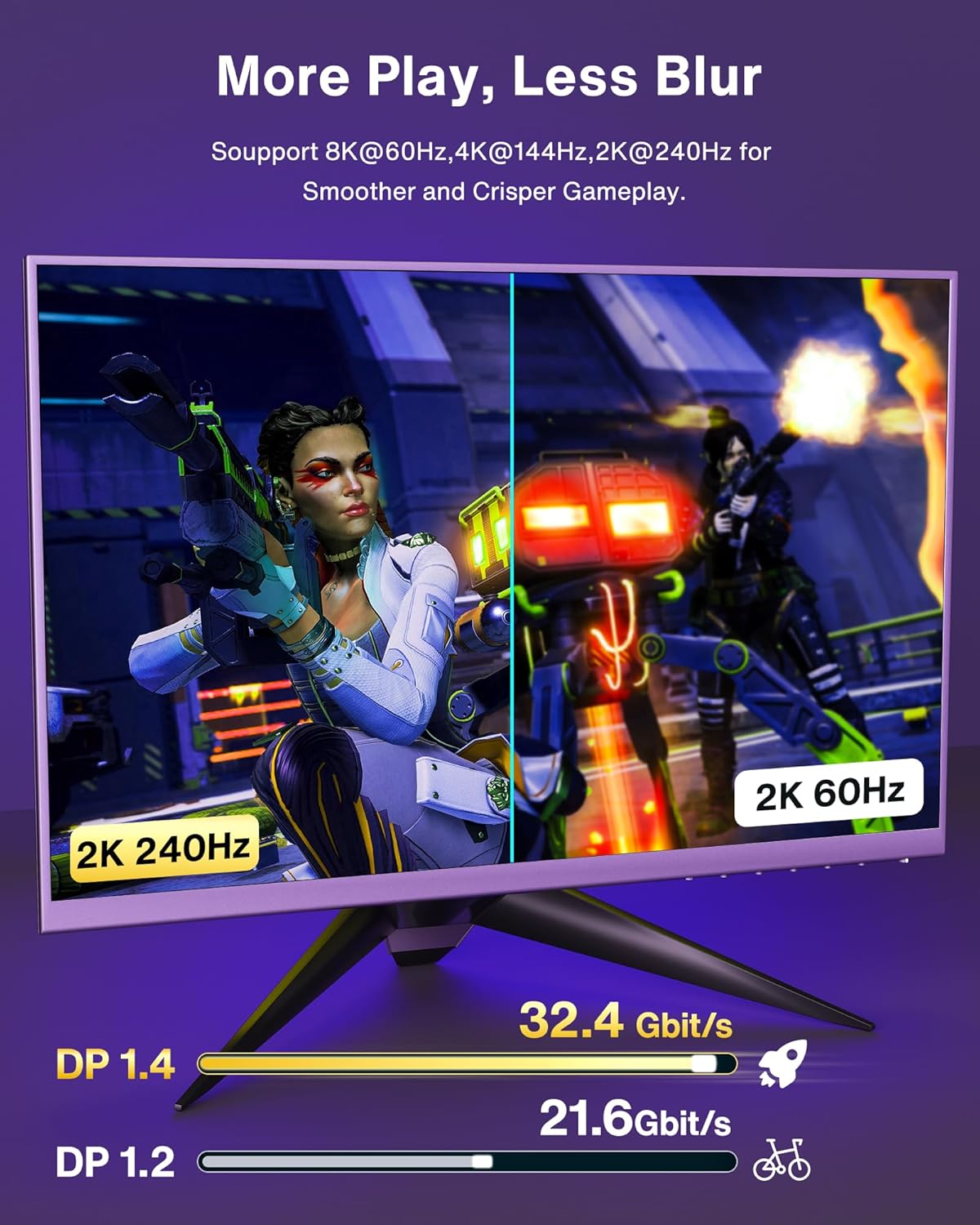
Figure 5: Durability features of the IVANKY DisplayPort cable, including the braided jacket and gold-plated connectors.
5. Troubleshooting
If you encounter issues with your IVANKY DisplayPort cable, refer to the following common problems and solutions:
5.1 No Signal or Intermittent Signal
- Check Connections: Ensure both ends of the DisplayPort cable are securely plugged into the respective ports on your source and display devices.
- Verify Input Source: On your monitor or TV, confirm that the correct DisplayPort input source is selected.
- Test with Another Cable/Port: If possible, try a different DisplayPort cable or connect to another DisplayPort on your devices to rule out port or cable defects.
- Update Drivers: Ensure your graphics card drivers are up to date.
5.2 Flickering or Distorted Image
- Reduce Resolution/Refresh Rate: Temporarily lower the display resolution or refresh rate in your operating system settings to see if the issue persists.
- Cable Length: For very high resolutions and refresh rates, longer cables can sometimes be more susceptible to interference. Ensure the cable length is appropriate for your setup.
- Interference: Keep the cable away from strong electromagnetic interference sources.
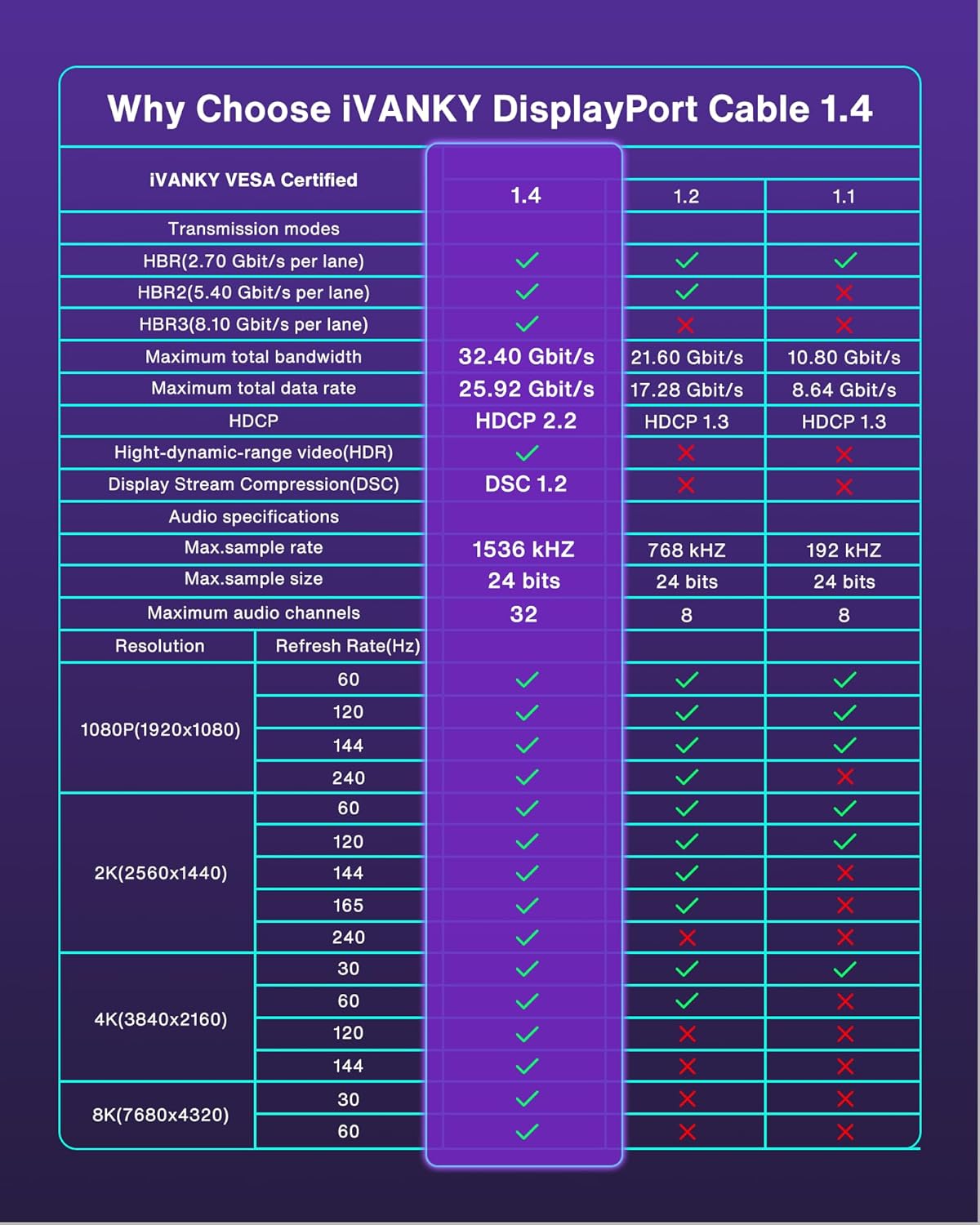
Figure 6: The cable is designed to provide a stable, flicker-free image.
5.3 FreeSync/G-Sync Not Activating
- Enable on Monitor: Ensure FreeSync or G-Sync is enabled in your monitor's OSD (On-Screen Display) settings.
- Enable in Graphics Driver: Activate FreeSync (AMD Radeon Software) or G-Sync (NVIDIA Control Panel) in your graphics card's software settings.
- Direct Connection: Adaptive Sync technologies typically require a direct DisplayPort connection without adapters or hubs.
6. Specifications
Key technical specifications for the IVANKY 8K DisplayPort Cable 1.4 (Model VBC31):
| Feature | Specification |
|---|---|
| Brand | IVANKY |
| Model Name | 8K DisplayPort 1.4 Cable - Braided (VBC31) |
| Connector Type | DisplayPort (Male-to-Male) |
| Cable Type | DisplayPort 1.4 |
| Certification | VESA Certified |
| Max Resolution & Refresh Rate | 8K@60Hz, 4K@144Hz, 2K@240Hz |
| Bandwidth | 32.4 Gbps (HBR3) |
| Supported Technologies | Dynamic HDR, HDCP 2.2, FreeSync, G-Sync |
| Conductor Material | 30AWG Tinned Copper |
| Connector Plating | 24K Gold Plated |
| Outer Material | Nylon Braided Jacket |
| Color | Black |
| Length | 6.6 Feet |
| Item Weight | 3.53 ounces (100 Grams) |

Figure 7: Detailed comparison of DisplayPort 1.4 features against older versions.
7. Warranty and Support
IVANKY is committed to providing high-quality products and customer satisfaction.
7.1 Warranty Information
This IVANKY DisplayPort cable comes with conditional customer support for up to 54 months. Please retain your proof of purchase for warranty claims.
7.2 Customer Support
For technical assistance, troubleshooting, or warranty inquiries, please contact our support team:
- Email: support@ivanky.com
- Our support team aims to respond within 24 hours.
Each IVANKY cable undergoes meticulous testing to ensure it meets the highest quality standards.


