
1. Introduction
This manual provides essential information for the safe and efficient operation of your Usongshine TwoTrees Sapphire Pro 1 3D Printer. Please read this manual thoroughly before operating the device to ensure proper setup, usage, and maintenance. Retain this manual for future reference.
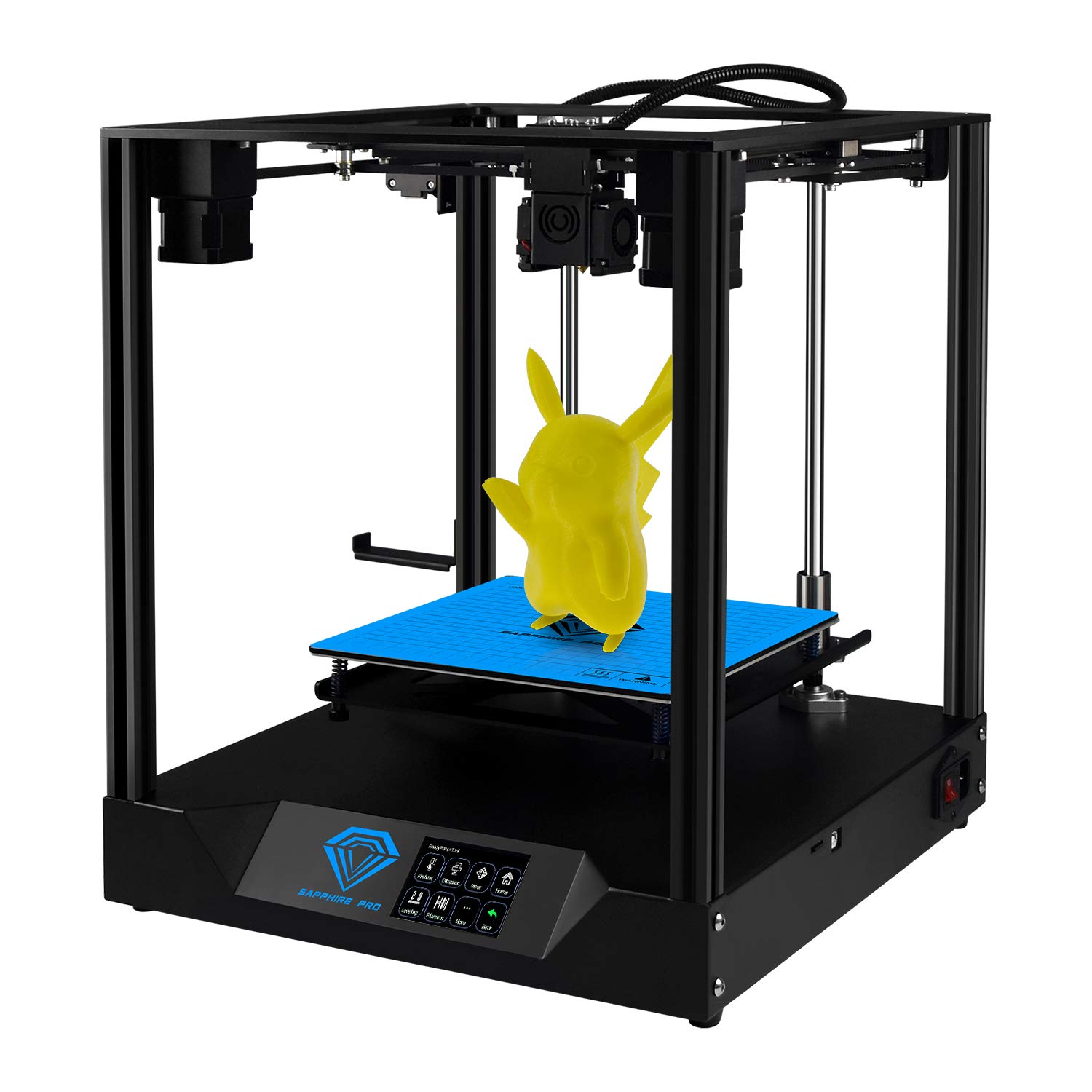
Figure 1.1: The Usongshine TwoTrees Sapphire Pro 1 3D Printer, fully assembled.
2. Safety Information
Observe the following safety precautions to prevent injury or damage to the printer:
- Hot Surfaces: The print nozzle and heated bed reach high temperatures during operation. Avoid touching these components to prevent burns. Allow them to cool completely before handling.
- Moving Parts: The printer contains moving parts that can cause injury. Keep hands and loose clothing away from the print head, build plate, and other moving components during operation.
- Ventilation: Operate the 3D printer in a well-ventilated area. Some filaments may emit fumes during printing.
- Power Supply: Use only the provided power adapter. Ensure the power cable is not damaged and is properly connected. Disconnect power before performing any maintenance or assembly.
- Filament Handling: Store filament in a dry environment to prevent moisture absorption, which can affect print quality.
- Children and Pets: Keep the 3D printer out of reach of children and pets.
3. Setup and Assembly
The Usongshine TwoTrees Sapphire Pro 1 features a kit design for easy assembly. The printer can typically be assembled in 4 steps, taking approximately 10 minutes.
3.1 Core Structure
The printer utilizes a Core-XY structure, which contributes to precise, faster, and quieter printing. The hot bed is fixed on the Z-axis, minimizing movement and potential points of failure.

Figure 3.1: Comparison of the sheet metal backplane design, illustrating the concise 'after' version.

Figure 3.2: Illustration of the hot bed fixed on the Z-axis, reducing movement and failure points.
3.2 Linear Guides
The printer incorporates linear guides for smoother and quieter motion during printing, enhancing overall print quality and user experience.

Figure 3.3: Detail of the linear guides, designed for smoother and quieter printer operation.
3.3 Key Components
The Sapphire Pro 1 is equipped with high-quality components for optimal performance:
- TMC2208 Stepper Motor Drivers: For X and Y axes, providing silent printing.
- Dual Fan Ring Cooling: Ensures rapid cooling of printed workpieces.
- BMG Dual-Drive Extruder: Delivers precise and consistent filament extrusion.

Figure 3.4: Overview of key internal components, including the double ring cooling fan, BMG extruder, and TMC2208/4988 quiet drivers.
4. Operating Instructions
4.1 Power On and Interface
Connect the printer to a power source and turn it on. The 3.5-inch color touch screen provides an intuitive interface for controlling the printer's functions.
4.2 Filament Loading
The Sapphire Pro 1 supports various filament types, including PLA, ABS, HIPS, Wood, PA, and PETG. Ensure the heated bed is at the appropriate temperature for your chosen filament. The heated bed can reach operating temperature in approximately 1 minute.
4.3 Printing Process
- Prepare Model: Use compatible slicing software (Cura, 3DPrinterOS, Repetier-Host, etc.) to convert your 3D model (STL, OBJ, JPG formats) into G-code.
- Transfer G-code: Transfer the G-code file to the printer via TF card or online printing.
- Automatic Leveling: The printer features automatic multi-point leveling for precise bed calibration.
- Start Print: Initiate the print job from the touch screen interface.
4.4 Resume Printing Function
The printer is equipped with a resume printing function. In the event of an accidental power loss, the printer can resume printing from the last completed layer once power is restored. It also supports filament detection to monitor supplies.

Figure 4.1: Illustration of the resume printing function, allowing prints to continue after power loss.
5. Maintenance
Regular maintenance ensures the longevity and optimal performance of your 3D printer:
- Cleaning: Regularly clean the print bed, nozzle, and printer frame to remove dust, filament debris, and residue. Use a soft cloth and appropriate cleaning solutions.
- Lubrication: Periodically lubricate the linear guides and lead screws with suitable lubricant to ensure smooth movement.
- Nozzle Inspection: Check the nozzle for wear or clogs. Replace the nozzle if necessary to maintain print quality.
- Firmware Updates: Check the manufacturer's website for any available firmware updates to improve performance and add new features.
6. Troubleshooting
If you encounter issues with your 3D printer, consider the following general troubleshooting steps:
- Print Quality Issues: Check filament quality, nozzle temperature, bed leveling, and slicing settings. Ensure the print bed is clean and properly adhered.
- Filament Not Extruding: Verify that the filament is loaded correctly, the nozzle is not clogged, and the extruder motor is functioning.
- Printer Not Responding: Check all power connections and ensure the printer is turned on. Restart the printer if necessary.
- Layer Shifting: Inspect belts for proper tension and ensure all mechanical components are secure.
For more detailed troubleshooting, refer to online resources or contact customer support.
7. Specifications
The following table details the technical specifications of the Usongshine TwoTrees Sapphire Pro 1 3D Printer:

Figure 7.1: Detailed product parameters and specifications for the Sapphire Pro 1.
| Parameter | Value |
|---|---|
| Model | Sapphire - Pro1 |
| Color | Black |
| Machine Material | Sheet metal |
| Number of Nozzles | 1 |
| Nozzle Diameter | 0.4mm |
| Hot Bed Size | 235mm x 235mm |
| Print Size (L*W*H) | 235mm x 235mm x 235mm |
| Printing Accuracy | ±0.01mm |
| Layer Thickness | 0.1-0.4mm |
| Printing Method | TF card / Online printing |
| Display | 3.5" color touch screen |
| Machine Speed (MAX) | 300mm/s |
| Extrusion Head Temperature (MAX) | 260 °C |
| Hot Bed Maximum Temperature (MAX) | 120 °C |
| XY Axis Positioning Accuracy | 0.01mm |
| Z Axis Positioning Accuracy | 0.0025mm |
| Print Material | PLA, ABS, PETG, Wooden filament |
| Filament Diameter | 1.75mm |
| Operating Language | EN, RU, ES, FR, IT, ZH-CN, ZH-HK |
| Software Format | STL, OBJ, JPG |
| Print File Format | Gcode |
| Machine Size (L*W*H) | 405mm x 380mm x 460mm |
| Package Size (L*W*H) | 500mm x 430mm x 250mm |
| Machine Weight | 11.5 Kg |
| Package Weight | 14.0 Kg |
| Working Environment | 220V/110V 360W |
| Operating System | Windows 7 and higher, Mac OS X |
| Support Software | Cura, 3DPrinterOS, Repetier-Host and other slicing software |
| Working Environment (Temp/Humidity) | 5-40 °C, 20-60% RH |

Figure 7.2: Overall dimensions and build volume of the Sapphire Pro 1 3D Printer.
8. Warranty and Support
For warranty information and technical support, please refer to the documentation provided with your purchase or contact the seller/manufacturer directly. Ensure you have your product model and purchase details available when seeking support.